
Centos610安装Nexus
1.下载Nexus
地址: https://pan.baidu.com/s/1D5AI6zmuRBSMK0k7j41VuQ
提取码: q50j
选择02-nexus
2.新建nexus账号
useradd nexus
重置密码
passwd nexus
123456
3.更改文件属性
chown -R nexus:nexus /opt/nexus/nexus-2.14.15-01/
chown -R nexus:nexus /opt/nexus/sonatype-work/
4.修改端口
cd /opt/nexus/nexus-2.14.15-01/conf
vi nexus.properties
#

# Sonatype Nexus (TM) Open Source Version

# Copyright (c) -present Sonatype, Inc.

# All rights reserved. Includes the third-party code listed at http://links.sonatype.com/products/nexus/oss/attributions.

#

# This program and the accompanying materials are made available under the terms of the Eclipse Public License Version 1.0,

# which accompanies this distribution and is available at http://www.eclipse.org/legal/epl-v10.html.

#

# Sonatype Nexus (TM) Professional Version is available from Sonatype, Inc. "Sonatype" and "Sonatype Nexus" are trademarks

# of Sonatype, Inc. Apache Maven is a trademark of the Apache Software Foundation. M2eclipse is a trademark of the

# Eclipse Foundation. All other trademarks are the property of their respective owners.

#

# Sonatype Nexus

# ==============

# This is the most basic configuration of Nexus.

# Jetty section

application-port=

application-host=192.168.125.139

nexus-webapp=${bundleBasedir}/nexus

nexus-webapp-context-path=/nexus

# Nexus section

nexus-work=${bundleBasedir}/../sonatype-work/nexus

runtime=${bundleBasedir}/nexus/WEB-INF

# orientdb buffer size in megabytes

storage.diskCache.bufferSize=
5.修改环境变量
vi /etc/profile
新增如下配置
#set nexus enviroment

 NEXUS_HOME=/opt/nexus/nexus-2.14.-

 PATH=$PATH:$NEXUS_HOME/bin

 export NEXUS_HOME
刷新生效
source /etc/profile
6.开机启动
# vi /etc/rc.d/rc.local
# set nexus auto-run when open system
su - nexus -c '/opt/nexus/nexus-2.14.15-01/bin/nexus start'
#复制脚本cp /opt/nexus/nexus-2.14.15-01/bin/nexus /etc/init.d/nexus
#添加系统服务:chkconfig --add nexus
#设置启动级别为345:chkconfig --levels 345 nexus on
#查看是否添加成功:chkconfig --list|grep nexus
#vi /etc/init.d/nexus
#第一行 设置启动账号
#RUN_AS_USER="root"
#将NEXUS_HOME=".."修改为NEXUS_HOME="/opt/nexus/nexus-2.14.15-01/"
#重启 reboot查看nexus是否启动,ps –ef|grep nexus
7.系统访问验证
http://192.168.125.139:8081/nexus
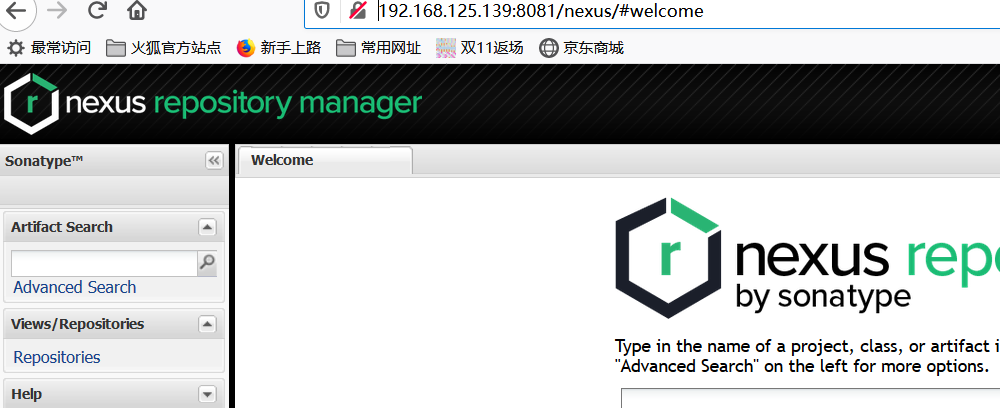
9.修改账号
默认账号 admin/admin123
请修改登录密码
10.重启再次验证
居然启动失败了,切换nexus账号输入 nexus console 执行一半失败了
经过日志分析2个原因:
a./opt/nexus/目录下面的有文件的所有这发生了变化,既文件的所属和权限发生了变化
b./opt/nexus/sonatype-work/nexus/conf/nexus.xml 删除该文件,运行时会自动生成
c.vi /etc/hosts 添加 127.0.0.1 机器名
经过以上分析修正后,执行正常了。
Centos610安装Nexus的更多相关文章
- CentOS安装Nexus(Maven私有库)详细配置及上传本地jar到私服
Nexus原理 Maven的原理就是将jar从远程中央仓库下载到PC磁盘的本地仓库,当本地仓库没有发现需要的jar就会去Maven默认的远程中央仓库Maven Central(由Apache维护)中寻 ...
- 在Windows上安装Nexus 3.2.0-01
在Windows上安装Nexus 环境: Windows 7 apache-maven-3.3.9 JDK 1.8 下载Nexus: https://sonatype-download.globa ...
- 在CMD命令下安装nexus报错和启动的问题
安装问题问题描述: 在控制台(cmd)下执行nexus install命令安装nexus服务的时候报错: wrapper | OpenSCManager failed - 拒绝访问. (0x5) 同时 ...
- CentOS 7下安装nexus 3
安装nexus 3的几个注意事项: 1.nexus 3和nexus 2不一样,nexus 2可以搜索Maven主仓库的包,但在nexus 3不能,只能搜索缓存过的包. 2.安装时关心的点在于运行环境, ...
- Linux环境安装Nexus
Linux环境安装Nexus Nexus可以做Maven私服,私服不是Maven的核心概念,它仅仅是一种衍生出来的特殊的Maven仓库.有三种专门的Maven仓库管理软件可以用来帮助大家建立私服: N ...
- Maven nexus 安装nexus私服出现的两个问题
1. 在win10中安装nexus时提示:wrapper | OpenSCManager failed - 拒绝访问. (0x5) 主要是没有权限.需要以管理员的身份运行 如果你是直接点击 start ...
- (十一)maven之安装nexus私服
安装nexus私服 前面的文章中对项目引入jar依赖包的时候,maven一般先是在本地仓库找对应版本的jar依赖包,如果在本地仓库中找不到,就上中央仓库中下载到本地仓库. 然而maven默认提供的中央 ...
- 在Windows上安装Nexus
在Windows上安装Nexus 学习了:https://www.cnblogs.com/yucongblog/p/6696736.html 下载地址:https://sonatype-downloa ...
- Maven nexus 安装nexus : wrapper | OpenSCManager failed - 拒绝访问。 (0x5)
在win7中安装nexus时提示:wrapper | OpenSCManager failed - 拒绝访问. (0x5) 主要是没有权限.需要以管理员的身份运行 如果你是直接点击 start-nex ...
随机推荐
- Android SDK安装环境变量配置
安卓tool: http://tools.android-studio.org/ SDK下载地址:http://dl.google.com/android/android-sdk_r24.4.1-wi ...
- helm安装异常解决方案
问题1:helm version正常 helm list 异常报错如下 解决方法: [root@MASTER1 ~]# helm init --service-account tiller --til ...
- HTML的内联框架(iframe)
HTML的内联框架(iframe) 第一种:打开网页就是带内联框架的页面 可以实现在自己的网页内部,打开另一个网页 语法: <!--src:地址frameborder:0为无边框:1为有边框-- ...
- E - Serge and Dining Room
https://codeforces.com/contest/1180/problem/E 转载自他人博客 题意:有nn个菜肴,有mm个小朋友,每个菜肴的价格为aiai,每个小朋友有bibi元钱,小朋 ...
- php设计模式之面向接口开发实例代码
<?php header("Content-type:text/html;charset=utf-8"); /** * 共同接口 */ interface db { func ...
- 题解【洛谷P1841】[JSOI2007]重要的城市
题面 题解 最短路图模板题. 介绍一下最短路图: 先对原图跑一边单源最短路,求出源点到每个点\(i\)的最短路\(dis[i]\). 接下来构建新图:对于一条边\((x,y,v)\),若\(dis[x ...
- 如何预测股票分析--先知(Prophet)
在上一篇中,我们探讨了自动ARIMA,但是好像表现的还是不够完善,接下来看看先知的力量! 先知(Prophet) 有许多时间序列技术可以用在股票预测数据集上,但是大多数技术在拟合模型之前需要大量的数据 ...
- 深度学习之tensorflow框架(上)
import tensorflow as tf import os os.environ[' def tensorflow_demo(): #原生python加法运算 a = 2; b=3; c=a+ ...
- SpringMVC--使用hibernate validator数据校验
JSR 303 Spring3开始支持JSR 303 验证框架,JSR303是Java为Bean数据合法性校验所提供的标准框架.JSR 303 支持XML和注解风格的验证,通过在Bean属性上标注类似 ...
- FromBase64String 输入的不是有效的 Base-64 字符串,因为它包含非 Base-64 字符、两个以上的填充字符,或者填充字符间包含非法字符
js前台: <input id="upload_img_input" v-on:change="onFileChange" type="file ...