
iOS开发NSLayoutConstraint代码自动布局
1、NSLayoutConstraint简介
适配界面大多用Masonry工具,也是基于NSLayoutConstraint写的!通过使用两个类方法实现自动布局:
+ (NSArray<__kindof NSLayoutConstraint *> *)constraintsWithVisualFormat:(NSString *)format

                                                                options:(NSLayoutFormatOptions)opts metrics:(nullable NSDictionary<NSString *,id> *)metrics

                                                                  views:(NSDictionary<NSString *, id> *)views;

+(instancetype)constraintWithItem:(id)view1

                        attribute:(NSLayoutAttribute)attr1

                        relatedBy:(NSLayoutRelation)relation

                           toItem:(nullable id)view2

                        attribute:(NSLayoutAttribute)attr2

                       multiplier:(CGFloat)multiplier

                         constant:(CGFloat)c;
1》使用自动布局之前设置view的自动布局约束为NO(view.translatesAutoresizingMaskIntoConstraints = NO)
2》UIViewController有个方法- (void)updateViewConstraints;
UIView有个方法- (void)updateConstraints;在对应的方法中设置自动布局;
2、如何使用constraintsWithVisualFormat和VFL语言
2.1》constraintsWithVisualFormat方法说明:
+ (NSArray<__kindof NSLayoutConstraint *> *)constraintsWithVisualFormat:(NSString *)format

                                                                options:(NSLayoutFormatOptions)opts

                                                                metrics:(nullable NSDictionary<NSString *,id> *)metrics

                                                                  views:(NSDictionary<NSString *, id> *)views;
方法说明:此方法通过VFL语言进行适配
  format:VFL语句字符串形式

  opts:枚举参数 NSLayoutFormatOptions

  metrics:字典 放置VFL语言用到的参数(例如height)对应key

  views:字典 放置VFL语言用到的view对应key
2.2》VFL语言简介
VFL(Visual Format Language)可视化格式语言,是苹果公司为了简化AutoLayout而编码推出的抽象语言。
具体表示方法:

水平方向        H:          垂直方向     V:      Views      [view]

关系      >=,==,<=         SuperView    |      空间,间隙-    -

优先级      @value
2.3》简单使用
创建一个蓝色view,离父视图上左右距离为20px、高为20:
    UIView *blueView = [[UIView alloc] init];

    blueView.backgroundColor = [UIColor blueColor];

    blueView.translatesAutoresizingMaskIntoConstraints = NO;

    [self.view addSubview:blueView];

    NSArray *arr = [NSLayoutConstraint constraintsWithVisualFormat:@"H:|-[blueView]-|"

                                                           options:

                                                           metrics:nil

                                                             views:NSDictionaryOfVariableBindings(blueView)];

    NSArray *arrV = [NSLayoutConstraint constraintsWithVisualFormat:@"V:|-[blueView(==height)]"

                                                            options:

                                                            metrics:@{@"height":@""}

                                                              views:NSDictionaryOfVariableBindings(blueView)];

    [self.view addConstraints:arr];

    [self.view addConstraints:arrV];
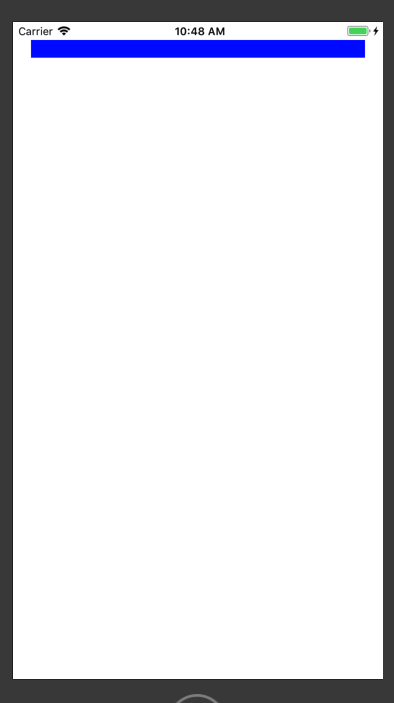
在蓝色view下方创建一个黄色view,左右距离父视图40px、上边离蓝色view8px、高度为20px:
    UIView *yellowView = [[UIView alloc] init];

    yellowView.backgroundColor = [UIColor yellowColor];

    yellowView.translatesAutoresizingMaskIntoConstraints = NO;

    [self.view addSubview:yellowView];

    NSArray *arr2 = [NSLayoutConstraint constraintsWithVisualFormat:@"H:|-40-[yellowView]-40-|"

                                                           options:

                                                           metrics:nil

                                                             views:NSDictionaryOfVariableBindings(yellowView)];

    NSArray *arr2V = [NSLayoutConstraint constraintsWithVisualFormat:@"V:[blueView]-[yellowView(==height)]"

                                                            options:

                                                            metrics:@{@"height":@""}

                                                              views:NSDictionaryOfVariableBindings(blueView,yellowView)];

    [self.view addConstraints:arr2];

    [self.view addConstraints:arr2V];
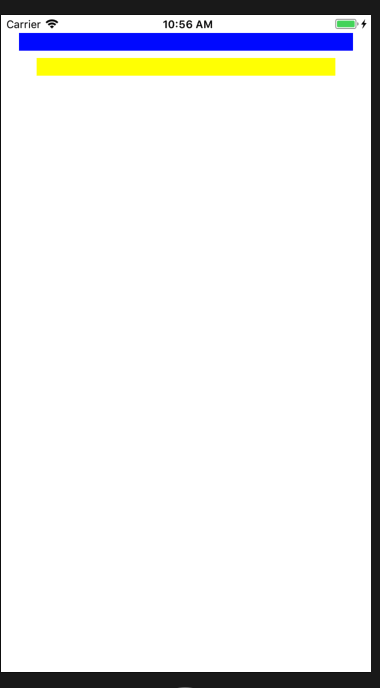
注意:-:在父视图中表示20px,同级视图表示8px;
参数metrics和views要和VFL语言的参数对应,否则会崩溃;
3、如何使用constraintWithItem方法
3.1》constraintWithItem方法说明:
+(instancetype)constraintWithItem:(id)view1

                        attribute:(NSLayoutAttribute)attr1

                        relatedBy:(NSLayoutRelation)relation

                           toItem:(nullable id)view2

                        attribute:(NSLayoutAttribute)attr2

                       multiplier:(CGFloat)multiplier

                         constant:(CGFloat)c;
view1:设置的视图

attr1:view1设置的属性

relation:视图view1和view2的属性关系

view2:参照视图

attr2:view2设置的属性

multiplier:视图view1指定属性是view2指定属性的多少倍

c:view1指定属性需要添加的浮点数
3.2》简单使用
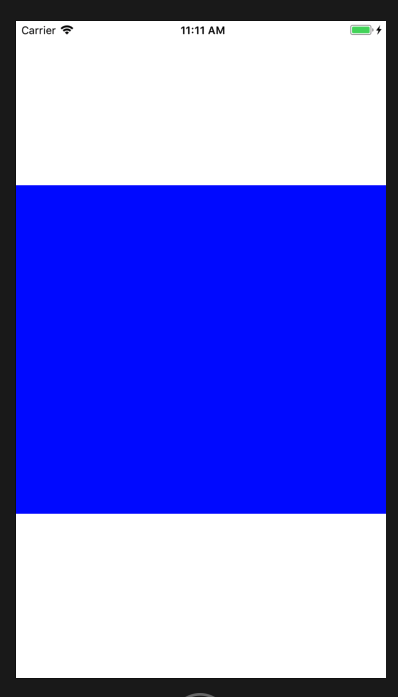
添加一个view位于父视图中心、宽度相等、高度为父视图一半:
    UIView *blueView = [[UIView alloc] init];

    blueView.backgroundColor = [UIColor blueColor];

    blueView.translatesAutoresizingMaskIntoConstraints = NO;

    [self.view addSubview:blueView];

    NSMutableArray *constraints = [NSMutableArray array];

    [constraints addObject:[NSLayoutConstraint constraintWithItem:blueView attribute:NSLayoutAttributeWidth relatedBy:NSLayoutRelationEqual toItem:self.view attribute:NSLayoutAttributeWidth multiplier:1.0 constant:0.0]];

    [constraints addObject:[NSLayoutConstraint constraintWithItem:blueView attribute:NSLayoutAttributeHeight relatedBy:NSLayoutRelationEqual toItem:self.view attribute:NSLayoutAttributeHeight multiplier:. constant:0.0]];

    [constraints addObject:[NSLayoutConstraint constraintWithItem:blueView attribute:NSLayoutAttributeCenterY relatedBy:NSLayoutRelationEqual toItem:self.view attribute:NSLayoutAttributeCenterY multiplier:1.0 constant:0.0]];

    [constraints addObject:[NSLayoutConstraint constraintWithItem:blueView attribute:NSLayoutAttributeCenterX relatedBy:NSLayoutRelationEqual toItem:self.view attribute:NSLayoutAttributeCenterX multiplier:1.0 constant:0.0]];

    [self.view addConstraints:constraints];
4、NSLayoutRelation、NSLayoutAttribute、NSLayoutFormatOptions枚举说明
4.1》NSLayoutRelation说明:
typedef NS_ENUM(NSInteger, NSLayoutRelation) {

    NSLayoutRelationLessThanOrEqual = -, //视图关系小于或等于

    NSLayoutRelationEqual = ,//视图关系等于

    NSLayoutRelationGreaterThanOrEqual = ,//视图关系大于或等于

};
4.2》NSLayoutAttribute说明:
typedef NS_ENUM(NSInteger, NSLayoutAttribute) {

    NSLayoutAttributeLeft = ,//视图的左边

    NSLayoutAttributeRight,//视图的右边

    NSLayoutAttributeTop,//视图的上边

    NSLayoutAttributeBottom,//视图的下边

    NSLayoutAttributeLeading,//视图的前边

    NSLayoutAttributeTrailing,//视图的后边

    NSLayoutAttributeWidth,//视图的宽度

    NSLayoutAttributeHeight,//视图的高度

    NSLayoutAttributeCenterX,//视图中心的X值

    NSLayoutAttributeCenterY,//视图中心的Y值

    NSLayoutAttributeLastBaseline,//视图的下基准线

    NSLayoutAttributeBaseline NS_SWIFT_UNAVAILABLE("Use 'lastBaseline' instead") = NSLayoutAttributeLastBaseline,

    NSLayoutAttributeFirstBaseline NS_ENUM_AVAILABLE_IOS(8_0),//视图的上基准线

    NSLayoutAttributeLeftMargin NS_ENUM_AVAILABLE_IOS(8_0),//视图的左边距

    NSLayoutAttributeRightMargin NS_ENUM_AVAILABLE_IOS(8_0),//视图的右边距

    NSLayoutAttributeTopMargin NS_ENUM_AVAILABLE_IOS(8_0),//视图的上边距

    NSLayoutAttributeBottomMargin NS_ENUM_AVAILABLE_IOS(8_0),//视图的下边距

    NSLayoutAttributeLeadingMargin NS_ENUM_AVAILABLE_IOS(8_0),//视图的前边距

    NSLayoutAttributeTrailingMargin NS_ENUM_AVAILABLE_IOS(8_0),//视图的后边距

    NSLayoutAttributeCenterXWithinMargins NS_ENUM_AVAILABLE_IOS(8_0),//视图的中心X边距

    NSLayoutAttributeCenterYWithinMargins NS_ENUM_AVAILABLE_IOS(8_0),//视图的中心Y边距

    NSLayoutAttributeNotAnAttribute = //无属性

};
注意:NSLayoutAttributeLeading和NSLayoutAttributeTrailing表示前、后边,因为中国书写是从左向右。如果从右向左则表示后、前边;
NSLayoutAttributeLastBaseline和NSLayoutAttributeFirstBaseline表示基准线,举例UILabel的上下基准线就是文字的上下边线;
4.3》NSLayoutFormatOptions说明
typedef NS_OPTIONS(NSUInteger, NSLayoutFormatOptions) {

    NSLayoutFormatAlignAllLeft = ( << NSLayoutAttributeLeft),//所有视图左边缘对齐。

    NSLayoutFormatAlignAllRight = ( << NSLayoutAttributeRight),//所有视图右边缘对齐

    NSLayoutFormatAlignAllTop = ( << NSLayoutAttributeTop),//所有视图顶部对齐

    NSLayoutFormatAlignAllBottom = ( << NSLayoutAttributeBottom),//所有视图底部对齐

    NSLayoutFormatAlignAllLeading = ( << NSLayoutAttributeLeading),//视图当前区域文字开始的边缘对齐(英文:左边,希伯来语:右边)

    NSLayoutFormatAlignAllTrailing = ( << NSLayoutAttributeTrailing),//视图当前区域文字结束的边缘对齐(英文:右边,希伯来语:左边)

    NSLayoutFormatAlignAllCenterX = ( << NSLayoutAttributeCenterX),//视图中心点x对齐

    NSLayoutFormatAlignAllCenterY = ( << NSLayoutAttributeCenterY),//视图中心点y对齐

    NSLayoutFormatAlignAllLastBaseline = ( << NSLayoutAttributeLastBaseline),//视图内容底部基线对齐、有文字就是文字底部

    NSLayoutFormatAlignAllBaseline NS_SWIFT_UNAVAILABLE("Use 'alignAllLastBaseline' instead") = NSLayoutFormatAlignAllLastBaseline,

    NSLayoutFormatAlignAllFirstBaseline NS_ENUM_AVAILABLE_IOS(8_0) = ( << NSLayoutAttributeFirstBaseline),,//视图内容定部基线对齐、有文字就是文字顶部

    //根据编辑内容和编写方向方式进行对齐

    NSLayoutFormatAlignmentMask = 0xFFFF,

    NSLayoutFormatDirectionLeadingToTrailing =  << , // default

    NSLayoutFormatDirectionLeftToRight =  << ,

    NSLayoutFormatDirectionRightToLeft =  << ,

    NSLayoutFormatDirectionMask = 0x3 << ,

    NSLayoutFormatSpacingEdgeToEdge API_AVAILABLE(ios(11.0),tvos(11.0)) =  << , // default

    NSLayoutFormatSpacingBaselineToBaseline API_AVAILABLE(ios(11.0),tvos(11.0)) =  << ,

    NSLayoutFormatSpacingMask API_AVAILABLE(ios(11.0),tvos(11.0)) = 0x1 << ,

};
iOS开发NSLayoutConstraint代码自动布局的更多相关文章
- iOS开发通过代码方式使用AutoLayout (NSLayoutConstraint + Masonry)
iOS开发通过代码方式使用AutoLayout (NSLayoutConstraint + Masonry) 随着iPhone6/6+设备的上市,如何让手头上的APP适配多种机型多种屏幕尺寸变得尤为迫 ...
- iOS开发 纯代码创建UICollectionView
转:http://jingyan.baidu.com/article/eb9f7b6d8a81a5869364e8a6.html iOS开发 纯代码创建UICollectionView 习惯了使用xi ...
- iOS 开发 – 均衡代码职责
前言 文章的标题有点绕口,不过想了半天,想不到更好的标题了.本文的诞生有一部分功劳要归于iOS应用现状分析,标题也是来源于原文中的"能把代码职责均衡的划分到不同的功能类里".如果你 ...
- 设计模式之单一职责原则(iOS开发,代码用Objective-C展示)
单一职责原则:就一个类而言,应该只有一个引起它变化的原因. 在iOS开发中,我们会很自然的给一个类添加各种各样的功能,比如随便写一个简单的应用程序,一般都会生成一个viewController类,于是 ...
- iOS开发:代码通用性以及其规范 第二篇(猜想iOS中实现TableView内部设计思路(附代码),以类似的思想实现一个通用的进度条)
在iOS开发中,经常是要用到UITableView的,我曾经思考过这样一个问题,为什么任何种类的model放到TableView和所需的cell里面,都可以正常显示?而我自己写的很多view却只是能放 ...
- iOS开发:代码通用性以及其规范 第一篇(附带,自定义UITextView\进度条\双表显示\瀑布流 代码设计思路)
在iOS团队开发中,我见过一些人的代码,也修改过他们的代码.有的人的代码写的非常之规范.通用,几乎不用交流,就可以知道如何修改以及在它基础上扩展延生.有的人的代码写的很垃圾,一眼看过去,简直会怀疑自己 ...
- IOS开发通过代码方式使用AutoLayout (NSLayoutConstraint + Masonry) 转载
http://blog.csdn.net/he_jiabin/article/details/48677911 随着iPhone6/6+设备的上市,如何让手头上的APP适配多种机型多种屏幕尺寸变得尤为 ...
- IOS开发之----代码块的使用(二)
iOS4引入了一个新特性,支持代码块的使用,这将从根本上改变你的编程方式.代码块是对C语言的一个扩展,因此在Objective-C中完全支持.如果你学过Ruby,Python或Lisp编程语言,那么你 ...
- iOS开发常用代码块(第二弹)
GCD定时器 dispatch_queue_t queue = dispatch_get_global_queue(DISPATCH_QUEUE_PRIORITY_DEFAULT, ); dispat ...
随机推荐
- dev 中 字符串转中文拼音缩写,对grid列表进行模糊匹配,grid获取焦点行,gridlookupedit控件用拼音模糊匹配下拉选项
番外篇:. //该方法是将字符串转化为中文拼音的首写字母大写, public static string RemoveSpecialCharacters(string str){try{if (str ...
- js 浮点数计算问题
//说明:javascript的加法结果会有误差,在两个浮点数相加的时候会比较明显.这个函数返回较为精确的加法结果. //调用:jsAdd(arg1,arg2) //返回值:arg1加上arg2的精确 ...
- Redis Desktop Manager可视化工具连接不上redis
1.在centos中启动redis之后,redis进程也是可查的,但是一连接可视化工具就报错: can't connect to redis-server 2.原因分析: ①首先redis是肯定已经开 ...
- 异或空间求基(模板)——hdu3949
输出样例有点问题的.. #include<bits/stdc++.h> using namespace std; #define ll unsigned long long #define ...
- Android studio 安装apk时报错:INSTALL_FAILED_NO_MATCHING_ABIS: Failed to extract native libraries
flutter项目 华为手机真机安装报错,解决 办法 app build.gradle android {...}内添加一下代码 splits { abi { enable true reset() ...
- Python-爬虫-HTTP协议请求之GET请求
我们在百度搜索时,输入关键词,比如“hello”,URL发生变化,如下: https://www.baidu.com/s?wd=hello&rsv_spt=1&rsv_iqid=0xf ...
- OAuth2.0的理解-转自阮一峰博客
一.应用场景 为了理解OAuth的适用场合,让我举一个假设的例子. 有一个"云冲印"的网站,可以将用户储存在Google的照片,冲印出来.用户为了使用该服务,必须让"云冲 ...
- hadoop2.x需要知道的默认yarn配置
在Hadoop 2.2.0中,YARN框架有很多默认的参数值,如果你是在机器资源比较不足的情况下,需要修改这些默认值,来满足一些任务需要.NodeManager和ResourceManager都是在y ...
- (转)sqoop常用命令http://www.cnblogs.com/cenyuhai/p/3306037.html
转于:http://www.cnblogs.com/cenyuhai/p/3306037.html 这个连接已经写的很详细了,我看了很受启发.
- hexo next主题深度优化(五),评论系统换成gittalk
文章目录 背景: 开始: 新建comments_git.js 找到comments.swig在最后一个endif之前 引入代码 pjax加入gitalk 遇到的问题 所有的页面共享的一个评论issue ...