
iOS开发NSLayoutConstraint代码自动布局
1、NSLayoutConstraint简介
适配界面大多用Masonry工具,也是基于NSLayoutConstraint写的!通过使用两个类方法实现自动布局:
+ (NSArray<__kindof NSLayoutConstraint *> *)constraintsWithVisualFormat:(NSString *)format

                                                                options:(NSLayoutFormatOptions)opts metrics:(nullable NSDictionary<NSString *,id> *)metrics

                                                                  views:(NSDictionary<NSString *, id> *)views;

+(instancetype)constraintWithItem:(id)view1

                        attribute:(NSLayoutAttribute)attr1

                        relatedBy:(NSLayoutRelation)relation

                           toItem:(nullable id)view2

                        attribute:(NSLayoutAttribute)attr2

                       multiplier:(CGFloat)multiplier

                         constant:(CGFloat)c;
1》使用自动布局之前设置view的自动布局约束为NO(view.translatesAutoresizingMaskIntoConstraints = NO)
2》UIViewController有个方法- (void)updateViewConstraints;
UIView有个方法- (void)updateConstraints;在对应的方法中设置自动布局;
2、如何使用constraintsWithVisualFormat和VFL语言
2.1》constraintsWithVisualFormat方法说明:
+ (NSArray<__kindof NSLayoutConstraint *> *)constraintsWithVisualFormat:(NSString *)format

                                                                options:(NSLayoutFormatOptions)opts

                                                                metrics:(nullable NSDictionary<NSString *,id> *)metrics

                                                                  views:(NSDictionary<NSString *, id> *)views;
方法说明:此方法通过VFL语言进行适配
  format:VFL语句字符串形式

  opts:枚举参数 NSLayoutFormatOptions

  metrics:字典 放置VFL语言用到的参数(例如height)对应key

  views:字典 放置VFL语言用到的view对应key
2.2》VFL语言简介
VFL(Visual Format Language)可视化格式语言,是苹果公司为了简化AutoLayout而编码推出的抽象语言。
具体表示方法:

水平方向        H:          垂直方向     V:      Views      [view]

关系      >=,==,<=         SuperView    |      空间,间隙-    -

优先级      @value
2.3》简单使用
创建一个蓝色view,离父视图上左右距离为20px、高为20:
    UIView *blueView = [[UIView alloc] init];

    blueView.backgroundColor = [UIColor blueColor];

    blueView.translatesAutoresizingMaskIntoConstraints = NO;

    [self.view addSubview:blueView];

    NSArray *arr = [NSLayoutConstraint constraintsWithVisualFormat:@"H:|-[blueView]-|"

                                                           options:

                                                           metrics:nil

                                                             views:NSDictionaryOfVariableBindings(blueView)];

    NSArray *arrV = [NSLayoutConstraint constraintsWithVisualFormat:@"V:|-[blueView(==height)]"

                                                            options:

                                                            metrics:@{@"height":@""}

                                                              views:NSDictionaryOfVariableBindings(blueView)];

    [self.view addConstraints:arr];

    [self.view addConstraints:arrV];
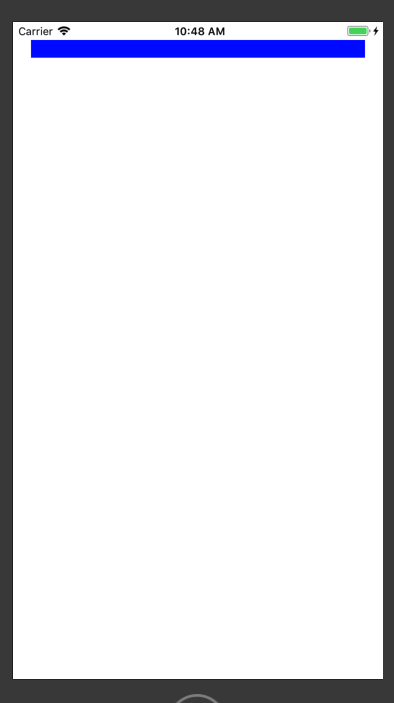
在蓝色view下方创建一个黄色view,左右距离父视图40px、上边离蓝色view8px、高度为20px:
    UIView *yellowView = [[UIView alloc] init];

    yellowView.backgroundColor = [UIColor yellowColor];

    yellowView.translatesAutoresizingMaskIntoConstraints = NO;

    [self.view addSubview:yellowView];

    NSArray *arr2 = [NSLayoutConstraint constraintsWithVisualFormat:@"H:|-40-[yellowView]-40-|"

                                                           options:

                                                           metrics:nil

                                                             views:NSDictionaryOfVariableBindings(yellowView)];

    NSArray *arr2V = [NSLayoutConstraint constraintsWithVisualFormat:@"V:[blueView]-[yellowView(==height)]"

                                                            options:

                                                            metrics:@{@"height":@""}

                                                              views:NSDictionaryOfVariableBindings(blueView,yellowView)];

    [self.view addConstraints:arr2];

    [self.view addConstraints:arr2V];
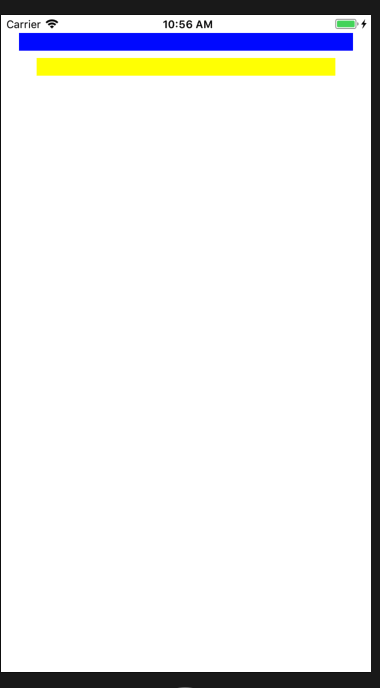
注意:-:在父视图中表示20px,同级视图表示8px;
参数metrics和views要和VFL语言的参数对应,否则会崩溃;
3、如何使用constraintWithItem方法
3.1》constraintWithItem方法说明:
+(instancetype)constraintWithItem:(id)view1

                        attribute:(NSLayoutAttribute)attr1

                        relatedBy:(NSLayoutRelation)relation

                           toItem:(nullable id)view2

                        attribute:(NSLayoutAttribute)attr2

                       multiplier:(CGFloat)multiplier

                         constant:(CGFloat)c;
view1:设置的视图

attr1:view1设置的属性

relation:视图view1和view2的属性关系

view2:参照视图

attr2:view2设置的属性

multiplier:视图view1指定属性是view2指定属性的多少倍

c:view1指定属性需要添加的浮点数
3.2》简单使用
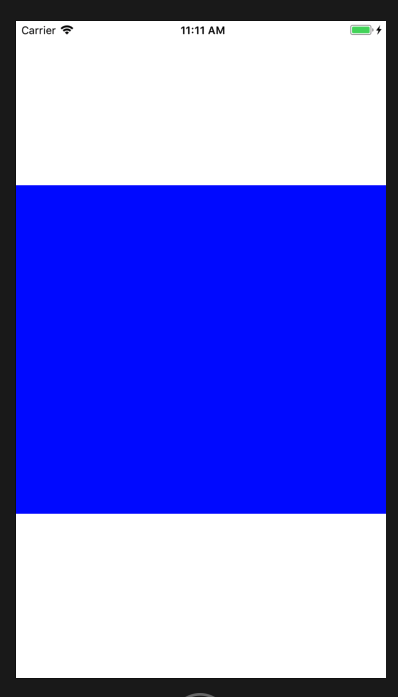
添加一个view位于父视图中心、宽度相等、高度为父视图一半:
    UIView *blueView = [[UIView alloc] init];

    blueView.backgroundColor = [UIColor blueColor];

    blueView.translatesAutoresizingMaskIntoConstraints = NO;

    [self.view addSubview:blueView];

    NSMutableArray *constraints = [NSMutableArray array];

    [constraints addObject:[NSLayoutConstraint constraintWithItem:blueView attribute:NSLayoutAttributeWidth relatedBy:NSLayoutRelationEqual toItem:self.view attribute:NSLayoutAttributeWidth multiplier:1.0 constant:0.0]];

    [constraints addObject:[NSLayoutConstraint constraintWithItem:blueView attribute:NSLayoutAttributeHeight relatedBy:NSLayoutRelationEqual toItem:self.view attribute:NSLayoutAttributeHeight multiplier:. constant:0.0]];

    [constraints addObject:[NSLayoutConstraint constraintWithItem:blueView attribute:NSLayoutAttributeCenterY relatedBy:NSLayoutRelationEqual toItem:self.view attribute:NSLayoutAttributeCenterY multiplier:1.0 constant:0.0]];

    [constraints addObject:[NSLayoutConstraint constraintWithItem:blueView attribute:NSLayoutAttributeCenterX relatedBy:NSLayoutRelationEqual toItem:self.view attribute:NSLayoutAttributeCenterX multiplier:1.0 constant:0.0]];

    [self.view addConstraints:constraints];
4、NSLayoutRelation、NSLayoutAttribute、NSLayoutFormatOptions枚举说明
4.1》NSLayoutRelation说明:
typedef NS_ENUM(NSInteger, NSLayoutRelation) {

    NSLayoutRelationLessThanOrEqual = -, //视图关系小于或等于

    NSLayoutRelationEqual = ,//视图关系等于

    NSLayoutRelationGreaterThanOrEqual = ,//视图关系大于或等于

};
4.2》NSLayoutAttribute说明:
typedef NS_ENUM(NSInteger, NSLayoutAttribute) {

    NSLayoutAttributeLeft = ,//视图的左边

    NSLayoutAttributeRight,//视图的右边

    NSLayoutAttributeTop,//视图的上边

    NSLayoutAttributeBottom,//视图的下边

    NSLayoutAttributeLeading,//视图的前边

    NSLayoutAttributeTrailing,//视图的后边

    NSLayoutAttributeWidth,//视图的宽度

    NSLayoutAttributeHeight,//视图的高度

    NSLayoutAttributeCenterX,//视图中心的X值

    NSLayoutAttributeCenterY,//视图中心的Y值

    NSLayoutAttributeLastBaseline,//视图的下基准线

    NSLayoutAttributeBaseline NS_SWIFT_UNAVAILABLE("Use 'lastBaseline' instead") = NSLayoutAttributeLastBaseline,

    NSLayoutAttributeFirstBaseline NS_ENUM_AVAILABLE_IOS(8_0),//视图的上基准线

    NSLayoutAttributeLeftMargin NS_ENUM_AVAILABLE_IOS(8_0),//视图的左边距

    NSLayoutAttributeRightMargin NS_ENUM_AVAILABLE_IOS(8_0),//视图的右边距

    NSLayoutAttributeTopMargin NS_ENUM_AVAILABLE_IOS(8_0),//视图的上边距

    NSLayoutAttributeBottomMargin NS_ENUM_AVAILABLE_IOS(8_0),//视图的下边距

    NSLayoutAttributeLeadingMargin NS_ENUM_AVAILABLE_IOS(8_0),//视图的前边距

    NSLayoutAttributeTrailingMargin NS_ENUM_AVAILABLE_IOS(8_0),//视图的后边距

    NSLayoutAttributeCenterXWithinMargins NS_ENUM_AVAILABLE_IOS(8_0),//视图的中心X边距

    NSLayoutAttributeCenterYWithinMargins NS_ENUM_AVAILABLE_IOS(8_0),//视图的中心Y边距

    NSLayoutAttributeNotAnAttribute = //无属性

};
注意:NSLayoutAttributeLeading和NSLayoutAttributeTrailing表示前、后边,因为中国书写是从左向右。如果从右向左则表示后、前边;
NSLayoutAttributeLastBaseline和NSLayoutAttributeFirstBaseline表示基准线,举例UILabel的上下基准线就是文字的上下边线;
4.3》NSLayoutFormatOptions说明
typedef NS_OPTIONS(NSUInteger, NSLayoutFormatOptions) {

    NSLayoutFormatAlignAllLeft = ( << NSLayoutAttributeLeft),//所有视图左边缘对齐。

    NSLayoutFormatAlignAllRight = ( << NSLayoutAttributeRight),//所有视图右边缘对齐

    NSLayoutFormatAlignAllTop = ( << NSLayoutAttributeTop),//所有视图顶部对齐

    NSLayoutFormatAlignAllBottom = ( << NSLayoutAttributeBottom),//所有视图底部对齐

    NSLayoutFormatAlignAllLeading = ( << NSLayoutAttributeLeading),//视图当前区域文字开始的边缘对齐(英文:左边,希伯来语:右边)

    NSLayoutFormatAlignAllTrailing = ( << NSLayoutAttributeTrailing),//视图当前区域文字结束的边缘对齐(英文:右边,希伯来语:左边)

    NSLayoutFormatAlignAllCenterX = ( << NSLayoutAttributeCenterX),//视图中心点x对齐

    NSLayoutFormatAlignAllCenterY = ( << NSLayoutAttributeCenterY),//视图中心点y对齐

    NSLayoutFormatAlignAllLastBaseline = ( << NSLayoutAttributeLastBaseline),//视图内容底部基线对齐、有文字就是文字底部

    NSLayoutFormatAlignAllBaseline NS_SWIFT_UNAVAILABLE("Use 'alignAllLastBaseline' instead") = NSLayoutFormatAlignAllLastBaseline,

    NSLayoutFormatAlignAllFirstBaseline NS_ENUM_AVAILABLE_IOS(8_0) = ( << NSLayoutAttributeFirstBaseline),,//视图内容定部基线对齐、有文字就是文字顶部

    //根据编辑内容和编写方向方式进行对齐

    NSLayoutFormatAlignmentMask = 0xFFFF,

    NSLayoutFormatDirectionLeadingToTrailing =  << , // default

    NSLayoutFormatDirectionLeftToRight =  << ,

    NSLayoutFormatDirectionRightToLeft =  << ,

    NSLayoutFormatDirectionMask = 0x3 << ,

    NSLayoutFormatSpacingEdgeToEdge API_AVAILABLE(ios(11.0),tvos(11.0)) =  << , // default

    NSLayoutFormatSpacingBaselineToBaseline API_AVAILABLE(ios(11.0),tvos(11.0)) =  << ,

    NSLayoutFormatSpacingMask API_AVAILABLE(ios(11.0),tvos(11.0)) = 0x1 << ,

};
iOS开发NSLayoutConstraint代码自动布局的更多相关文章
- iOS开发通过代码方式使用AutoLayout (NSLayoutConstraint + Masonry)
iOS开发通过代码方式使用AutoLayout (NSLayoutConstraint + Masonry) 随着iPhone6/6+设备的上市,如何让手头上的APP适配多种机型多种屏幕尺寸变得尤为迫 ...
- iOS开发 纯代码创建UICollectionView
转:http://jingyan.baidu.com/article/eb9f7b6d8a81a5869364e8a6.html iOS开发 纯代码创建UICollectionView 习惯了使用xi ...
- iOS 开发 – 均衡代码职责
前言 文章的标题有点绕口,不过想了半天,想不到更好的标题了.本文的诞生有一部分功劳要归于iOS应用现状分析,标题也是来源于原文中的"能把代码职责均衡的划分到不同的功能类里".如果你 ...
- 设计模式之单一职责原则(iOS开发,代码用Objective-C展示)
单一职责原则:就一个类而言,应该只有一个引起它变化的原因. 在iOS开发中,我们会很自然的给一个类添加各种各样的功能,比如随便写一个简单的应用程序,一般都会生成一个viewController类,于是 ...
- iOS开发:代码通用性以及其规范 第二篇(猜想iOS中实现TableView内部设计思路(附代码),以类似的思想实现一个通用的进度条)
在iOS开发中,经常是要用到UITableView的,我曾经思考过这样一个问题,为什么任何种类的model放到TableView和所需的cell里面,都可以正常显示?而我自己写的很多view却只是能放 ...
- iOS开发:代码通用性以及其规范 第一篇(附带,自定义UITextView\进度条\双表显示\瀑布流 代码设计思路)
在iOS团队开发中,我见过一些人的代码,也修改过他们的代码.有的人的代码写的非常之规范.通用,几乎不用交流,就可以知道如何修改以及在它基础上扩展延生.有的人的代码写的很垃圾,一眼看过去,简直会怀疑自己 ...
- IOS开发通过代码方式使用AutoLayout (NSLayoutConstraint + Masonry) 转载
http://blog.csdn.net/he_jiabin/article/details/48677911 随着iPhone6/6+设备的上市,如何让手头上的APP适配多种机型多种屏幕尺寸变得尤为 ...
- IOS开发之----代码块的使用(二)
iOS4引入了一个新特性,支持代码块的使用,这将从根本上改变你的编程方式.代码块是对C语言的一个扩展,因此在Objective-C中完全支持.如果你学过Ruby,Python或Lisp编程语言,那么你 ...
- iOS开发常用代码块(第二弹)
GCD定时器 dispatch_queue_t queue = dispatch_get_global_queue(DISPATCH_QUEUE_PRIORITY_DEFAULT, ); dispat ...
随机推荐
- vue 学习一 组件生命周期
先上一张vue组件生命周期的流程图 以上就是一个组件完整的生命周期,而在组件处于每个阶段时又会提供一些周期钩子函数以便我们进行一些逻辑操作,而总体来讲 vue的组件共有8个生命周期钩子 beforeC ...
- lterator遍历
iterator是一种接口机制,为各种不同的数据结构提供统一的访问机制 作用: 1.为各种数据结构,提供一个统一的.简便的访问接口: 2.使得数据结构的成员能够按某种次序排列 3.ES6创造了一种新的 ...
- Java KMP算法代码
1. KMP 算法(字符串匹配算法)较 BF(朴素的字符串匹配)算法有哪些改进 1) 在主串和子串匹配的过程中,主串不再回退,只改变子串的比较位置. 2) 为子串生成对应的next数组,每次匹配失败, ...
- MySQL主从复制&读写分离&分库分表
MySQL主从复制 MySQL的主从复制只能保证主机对外提供服务,从机是不提供服务的,只是在后台为主机进行备份数据 首先我们说说主从复制的原理,这个是必须要理解的玩意儿: 理解: MySQL之间的数据 ...
- 0928CSP-S模拟测试赛后总结
依旧跌落.昨天只是偶然诈尸.我依旧是那个第二机房垫底大垃圾. 赛时打的很放松.因为T1想到了正解.对拍也打了.尽管用了大约一半的考试时间. 但是对拍拍了很久没有出错.如果你在2019年9月28日晚一下 ...
- delphi实现圆角窗体[转]
procedure TForm1.FormCreate(Sender: TObject); var hr :thandle; begin hr:=createroundrectrgn(1,1,widt ...
- NX二次开发-UFUN拾取平面对话框UF_UI_specify_plane
#include <uf.h> #include <uf_ui.h> UF_initialize(); //拾取平面对话框 ] = { , , , , , , , , }; ] ...
- javascript 插件开发教程
如何自己开发一款js或者jquery插件 引子 初学js不久,接触到js插件开发,其实很简单,不像网上吹嘘的那么复杂,又要掌握js,掌握jquery,其实没有那么复杂,下面简单介绍,供学习使用. jq ...
- linux下创建oracle表空间
来自:http://blog.sina.com.cn/s/blog_62192aed01018aep.html 1 . 登录服务器 2 . 查看磁盘空间是否够大df -h -h更具目前磁盘空间和使用情 ...
- 学习修复Laravel The only supported ciphers are AES-128-CBC and AES-256-CBC
The only supported ciphers are AES-128-CBC and AES-256-CBC 在项目中,删除了 .env的APP_KEY的值,再运行 php artisan k ...