
day39-Spring 17-Spring的JDBC模板:完成增删改的操作
JdbcTemplate根DBUtils非常类似,你要是有非常多的Dao,你每一个Dao都需要写它
    /*在Dao层注入JDBC模板*/

    private JdbcTemplate jdbcTemplate;

    public void setJdbcTemplate(JdbcTemplate jdbcTemplate) {

        this.jdbcTemplate = jdbcTemplate;

    }
而且你的每一个配置文件都得给它注入一下.
    <bean id="userDao" class="cn.itcast.spring3.demo2.UserDao">

       <property name="jdbcTemplate" ref="jdbcTemplate"></property>

    </bean>

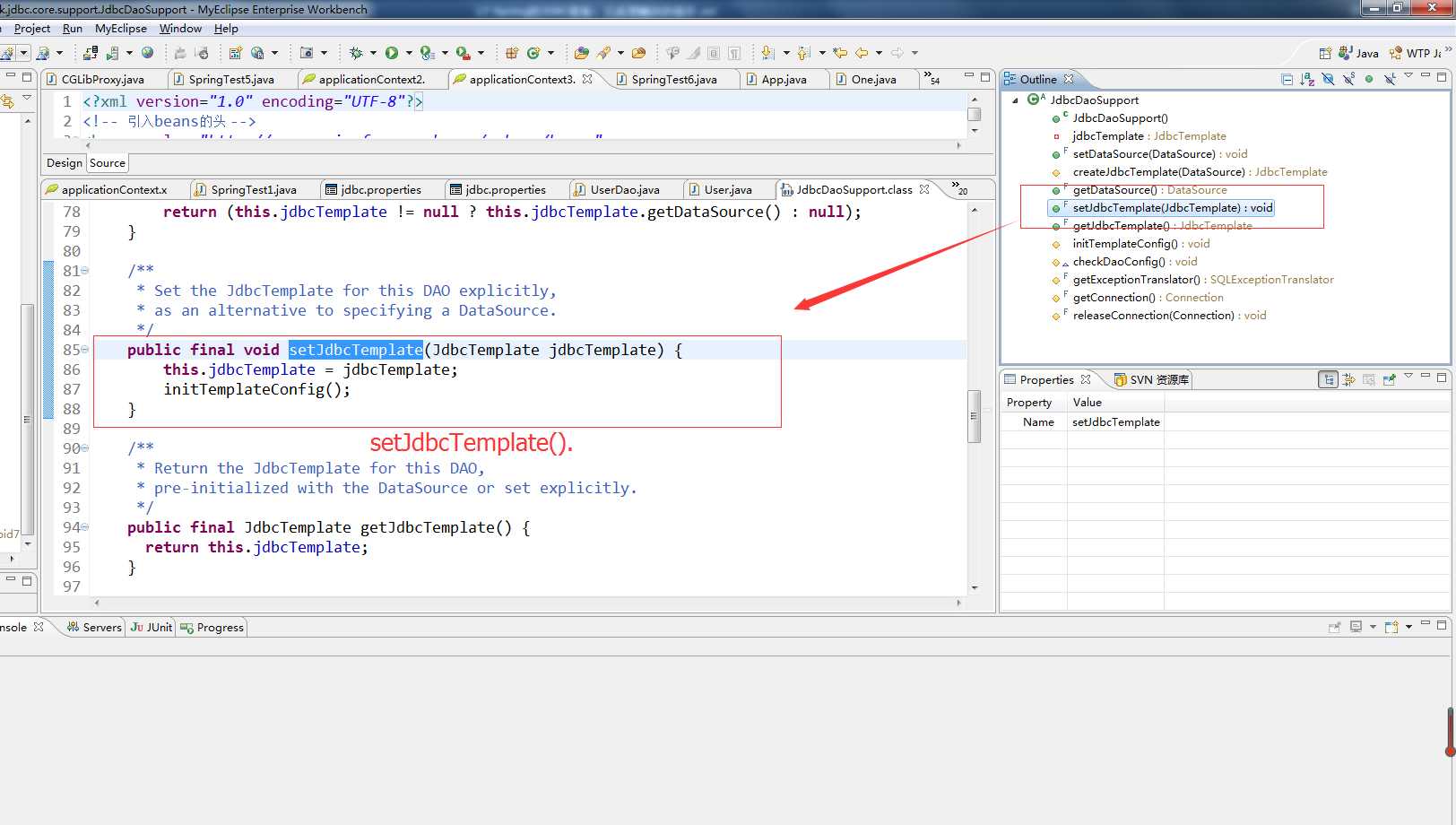
JdbcDaoSupport的源码
/*

 * Copyright 2002-2008 the original author or authors.

 *

 * Licensed under the Apache License, Version 2.0 (the "License");

 * you may not use this file except in compliance with the License.

 * You may obtain a copy of the License at

 *

 *      http://www.apache.org/licenses/LICENSE-2.0

 *

 * Unless required by applicable law or agreed to in writing, software

 * distributed under the License is distributed on an "AS IS" BASIS,

 * WITHOUT WARRANTIES OR CONDITIONS OF ANY KIND, either express or implied.

 * See the License for the specific language governing permissions and

 * limitations under the License.

 */

package org.springframework.jdbc.core.support;

import java.sql.Connection;

import javax.sql.DataSource;

import org.springframework.dao.support.DaoSupport;

import org.springframework.jdbc.CannotGetJdbcConnectionException;

import org.springframework.jdbc.core.JdbcTemplate;

import org.springframework.jdbc.datasource.DataSourceUtils;

import org.springframework.jdbc.support.SQLExceptionTranslator;

/**

 * Convenient super class for JDBC-based data access objects.

 *

 * <p>Requires a {@link javax.sql.DataSource} to be set, providing a

 * {@link org.springframework.jdbc.core.JdbcTemplate} based on it to

 * subclasses through the {@link #getJdbcTemplate()} method.

 *

 * <p>This base class is mainly intended for JdbcTemplate usage but can

 * also be used when working with a Connection directly or when using

 * <code>org.springframework.jdbc.object</code> operation objects.

 *

 * @author Juergen Hoeller

 * @since 28.07.2003

 * @see #setDataSource

 * @see #getJdbcTemplate

 * @see org.springframework.jdbc.core.JdbcTemplate

 */

public abstract class JdbcDaoSupport extends DaoSupport {

    private JdbcTemplate jdbcTemplate;

    /**

     * Set the JDBC DataSource to be used by this DAO.

     */

    public final void setDataSource(DataSource dataSource) {

        if (this.jdbcTemplate == null || dataSource != this.jdbcTemplate.getDataSource()) {

            this.jdbcTemplate = createJdbcTemplate(dataSource);

            initTemplateConfig();

        }

    }

    /**

     * Create a JdbcTemplate for the given DataSource.

     * Only invoked if populating the DAO with a DataSource reference!

     * <p>Can be overridden in subclasses to provide a JdbcTemplate instance

     * with different configuration, or a custom JdbcTemplate subclass.

     * @param dataSource the JDBC DataSource to create a JdbcTemplate for

     * @return the new JdbcTemplate instance

     * @see #setDataSource

     */

    protected JdbcTemplate createJdbcTemplate(DataSource dataSource) {

        return new JdbcTemplate(dataSource);

    }

    /**

     * Return the JDBC DataSource used by this DAO.

     */

    public final DataSource getDataSource() {

        return (this.jdbcTemplate != null ? this.jdbcTemplate.getDataSource() : null);

    }

    /**

     * Set the JdbcTemplate for this DAO explicitly,

     * as an alternative to specifying a DataSource.

     */

    public final void setJdbcTemplate(JdbcTemplate jdbcTemplate) {

        this.jdbcTemplate = jdbcTemplate;

        initTemplateConfig();

    }

    /**

     * Return the JdbcTemplate for this DAO,

     * pre-initialized with the DataSource or set explicitly.

     */

    public final JdbcTemplate getJdbcTemplate() {

      return this.jdbcTemplate;

    }

    /**

     * Initialize the template-based configuration of this DAO.

     * Called after a new JdbcTemplate has been set, either directly

     * or through a DataSource.

     * <p>This implementation is empty. Subclasses may override this

     * to configure further objects based on the JdbcTemplate.

     * @see #getJdbcTemplate()

     */

    protected void initTemplateConfig() {

    }

    @Override

    protected void checkDaoConfig() {

        if (this.jdbcTemplate == null) {

            throw new IllegalArgumentException("'dataSource' or 'jdbcTemplate' is required");

        }

    }

    /**

     * Return the SQLExceptionTranslator of this DAO's JdbcTemplate,

     * for translating SQLExceptions in custom JDBC access code.

     * @see org.springframework.jdbc.core.JdbcTemplate#getExceptionTranslator()

     */

    protected final SQLExceptionTranslator getExceptionTranslator() {

        return getJdbcTemplate().getExceptionTranslator();

    }

    /**

     * Get a JDBC Connection, either from the current transaction or a new one.

     * @return the JDBC Connection

     * @throws CannotGetJdbcConnectionException if the attempt to get a Connection failed

     * @see org.springframework.jdbc.datasource.DataSourceUtils#getConnection(javax.sql.DataSource)

     */

    protected final Connection getConnection() throws CannotGetJdbcConnectionException {

        return DataSourceUtils.getConnection(getDataSource());

    }

    /**

     * Close the given JDBC Connection, created via this DAO's DataSource,

     * if it isn't bound to the thread.

     * @param con Connection to close

     * @see org.springframework.jdbc.datasource.DataSourceUtils#releaseConnection

     */

    protected final void releaseConnection(Connection con) {

        DataSourceUtils.releaseConnection(con, getDataSource());

    }

}

package cn.itcast.spring3.demo2;

import org.junit.Test;

import org.junit.runner.RunWith;

import org.springframework.beans.factory.annotation.Autowired;

import org.springframework.beans.factory.annotation.Qualifier;

import org.springframework.test.context.ContextConfiguration;

import org.springframework.test.context.junit4.SpringJUnit4ClassRunner;

@RunWith(SpringJUnit4ClassRunner.class)

@ContextConfiguration("classpath:applicationContext.xml")

public class SpringTest2 {

    @Autowired

    @Qualifier("userDao")

    private UserDao userDao;

    @Test

    public void demo1(){

        //web层->业务层->Dao层

        User user = new User();

        user.setName("童童");

        userDao.add(user);

    }

    @Test

    public void demo2(){

        //web层->业务层->Dao层

        User user = new User();

        user.setId(1);

        user.setName("小编");

        userDao.update(user);

    }

    @Test

    public void demo3(){

        //web层->业务层->Dao层

        User user = new User();

        user.setId(1);

        userDao.delete(user);

    }

}
package cn.itcast.spring3.demo2;

public class User {

  private Integer id;

  private String name;

public Integer getId() {

    return id;

}

public void setId(Integer id) {

    this.id = id;

}

public String getName() {

    return name;

}

public void setName(String name) {

    this.name = name;

}

@Override

public String toString() {

    return "User [id=" + id + ", name=" + name + "]";

}

}
package cn.itcast.spring3.demo2;

import org.springframework.jdbc.core.JdbcTemplate;

import org.springframework.jdbc.core.support.JdbcDaoSupport;

//public class UserDao {

    public class UserDao extends JdbcDaoSupport{

    /*在Dao层注入JDBC模板*/

/*    private JdbcTemplate jdbcTemplate;

    public void setJdbcTemplate(JdbcTemplate jdbcTemplate) {

        this.jdbcTemplate = jdbcTemplate;

    }*/

    public void add(User user){

         String sql = "insert into user values(null,?)";

         this.getJdbcTemplate().update(sql, user.getName());

     }

     public void update(User user){

         String sql = "update user set name = ? where id = ?";

         this.getJdbcTemplate().update(sql, user.getName(), user.getId());

     }

     public void delete(User user){

         String sql = "delete from user where id = ?";

         this.getJdbcTemplate().update(sql, user.getId());

     }

}

day39-Spring 17-Spring的JDBC模板:完成增删改的操作的更多相关文章
- JDBC连接数据库及增删改查操作
什么是JDBC?Java语言访问数据库的一种规范,是一套APIJDBC (Java Database Connectivity) API,即Java数据库编程接口,是一组标准的Java语言中的接口和类 ...
- JDBC学习笔记——增删改查
1.数据库准备 要用JDBC操作数据库,第一步当然是建立数据表: ? 1 2 3 4 5 6 CREATE TABLE `user` ( `id` int(11) NOT NULL AUTO_I ...
- eclipse控制台下实现jdbc简单的增删改查测试
1.现在MySQL中创建一个表 2.首先创建一个类 //导入的包 import java.sql.Connection;import java.sql.DriverManager;import jav ...
- jdbc 数据的增删改查的Statement Resultset PreparedStatement
完成数据库的连接,就马上要对数据库进行增删改查操作了:先来了解一下Statement 通过JDBC插入数据 (这里提供一个查找和插入方法) Statement:用于执行sql语句的对象: *1.通过C ...
- mvc模式jsp+servel+jdbc oracle基本增删改查demo
mvc模式jsp+servel+jdbc oracle基本增删改查demo 下载地址
- 通过jdbc连接MySql数据库的增删改查操作
一.获取数据库连接 要对MySql数据库内的数据进行增删改查等操作,首先要获取数据库连接 JDBC:Java中连接数据库方式 具体操作如下: 获取数据库连接的步骤: 1.先定义好四个参数 String ...
- Spring的jdbc模板3:完成CURD操作
测试类代码如下 package zcc.spring_jdbc.demo2; import java.sql.ResultSet; import java.sql.SQLException; impo ...
- JDBC实现简单增删改查
JDBC全称为:Java Data Base Connectivity (java数据库连接),主要用于java与数据库的链接. 整个链接过程如下图: 1.数据库驱动:Driver 加载mysql驱动 ...
- jsp+Servlet+JavaBean+JDBC+MySQL项目增删改查
1简单的Mvc,分层建包. java resources src/mian/java (1)dao 包 JDBC连接类,连接数据库.增删改查方法,其他的方法. (2)model包 实体类,数据库字段, ...
随机推荐
- ES6 class继承
ES6 class继承 class类的继承 class可以通过extends关键字实现继承,这笔ES5的通过修改原型连实现继承要清晰和方便很多. class Point{ } class ColorP ...
- PAT甲级——A1062 Talent and Virtue
About 900 years ago, a Chinese philosopher Sima Guang wrote a history book in which he talked about ...
- 多对多关联懒加载导致failed to lazily initialize a collection of role: 实体类, could not initialize proxy - no Session 追加配置fetch = FetchType.EAGER解决
一篇文章需要关联很多个标签,所以他们呈一对多(多对多)的关系 org.springframework.web.util.NestedServletException: Request processi ...
- golang包引用
一.我的GOPATH环境变量值如下图: 二.在GOPATH路径下面的的src目录下面的目录名称就是引用里面包的起始位置,如下图: 三.举例说明:这里引用同一个项目的包,源文件“learn/main/m ...
- TZ_10_spring-AOP日志处理
1.在某个用户登陆后台后对其每一项操作进行保存日志处理 LogAopController @Component @Aspect public class LogAop { @Autowired pri ...
- c#多线程通信之委托(事件)
在研究c# 线程之间通信时,发现传统的方法大概有三种 ①全局变量,由于同一进程下的多个进程之间共享数据空间,所以使用全局变量是最简单的方法,但要记住使用volatile进行限制. ②线程之间发送消息( ...
- Aspose Words、Excel导出等操作
/*Word先保存再输出-下载*/ strReportFilePath = Server.MapPath("~") + strReportFilePath; doc.Save(st ...
- Openlayers3 WebGis二次开发包实例
<%@ Page Language="C#" AutoEventWireup="true" CodeBehind="index.aspx.cs& ...
- 实时查看linux网卡流量 的base脚本
#!/bin/bash " ] do eth=$ RXpre=$(cat /proc/net/dev | grep $eth | tr : " " | awk '{pri ...
- shell linux基本命令实例、笔记
1. 在当前文件夹下.查找20分钟内,被訪问过的文件, 并将文件的详情显示出来: find ./ -name '*.log' -mmin -20 -exec ls -l {} \; 当然,须要指出 ...