
js Dom为页面中的元素绑定键盘或鼠标事件
html鼠标事件
onload 页面加载
onclick 鼠标单击
onmouseover 鼠标移入
onmouseout 鼠标移出
onfocus 获取焦点
onblur 失去焦点
onchange 域的内容改变
在事件触发中,this表示对当前dom对象的引用
1、html事件,在html元素上直接绑定事件
<!DOCTYPE html>

<html lang="en">

<head>

    <meta charset="UTF-8">

    <title>Document</title>

    <style>

        .btn{

            width:140px;

            height:30px;

            background:#abcdef;

            line-height:30px;

            text-align: center;

            font-size:14px;

            border-radius:5px;

            cursor:pointer;

        }

        div{

            width:140px;

            height:140px;

            background:#abcdef;

            line-height:140px;

            text-align: center;

            font-size:14px;

            margin:50px 0;

        }

    </style>

</head>

<body>

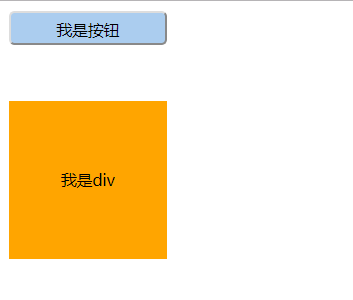
    <button id="btn" class="btn" onclick="alert('我被点击啦!');">我是按钮</button>

    <div onmouseover="myFun(this,'orange')" onmouseout="myFun(this,'pink')">我是div</div>

    <script>

        function myFun(obj,bgcolor){

            obj.style.backgroundColor=bgcolor;

        }

    </script>

</body>

</html>
DOM 0级
通过dom获取元素,并绑定事件
如果事件绑定跟的是函数名,千万不要加括号,否则不需要点击,页面一刷新即会触发函数
<!DOCTYPE html>

<html lang="en">

<head>

    <meta charset="UTF-8">

    <title>Document</title>

    <style>

        .btn{

            width:140px;

            height:140px;

            background:#abcdef;

            line-height:140px;

            text-align: center;

            font-size:14px;

            margin:50px 0;

        }

        .btn-active{

            width:140px;

            height:140px;

            line-height:140px;

            text-align: center;

            font-size:14px;

            margin:50px 0;

            background:pink;

        }

    </style>

</head>

<body>

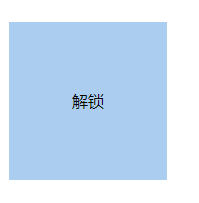
    <div id="btn" class="btn">解锁</div>

    <script>

        var btn=document.getElementById("btn");

        btn.onclick=myFun;//此处函数后面一定不能加括号,否则不需要点击会直接调用

        function myFun(){

            if(this.className=="btn"){

                this.className="btn-active";

                this.innerHTML="锁定";

            }else{

                this.className="btn";

                this.innerHTML="解锁";

            }

        }

    </script>

</body>

</html>
当把获取dom元素的脚本,放置在元素的前面,会报错
<!DOCTYPE html>

<html lang="en">

<head>

    <meta charset="UTF-8">

    <title>Document</title>

    <style>

        .btn{

            width:140px;

            height:140px;

            background:#abcdef;

            line-height:140px;

            text-align: center;

            font-size:14px;

            margin:50px 0;

        }

        .btn-active{

            width:140px;

            height:140px;

            line-height:140px;

            text-align: center;

            font-size:14px;

            margin:50px 0;

            background:pink;

        }

    </style>

        <script>

        var btn=document.getElementById("btn");

        btn.onclick=myFun;//此处函数后面一定不能加括号,否则不需要点击会直接调用

        function myFun(){

            if(this.className=="btn"){

                this.className="btn-active";

                this.innerHTML="锁定";

            }else{

                this.className="btn";

                this.innerHTML="解锁";

            }

        }

    </script>

</head>

<body>

    <div id="btn" class="btn">解锁</div>

</body>

</html>
把脚本写在window.onload事件中,确保元素已经生成
<!DOCTYPE html>

<html lang="en">

<head>

    <meta charset="UTF-8">

    <title>Document</title>

    <style>

        .btn{

            width:140px;

            height:140px;

            background:#abcdef;

            line-height:140px;

            text-align: center;

            font-size:14px;

            margin:50px 0;

        }

        .btn-active{

            width:140px;

            height:140px;

            line-height:140px;

            text-align: center;

            font-size:14px;

            margin:50px 0;

            background:pink;

        }

    </style>

    <script>

        window.onload=function(){

            var btn=document.getElementById("btn");

            btn.onclick=myFun;//此处函数后面一定不能加括号,否则不需要点击会直接调用

            function myFun(){

                if(this.className=="btn"){

                    this.className="btn-active";

                    this.innerHTML="锁定";

                }else{

                    this.className="btn";

                    this.innerHTML="解锁";

                }

            }

        }

    </script>

</head>

<body>

    <div id="btn" class="btn">解锁</div>

</body>

</html>
onfocus事件和onblur事件
<!DOCTYPE html>

<html lang="en">

<head>

    <meta charset="UTF-8">

    <title>Document</title>

    <style>

        #tip{display: none;}

    </style>

    <script>

        window.onload=function(){

            var password=document.getElementById("password");

            var tip=document.getElementById("tip");

            password.onfocus=function(){

                tip.style.display="inline-block";

            }

            password.onblur=function(){

                var val=this.value;

                // 密码是6位数字

                if(val.length==6 && !isNaN(val)){

                    tip.innerHTML="ok";

                }else{

                    tip.innerHTML="error";

                }

            }

        }

    </script>

</head>

<body>

    <input type="password" id="password" name="password">

    <span id="tip">请输入密码</span>

</body>

</html>

获取body元素 document.body
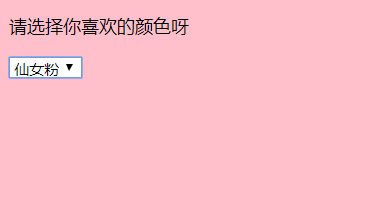
当select中的option被选择时,select的value值就会等于被选中的option的value值
因此可以用this.value得到被选择的option的value值
<!DOCTYPE html>

<html lang="en">

<head>

    <meta charset="UTF-8">

    <title>Document</title>

    <style>

        body{

            width:100%;

            height:100%;

        }

    </style>

    <script>

        window.onload=function(){

            var menu=document.getElementById("menu");

            menu.onchange=function(){

                var color=this.value;

                if(color==""){

                    document.body.style.backgroundColor="#fff";

                }else{

                    document.body.style.backgroundColor=color;

                }

            }

        }

    </script>

</head>

<body>

    <p>请选择你喜欢的颜色呀</p>

    <select name="menu" id="menu">

        <option value="">请选择</option>

        <option value="orange">元气橙</option>

        <option value="pink">仙女粉</option>

        <option value="#abcdef">森系蓝</option>

    </select>

</body>

</html>
鼠标事件
onmousedown 鼠标按下
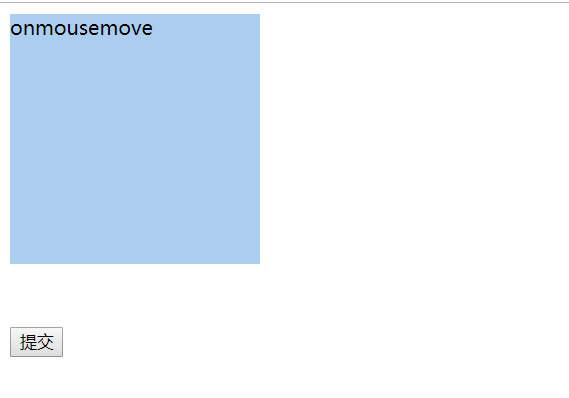
onmousemove 鼠标在元素内移动
onmouseup 鼠标松开
onresize 浏览器窗口大小调整
onscroll 拖动滚动条
onsubmit 表单提交 加在form表单上,而不是加在提交按钮上
onmousedown+onmouseup=onclick
<!DOCTYPE html>

<html lang="en">

<head>

    <meta charset="UTF-8">

    <title>Document</title>

    <style>

        body{

            width:100%;

            height:100%;

        }

        div{

            width:200px;

            height:200px;

            background:#abcdef;

            overflow: auto;

        }

        #myform{

            margin-top:50px;

        }

    </style>

    <script>

        window.onload=function(){

            var div=document.getElementById("div");

            div.onmousedown=function(){

                this.innerHTML="onmousedown";

            }

            div.onmousemove=function(){

                this.innerHTML="onmousemove";

            }

            div.onmouseup=function(){

                this.innerHTML="onmouseup";

            }

            window.onresize=function(){

                console.log("resized");

            }

            div.onscroll=function(){

                this.style.color="orange";

            }

            var myform=document.getElementById("myform");

            myform.onsubmit=function(){

                alert("表单提交啦~");

            }

        }

    </script>

</head>

<body>

    <div id="div">

        文字<br>文字<br>文字<br>文字<br>文字<br>文字<br>文字<br>文字<br>文字<br>文字<br>文字<br>文字<br>文字<br>文字<br>文字<br>文字<br>文字<br>文字<br>文字<br>文字<br>文字<br>文字<br>文字<br>文字<br>文字<br>文字<br>文字<br>文字<br>文字<br>文字<br>文字<br>文字<br>文字<br>文字<br>文字<br>文字<br>文字<br>文字<br>

    </div>

    <form id="myform">

        <input type="submit">

    </form>

</body>

</html>
键盘事件
onkeydown 键盘被按下
onkeypress 键盘被按下(只有字母+数字+符号)
onkeyup 键盘被释放
keyCode 键码
<!DOCTYPE html>

<html lang="en">

<head>

    <meta charset="UTF-8">

    <title>Document</title>

    <style>

        body{

            width:100%;

            height:100%;

        }

    </style>

    <script>

        window.onload=function(){

            var count=document.getElementById("count");

            var text=document.getElementById("text");

            text.onkeyup=function(e){

                console.log(e.keyCode);

                var len=text.value.length;

                count.innerHTML=30-len;

            }

        }

    </script>

</head>

<body>

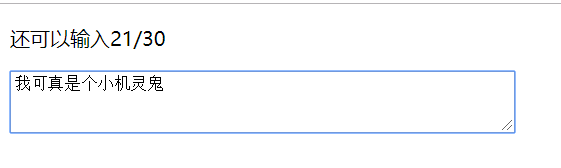
    <p>还可以输入<span id="count">30</span>/30</p>

    <textarea name="text" id="text" cols="60" rows="3"></textarea>

</body>

</html>
js Dom为页面中的元素绑定键盘或鼠标事件的更多相关文章
- 使用HTML5的JS选择器操作页面中的元素
文件命名为:querySelector.html,可在Chrome浏览器中预览效果. 1 <!DOCTYPE html> 2 <html lang="en"> ...
- 从零开始学 Web 之 DOM(六)为元素绑定与解绑事件
大家好,这里是「 从零开始学 Web 系列教程 」,并在下列地址同步更新...... +-------------------------------------------------------- ...
- Selenium2+python自动化12-操作元素(键盘和鼠标事件)
前言 在前面的几篇中重点介绍了一些元素的到位方法,到位到元素后,接下来就是需要操作元素了.本篇总结了web页面常用的一些操作元素方法,可以统称为行为事件 有些web界面的选项菜单需要鼠标悬停在某个元素 ...
- 自动化测试-8.selenium操作元素之键盘和鼠标事件
前言 在前面的几篇中重点介绍了一些元素的定位方法,定位到元素后,接下来就是需要操作元素了.本篇总结了web页面常用的一些操作元素方法,可以统称为行为事件 有些web界面的选项菜单需要鼠标悬停在某个元素 ...
- Selenium2学习(八)-- 操作元素(键盘和鼠标事件)
前言 在前面的几篇中重点介绍了一些元素的到位方法,到位到元素后,接下来就是需要操作元素了.本篇总结了web页面常用的一些操作元素方法,可以统称为行为事件 有些web界面的选项菜单需要鼠标悬停在某个元素 ...
- Selenium2+python自动化12-操作元素(键盘和鼠标事件)【转载】
前言 在前面的几篇中重点介绍了一些元素的到位方法,到位到元素后,接下来就是需要操作元素了.本篇总结了web页面常用的一些操作元素方法,可以统称为行为事件 有些web界面的选项菜单需要鼠标悬停在某个元素 ...
- JS基础入门篇( 三 )—使用JS获取页面中某个元素的4种方法以及之间的差别( 一 )
1.使用JS获取页面中某个元素的4种方法 1.通过id名获取元素 document.getElementById("id名"); 2.通过class名获取元素 document.g ...
- Js脚本选取iframe中的元素
遇到个小问题,需要用到原生Js处理页面中的元素,以往一个document.getElementById就完活的选取元素,这次却不好使了.. 仔细看代码发现要选取元素外面多了一个iframe标签 < ...
- 控制使用jquery load()方法载入新页面中的元素
最近在项目中用到jquery的load()方法来加载页面,首先简单说一下load()方法. load(url,data,callback);该方法接收三个参数,第一个是载入的页面地址,第二个是要传到服 ...
随机推荐
- (数据科学学习手札74)基于geopandas的空间数据分析——数据结构篇
本文对应代码已上传至我的Github仓库https://github.com/CNFeffery/DataScienceStudyNotes 1 简介 geopandas是建立在GEOS.GDAL.P ...
- kvm实现快速增量盘模式的克隆脚本
转自:http://zxlwz.blog.51cto.com/6952946/1852424 要求:备份的img磁盘格式只有qcow2格式支持增量盘使用和快照功能当你的一个虚拟机格式是raw格式时,请 ...
- qt客户端程序使用svg图片资源的几种方法
直接使用svg格式文件资源的情况 1. 直接在UI控件属性面板中选择部分支持icon图标的控件的icon来源,这样图标可以显示 2.给toolbutton添加样式 qproperty-icon: ur ...
- 使用自环接口的UDP服务器和客户端
import argparse,socket from datetime import datetime MAX_BYTES = 65535 def server(port): sock = sock ...
- thinkphp3关闭Runtime中的日志方法
将LOG_LEVEL允许记录的日志级别设置为空,则不会记录日志
- HDU_1035_水
http://acm.xidian.edu.cn/problem.php?id=1035 本来想用goto优化一下的,不知道什么情况,加了goto就wa了. #include<iostream& ...
- (七)mybatis批量操作,分页插件
首先使用方式很简单: SqlSession sqlSession = sessionFactory.openSession(ExecutorType.BATCH); 批量操作核心:改变执行sql的方式 ...
- Python3(十一) 原生爬虫
一.爬虫实例 1.原理:文本分析并提取信息——正则表达式. 2.实例目的:爬取熊猫TV某个分类下面主播的人气排行 分析网站结构 操作:F12查看HTML信息,Ctrl+Shift+C鼠标选取后找到对应 ...
- CentOS7及Docker配置中文字符集问题
说明 Linux系统默认使用英文字符集,不会安装中文字符集等其他字符. 查看当前字符集 $ 安装字符集 使用locale命令看看当前系统所使用的字符集 $ locale LANG=en_US.UTF- ...
- Nginx location配置 正则表达式
一. location 的匹配符 Syntax: location [ = | ~ | ~* | ^~ ] uri { ... }location @name { ... } 1. 语法格式 ...