
使用Elasticsearch中的copy_to来提高搜索效率
在今天的这个教程中,我们来着重讲解一下如何使用Elasticsearch中的copy来提高搜索的效率。比如在我们的搜索中,经常我们会遇到如下的文档:
    {

        "user" : "双榆树-张三",

        "message" : "今儿天气不错啊,出去转转去",

        "uid" : 2,

        "age" : 20,

        "city" : "北京",

        "province" : "北京",

        "country" : "中国",

        "address" : "中国北京市海淀区",

        "location" : {

          "lat" : "39.970718",

          "lon" : "116.325747"

        }

    }
在这里,我们可以看到在这个文档中,我们有这样的几个字段:
     "city" : "北京",

     "province" : "北京",

     "country" : "中国",
它们是非常相关的。我们在想是不是可以把它们综合成一个字段,这样可以方便我们的搜索。假如我们要经常对这三个字段进行搜索,那么一种方法我们可以在must子句中使用should子句运行bool查询。这种方法写起来比较麻烦。有没有一种更好的方法呢?
我们其实可以使用Elasticsearch所提供的copy_to来提高我们的搜索效率。我们可以首先把我们的index的mapping设置成如下的项(这里假设我们使用的是一个叫做twitter的index)。
    PUT twitter

    {

      "mappings": {

        "properties": {

          "address": {

            "type": "text",

            "fields": {

              "keyword": {

                "type": "keyword",

                "ignore_above": 256

              }

            }

          },

          "age": {

            "type": "long"

          },

          "city": {

            "type": "keyword",

            "copy_to": "region"

          },

          "country": {

            "type": "keyword",

            "copy_to": "region"

          },

          "province": {

            "type": "keyword",

            "copy_to": "region"

          },

          "region": {

            "type": "text",

            "store": true

          },

          "location": {

            "type": "geo_point"

          },

          "message": {

            "type": "text",

            "fields": {

              "keyword": {

                "type": "keyword",

                "ignore_above": 256

              }

            }

          },

          "uid": {

            "type": "long"

          },

          "user": {

            "type": "text",

            "fields": {

              "keyword": {

                "type": "keyword",

                "ignore_above": 256

              }

            }

          }

        }

      }

    }
在这里,我们特别注意如下的这个部分:
        "city": {

          "type": "keyword",

          "copy_to": "region"

        },

        "country": {

          "type": "keyword",

          "copy_to": "region"

        },

        "province": {

          "type": "keyword",

          "copy_to": "region"

        },

        "region": {

          "type": "text"

        }
我们把city, country及province三个项合并成为一个项region,但是这个region并不存在于我们文档的source里。当我们这么定义我们的mapping的话,在文档被索引之后,有一个新的region项可以供我们进行搜索。
我们可以采用如下的数据来进行展示:
    POST _bulk

    { "index" : { "_index" : "twitter", "_id": 1} }

    {"user":"双榆树-张三","message":"今儿天气不错啊,出去转转去","uid":2,"age":20,"city":"北京","province":"北京","country":"中国","address":"中国北京市海淀区","location":{"lat":"39.970718","lon":"116.325747"}}

    { "index" : { "_index" : "twitter", "_id": 2 }}

    {"user":"东城区-老刘","message":"出发,下一站云南!","uid":3,"age":30,"city":"北京","province":"北京","country":"中国","address":"中国北京市东城区台基厂三条3号","location":{"lat":"39.904313","lon":"116.412754"}}

    { "index" : { "_index" : "twitter", "_id": 3} }

    {"user":"东城区-李四","message":"happy birthday!","uid":4,"age":30,"city":"北京","province":"北京","country":"中国","address":"中国北京市东城区","location":{"lat":"39.893801","lon":"116.408986"}}

    { "index" : { "_index" : "twitter", "_id": 4} }

    {"user":"朝阳区-老贾","message":"123,gogogo","uid":5,"age":35,"city":"北京","province":"北京","country":"中国","address":"中国北京市朝阳区建国门","location":{"lat":"39.718256","lon":"116.367910"}}

    { "index" : { "_index" : "twitter", "_id": 5} }

    {"user":"朝阳区-老王","message":"Happy BirthDay My Friend!","uid":6,"age":50,"city":"北京","province":"北京","country":"中国","address":"中国北京市朝阳区国贸","location":{"lat":"39.918256","lon":"116.467910"}}

    { "index" : { "_index" : "twitter", "_id": 6} }

    {"user":"虹桥-老吴","message":"好友来了都今天我生日,好友来了,什么 birthday happy 就成!","uid":7,"age":90,"city":"上海","province":"上海","country":"中国","address":"中国上海市闵行区","location":{"lat":"31.175927","lon":"121.383328"}}
在Kibnana中执行上面的语句,它将为我们生产我们的twitter索引。同时我们可以通过如下的语句来查询我们的mapping:
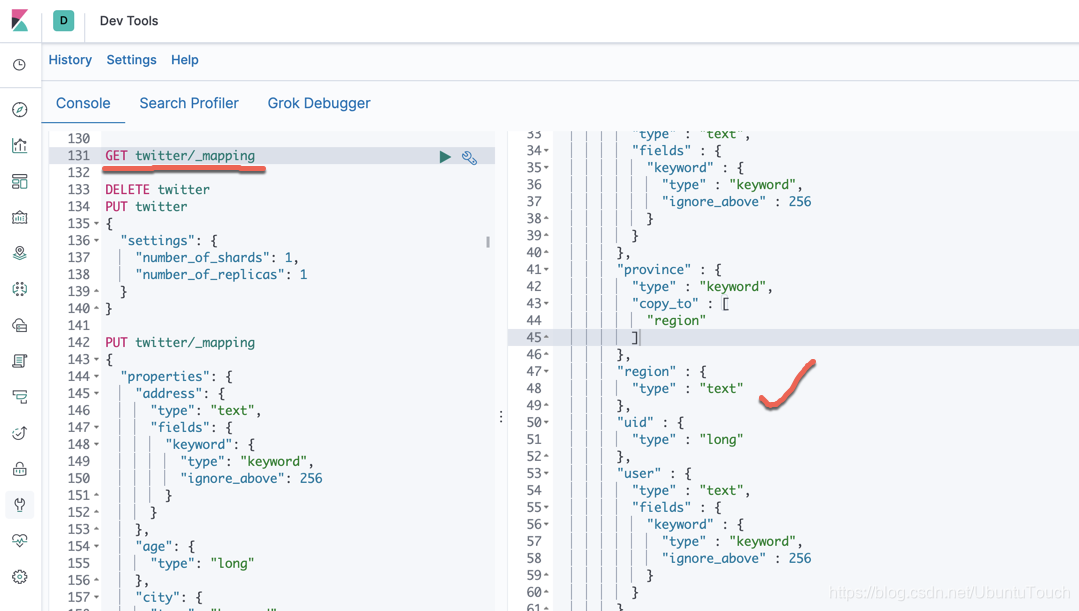
我们可以看到twitter的mapping中有一个新的被称作为region的项。它将为我们的搜索带来方便。
那么假如我们想搜索country:中国,province:北京 这样的记录的话,我们可以只写如下的一条语句就可以了:
    GET twitter/_search

    {

      "query": {

        "match": {

          "region": {

            "query": "中国 北京",

            "minimum_should_match": 4

          }

        }

      }

    }
下面显示的是搜索的结果:
    {

      "took" : 0,

      "timed_out" : false,

      "_shards" : {

        "total" : 1,

        "successful" : 1,

        "skipped" : 0,

        "failed" : 0

      },

      "hits" : {

        "total" : {

          "value" : 5,

          "relation" : "eq"

        },

        "max_score" : 0.8114117,

        "hits" : [

          {

            "_index" : "twitter",

            "_type" : "_doc",

            "_id" : "1",

            "_score" : 0.8114117,

            "_source" : {

              "user" : "双榆树-张三",

              "message" : "今儿天气不错啊,出去转转去",

              "uid" : 2,

              "age" : 20,

              "city" : "北京",

              "province" : "北京",

              "country" : "中国",

              "address" : "中国北京市海淀区",

              "location" : {

                "lat" : "39.970718",

                "lon" : "116.325747"

              }

            }

          },

          {

            "_index" : "twitter",

            "_type" : "_doc",

            "_id" : "2",

            "_score" : 0.8114117,

            "_source" : {

              "user" : "东城区-老刘",

              "message" : "出发,下一站云南!",

              "uid" : 3,

              "age" : 30,

              "city" : "北京",

              "province" : "北京",

              "country" : "中国",

              "address" : "中国北京市东城区台基厂三条3号",

              "location" : {

                "lat" : "39.904313",

                "lon" : "116.412754"

              }

            }

          },

          {

            "_index" : "twitter",

            "_type" : "_doc",

            "_id" : "3",

            "_score" : 0.8114117,

            "_source" : {

              "user" : "东城区-李四",

              "message" : "happy birthday!",

              "uid" : 4,

              "age" : 30,

              "city" : "北京",

              "province" : "北京",

              "country" : "中国",

              "address" : "中国北京市东城区",

              "location" : {

                "lat" : "39.893801",

                "lon" : "116.408986"

              }

            }

          },

          {

            "_index" : "twitter",

            "_type" : "_doc",

            "_id" : "4",

            "_score" : 0.8114117,

            "_source" : {

              "user" : "朝阳区-老贾",

              "message" : "123,gogogo",

              "uid" : 5,

              "age" : 35,

              "city" : "北京",

              "province" : "北京",

              "country" : "中国",

              "address" : "中国北京市朝阳区建国门",

              "location" : {

                "lat" : "39.718256",

                "lon" : "116.367910"

              }

            }

          },

          {

            "_index" : "twitter",

            "_type" : "_doc",

            "_id" : "5",

            "_score" : 0.8114117,

            "_source" : {

              "user" : "朝阳区-老王",

              "message" : "Happy BirthDay My Friend!",

              "uid" : 6,

              "age" : 50,

              "city" : "北京",

              "province" : "北京",

              "country" : "中国",

              "address" : "中国北京市朝阳区国贸",

              "location" : {

                "lat" : "39.918256",

                "lon" : "116.467910"

              }

            }

          }

        ]

      }

    }
这样我们只对一个region进行操作就可以了,否则我们需要针对country, city及province分别进行搜索。
如何查看copy_to的内容
在之前的mapping中,我们对region字段加入了如下的一个属性:
          "region": {

            "type": "text",

            "store": true

          }
这里的store属性为true,那么我们可以通过如下的命令来查看文档的region的内容:
GET twitter/_doc/1?stored_fields=region
那么它显示的内容如下:
    {

      "_index" : "twitter",

      "_type" : "_doc",

      "_id" : "1",

      "_version" : 1,

      "_seq_no" : 0,

      "_primary_term" : 1,

      "found" : true,

      "fields" : {

        "region" : [

          "北京",

          "北京",

          "中国"

        ]

      }

    }
如果你想了解更多关于Elastic Stack,请参阅文章“Elasticsearch简介”
使用Elasticsearch中的copy_to来提高搜索效率的更多相关文章
- 第一期chrome浏览器的小技巧------《提高搜索效率》
!!! 这次的技巧是:利用chrome提供的设置 提高你的搜索效率 !!! 我们经常遇到问题,搜索的时候很不方便 比如你在百度上搜索一个东西的时候正好没有搜到,那么你想找到这个东西的话,很明显要到其他 ...
- Elasticsearch中的索引管理和搜索常用命令总结
添加一个index,指定分片是3,副本是1 curl -XPUT "http://10.10.110.125:9200/test_ods" -d' { "settings ...
- lucene-利用内存中索引和多线程提高索引效率
转载地址: http://hi.baidu.com/idoneing/item/bc1cb914521c40603e87ce4d 1.RAMDirectory和FSDirectory对比 RAMDir ...
- Charles中使用Map Local提高测试效率
书接上回,上次说到Charles中可以使用修改返回值来模拟接口返回,这次我们来说一下Charles中另外一个强大的功能. 我们用手机连接Charles,具体可以参考上一篇<借助Charles来测 ...
- union all 取代 select中的case when 提高查询效率
首先union all不是适用于所有情况,其次,case when的可读性肯定要强.所以在不是特别在意性能的情况下, 可以考虑用case when. 再者,不是所有情况下的union all都要比ca ...
- 002 elasticsearch中的一些概念
在本文中,主要是ES7中的核心概念. ElasticSearch是一个实时分布式开源全文搜索和分析引擎.它可以从RESTful网络服务接口访问,并使用无模式JSON (JavaScript对象符号)文 ...
- Logstash:解析 JSON 文件并导入到 Elasticsearch 中
转载自:https://elasticstack.blog.csdn.net/article/details/114383426 在今天的文章中,我们将详述如何使用 Logstash 来解析 JSON ...
- 倍数提高工作效率的 Android Studio 奇技
来源:JeremyHe 链接:http://zlv.me/posts/2015/07/13/14_android-studio-tips/ 这是从Philippe Breault的系列文章<An ...
- [转]倍数提高工作效率的 Android Studio 奇技
转自:http://android.jobbole.com/81687/ 倍数提高工作效率的 Android Studio 奇技 2015/10/08 · 技术分享 · 4 评论· Android S ...
随机推荐
- HashSet集合存储数据的结构和HashSet集合存储元素不重复的原理
HashSet集合存储数据的结构 HashSet集合存储元素不重复的原理 //创建HashSet集合对象 Hashset<String> set = new HashSet<> ...
- 30行自己写并发工具类(Semaphore, CyclicBarrier, CountDownLatch)是什么体验?
30行自己写并发工具类(Semaphore, CyclicBarrier, CountDownLatch)是什么体验? 前言 在本篇文章当中首先给大家介绍三个工具Semaphore, CyclicBa ...
- HCNP Routing&Switching之DHCP中继
前文我们聊了下BFD相关话题,回顾请参考https://www.cnblogs.com/qiuhom-1874/p/16487842.html:今天来聊一聊DHCP中继相关话题: DHCP的作用 DH ...
- vue中如何在自定义组件上使用v-model和.sync
自定义事件 tips 推荐始终使用 kebab-case 的事件名.(v-on会将事件名自动转换为小写,避免匹配不到) changeData × change-data √ 自定义组件的v-model ...
- PHP操作路由器
用PHP操作路由器 我们经常会碰到需要自动换IP的需求,比方模拟点击投票,数据采集被封IP,Alexa作弊等等,也就是需要经常换IP的,我们都可以通过PHP控制路由器来换IP,这样就不需要用按键精灵搞 ...
- 流量如何才能变现?实际测试谷歌广告联盟(Google Adsense)的广告效果以及如何优化相关代码
原文转载自「刘悦的技术博客」https://v3u.cn/a_id_150 2010年,谷歌正式退出中国市场,无数人扼腕叹息,如今十年过去了,谷歌还有两条重要的业务线并没有完全退出,一个是页面统计业务 ...
- 一颗完整意义的LPWAN SOC无线通信芯片——ASR6601
ASR6601是完整意义的LPWAN SOC无线通信芯片,该芯片集成了LORA射频收发器.调制解调器和32位RISC MCU.MCU采用cortex M4,频率48mhz.LORA射频收发器从150 ...
- 一分钟安装DolphinScheduler并上手体验
一分钟安装Apache DolphinScheduler并上手体验 1 一分钟安装DolphinScheduler并上手体验 本教程基于DolphinScheduler1.3.2 2 需要准备: 一台 ...
- 痞子衡嵌入式:聊聊i.MXRT1170双核下不同GPIO组的访问以及中断设计
大家好,我是痞子衡,是正经搞技术的痞子.今天痞子衡给大家介绍的是i.MXRT1170双核下不同GPIO组的访问以及中断设计. 在双核 i.MXRT1170 下设计应用程序,有一个比较重要的考虑点就是外 ...
- DS二叉树——二叉树之数组存储
题目描述 二叉树可以采用数组的方法进行存储,把数组中的数据依次自上而下,自左至右存储到二叉树结点中,一般二叉树与完全二叉树对比,比完全二叉树缺少的结点就在数组中用0来表示.,如下图所示 从上图可以看出 ...