
封装avalonia指定组件允许拖动的工具类
封装avalonia指定组件允许拖动的工具类
创建Avalonia的MVVM项目,命名DragDemo ,然后将项目的Nuget包更新到预览版
    <ItemGroup>

        <PackageReference Include="Avalonia" Version="11.0.0-preview5" />

        <PackageReference Include="Avalonia.Desktop" Version="11.0.0-preview5" />

        <!--Condition below is needed to remove Avalonia.Diagnostics package from build output in Release configuration.-->

        <PackageReference Condition="'$(Configuration)' == 'Debug'" Include="Avalonia.Diagnostics" Version="11.0.0-preview5" />

        <PackageReference Include="Avalonia.ReactiveUI" Version="11.0.0-preview5" />

        <PackageReference Include="XamlNameReferenceGenerator" Version="1.5.1" />

    </ItemGroup>
更新完成以后ViewLocator和App.axaml会报错,
修改ViewLocator.cs为下面的代码
using System;

using Avalonia.Controls;

using Avalonia.Controls.Templates;

using DragDemo.ViewModels;

namespace DragDemo;

public class ViewLocator : IDataTemplate

{

    /// <summary>

    /// 将IControl修改成Control

    /// </summary>

    /// <param name="data"></param>

    /// <returns></returns>

    public Control Build(object data)

    {

        var name = data.GetType().FullName!.Replace("ViewModel", "View");

        var type = Type.GetType(name);

        if (type != null)

        {

            return (Control)Activator.CreateInstance(type)!;

        }

        return new TextBlock { Text = "Not Found: " + name };

    }

    public bool Match(object data)

    {

        return data is ViewModelBase;

    }

}
添加Avalonia.Themes.Fluent,因为预览版本的包已经独立需要单独安装
<PackageReference Include="Avalonia.Themes.Fluent" Version="11.0.0-preview5" />
打开App.axaml文件,修改为以下代码
<Application xmlns="https://github.com/avaloniaui"

             xmlns:x="http://schemas.microsoft.com/winfx/2006/xaml"

             xmlns:local="using:DragDemo"

             RequestedThemeVariant="Light"

             x:Class="DragDemo.App">

    <Application.DataTemplates>

        <local:ViewLocator/>

    </Application.DataTemplates>

    <Application.Styles>

        <FluentTheme DensityStyle="Compact"/>

    </Application.Styles>

</Application>
打开Views/MainWindow.axaml
在头部添加以下代码,让窗口无边框,设置指定窗口Height="38" Width="471",参数让其不要占用整个屏幕,
<Window xmlns="https://github.com/avaloniaui"

        xmlns:x="http://schemas.microsoft.com/winfx/2006/xaml"

        xmlns:vm="using:DragDemo.ViewModels"

        xmlns:d="http://schemas.microsoft.com/expression/blend/2008"

        xmlns:mc="http://schemas.openxmlformats.org/markup-compatibility/2006"

        mc:Ignorable="d" d:DesignWidth="800" d:DesignHeight="450"

        x:Class="DragDemo.Views.MainWindow"

        Icon="/Assets/avalonia-logo.ico"

        ExtendClientAreaToDecorationsHint="True"

        ExtendClientAreaChromeHints="NoChrome"

        ExtendClientAreaTitleBarHeightHint="-1"

        MaxHeight="38" MaxWidth="471"

        Title="DragDemo">

    <Window.Styles>

        <Style Selector="Window">

            <Setter Property="BorderThickness" Value="0"/>

            <Setter Property="Padding" Value="0"/>

            <Setter Property="Background" Value="Transparent"/>

            <Setter Property="BorderBrush" Value="Transparent"/>

        </Style>

    </Window.Styles>

    <Design.DataContext>

        <vm:MainWindowViewModel/>

    </Design.DataContext>

    <StackPanel>

        <StackPanel Opacity="0.1" Height="38" Width="471">

        </StackPanel>

        <Border Name="Border" Width="471" CornerRadius="10" Opacity="1" Background="#FFFFFF">

            <Button>按钮</Button>

        </Border>

    </StackPanel>

</Window>
以下代码在上面窗口用于设置窗口无边框
    <Window.Styles>

        <Style Selector="Window">

            <Setter Property="BorderThickness" Value="0"/>

            <Setter Property="Padding" Value="0"/>

            <Setter Property="Background" Value="Transparent"/>

            <Setter Property="BorderBrush" Value="Transparent"/>

        </Style>

    </Window.Styles>
然后打开/Views/MainWindow.axaml.cs文件,将边框设置成无边框,并且设置窗体透明为WindowTransparencyLevel.Transparent
using Avalonia;

using Avalonia.Controls;

namespace DragDemo.Views;

public partial class MainWindow : Window

{

    public MainWindow()

    {

        InitializeComponent();

        this.TransparencyLevelHint = WindowTransparencyLevel.Transparent;

        ExtendClientAreaToDecorationsHint = true;

        WindowState = WindowState.Maximized;

    }

}
效果图如下,因为限制了窗体最大大小,并且在按钮上面添加了透明区块,这样看起来就像是悬浮了
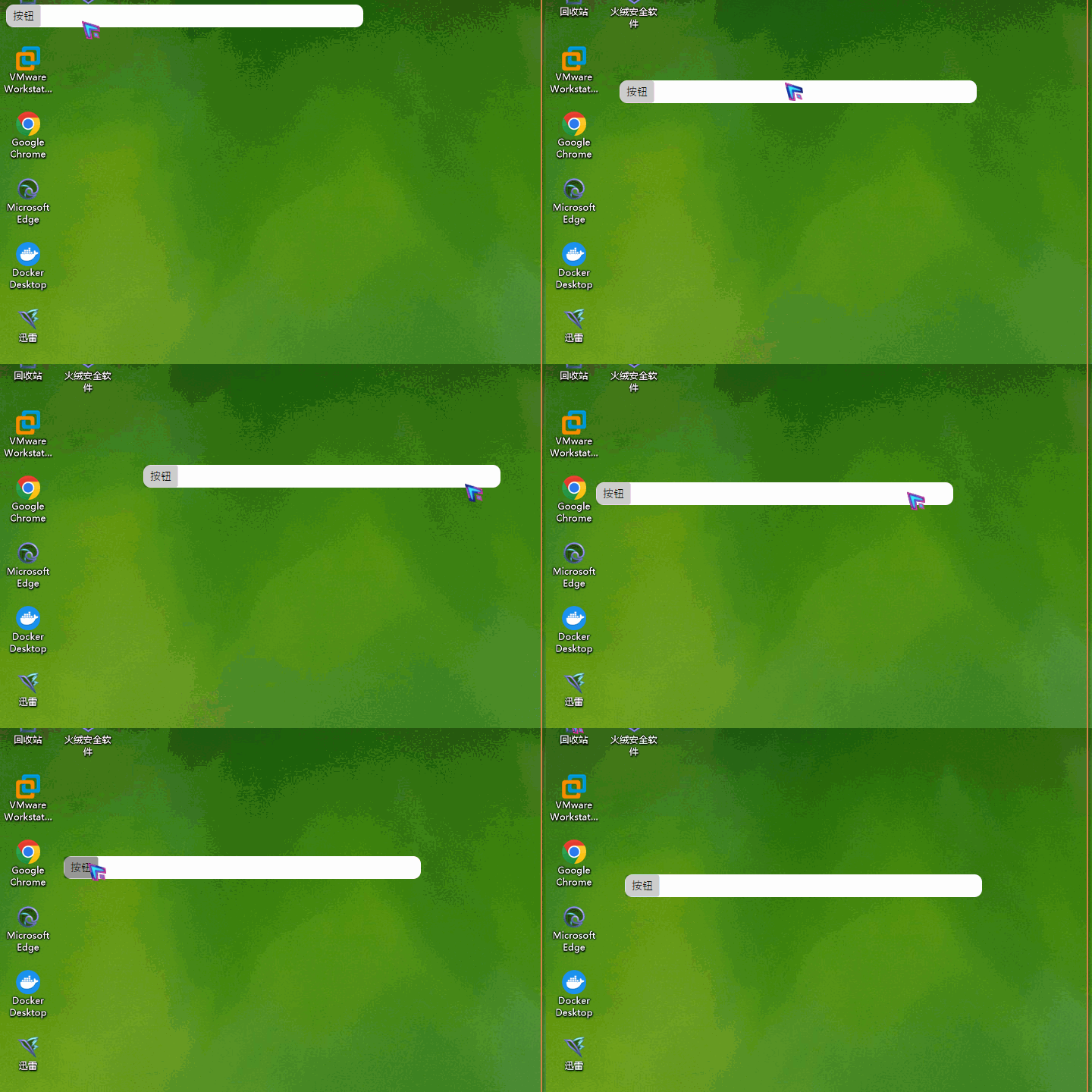
然后我们开始写指定组件拖动工具类,创建DragControlHelper.cs 以下就是封装的工具类 定义了一个ConcurrentDictionary静态参数,指定组件为Key ,Value为DragModule ,DragModule模型中定义了拖动的逻辑在调用StartDrag的时候传递需要拖动的组件,他会创建一个DragModule对象,创建的时候会创建定时器,当鼠标被按下时启动定时器,当鼠标被释放时定时器被停止,定时器用于平滑更新窗体移动,如果直接移动窗体会抖动。
using System;

using System.Collections.Concurrent;

using Avalonia;

using Avalonia.Controls;

using Avalonia.Input;

using Avalonia.Threading;

using Avalonia.VisualTree;

namespace DragDemo;

public class DragControlHelper

{

    private static ConcurrentDictionary<Control, DragModule> _dragModules = new();

    public static void StartDrag(Control userControl)

    {

        _dragModules.TryAdd(userControl, new DragModule(userControl));

    }

    public static void StopDrag(Control userControl)

    {

        if (_dragModules.TryRemove(userControl, out var dragModule))

        {

            dragModule.Dispose();

        }

    }

}

class DragModule : IDisposable

{

    /// <summary>

    /// 记录上一次鼠标位置

    /// </summary>

    private Point? lastMousePosition;

    /// <summary>

    /// 用于平滑更新坐标的计时器

    /// </summary>

    private DispatcherTimer _timer;

    /// <summary>

    /// 标记是否先启动了拖动

    /// </summary>

    private bool isDragging = false;

    /// <summary>

    /// 需要更新的坐标点

    /// </summary>

    private PixelPoint? _targetPosition;

    public Control UserControl { get; set; }

    public DragModule(Control userControl)

    {

        UserControl = userControl;

        // 添加当前控件的事件监听

        UserControl.PointerPressed += OnPointerPressed;

        UserControl.PointerMoved += OnPointerMoved;

        UserControl.PointerReleased += OnPointerReleased;

        // 初始化计时器

        _timer = new DispatcherTimer

        {

            Interval = TimeSpan.FromMilliseconds(10)

        };

        _timer.Tick += OnTimerTick;

    }

    /// <summary>

    /// 计时器事件

    /// </summary>

    /// <param name="sender"></param>

    /// <param name="e"></param>

    private void OnTimerTick(object sender, EventArgs e)

    {

        var window = UserControl.FindAncestorOfType<Window>();

        if (window != null && window.Position != _targetPosition)

        {

            // 更新坐标

            window.Position = (PixelPoint)_targetPosition;

        }

    }

    private void OnPointerPressed(object sender, PointerPressedEventArgs e)

    {

        if (!e.GetCurrentPoint(UserControl).Properties.IsLeftButtonPressed) return;

        // 启动拖动

        isDragging = true;

        // 记录当前坐标

        lastMousePosition = e.GetPosition(UserControl);

        e.Handled = true;

        // 启动计时器

        _timer.Start();

    }

    private void OnPointerReleased(object sender, PointerReleasedEventArgs e)

    {

        if (!isDragging) return;

        // 停止拖动

        isDragging = false;

        e.Handled = true;

        // 停止计时器

        _timer.Stop();

    }

    private void OnPointerMoved(object sender, PointerEventArgs e)

    {

        if (!e.GetCurrentPoint(UserControl).Properties.IsLeftButtonPressed) return;

        // 如果没有启动拖动,则不执行

        if (!isDragging) return;

        var currentMousePosition = e.GetPosition(UserControl);

        var offset =currentMousePosition - lastMousePosition.Value;

        var window = UserControl.FindAncestorOfType<Window>();

        if (window != null)

        {

            // 记录当前坐标

            _targetPosition = new PixelPoint(window.Position.X + (int)offset.X,

                window.Position.Y + (int)offset.Y);

        }

    }

    public void Dispose()

    {

        _timer.Stop();

        _targetPosition = null;

        lastMousePosition = null;

    }

}
打开MainWindow.axaml.cs,修改成以下代码 ,在渲染成功以后拿到Border(需要移动的组件),添加到DragControlHelper.StartDrag(border);中,然后再OnUnloaded的时候将Border再卸载掉
using Avalonia;

using Avalonia.Controls;

using Avalonia.Media;

using Avalonia.Threading;

namespace DragDemo.Views;

public partial class MainWindow : Window

{

    public MainWindow()

    {

        InitializeComponent();

        this.TransparencyLevelHint = WindowTransparencyLevel.Transparent;

        ExtendClientAreaToDecorationsHint = true;

        WindowState = WindowState.Maximized;

    }

    public override void Render(DrawingContext context)

    {

        base.Render(context);

        Dispatcher.UIThread.Post(() =>

        {

            var border = this.Find<Border>("Border");

            DragControlHelper.StartDrag(border);

        });

    }

    protected override void OnUnloaded()

    {

        var border = this.Find<Border>("Border");

        DragControlHelper.StopDrag(border);

        base.OnUnloaded();

    }

}
效果展示:
来着token的分享
技术交流群:737776595
封装avalonia指定组件允许拖动的工具类的更多相关文章
- Android基于Retrofit2.0 +RxJava 封装的超好用的RetrofitClient工具类(六)
csdn :码小白 原文地址: http://blog.csdn.net/sk719887916/article/details/51958010 RetrofitClient 基于Retrofit2 ...
- 基于Dapper二次封装了一个易用的ORM工具类:SqlDapperUtil
基于Dapper二次封装了一个易用的ORM工具类:SqlDapperUtil,把日常能用到的各种CRUD都进行了简化封装,让普通程序员只需关注业务即可,因为非常简单,故直接贴源代码,大家若需使用可以直 ...
- 封装各种生成唯一性ID算法的工具类
/** * Copyright (c) 2005-2012 springside.org.cn * * Licensed under the Apache License, Version 2.0 ( ...
- 仿照hibernate封装的一个对数据库操作的jdbc工具类
package project02_Order_management.util; import java.io.IOException; import java.lang.reflect.Field; ...
- swift项目第十天:网络请求工具类的封装
import UIKit /* 必须先导入头文件:import AFNetworking */ import AFNetworking //MARK:-0:定义枚举:以枚举定义请求网络的get和pos ...
- 利用Jackson封装常用JsonUtil工具类
在日常的项目开发中,接口与接口之间.前后端之间的数据传输一般都是使用JSON格式,那必然会封装一些常用的Json数据转化的工具类,本文讲解下如何利用Jackson封装高复用性的Json转换工具类. 转 ...
- Apache Commons 工具类介绍及简单使用
转自:http://www.cnblogs.com/younggun/p/3247261.html Apache Commons包含了很多开源的工具,用于解决平时编程经常会遇到的问题,减少重复劳动.下 ...
- Apache Commons 工具类简单使用
Apache Commons包含了很多开源的工具,用于解决平时编程经常会遇到的问题,减少重复劳动.下面是我这几年做开发过程中自己用过的工具类做简单介绍. 组件 功能介绍 BeanUtils 提供了对于 ...
- RedisUtil工具类
转载:http://blog.csdn.net/liuxiao723846/article/details/50401406 1.使用了jedis客户端,对redis进行了封装,包括: 1)使用了re ...
- FileUtils删除文件的工具类
前提是知道文件在哪个文件夹下面然后到文件夹下面删除文件,如果文件夹也需要传参数需要对下面方法进行改造. ( 需要借助于commons-io.jar和ResourceUtils.java ) 1.De ...
随机推荐
- 跳出foreach循环
直接return false没用,需要用throw来跳出foreach 1 try { 2 this.categoryList.forEach((item, index) => { 3 if ( ...
- 【HarmonyOS】ArkTS Native开发——使用 system函数创建文件
ArkTS是HamronyOS优选的主力语言,但官方文档指南中对于Native应用开发并没有详细的描述,只有一篇Codelab可以学习(简易Native C++ 示例(ArkTS) (huawei ...
- python基础re模块与正则
正则表达式前戏 正则表达式是用来匹配与查找字符串的,从网上爬取数据自然或多或少会用到正则表达式,python的正则表达式要先引入re模块,正则表达式以r引导 案例:手机号校验 基本要求:手机号必须是1 ...
- python + mysql +djagno +unittest 实现WEB、APP UI自动化测试平台--------(一)基础表
from django.db import models # Create your models here. class DictConfig(models.Model): "" ...
- vue 强制刷新数据 this.$forceUpdate()
vue项目中,修改了数据可能已经渲染的地方不会发生变化,所以加上 this.$forceUpdate()可以强制刷新数据
- java后端整合极光消息推送
目录 1.简介 2.极光Demo 2.1.进入极光官网--应用管理 2.2.快速集成一个Android/iOS的SDK 2.3.java服务端代码 3.参考资料 1.简介 简单来说,就是androi ...
- 基于jQuery的三种AJAX请求
基于jQuery的三种AJAX请求 1. 介绍 get请求 通常用于 获取服务端资源(向服务器要资源) 例如:根据URL地址,从服务器获取HTML文件.CSS文件.JS文件.图片文件.数据资源等. ...
- C#开发的资源文件程序(可国际化) - 开源研究系列文章
上次将小软件的线程池描述了,也将插件程序描述了,这次就将里面的资源文件相关的内容进行下记录,这里能够让程序做成国际化的形式(即多语言程序),主要就是通过这个资源文件的方式进行的处理.下面将对这个资源文 ...
- ac自动姬
字符串 ac自动姬 前言 省选临近,不能再颓了! 说着开始研究起moonlight串流.真香 本期博客之所以在csdn上发了一份,因为没有图床!如果有图床我一定会自力更生的! 好像和字符串没有毛关系 ...
- java入门与进阶-P1.1+P1.2
计算机与编程语言 计算机如何解决问题 !-- 首先计算机他是不知道自己需要去做什么的,它需要按照你所说的步骤一步一步进行直到结束 "请给我一杯水" 1.转身走到厨房; 2.找到一个 ...