
TFrecord写入与读取
Protocol buffers are Google's language-neutral, platform-neutral, extensible mechanism for serializing structured data.
Protocol buffers是由Google设计的无关程序语言、平台的、具有可扩展性机制的序列化数据结构。
The
tf.train.Examplemessage (or protosun) is a flexible message type that represents a{"string": value}mapping. It is designed for use with TensorFlow and is used throughout the higher-level APIs such as TFX.
tf.traom.Example是一种表示{“string”:value}映射关系的灵活的消息类型。它被设计用于TensorFlow以及更加高级的API。
写入
tf.train.Example
一个tf.train.Example的实例是构建的是数个{”string“: tf.train.Feature}映射。
其中,tf.train.Feature可以是以下三种,其他类型的数据格式可以通过一个或多个Feature组合描述:
- tf.train.BytesList
- tf.train.FloatList
- tf.train.Int64List
模板
import tensorflow as tf

with tf.io.TFRecordWriter("train.tfrecords","GZIP") as writer:

    for i in range(200): # Assume there are 200 records

        example_proto = tf.train.Example(

            features=tf.train.Features(

                feature= {

                    'feature0':

                        tf.train.Feature(float_list=tf.train.int64List(value=feature0)),

                    'feature1':

                        tf.train.Feature(float_list=tf.train.FloatList(value=feature1)),

                    'feature2':

                        tf.train.Feature(float_list=tf.train.BtyesList(value=feature2)),

                    'label':

                        tf.train.Feature(float_list=tf.train.int64List(value=[label])),

                }

            )

        )

        writer.write(example_proto.SerializeToString())
读取
tf.io.parse_single_example 和 tf.io.parse_example
One might see performance advantages by batching
Exampleprotos withparse_exampleinstead of using this function directly.
对Example protos分批并使用parse_example会比直接使用parse_single_example有性能优势。
模板
# with map_func using tf.io.parse_single_example

def map_func(example):

    # Create a dictionary describing the features.

    feature_description = {

        'feature0': tf.io.FixedLenFeature([len_feature0], tf.int64),

        'feature1': tf.io.FixedLenFeature([len_feature1], tf.float32),

        'feature2': tf.io.FixedLenFeature([len_feature2], tf.int64),

        'label': tf.io.FixedLenFeature([1], tf.int64),

    }

    parsed_example = tf.io.parse_single_example(example, features=feature_description)

    feature0 = parsed_example["feature0"]

    feature1 = parsed_example["feature1"]

    feature2 = parsed_example["feature2"]

    label = parsed_example["label"]

    return image, label

raw_dataset = tf.data.TFRecordDataset("train.tfrecords","GZIP")

parsed_dataset = raw_dataset.map(map_func=map_func)

parsed_dataset = raw_dataset.batch(BATCH_SIZE)
以下代码和前者的区别在于map_func中使用tf.io.parse_example替换tf.io.parse_single_example,并在调用map方法前先调用batch方法。
# with map_func using tf.io.parse_example

def map_func(example):

    # Create a dictionary describing the features.

    feature_description = {

        'feature0': tf.io.FixedLenFeature([len_feature0], tf.int64),

        'feature1': tf.io.FixedLenFeature([len_feature1], tf.float32),

        'feature2': tf.io.FixedLenFeature([len_feature2], tf.int64),

        'label': tf.io.FixedLenFeature([1], tf.int64),

    }

    parsed_example = tf.io.parse_example(example, features=feature_description)

    # features can be modified here

    feature0 = parsed_example["feature0"]

    feature1 = parsed_example["feature1"]

    feature2 = parsed_example["feature2"]

    label = parsed_example["label"]

    return image, label

raw_dataset = tf.data.TFRecordDataset(["./1.tfrecords", "./2.tfrecords"])

raw_dataset = raw_dataset.batch(BATCH_SIZE)

parsed_dataset = raw_dataset.map(map_func=map_func)
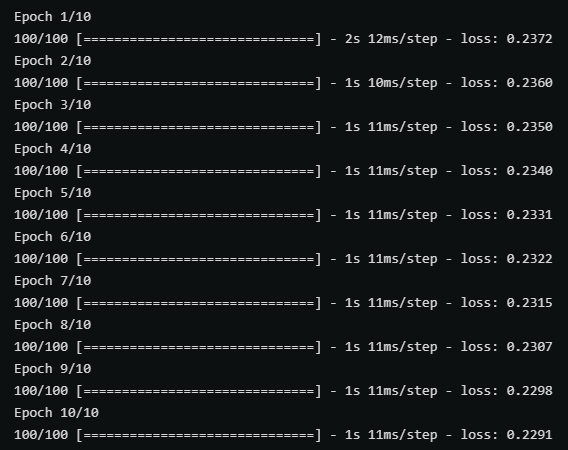
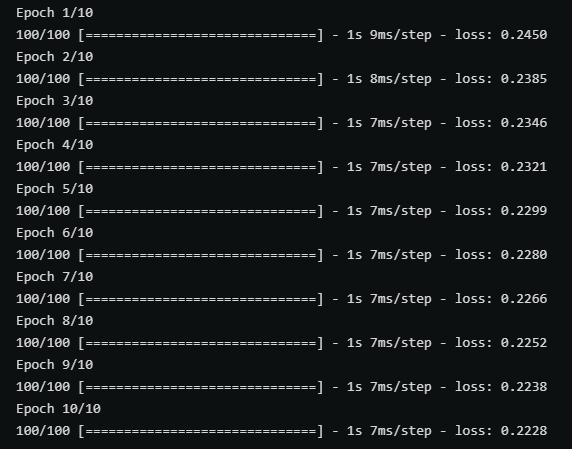
以上两张图分别时使用带有parse_single_example和parse_example的map_func在训练中的性能对比,后者(parse_example)明显性能更优秀。
不定长数据的读写 RaggedFeature
对于不定长且未padding的数据,写入过程中和定长数据没有区别,但在读取过程中需要使用tf.io.RaggedFeature替代tf.io.FixedLenFeature。
def map_func(example):

    # Create a dictionary describing the features.

    feature_description = {

        'feature': tf.io.RaggedFeature(tf.float32),

        'label': tf.io.FixedLenFeature([1], tf.int64),

    }

    parsed_example = tf.io.parse_example(example, features=feature_description)

    # feature = parsed_example["feature"]

    feature = parsed_example["feature"].to_tensor(shape=[1,100])

    label = parsed_example["label"]

    return feature, label

raw_dataset = tf.data.TFRecordDataset("train_unpadding.tfrecords").batch(1000)

parsed_dataset = raw_dataset.map(map_func=map_func)
下图对比了是否对不定长数据进行padding分别在压缩和未压缩的情况下的文件大小。

TFrecord写入与读取的更多相关文章
- java一行一行写入或读取数据
原文:http://www.cnblogs.com/linjiqin/archive/2011/03/23/1992250.html 假如E:/phsftp/evdokey目录下有个evdokey_2 ...
- iOS中plist的创建,数据写入与读取
iOS中plist的创建,数据写入与读取 Documents:应用将数据存储在Documents中,但基于NSuserDefaults的首选项设置除外Library:基于NSUserDefaults的 ...
- Java Web SSH框架总是无法写入无法读取Cookie
不关乎技术,关乎一个小Tips: 默认情况下,IE和Chrome内核的浏览器会认为http://localhost为无效的域名,所以不会保存它的cookie,使用http://127.0.0.1访问程 ...
- php 如何写入、读取word,excel文档
如何在php写入.读取word文档 <? //如何在php写入.读取word文档 // 建立一个指向新COM组件的索引 $word = new COM("word.applicatio ...
- Java笔记--java一行一行写入或读取数据
转自 Ruthless java一行一行写入或读取数据 链接:http://www.cnblogs.com/linjiqin/archive/2011/03/23/1992250.html 假如E:/ ...
- 蜗牛爱课- iOS中plist的创建,数据写入与读取
iOS中plist的创建,数据写入与读取功能创建一个test.plist文件-(void)triggerStorage{ NSArray *paths=NSSearchPathForDirect ...
- HDFS写入和读取流程
HDFS写入和读取流程 一.HDFS HDFS全称是Hadoop Distributed System.HDFS是为以流的方式存取大文件而设计的.适用于几百MB,GB以及TB,并写一次读多次的场合.而 ...
- java处理Excel文件---excel文件的创建,删除,写入,读取
这篇文章的代码是我封装的excel处理类,包含推断excel是否存在,表格索引是否存在,创建excel文件,删除excel文件,往excel中写入信息,从excel中读取数据. 尤其在写入与读取两个方 ...
- INI文件的写入与读取
INI文件的写入与读取 [节名] '[]中的节名对应此API的第一参数 Name=内容 'Nmae对应此API的第二参数 API的第三参数是没有取到匹配内容时返回的字符串; ...
随机推荐
- 那些我懵懵懂懂的js
1.this 如果说this是代表当前对象,而js中,除原始值(var str = "Leonie",值Leonie是不能改变的,它就是一个字符串,如var num = 4, 4也 ...
- S3C2410——LED灯实验
一.S3C2410输入/输出的原理 Linux主要有字符设备.块设备和网络设备3类驱动程序,我们一般编写的驱动都是字符设备驱动程序. 二.程序部分 编写程序控制3个LED灯,代码分为2个部分:控制LE ...
- MySQL数据库3
内容概要 自增特性 约束条件之外键 外键简介 外键关系 外键SQL语句之一对多关系 外键SQL语句之多对多关系 外键SQL语句之一对一关系 查询关键字 数据准备 查询关键字之select与from 查 ...
- 从零开始实现lmax-Disruptor队列(二)多消费者、消费者组间消费依赖原理解析
MyDisruptor V2版本介绍 在v1版本的MyDisruptor实现单生产者.单消费者功能后.按照计划,v2版本的MyDisruptor需要支持多消费者和允许设置消费者组间的依赖关系. 由于该 ...
- .NetCore实现图片缩放与裁剪 - 基于ImageSharp
前言 (突然发现断更有段时间了 最近在做博客的时候,需要实现一个类似Lorempixel.LoremPicsum这样的随机图片功能,图片有了,还需要一个根据输入的宽度高度获取图片的功能,由于之前处理图 ...
- 在jupyter中配置c++内核
安装 xeus-cling conda install xeus-cling -c conda-forg xeus-cling 是一个用于编译解释于C++的Jupyter内核目前,支持Mac与Linu ...
- Linux shell 2>&1的意思
在脚本里经常看到 ./xxx.sh > /dev/null 2>&1 ./xxx.sh > log.file 2>&1 在shell中输入输出都有对应的文件描述 ...
- 华为AppLinking中统一链接的创建和使用
运营的同学近期在准备海外做一波线下投放,涉及到海外的Google Play,iOS设备的App Store,以及华为渠道的AppGallery. 其中运营希望我们能够将三个平台的下载整合到一个链接 ...
- jQuery获取市、区县、乡镇、村
效果图: 首先根据自己方法把地区树状结构json字符串拿到 html下拉框和js写法如下: <select class="form-control" style=" ...
- docker安装node
#1.拉取镜像 docker pull node:latest #2.运行 docker run -itd --name node-test --restart=always node #--rest ...