
TFrecord写入与读取
Protocol buffers are Google's language-neutral, platform-neutral, extensible mechanism for serializing structured data.
Protocol buffers是由Google设计的无关程序语言、平台的、具有可扩展性机制的序列化数据结构。
The
tf.train.Examplemessage (or protosun) is a flexible message type that represents a{"string": value}mapping. It is designed for use with TensorFlow and is used throughout the higher-level APIs such as TFX.
tf.traom.Example是一种表示{“string”:value}映射关系的灵活的消息类型。它被设计用于TensorFlow以及更加高级的API。
写入
tf.train.Example
一个tf.train.Example的实例是构建的是数个{”string“: tf.train.Feature}映射。
其中,tf.train.Feature可以是以下三种,其他类型的数据格式可以通过一个或多个Feature组合描述:
- tf.train.BytesList
- tf.train.FloatList
- tf.train.Int64List
模板
import tensorflow as tf

with tf.io.TFRecordWriter("train.tfrecords","GZIP") as writer:

    for i in range(200): # Assume there are 200 records

        example_proto = tf.train.Example(

            features=tf.train.Features(

                feature= {

                    'feature0':

                        tf.train.Feature(float_list=tf.train.int64List(value=feature0)),

                    'feature1':

                        tf.train.Feature(float_list=tf.train.FloatList(value=feature1)),

                    'feature2':

                        tf.train.Feature(float_list=tf.train.BtyesList(value=feature2)),

                    'label':

                        tf.train.Feature(float_list=tf.train.int64List(value=[label])),

                }

            )

        )

        writer.write(example_proto.SerializeToString())
读取
tf.io.parse_single_example 和 tf.io.parse_example
One might see performance advantages by batching
Exampleprotos withparse_exampleinstead of using this function directly.
对Example protos分批并使用parse_example会比直接使用parse_single_example有性能优势。
模板
# with map_func using tf.io.parse_single_example

def map_func(example):

    # Create a dictionary describing the features.

    feature_description = {

        'feature0': tf.io.FixedLenFeature([len_feature0], tf.int64),

        'feature1': tf.io.FixedLenFeature([len_feature1], tf.float32),

        'feature2': tf.io.FixedLenFeature([len_feature2], tf.int64),

        'label': tf.io.FixedLenFeature([1], tf.int64),

    }

    parsed_example = tf.io.parse_single_example(example, features=feature_description)

    feature0 = parsed_example["feature0"]

    feature1 = parsed_example["feature1"]

    feature2 = parsed_example["feature2"]

    label = parsed_example["label"]

    return image, label

raw_dataset = tf.data.TFRecordDataset("train.tfrecords","GZIP")

parsed_dataset = raw_dataset.map(map_func=map_func)

parsed_dataset = raw_dataset.batch(BATCH_SIZE)
以下代码和前者的区别在于map_func中使用tf.io.parse_example替换tf.io.parse_single_example,并在调用map方法前先调用batch方法。
# with map_func using tf.io.parse_example

def map_func(example):

    # Create a dictionary describing the features.

    feature_description = {

        'feature0': tf.io.FixedLenFeature([len_feature0], tf.int64),

        'feature1': tf.io.FixedLenFeature([len_feature1], tf.float32),

        'feature2': tf.io.FixedLenFeature([len_feature2], tf.int64),

        'label': tf.io.FixedLenFeature([1], tf.int64),

    }

    parsed_example = tf.io.parse_example(example, features=feature_description)

    # features can be modified here

    feature0 = parsed_example["feature0"]

    feature1 = parsed_example["feature1"]

    feature2 = parsed_example["feature2"]

    label = parsed_example["label"]

    return image, label

raw_dataset = tf.data.TFRecordDataset(["./1.tfrecords", "./2.tfrecords"])

raw_dataset = raw_dataset.batch(BATCH_SIZE)

parsed_dataset = raw_dataset.map(map_func=map_func)
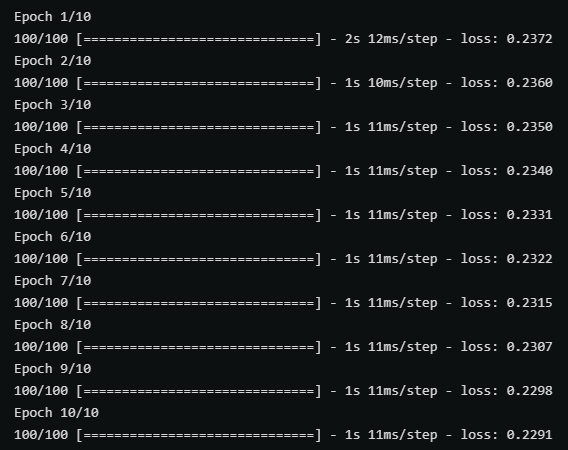
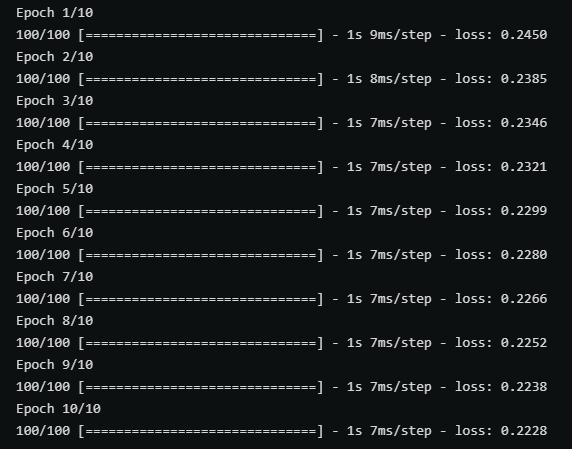
以上两张图分别时使用带有parse_single_example和parse_example的map_func在训练中的性能对比,后者(parse_example)明显性能更优秀。
不定长数据的读写 RaggedFeature
对于不定长且未padding的数据,写入过程中和定长数据没有区别,但在读取过程中需要使用tf.io.RaggedFeature替代tf.io.FixedLenFeature。
def map_func(example):

    # Create a dictionary describing the features.

    feature_description = {

        'feature': tf.io.RaggedFeature(tf.float32),

        'label': tf.io.FixedLenFeature([1], tf.int64),

    }

    parsed_example = tf.io.parse_example(example, features=feature_description)

    # feature = parsed_example["feature"]

    feature = parsed_example["feature"].to_tensor(shape=[1,100])

    label = parsed_example["label"]

    return feature, label

raw_dataset = tf.data.TFRecordDataset("train_unpadding.tfrecords").batch(1000)

parsed_dataset = raw_dataset.map(map_func=map_func)
下图对比了是否对不定长数据进行padding分别在压缩和未压缩的情况下的文件大小。

TFrecord写入与读取的更多相关文章
- java一行一行写入或读取数据
原文:http://www.cnblogs.com/linjiqin/archive/2011/03/23/1992250.html 假如E:/phsftp/evdokey目录下有个evdokey_2 ...
- iOS中plist的创建,数据写入与读取
iOS中plist的创建,数据写入与读取 Documents:应用将数据存储在Documents中,但基于NSuserDefaults的首选项设置除外Library:基于NSUserDefaults的 ...
- Java Web SSH框架总是无法写入无法读取Cookie
不关乎技术,关乎一个小Tips: 默认情况下,IE和Chrome内核的浏览器会认为http://localhost为无效的域名,所以不会保存它的cookie,使用http://127.0.0.1访问程 ...
- php 如何写入、读取word,excel文档
如何在php写入.读取word文档 <? //如何在php写入.读取word文档 // 建立一个指向新COM组件的索引 $word = new COM("word.applicatio ...
- Java笔记--java一行一行写入或读取数据
转自 Ruthless java一行一行写入或读取数据 链接:http://www.cnblogs.com/linjiqin/archive/2011/03/23/1992250.html 假如E:/ ...
- 蜗牛爱课- iOS中plist的创建,数据写入与读取
iOS中plist的创建,数据写入与读取功能创建一个test.plist文件-(void)triggerStorage{ NSArray *paths=NSSearchPathForDirect ...
- HDFS写入和读取流程
HDFS写入和读取流程 一.HDFS HDFS全称是Hadoop Distributed System.HDFS是为以流的方式存取大文件而设计的.适用于几百MB,GB以及TB,并写一次读多次的场合.而 ...
- java处理Excel文件---excel文件的创建,删除,写入,读取
这篇文章的代码是我封装的excel处理类,包含推断excel是否存在,表格索引是否存在,创建excel文件,删除excel文件,往excel中写入信息,从excel中读取数据. 尤其在写入与读取两个方 ...
- INI文件的写入与读取
INI文件的写入与读取 [节名] '[]中的节名对应此API的第一参数 Name=内容 'Nmae对应此API的第二参数 API的第三参数是没有取到匹配内容时返回的字符串; ...
随机推荐
- 【hexo博客搭建】将搭建好的hexo博客部署到阿里云服务器上面(下)
一.部署到阿里云服务器 既然博客也已经成功在本地部署,然后主题也成功安装,接下来就可以部署到服务器上面了,如果你也想要魔改matery主题,可以去各种博客上面找一找大佬的教程,或者联系我,也可以让你少 ...
- ELF文件结构
ELF文件结构 ELF文件的全称是Executable and Linkable Format,直译为"可执行可链接格式",包括目标文件(.o).可执行文件(可以直接运行).静态链 ...
- 【单片机】NB-IoT移远BC28调试笔记
一.入网总体思路 入网思路是参考 <Quectel_BC95&BC35-G&BC28_应用设计指导_V1.1.pdf>来做的.流程如图所示: 二.具体调试细节3.1 AT+ ...
- veeambackup通过虚拟机还原系统文件操作说明
如何从 VeeamBackup Replication 从备份中提取文件恢复到本地.当我们的服务器中误操作删除了一些文件特别是共享文件,文件被删除后往往都是几个小时或者几天后才被发现.特别是文件服务器 ...
- 在windows下使用s3cmd和s3browser来管理amazon s3的笔记
S3是Amazon S3的简称,s3cmd是一款命令行工具用来管理s3,同时还有一款图形化的管理工具:s3 browser. 因为绝大多数用户都是在linux下管理s3,而我们的打包机是在window ...
- 攻防世界pwn题:forgot
0x00:查看文件信息 该文件是32位的,canary和PIE保护机制没开. 0x01:用IDA进行静态分析 总览: 该函数就是:v5初值为1,对v2输入一串字符.然后执行一个会根据输入的字符串而修改 ...
- Google搜索为什么不能无限分页?
这是一个很有意思却很少有人注意的问题. 当我用Google搜索MySQL这个关键词的时候,Google只提供了13页的搜索结果,我通过修改url的分页参数试图搜索第14页数据,结果出现了以下的错误提示 ...
- Windows系统重置用户登录密码
更新记录 2022年4月16日:本文迁移自Panda666原博客,原发布时间:2021年8月23日. 方法一.使用带有密码恢复功能的PE盘 买一张 PE光盘 或 自制PE启动盘,这里推荐微PE. 准备 ...
- 过年了,基于Vue做一个消息通知组件
前言 今天除夕,在这里祝大家新年快乐!!!今天在这个特别的日子里我们做一个消息通知组件,好,我们开始行动起来吧!!!项目一览 效果很简单,就是这种的小卡片似的效果. 我们先开始写UI页面,可自定义消息 ...
- 一次 Keepalived 高可用的事故,让我重学了一遍它!
原文首发: 你好,我是悟空. 前言 上次我们遇到了一个 MySQL 故障的事故,这次我又遇到了另外一个奇葩的问题: Keepalived 高可用组件的虚拟 IP 持续漂移,导致 MySQL 主从不断切 ...