
vue日历(纯 js,没用任何插件和组件)
效果图:
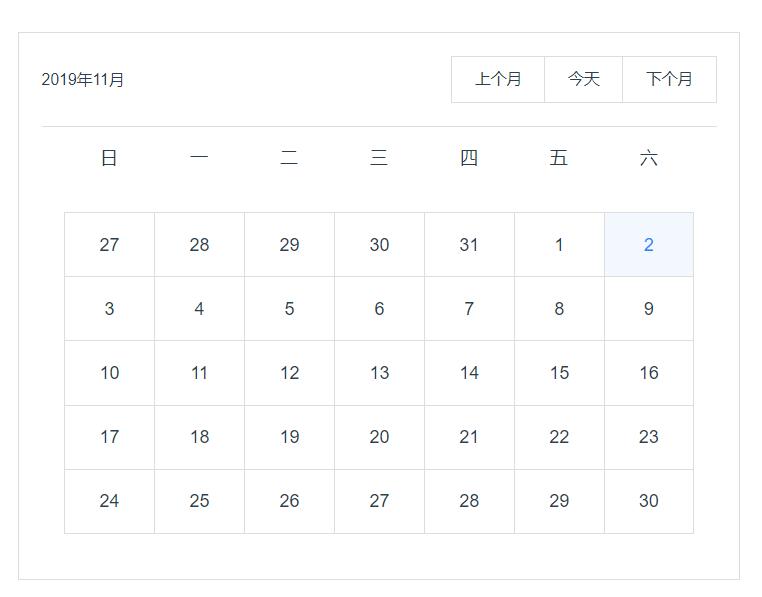
代码:
<template>

  <div class="calender">

    <div class="top">

      <div class="top_date">

        {{year}}年{{month}}月

      </div>

      <div class="btn_wrap">

        <ul>

          <li @click="handleShowNextMonth">

            下个月

          </li>

          <li @click="handleShowToday">

            今天

          </li>

          <li @click="handleShowLastMonth">

            上个月

          </li>

        </ul>

      </div>

    </div>

    <div class="date_wrap">

      <ul class="week">

          <li>日</li>

          <li>一</li>

          <li>二</li>

          <li>三</li>

          <li>四</li>

          <li>五</li>

          <li>六</li>

      </ul>

      <ul class="day">

        <li v-for="(item,index) in days" :key=index :class="{now:nowLi==year.toString()+month.toString()+item}">

          {{item}}

        </li>

      </ul>

    </div>

  </div>

</template>

<script>

export default {

  name: 'calender',

  data () {

    return {

     year:'',

     month:'',

     days:[],

     nowLi:'',

    }

  },

  methods:{

    //控制当前日期显示特殊样式

    handleShowDateStyle(){

      let now = new Date()

      this.nowLi=now.getFullYear().toString()+(now.getMonth()+1).toString()+now.getDate().toString()

      console.log(this.nowLi)

    },

    //得到当前年这个月分有多少天

    getDays(Y,M){

      let day = new Date(Y, M, 0).getDate()

      return day;

    },

    //得到当前年,这个月的一号是周几

    getWeek(Y,M){

        let now = new Date()

        now.setFullYear(this.year)

        now.setMonth(this.month-1)

        now.setDate(1);

        let week = now.getDay();

        return week;

    },

    pushDays(){

            //将这个月多少天加入数组days

            for(let i = 1; i<=this.getDays(this.year,this.month);i++){

              this.days.push(i)

            }

            //将下个月要显示的天数加入days

            // for(let i = 1;i<=42-this.getDays(this.year,this.month)-this.getWeek(this.year,this.month);i++){

            //   this.days.push(i)

            // }

            //将上个月要显示的天数加入days

            for(let i=0;i<this.getWeek(this.year,this.month);i++){

              var lastMonthDays=this.getDays(this.year,this.month-1)

                this.days.unshift(lastMonthDays-i)

            }

             console.log(this.days)

             console.log(this.getWeek(this.year,this.month))

    },

    getDate(){

            let now = new Date();

            this.year = now.getFullYear();

            this.month = now.getMonth()+1;

            this.pushDays();

    },

    changeDate(){

    },

    handleShowNextMonth(){

       this.days=[];

      if(this.month<12){

        this.month=this.month+1;

         this.pushDays();

      }else{

        this.month= this.month=1;

        this.year=this.year+1;

        this.pushDays();

      }

    },

    handleShowToday(){

      this.days=[];

      let now = new Date();

      this.year=now.getFullYear();

      this.month=now.getMonth()+1;

      this.pushDays();

    },

    handleShowLastMonth(){

       this.days=[];

      if(this.month>1){

         this.month=this.month-1;

      this.pushDays();

      }else if( this.year>1970){

        this.month=12;

        this.year=this.year-1;

        this.pushDays();

      }else{

        alert("不能查找更远的日期")

      }

    }

  },

  mounted(){

    this.getDate();

    this.handleShowDateStyle();

  }

}

</script>

<style scoped>

.calender{

  width: 600px;

  position: relative;

  margin: 0 auto;

  margin-top: 50px;

  border: 1px solid #ddd;

  padding: 20px;

}

.top{

  width: 100%;

  position: relative;

  display: flex;

  border-bottom: 1px solid #ddd;

  padding-bottom: 20px;

}

.top_date{

  width: 100px;

  text-align: left;

  line-height: 42px;

}

.btn_wrap{

  flex: 1;

  text-align: right

}

.btn_wrap ul{

  display: flex;

  flex-direction: row-reverse

}

.btn_wrap ul li{

  padding: 10px 20px;

  border: 1px solid #ddd;

  font-size: 14px;

  line-height: 20px;

  cursor: pointer;

}

.btn_wrap ul li:hover{

  background: #ddd;

  color:red;

}

.btn_wrap ul li:first-child{

  border-left: none;

}

.btn_wrap ul li:last-child{

  border-right: none;

}

.date_wrap{

  position: relative;

}

.week{

  display: flex;

  flex-direction: row;

  padding: 20px;

  font-size: 16px;

}

.week li{

  width: 14.28%;

}

.day{

  display: flex;

  flex-direction: row;

  padding: 20px;

  font-size: 16px;

  flex-wrap: wrap;

}

.day li{

  width: 14.28%;

  padding: 20px;

  box-sizing: border-box;

  border: 1px solid #ddd

}

.day li:nth-child(n+8){

  border-top:none;

}

.day li:nth-child(n+1){

  border-right: none;

}

.day li:nth-child(7n){

  border-right: 1px solid #ddd

}

.now{

  background: #f2f8fe;

  color:#1989fa;

}

</style>
感谢 各位老板 小额打赏: (有问题call俺)


参考链接:https://www.jianshu.com/p/6d8a138d2592
vue日历(纯 js,没用任何插件和组件)的更多相关文章
- 纯js客服插件集qq、旺旺、skype、百度hi、msn
原文 纯js客服插件集qq.旺旺.skype.百度hi.msn 客服插件,集qq.旺旺.skype.百度hi.msn 等 即时通讯工具,并可自己添加支持的通讯工具,极简主义,用法自己琢磨.我的博客 h ...
- 纯js的统计图插件-统计图
第一次写博客,写的不到望大家见谅! 今天给大家分享一个纯js的插件(统计图),有知道的可以在下面评论一起谈论一下,刚学着的时候,我是看了好久才看懂的一个基本结构,到后来我才知道原来直接去原网站上找到复 ...
- kPagination纯js实现分页插件
kPagination分页插件 纯js分页插件,压缩版本~4kb,样式可以自定义 demo 使用方法 <div id="pagination"></div> ...
- js+vue、纯js 按条件分页
听说大牛都从博客开始的... 人狠话不多,翠花上酸菜代码: 有注解基本上都看的懂!但是自己还是要注意以下几点,免得以后再浪费时间. #.vue 中监听事件 v-on:change=“vueChange ...
- vue 和 react 常用包(插件、组件 或 工具)
vue 和 react 都可以使用的包(只是 纯 js 功能的包) 1.qs : https://blog.csdn.net/sansan_7957/article/details/82227040 ...
- JS图形化插件利器组件系列 —— Gojs组件
阅读目录 一.组件效果预览 二.初次接触 1.Gojs简介 2.使用入门 三.综合效果 1.自定义流程的使用 2.工业流程图 四.总结 正文 前言:之前分享过两篇关于流程画图的前端组件,使用的jsPl ...
- baguetteBox.js响应式画廊插件(纯JS)
baguetteBox.js baguetteBox.js 是一个简单和易于使用lightbox纯JavaScript脚本,拥有图像放大缩小并带有相应的CSS3过度,并能在触摸屏等设备上完美展示. D ...
- vue.js国际化vue-i18n插件的使用问题,在模版文本、组件方法、jsf方法里的使用
vue.js国际化vue-i18n插件的使用问题,在模版文本.组件方法.jsf方法里的使用 1.在文本里使用{{$t("xxx")}} <span>{{$t(" ...
- 纯js实现复制到剪贴板功能
在网页上复制文本到剪切板,一般是使用JS+Flash结合的方法,网上有很多相关文章介绍.随着 HTML5 技术的发展,Flash 已经在很多场合不适用了,甚至被屏蔽.本文介绍的一款JS插件,实现了纯J ...
随机推荐
- 写给开发人员的实用密码学(三)—— MAC 与密钥派生函数 KDF
目录 一.MAC 消息认证码 MAC 与哈希函数.数字签名的区别 MAC 的应用 1. 验证消息的真实性.完整性 2. AE 认证加密 - Authenticated encryption 3. 基于 ...
- Laravel 8 图片上传七牛云
1.利用 composer 下载依赖包 composer require itbdw/laravel-storage-qiniu 2.打开 config 文件夹下的 app.php 文件,在 prov ...
- ref属性
ref属性 1.被用来给元素或组件注册引用信息(id的替代者) 2.应用在html标签上获取的是真实DOM元素,应用在组件标签上是组件实例对象(vc) 3.使用方式: 打标识:<h1 ref=& ...
- rsyn的使用
以下是rsync的语法: Local: rsync [OPTION...] SRC... [DEST] Access via remote shell: Pull: rsync [OPTION...] ...
- 您的请求在Web服务器中没有找到对应的站点”这是什么原因?出现这个界面说明域名解析已经正确并生效,这是由于域名没有绑定好,
宝塔出现 您的请求在Web服务器中没有找到对应的站点"这是什么原因?出现这个界面说明域名解析已经正确并生效,这是由于域名没有绑定好 , 本人经过测试使用如下方法解决.允话空HTTP_REFE ...
- hadoop-SSH免密登录配置
一:配置基础环境 一.修改主机名 修改 master 机器主机名 [root@server ~]# hostnamectl set-hostname master-wzg [root@server ~ ...
- 在/etc/docker/下 创建daemon.json重新加载后docker无法启动问题 /etc/docker/daemon.json编辑不了 找不到
可能产生这个问题的原因至少有以下几个: 编辑daemon.json步骤不对:想要创建并编辑daemon.json,应该是先启动docker服务,此时系统自动产生/etc/docker目录,此时cat生 ...
- Centos7下开启防火墙,允许通过的端口
1.查看防火墙状态 systemctl status firewalld 2.如果不是显示active状态,需要打开防火墙 systemctl start firewalld 3.# 查看所有已开放的 ...
- CentOS 通过shell脚本过滤得到服务器IP地址
1.CentOS 6.x (32Bit &&64Bit) [root@localhost ~]# ifconfig |grep Bcast |awk '{print$2}' |sed ...
- 6月6日 python复习 面向对象
1.面向对象编程 1.面向过程编程核心是"过程"二字,过程指的是解决问题的步骤,即先干什么再干什么基于该思想编写程序就好比在编写一条流水线,是一种机械式的思维方式 优点:复杂的问题 ...