
Android 开发之自定义Dialog及UI的实现
我们在开发中,经常会自定义Dialog,因为原生的AlertDialog无法满足我们的需求,这个时候就需要自定义Dialog,那么如何自定义呢,其实不难,就是有点繁琐而已。也就是自定义一个UI的xml文件,然后用setContentView方法来自定义设置。最近开发做了个小例子,特此分享记录出来给大家。
Dialog效果如下:
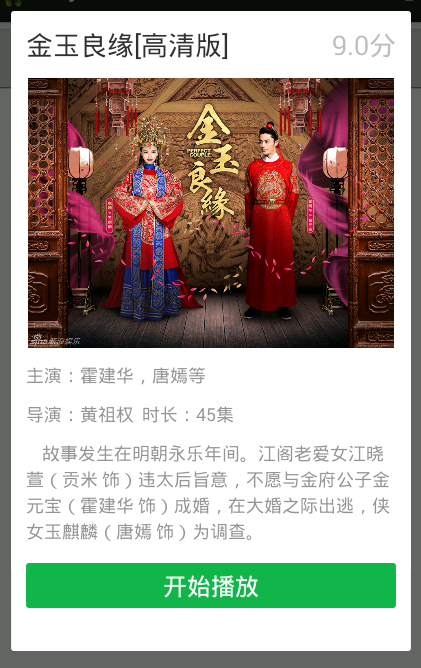
创建对话框类实现如下:
import android.app.Dialog;

import android.content.Context;

import android.util.DisplayMetrics;

import android.view.Gravity;

import android.view.LayoutInflater;

import android.view.View;

import android.view.Window;

import android.view.WindowManager;

import android.view.View.OnClickListener;

import android.widget.ImageView;

import android.widget.TextView;

public class DialogUitl {

    private static Dialog watchMovieDialog;

    public static Dialog showWatchMovieDialog(Context context) {

        if(watchMovieDialog == null){

            watchMovieDialog = new Dialog(context, R.style.watchMovieDialog);

            View dialogView = LayoutInflater.from(context).inflate(R.layout.dialog_watch_movie, null);

            watchMovieDialog.setCanceledOnTouchOutside(false);

            watchMovieDialog.setContentView(dialogView);

            Window dialogWindow = watchMovieDialog.getWindow();

            WindowManager.LayoutParams lp = dialogWindow.getAttributes();

            dialogWindow.setGravity(Gravity.CENTER_VERTICAL | Gravity.CENTER_HORIZONTAL);

            DisplayMetrics metrics = context.getApplicationContext().getResources().getDisplayMetrics();

            lp.width = metrics.widthPixels * 5 / 6;

            lp.height = metrics.heightPixels *  4/5;

            dialogWindow.setAttributes(lp);

            dialogWindow.setBackgroundDrawable(context.getResources().getDrawable(R.drawable.dlg_movie_bg));

            //dialogWindow.setBackgroundDrawableResource(R.drawable.dlg_movie_bg);

            watchMovieDialog.setCancelable(true);

            String title = "金玉良缘[高清版]";

            String score = "9.0分";

            String director = "黄祖权";

            String actor = "霍建华,唐嫣等";

            int   imageId = R.drawable.movie_img;

            String duration = "45集";

            String introduce = "    故事发生在明朝永乐年间。江阁老爱女江晓萱(贡米 饰)违太后旨意,不愿与金府公子金元宝(霍建华 饰)成婚,在大婚之际出逃,侠女玉麒麟(唐嫣 饰)为调查。";

            ((TextView)dialogView.findViewById(R.id.title)).setText(title);

            ((TextView)dialogView.findViewById(R.id.score)).setText(score);

            ((TextView)dialogView.findViewById(R.id.redirectContent)).setText(director);

            ((TextView)dialogView.findViewById(R.id.roleContent)).setText(actor);

            ((TextView)dialogView.findViewById(R.id.duration)).setText(duration);

            ((TextView)dialogView.findViewById(R.id.introduce)).setText(introduce);

            ((ImageView)dialogView.findViewById(R.id.ivImage)).setImageResource(imageId);

        }

        return watchMovieDialog;

    }

}
对应的UI的xml文件实现如下:
<?xml version="1.0" encoding="utf-8"?>

<LinearLayout xmlns:android="http://schemas.android.com/apk/res/android"

    android:id="@+id/dialog"

    android:layout_width="fill_parent"

    android:layout_height="wrap_content"

    android:orientation="vertical"

    >

    <RelativeLayout

        android:layout_width="fill_parent"

        android:layout_height="wrap_content"

        android:layout_margin="10dip"

         >

        <TextView

            android:id="@+id/title"

            android:layout_width="wrap_content"

            android:layout_height="wrap_content"

            android:layout_alignParentLeft="true"

            android:layout_alignParentTop="true"

            android:textSize="18sp"

            android:text="" />

        <TextView

            android:id="@+id/score"

            android:layout_width="wrap_content"

            android:layout_height="wrap_content"

            android:layout_alignParentRight="true"

            android:layout_alignParentTop="true"

            android:textColor="@color/color_bebebe"

            android:textSize="18sp"

            android:text="" />

    </RelativeLayout>

    <ImageView

        android:id="@+id/ivImage"

        android:layout_marginLeft="10dip"

        android:layout_marginRight="10dip"

        android:layout_marginBottom="10dip"

        android:layout_width="fill_parent"

        android:layout_height="180dp"

        android:src="@drawable/movie_img" />

    <LinearLayout

        android:layout_width="fill_parent"

        android:layout_height="wrap_content"

        android:layout_marginLeft="10dip"

        android:layout_marginRight="10dip"

        android:layout_marginBottom="10dip"

        android:orientation="vertical"

        android:background="@color/white"

         >

        <LinearLayout

            android:layout_width="fill_parent"

            android:layout_height="wrap_content"

            android:orientation="horizontal"

            android:layout_marginBottom="10dip" >

            <TextView

                android:id="@+id/role"

                android:layout_width="wrap_content"

                android:layout_height="wrap_content"

                android:text="主演:"

                 android:textColor="@color/color_959595"

                android:textSize="12sp" />

            <TextView

                android:id="@+id/roleContent"

                android:layout_width="wrap_content"

                android:layout_height="wrap_content"

                android:text=""

                 android:textColor="@color/color_959595"

                android:textSize="12sp" />

        </LinearLayout>

        <LinearLayout

            android:layout_width="fill_parent"

            android:layout_height="wrap_content"

            android:orientation="horizontal" >

            <TextView

                android:id="@+id/redirect"

                android:layout_width="wrap_content"

                android:layout_height="wrap_content"

                android:singleLine="true"

                android:text="导演:"

                android:textColor="@color/color_959595"

                android:textSize="12sp" />

            <TextView

                android:id="@+id/redirectContent"

                android:layout_width="wrap_content"

                android:layout_height="wrap_content"

                android:singleLine="false"

                android:text=""

                android:textColor="@color/color_959595"

                android:textSize="12sp" />

            <TextView

                android:id="@+id/redirect"

                android:layout_width="wrap_content"

                android:layout_height="wrap_content"

                android:singleLine="true"

                android:text="  时长:"

                android:textColor="@color/color_959595"

                android:textSize="12sp" />

            <TextView

                android:id="@+id/duration"

                android:layout_width="wrap_content"

                android:layout_height="wrap_content"

                android:singleLine="false"

                android:text=""

                android:textColor="@color/color_959595"

                android:textSize="12sp" />

        </LinearLayout>

    </LinearLayout>

    <TextView

                android:id="@+id/introduce"

                android:layout_width="fill_parent"

                android:layout_height="wrap_content"

                android:layout_marginLeft="10dip"

                android:layout_marginRight="10dip"

                android:layout_marginBottom="10dip"

                android:singleLine="false"

                android:text=""

                android:textColor="@color/color_959595"

                android:lineSpacingExtra="3dp"

                android:textSize="12sp" />

    <LinearLayout

            android:layout_width="fill_parent"

            android:layout_height="wrap_content"

            android:layout_marginLeft="10dip"

            android:layout_marginRight="10dip"

            android:layout_marginBottom="10dip"

            android:gravity="center"

            android:orientation="horizontal"

            >

                <TextView

                    android:id="@+id/playing"

                    android:layout_width="wrap_content"

                    android:layout_height="wrap_content"

                    android:layout_weight="1"

                    android:layout_gravity="center"

                    android:background="@drawable/btn_install_selector"

                    android:gravity="center"

                    android:text="开始播放"

                    android:textColor="@color/white"

                    android:textSize="16sp"

                    android:clickable="true"/>

        </LinearLayout>

</LinearLayout>
对话框底部的绿色Button的Style 实现(btn_install_selector.xml):
<?xml version="1.0" encoding="utf-8"?>

<selector xmlns:android="http://schemas.android.com/apk/res/android">

    <item android:state_pressed="true" android:drawable="@drawable/btn_install_bg"/>

    <item android:state_enabled="false" android:drawable="@drawable/btn_sending_bg"/>

    <item android:drawable="@drawable/btn_install_normall"/>

</selector>
最后调用Dialog方法如下:
在你需要弹出对话框的地方 调用以下代码即可:
DialogUitl.showWatchMovieDialog(this).show();
Android 开发之自定义Dialog及UI的实现的更多相关文章
- Android开发之自定义Dialog简单实现
本文着重研究了自定义对话框,通过一下步骤即可清晰的理解原理,通过更改界面设置和style类型,可以应用在各种各样适合自己的App中. 首先来看一下效果图: 首先是activity的界面 点击了上述图片 ...
- Android中制作自定义dialog对话框的实例
http://www.jb51.net/article/83319.htm 这篇文章主要介绍了Android中制作自定义dialog对话框的实例分享,安卓自带的Dialog显然不够用,因而我们要继 ...
- [Android] Android开发优化之——对界面UI的优化(2)
在Android应用开发过程中,屏幕上控件的布局代码和程序的逻辑代码通常是分开的.界面的布局代码是放在一个独立的xml文件中的,这个文件里面是树型组织的,控制着页面的布局.通常,在这个页面中会用到很多 ...
- [Android] Android开发优化之——对界面UI的优化(1)
在Android应用开发过程中,屏幕上控件的布局代码和程序的逻辑代码通常是分开的.界面的布局代码是放在一个独立的xml文件中的,这个文件里面是树型组织的,控制着页面的布局.通常,在这个页面中会用到很多 ...
- android开发之自定义组件
android开发之自定义组件 一:自定义组件: 我认为,自定义组件就是android给我们提供的的一个空白的可以编辑的图片,它帮助我们实现的我们想要的界面,也就是通过自定义组件我们可以把我们要登入的 ...
- Android单个按钮自定义Dialog
代码改变世界 Android单个按钮自定义Dialog dialog_layout.xml <?xml version="1.0" encoding="utf-8& ...
- Android开发之自定义的ListView(UITableViewController)
Android开发中的ListView, 顾名方法思义,就是表视图.表示图在iOS开发中就是TableView.两者虽然名称不一样,但是其使用方法,使用场景以及该控件的功能都极为相似,都是用来展示大量 ...
- Android开发之自定义组件和接口回调
说到自定义控件不得不提的就是接口回调,在Android开发中接口回调用的还是蛮多的.在这篇博客开始的时候呢,我想聊一下iOS的自定义控件.在iOS中自定义控件的思路是继承自UIView, 在UIVie ...
- Android学习笔记_52_全面了解Android开发规范:性能及UI优化
一.Android编码规范 1.java代码中不出现中文,最多注释中可以出现中文 2.局部变量命名.静态成员变量命名 只能包含字母,单词首字母出第一个外,都为大写,其他字母都为小写 3.常量命名 只能 ...
随机推荐
- 破解之关键CALL与关键跳查找方法
找关键CALL和关键跳 方法一: 输入假码注册程序,记录下错误提示信息. OD载入程序--> 右键-->查找-->所有参考文本字串-->(右键-->查找文本,注:不要区分 ...
- 【2011 Greater New York Regional 】Problem I :The Golden Ceiling
一道比较简单但是繁琐的三维计算几何,找错误找的我好心酸,没想到就把一个变量给写错了 = =: 题目的意思是求平面切长方体的截面面积+正方体顶部所遮盖的面积: 找出所有的切点,然后二维凸包一下直接算面积 ...
- android recovery模式及ROM制作
转自android recovery模式及ROM制作 1.总述 为了方便客户日后的固件升级,本周研究了一下android的recovery模式.网上有不少这类的资料,但都比较繁杂,没有一个系统的介绍与 ...
- Spring-boot 配置Aop获取controller里的request中的参数以及其返回值
首先在你的Maven的pom文件里加入aop的依赖: <dependency> <groupId>org.springframework.boot</groupId> ...
- ASP.NET MVC 下 引用阿里巴巴和IconFont字体路径404问题
参考:http://stackoverflow.com/questions/28169365/font-wont-get-found-on-server-for-firefox# http://blo ...
- 无法使用以下搜索标准找到 X.509 证书: StoreName“My”、StoreLocation“LocalMachine”、FindType“FindBySubjectName”、FindValue“MyWebSite”。
http://www.codeproject.com/Articles/96028/WCF-Service-with-custom-username-password-authenti 需要制作证书 ...
- Oracle core06_latch&lock
lock and latch 在oracle中为了保护共享资源,使用了两种不同的锁机制lock和latch,这两种锁有明显不同点: 1,lock和pin,采用的是队列的方式,先来先服务的策略,latc ...
- statspack系列6
原文:http://jonathanlewis.wordpress.com/2006/12/27/analysing-statspack-6/ 作者:Jonathan Lewis 下面是一段时间以前网 ...
- bzoj1085
肯定是搜索题无疑问, 首先要求在15步以内(包括15步)到达目标状态,也就是限定了搜索的深度,于是我们用dfs更合适 但这样复杂度仍然太大,原因就是我们在搜索中做了很多很不优的尝试 考虑当前状态若与目 ...
- bzoj1179
这种tarjan+dp的水题我竟然还WA了两次,要小心! type link=^node; node=record po:longint; next:link; ...