
UIButton 使用imageEdgeInsets和titleEdgeInsets属性
现在App的底部栏、侧边栏、顶部栏经常出现一些包含图像和文字的Item,以前用按钮上面添加label和imageView, 想想实在是对资源的浪费。。
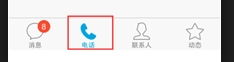
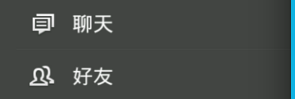
图1 — 底部栏 图2 — 侧边栏
apple已经考虑到这点,UIButton里其实已经自带了label和imageView,虽然不能像设置frame一样设置它们的位置,
但是可以通过设置四个边的EdgeInset来“挤”。
但是"挤"是个技术活,要使得图片和文字怪怪的听话可不是简单,一点点的调整很繁琐。
UIButton内有两个控件titleLabel和imageView,可以用来显示一个文本和图片,这里的图片区别于背景图片。给UIButton设置了title和image后,它们会图片在左边,文本在图片右边显示。它们两个做为一个整体依赖于button的contentHorizontalAlignment居左居右或居中显示。
1.当button.width < image.width时,只显示被压缩后的图片,图片是按fillXY的方式压缩。
2.当button.width > image.width,且 button.width < (image.width + text.width)时,图片正常显示,文本被压缩。
3.当button.width > (image.width + text.width),两者并列默认居中显示,可通过button的属性contentHorizontalAlignment改变对齐方式。
需要注意的是,对titleLabel和imageView设置偏移,是针对它当前的位置起作用的,并不是针对它距离button边框的距离的。我测试下来,当button的contentHorizontalAlignment为居中时,偏移的距离和实际传的值有些偏差,没有发现规律,看不到源码也没在研究,但把button的contentHorizontalAlignment设为居左时,contentVerticalAlignment设为居上时,可以很方便的通过EdgeInsets改变两个子控件的位置。居左时,运行结果如图1.
前提:UIButton: width=220, height=100, image: width=height=36 text width=62
想要让图片和文本上下排列,需要让image向下偏移10(距离上边间隙),然后向右偏移92( button.width - image.width / 2),计算下来为 [btn setImageEdgeInsets:UIEdgeInsetsMake(5, 92, 0, 0)],它的偏移是针对它图1时的位置,如果想向上偏移传的为负值。
下面要计算机文本偏移了,向下偏移46 (36+10 图片的高度+间隙),向右偏移44 ( (button.width - text.width) / 2 - image.width );因为文本本身起始x方向位置是从image.width开始的,所以算偏移时,要减掉这个宽度。计算结果为[btn setTitleEdgeInsets:UIEdgeInsetsMake(46, 44, 0, 0)];

图1

图2
文字和图片的摆放一般有两种情况: 上下摆放和左右摆放;
参考了stackoverflow:
看看左右摆放:
             // the space between the image and text

             CGFloat spacing = 6.0;

             // lower the text and push it left so it appears centered

             //  below the image

             CGSize imageSize = button.imageView.frame.size;

             button.titleEdgeInsets = UIEdgeInsetsMake(0.0, - imageSize.width, - (imageSize.height + spacing), 0.0);

             // raise the image and push it right so it appears centered

             //  above the text

             CGSize titleSize = button.titleLabel.frame.size;

             button.imageEdgeInsets = UIEdgeInsetsMake(- (titleSize.height + spacing), 0.0, 0.0, - titleSize.width);
The following version contains changes to support iOS 7+ that have been recommended in comments below. I haven't tested this code myself, so I'm not sure how well it works or whether it would break if used under previous versions of iOS.
根据底下的评论建议,下面的代码包含更改后支持iOS7以上版本。我自己还没有测试这代码,不知道是否能用,或者在iOS7以前的版本中会崩溃。
             // the space between the image and text

             CGFloat spacing = 6.0;

             // lower the text and push it left so it appears centered

             //  below the image

             CGSize imageSize = button.imageView.image.size;

             button.titleEdgeInsets = UIEdgeInsetsMake(0.0, - imageSize.width, - (imageSize.height + spacing), 0.0);

             // raise the image and push it right so it appears centered

             //  above the text

             CGSize titleSize = [button.titleLabel.text sizeWithAttributes:@{NSFontAttributeName: button.titleLabel.font}];

             button.imageEdgeInsets = UIEdgeInsetsMake(- (titleSize.height + spacing), 0.0, 0.0, - titleSize.width);
附注: 其实如果是底部栏(情况一)的换可以考虑使用UITabBarController,自定义barItem就可以了。
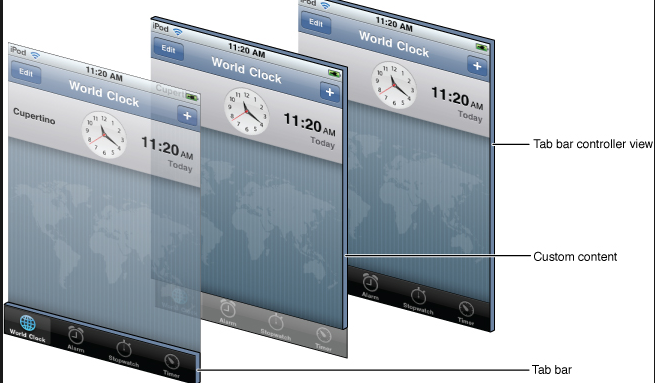
当时有个需求:从UIViewController(登陆)"push" 到UITabBarViewController, 由于UIViewController和UITabBarViewController是不同的类,
直接用navigationController push会到UITabBarViewController的navigationController里,这时候你就需要设置每一个UITabBarItem对应的UINavigationController。
push的代码:
     FirstViewController*  viewController1 = [[FirstViewController alloc] initWithNibName:@"FirstViewController" bundle:[NSBundle mainBundle]];

     SecondViewController*  viewController2 = [[SecondViewController alloc] initWithNibName:@"SecondViewController" bundle:[NSBundle mainBundle]];

     UITabBarItem *item = [[UITabBarItem alloc] initWithTitle:@"View1" image:Nil tag:];

     UITabBarItem *item2 = [[UITabBarItem alloc] initWithTitle:@"View2" image:Nil tag:];

     UINavigationController *navigate, *navigate2;

     navigate = [[UINavigationController alloc] initWithRootViewController:viewController1];

     navigate2 = [[UINavigationController alloc] initWithRootViewController:viewController2];

     navigate.tabBarItem = item;

     navigate2.tabBarItem = item2;

     UITabBarController *tabBar = [[UITabBarController alloc] init ];

      tabBar.viewControllers = [NSArray arrayWithObjects:navigate,navigate2, nil];

     [self.navigationController pushViewController:tabBar animated:YES];
这样做对资源要求更高,所以stackoverflow上这个问题是被投反对票的,有谁有更好的方法请留言。
关于UIViewController和UINavigationController的关系可以参考 http://blog.csdn.net/jerryvon/article/details/7597481, 写的很明白。
原文: http://www.cnblogs.com/A--G/p/5131401.html
参考链接: 1. http://stackoverflow.com/questions/2451223/uibutton-how-to-center-an-image-and-a-text-using-imageedgeinsets-and-titleedgei
3. http://blog.csdn.net/dfqin/article/details/37813591
UIButton 使用imageEdgeInsets和titleEdgeInsets属性的更多相关文章
- UIButton的imageEdgeInsets 和 titleEdgeInsets
我们知道,在UIButton中有一个UILabel和一个UIImageView,同时还有属性: titleEdgeInsets,imageEdgeInsets.介绍下 imageEdgeInsets ...
- UIButton的titleEdgeInsets属性和imageEdgeInsets属性实现图片文字按要求排列
button可以设置 titleEdgeInsets属性和 imageEdgeInsets属性来调整其image和label相对位置,具体参考http://stackoverflow.com/ques ...
- iOS:UIView、UIControl、UIButton、UILabel简单的属性和方法常识
常见属性和方法 一 .UIVIew 常见属性 1.frame 位置和尺寸(以父控件的左上角为原点(0,0)) 2.center 中点 (以父控件的左上角为原点(0,0)) 3.bounds 位置和尺寸 ...
- iOS-UIButton-文字位置,字体大小,边角样式,button种类,点击事件,内容位置
一. 设置button的文字居左,居中,居右 //设置button居左 button.contentHorizontalAlignment = UIControlContentHorizontalAl ...
- UIButton的titleEdgeInsets和imageEdgeInsets属性
转:http://www.cnblogs.com/huichun/p/3419596.html uiButton控件上自带了一个uiLabel类型的子控件和一个uiImageView类型的子控件,如果 ...
- UIButton中的三个UIEdgeInsets属性
接着昨天的 UIButton中的三个UIEdgeInsets属性 ,今天我们具体谈谈UIButton的contentEdgeInsets.titleEdgeInsets.imageEdgeInsets ...
- IOS(二)基本控件UIButton、简易动画、transform属性、UIImageView
UIButton //1.设置UIButton 的左右移动 .center属性 获得 CGPoint 来修改x y //1.设置UIButton 的放大缩小 bounds属性 获得CGRect 然后通 ...
- [iOS]详解调整UIButton的title和image的位置
UIButton的默认布局是:title在右,image在左; 很多时候我们需要的是title在左边,或者title在下面,这时就需要调整UIButton的TitleLabel和ImageView的位 ...
- UIButton中的**EdgeInsets是做什么用的?
UIButton中的**EdgeInsets是做什么用的? UIEdgeInsetsMake Creates an edge inset for a button or view.An inset i ...
随机推荐
- LR测试工具性能指标详解
这篇文章将对LoadRunner测试工具的性能指标从以下三点进行详解. 第一点.Web资源分析是从服务器入手对Web服务器的性能分析. 1.Hits per Second "每秒点击次数&q ...
- linux中替换目录下的某个文件中包含的IP地址
#!/bin/bash #set -x oldIP=172.17.39.135 newIP=172.17.98.115 homefile=/usr/local/ims/ filelist=`grep ...
- pyhton 查找一个数的所有因子 以及 判断一个数是否是质数 两个小脚本
最近看到一个网站, 欧拉计划.挺好玩,都是一些算法题.这是本站:http://projecteuler.net/problems 这个是中文站:http://pe.spiritzhang.com/ 下 ...
- HDOJ/HDU 1180 诡异的楼梯(经典BFS-详解)
Problem Description Hogwarts正式开学以后,Harry发现在Hogwarts里,某些楼梯并不是静止不动的,相反,他们每隔一分钟就变动一次方向. 比如下面的例子里,一开始楼梯在 ...
- HDOJ/HDU 1161 Eddy's mistakes(大写字母转换成小写字母)
Problem Description Eddy usually writes articles ,but he likes mixing the English letter uses, for e ...
- Tomcat启动失败闪退
最近把电脑系统从win8升到了8.1(之前源于各种原因都没升外带升级失败),用都用了1个月了,突然发现tomcat启动不了,提示找不到什么什么- -,因为平时基本都是从开发工具里运行的服务器,都没有问 ...
- Windows下,通过程序设置全屏抗锯齿(多重采样)的方法
这里说的全屏抗锯齿,不是基于着色器的FXAA之类的方式,而是兼容性更好的,基于固定管线的多重采样方式. 先来说一下开发环境,我用的是VC2013+GLEW1.11. 要通过程序设置多重采样,首先需要进 ...
- 转 wordpress搭建
新建一个博客文件 在搭建博客的过程中,我们需要创建一个文件,用来存储博客的相关信息.这些信息包括域名的信息,主机空间服务器ip,FTP登录名和密码,空间面板登录信息等等,只要是与该博客有关的信息,全部 ...
- Linux如何查找文件安装路径?
Linux中查看某 个软件的安装路径(地址)有时显得非常重要.比如某个文件的快速启动项被删除,或者你要建立快速启动项,或者想删除. 添加安装文件等等,很多地方都要用到查案文件安装路径的命令. 这里给大 ...
- HDU4283:You Are the One(区间DP)
Problem Description The TV shows such as You Are the One has been very popular. In order to meet the ...