
mybatis基础(下)
- mybatis和spring整合
- 需要spring通过单例方式管理SqlSessionFactory
- spring和mybatis整合生成代理对象,使用SqlSessionFactory创建SqlSession
- 持久层的mapper都需要由spring进行管理
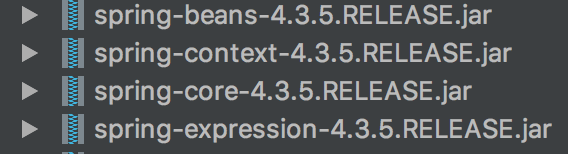
- 需要导入的jar包

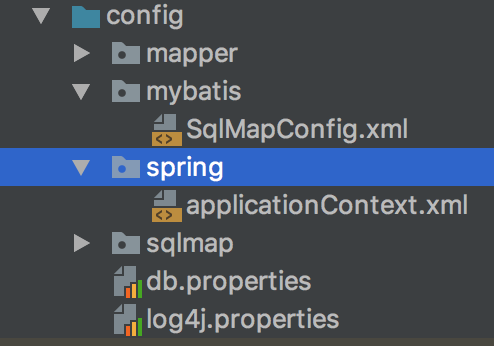
- 需要建立的文件
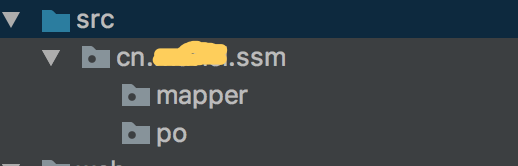
- 需要建立的包
- 在applicationContext.xml配置sqlSessionFactory
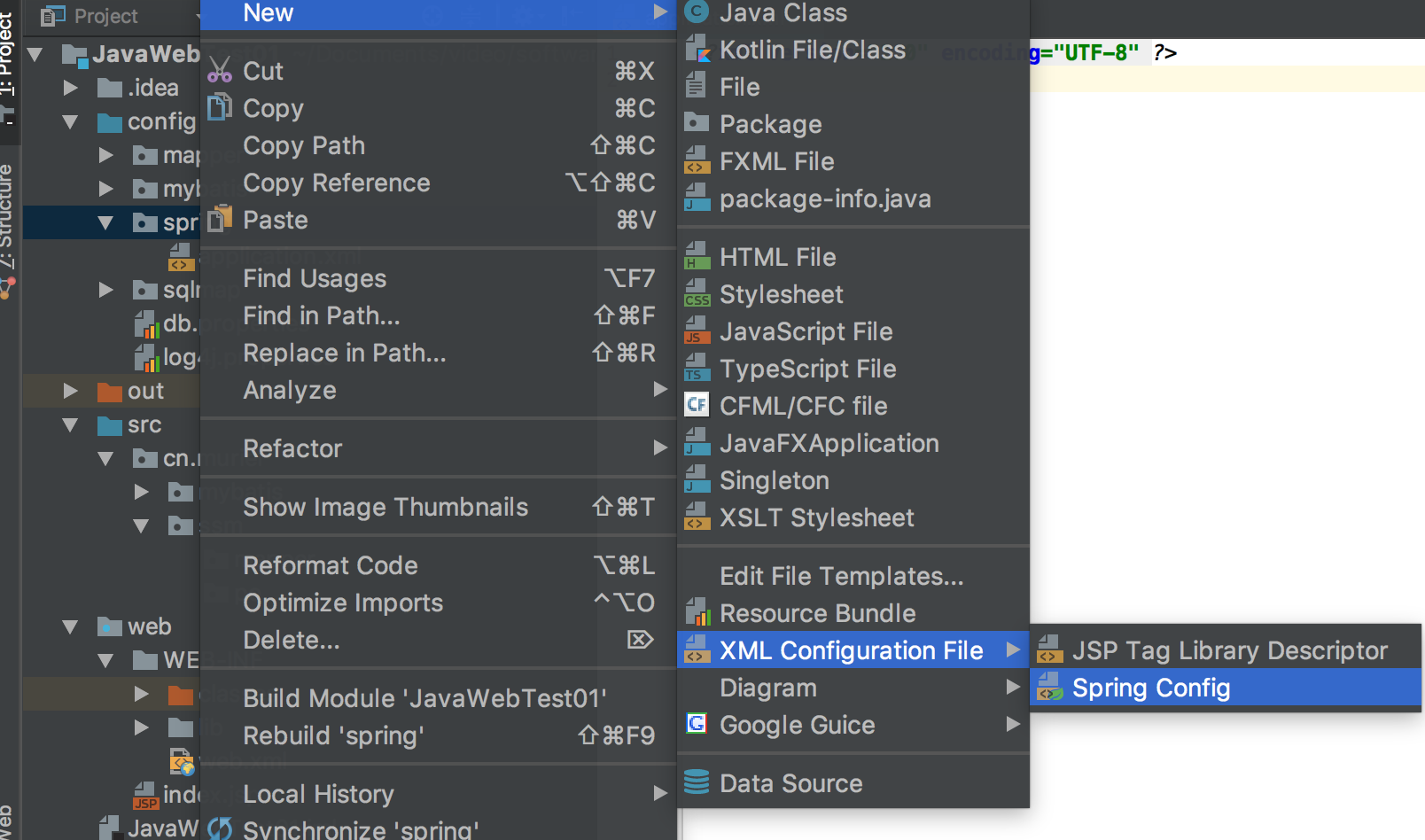
- 创建applicationContext.xml
- 配置applicationContext.xml
<?xml version="1.0" encoding="UTF-8"?>

<beans xmlns="http://www.springframework.org/schema/beans"

       xmlns:xsi="http://www.w3.org/2001/XMLSchema-instance"

       xmlns:context="http://www.springframework.org/schema/context"

       xsi:schemaLocation="http://www.springframework.org/schema/beans http://www.springframework.org/schema/beans/spring-beans.xsd http://www.springframework.org/schema/context http://www.springframework.org/schema/context/spring-context.xsd">

    <!-- 加载配置文件 -->

    <context:property-placeholder location="classpath:db.properties"/>

    <!-- 数据源,使用dbcp -->

    <!--

        driverClassName:

        url:

        username:

        password:

        maxActive:

        maxIdle:

    -->

    <bean id="dataSource" class="org.apache.commons.dbcp2.BasicDataSource" destroy-method="close">

        <property name="driverClassName" value="${jdbc.driver}"/>

        <property name="url" value="${jdbc.url}"/>

        <property name="username" value="${jdbc.username}"/>

        <property name="password" value="${jdbc.password}"/>

        <!--<property name="maxActive" value="10"/>-->

        <property name="maxIdle" value="5"/>

    </bean>

    <!-- 配置SqlSessionFactory -->

    <!--

        class:设置为mybatis-spring.jar中的类

        id:唯一表示标识

    -->

    <bean id="SqlSessionFactory" class="org.mybatis.spring.SqlSessionFactoryBean">

        <!-- 加载mybatis的配置文件 -->

        <property name="configLocation" value="mybatis/SqlMapConfig.xml"/>

        <!-- 加载数据源 -->

        <property name="dataSource" ref="dataSource"/>

    </bean>

</beans>
- 创建applicationContext.xml
- 整合代码及其bug
- 若报找不到org.springframework.dao.support.DaoSupport的类文件
- 导入spring-tx-4.3.5.RELEASE.jar
若报java.lang.ClassNotFoundException: org.apache.commons.pool2.PooledObjectFactory
- 导入commons-pool2-2.6.1.jar
若报java.lang.NoClassDefFoundError: org/springframework/aop/support/AopUtils
- 导入spring-aop-4.3.5.RELEASE.jar
- 若报nested exception is java.lang.NoClassDefFoundError: org/springframework/jdbc/datasource/TransactionAwareDataSourceProxy
- 导入spring-jdbc-4.3.5.RELEASE.jar
- 原生dao
/**

 * dao接口实现类需要注入SqlSessionFactory,通过spring进行注入

 * 这里通过spring声明配置方式,配置dao的bean

 */

public interface UserDao {

    public abstract List<User> selectAllUser();

}

/**

 * UserDao的实现类

 */

public class UserDaoImpl extends SqlSessionDaoSupport implements UserDao {

    @Override

    public List<User> selectAllUser() {

        //继承SqlSessionDaoSupport,通过this.getSqlSession()得到sqlSession

        SqlSession connection = this.getSqlSession();

        List<User> users = connection.selectList("user.selectAllUser");

        //方法结束就自动关闭,所以不需要close();

        //connection.close();

        return users;

    }

}

<!-- 在applicationContext.xml配置 -->

    <?xml version="1.0" encoding="UTF-8"?>

    <beans xmlns="http://www.springframework.org/schema/beans"

           xmlns:xsi="http://www.w3.org/2001/XMLSchema-instance"

               xmlns:context="http://www.springframework.org/schema/context"

           xsi:schemaLocation="http://www.springframework.org/schema/beans http://www.springframework.org/schema/beans/spring-beans.xsd http://www.springframework.org/schema/context http://www.springframework.org/schema/context/spring-context.xsd">

        <!-- 加载配置文件 -->

            <context:property-placeholder location="classpath:db.properties"/>

        <!-- 数据源,使用dbcp -->

        <!--

            driverClassName:

            url:

            username:

            password:

            maxActive:

            maxIdle:

        -->

        <bean id="dataSource" class="org.apache.commons.dbcp2.BasicDataSource" destroy-method="close">

            <property name="driverClassName" value="${jdbc.driver}"/>

            <property name="url" value="${jdbc.url}"/>

            <property name="username" value="${jdbc.username}"/>

            <property name="password" value="${jdbc.password}"/>

            <!--<property name="maxActive" value="10"/>-->

            <property name="maxIdle" value="5"/>

        </bean>

        <!-- 配置SqlSessionFactory -->

        <!--

        class:设置为mybatis-spring.jar中的类

        id:唯一表示标识

        -->

        <bean id="SqlSessionFactory" class="org.mybatis.spring.SqlSessionFactoryBean">

            <!-- 加载mybatis的配置文件 -->

            <property name="configLocation" value="mybatis/SqlMapConfig.xml"/>

            <!-- 加载数据源 -->

            <property name="dataSource" ref="dataSource"/>

        </bean>

        <!-- 原始dao接口 -->

        <bean id="userDao" class="cn.muriel.ssm.dao.impl.UserDaoImpl">

            <property name="sqlSessionFactory" ref="SqlSessionFactory"/>

        </bean>

    </beans>

<!-- 在userMapper.xml配置 -->

  <?xml version="1.0" encoding="UTF-8" ?>

  <!-- 此时您可能想知道SqlSession或Mapper类究竟执行了什么。

      MyBatis提供的全套功能可以通过使用多年来MyBatis流行的基于XML的映射语言来实现。

      如果您以前使用过MyBatis,那么您将很熟悉这个概念,但是对XML映射文档进行了大量改进,以后会很清楚。 -->

  <!DOCTYPE mapper

        PUBLIC "-//mybatis.org//DTD Mapper 3.0//EN"

        "http://mybatis.org/dtd/mybatis-3-mapper.dtd">

  <!-- namespace命名空间。作用对sql进行分类化管理,理解sql隔离

     注意:使用mapper代理方法开发,namespace有特殊重要的作用 -->

    <mapper namespace="cn.muriel.ssm.dao.UserDao">

        <select id="selectAllUser" resultType="cn.muriel.mybatis.po.User">

                select * from user

      </select>

  </mapper>

<!-- 测试 -->

    public class TestUtil {

        private static ApplicationContext applicationContext;

        //在setUp这个方法得到spring容器

        public static void main(String[] args) {

            applicationContext = new ClassPathXmlApplicationContext("classpath:spring/applicationContext.xml");

            UserDao userDao = (UserDao) applicationContext.getBean("userDao");


            JSONArray sendJson = JSONArray.fromObject(userDao.selectAllUser());

            System.out.println(sendJson + "");

    }

} - 代理mapper
/**

 * dao接口实现类需要注入SqlSessionFactory,通过spring进行注入

 * 这里通过spring声明配置方式,配置dao的bean

 */

public interface UserMapper {

    public abstract List<User> selectAllUser();

}

/**

 * UserDao的实现类

 */

public class UserDaoImpl extends SqlSessionDaoSupport implements UserMapper {

    @Override

    public List<User> selectAllUser() {

        //继承SqlSessionDaoSupport,通过this.getSqlSession()得到sqlSession

        SqlSession connection = this.getSqlSession();

        List<User> users = connection.selectList("user.selectAllUser");

        //方法结束就自动关闭,所以不需要close();

        //connection.close();

        return users;

    }

}

<!-- 在applicationContext.xml配置 -->

    <?xml version="1.0" encoding="UTF-8"?>

    <beans xmlns="http://www.springframework.org/schema/beans"

           xmlns:xsi="http://www.w3.org/2001/XMLSchema-instance"

               xmlns:context="http://www.springframework.org/schema/context"

           xsi:schemaLocation="http://www.springframework.org/schema/beans http://www.springframework.org/schema/beans/spring-beans.xsd http://www.springframework.org/schema/context http://www.springframework.org/schema/context/spring-context.xsd">

        <!-- 加载配置文件 -->

            <context:property-placeholder location="classpath:db.properties"/>

        <!-- 数据源,使用dbcp -->

        <!--

            driverClassName:

            url:

            username:

            password:

            maxActive:

            maxIdle:

        -->

        <bean id="dataSource" class="org.apache.commons.dbcp2.BasicDataSource" destroy-method="close">

            <property name="driverClassName" value="${jdbc.driver}"/>

            <property name="url" value="${jdbc.url}"/>

            <property name="username" value="${jdbc.username}"/>

            <property name="password" value="${jdbc.password}"/>

            <!--<property name="maxActive" value="10"/>-->

            <property name="maxIdle" value="5"/>

        </bean>

        <!-- 配置SqlSessionFactory -->

        <!--

        class:设置为mybatis-spring.jar中的类

        id:唯一表示标识

        -->

        <bean id="SqlSessionFactory" class="org.mybatis.spring.SqlSessionFactoryBean">

            <!-- 加载mybatis的配置文件 -->

            <property name="configLocation" value="mybatis/SqlMapConfig.xml"/>

            <!-- 加载数据源 -->

            <property name="dataSource" ref="dataSource"/>

        </bean>

       <!-- mapper配置 -->

        <!--

            class为mybatis-spring.jar下的类

            MapperFactoryBean:根据mapper接口生成代理对象

        -->

         <!-- UserMapper.java和userMapper.xml在同一个包下 -->

        <bean id="userMapper" class="org.mybatis.spring.mapper.MapperFactoryBean">

            <property name="mapperInterface" value="cn.muriel.ssm.mapper.UserMapper"/>

    <!-- 若ref改为value,则报ConversionNotSupportedException -->

            <property name="sqlSessionFactory" rel="SqlSessionFactory"/>

        </bean>

    </beans>

<!-- 在userMapper.xml配置 -->

  <?xml version="1.0" encoding="UTF-8" ?>

  <!-- 此时您可能想知道SqlSession或Mapper类究竟执行了什么。

      MyBatis提供的全套功能可以通过使用多年来MyBatis流行的基于XML的映射语言来实现。

      如果您以前使用过MyBatis,那么您将很熟悉这个概念,但是对XML映射文档进行了大量改进,以后会很清楚。 -->

  <!DOCTYPE mapper

        PUBLIC "-//mybatis.org//DTD Mapper 3.0//EN"

        "http://mybatis.org/dtd/mybatis-3-mapper.dtd">

  <!-- namespace命名空间。作用对sql进行分类化管理,理解sql隔离

     注意:使用mapper代理方法开发,namespace有特殊重要的作用 -->

    <mapper namespace="cn.muriel.ssm.mapper.UserMapper">

        <select id="selectAllUser" resultType="cn.muriel.mybatis.po.User">

                select * from user

      </select>

  </mapper>

<!-- 测试 -->

    public class TestUtil {

        private static ApplicationContext applicationContext;

        //在setUp这个方法得到spring容器

        public static void main(String[] args) {

            applicationContext = new ClassPathXmlApplicationContext("classpath:spring/applicationContext.xml");

            UserMapper userMapper = (UserMapper) applicationContext.getBean("userMapper");


            JSONArray sendJson = JSONArray.fromObject(userMapper.selectAllUser());

            System.out.println(sendJson + "");

    }

} - mapper的扫描配置
/**

 * dao接口实现类需要注入SqlSessionFactory,通过spring进行注入

 * 这里通过spring声明配置方式,配置dao的bean

 */

public interface UserMapper {

    public abstract List<User> selectAllUser();

}

/**

 * UserDao的实现类

 */

public class UserDaoImpl extends SqlSessionDaoSupport implements UserMapper {

    @Override

    public List<User> selectAllUser() {

        //继承SqlSessionDaoSupport,通过this.getSqlSession()得到sqlSession

        SqlSession connection = this.getSqlSession();

        List<User> users = connection.selectList("user.selectAllUser");

        //方法结束就自动关闭,所以不需要close();

        //connection.close();

        return users;

    }

}

<!-- 在applicationContext.xml配置 -->

    <?xml version="1.0" encoding="UTF-8"?>

    <beans xmlns="http://www.springframework.org/schema/beans"

           xmlns:xsi="http://www.w3.org/2001/XMLSchema-instance"

               xmlns:context="http://www.springframework.org/schema/context"

           xsi:schemaLocation="http://www.springframework.org/schema/beans http://www.springframework.org/schema/beans/spring-beans.xsd http://www.springframework.org/schema/context http://www.springframework.org/schema/context/spring-context.xsd">

        <!-- 加载配置文件 -->

            <context:property-placeholder location="classpath:db.properties"/>

        <!-- 数据源,使用dbcp -->

        <!--

            driverClassName:

            url:

            username:

            password:

            maxActive:

            maxIdle:

        -->

        <bean id="dataSource" class="org.apache.commons.dbcp2.BasicDataSource" destroy-method="close">

            <property name="driverClassName" value="${jdbc.driver}"/>

            <property name="url" value="${jdbc.url}"/>

            <property name="username" value="${jdbc.username}"/>

            <property name="password" value="${jdbc.password}"/>

            <!--<property name="maxActive" value="10"/>-->

            <property name="maxIdle" value="5"/>

        </bean>

        <!-- 配置SqlSessionFactory -->

        <!--

        class:设置为mybatis-spring.jar中的类

        id:唯一表示标识

        -->

        <bean id="SqlSessionFactory" class="org.mybatis.spring.SqlSessionFactoryBean">

            <!-- 加载mybatis的配置文件 -->

            <property name="configLocation" value="mybatis/SqlMapConfig.xml"/>

            <!-- 加载数据源 -->

            <property name="dataSource" ref="dataSource"/>

        </bean>

        <!-- mapper批量扫描,从mapper包中扫描出mapper接口,自动创    建代理对象并且在spring容器中注册 -->

            <!-- 自动扫描出来的mapper的bean的id为mapper类名(首字母小写) -->

            <bean class="org.mybatis.spring.mapper.MapperScannerConfigurer">

               <!--

                 指定扫描的包名

                 指定mapper接口的包名,mybatis自动扫描包下边所以mapper接口进行加载

                 遵循一些规范:需要将mapper接口类名和mapper.xml映射文件名称保持一致,且在一个目录中

                 如果扫描多个包,每个包中间使用逗号分隔

               -->

               <property name="basePackage" value="cn.muriel.ssm.mapper"/>

               <!-- 数据源 -->

                <property name="sqlSessionFactoryBeanName" value="SqlSessionFactory"/>

            </bean>

    </beans>

<!-- 在userMapper.xml配置 -->

  <?xml version="1.0" encoding="UTF-8" ?>

  <!-- 此时您可能想知道SqlSession或Mapper类究竟执行了什么。

      MyBatis提供的全套功能可以通过使用多年来MyBatis流行的基于XML的映射语言来实现。

      如果您以前使用过MyBatis,那么您将很熟悉这个概念,但是对XML映射文档进行了大量改进,以后会很清楚。 -->

  <!DOCTYPE mapper

        PUBLIC "-//mybatis.org//DTD Mapper 3.0//EN"

        "http://mybatis.org/dtd/mybatis-3-mapper.dtd">

  <!-- namespace命名空间。作用对sql进行分类化管理,理解sql隔离

     注意:使用mapper代理方法开发,namespace有特殊重要的作用 -->

    <mapper namespace="cn.muriel.ssm.mapper.UserMapper">

        <select id="selectAllUser" resultType="cn.muriel.mybatis.po.User">

                select * from user

      </select>

  </mapper>

<!-- 测试 -->

    public class TestUtil {

        private static ApplicationContext applicationContext;

        //在setUp这个方法得到spring容器

        public static void main(String[] args) {

            applicationContext = new ClassPathXmlApplicationContext("classpath:spring/applicationContext.xml");

            UserMapper userMapper = (UserMapper) applicationContext.getBean("userMapper");


            JSONArray sendJson = JSONArray.fromObject(userMapper.selectAllUser());

            System.out.println(sendJson + "");

    }

}
- 若报找不到org.springframework.dao.support.DaoSupport的类文件
- 需要建立的文件
mybatis基础(下)的更多相关文章
- myBatis 基础测试 表关联关系配置 集合 测试
myBatis 基础测试 表关联关系配置 集合 测试 测试myelipse项目源码 sql 下载 http://download.csdn.net/detail/liangrui1988/599388 ...
- JAVA之Mybatis基础入门--框架搭建与简单查询
JAVA中,操作数据库有JDBC.hibernate.Mybatis等技术,今天整理了下,来讲一讲下Mybatis.也为自己整理下文档: hibernate是一个完全的ORM框架,是完全面向对象的.但 ...
- mybatis基础系列(四)——关联查询、延迟加载、一级缓存与二级缓存
关本文是Mybatis基础系列的第四篇文章,点击下面链接可以查看前面的文章: mybatis基础系列(三)——动态sql mybatis基础系列(二)——基础语法.别名.输入映射.输出映射 mybat ...
- mybatis基础系列(三)——动态sql
本文是Mybatis基础系列的第三篇文章,点击下面链接可以查看前面的文章: mybatis基础系列(二)--基础语法.别名.输入映射.输出映射 mybatis基础系列(一)--mybatis入门 动态 ...
- mybatis基础系列(二)——基础语法、别名、输入映射、输出映射
增删改查 mapper根节点及其子节点 mybatis框架需要读取映射文件创建会话工厂,映射文件是以<mapper>作为根节点,在根节点中支持9个元素,分别为insert.update.d ...
- mybatis基础系列(一)——mybatis入门
好久不发博客了,写博文的一个好处是能让心静下来,整理下之前学习过的一些知识一起分享,大神路过~ mybatis简介 MyBatis 是一款优秀的持久层框架,它支持定制化 SQL.存储过程以及高级映射. ...
- MyBatis基础入门《十七》动态SQL
MyBatis基础入门<十七>动态SQL 描述: >> 完成多条件查询等逻辑实现 >> 用于实现动态SQL的元素主要有: > if > trim > ...
- MyBatis基础入门《十六》缓存
MyBatis基础入门<十六>缓存 >> 一级缓存 >> 二级缓存 >> MyBatis的全局cache配置 >> 在Mapper XML文 ...
- MyBatis基础入门《十四》ResultMap子元素(association )
MyBatis基础入门<十四>ResultMap子元素(association ) 1. id: >> 一般对应数据库中改行的主键ID,设置此项可以提高Mybatis的性能 2 ...
- MyBatis基础入门《三》Select查询集合
MyBatis基础入门<三>Select查询集合 描述: 代码新增了一个MybatisUtil工具类,查询数据库返回集合的时候,接收数据的三种方式.由于代码会渐渐增多,未涉及改动过的文件不 ...
随机推荐
- -bash:syntax error near unexpected token '('
在Xshell5中编写int main(int argc,char** argv)时, 出现-bash:syntax error near unexpected token '(' : 可是我是按照 ...
- react-native 常用的一些插件
react-native 常用的一些插件 最近在做react-native的app,用到的一些好用的插件,在这儿记录一下 由于返回的后台内容是富文本编辑器Quill,返回的的是Delta对象,使用了q ...
- 初识CUDA
如果问题规模较小,逻辑控制较为复杂,并行性很小优先使用CPU处理该问题,如果包含较大规模的数据处理,则考虑使用GPU进行处理. CPU上线程是重量级实体,可以开启1~32个线程,且上下文切换较为缓慢, ...
- 企业IT管理员IE11升级指南【9】—— IE10与IE11的功能对比
企业IT管理员IE11升级指南 系列: [1]—— Internet Explorer 11增强保护模式 (EPM) 介绍 [2]—— Internet Explorer 11 对Adobe Flas ...
- Servlet, Struts2和SpringMVC 并发访问线程安全问题
第一部分: Servlet不是线程安全的. 要解释Servlet为什么不是线程安全的,需要了解Servlet容器(即Tomcat)使如何响应HTTP请求的. 当Tomcat接收到Client的HTTP ...
- InputStream和Reader,FileInputStream和 FileReader的区别
一.InputStream和Reader的区别 InputStream和Reader都可以用来读数据(从文件中读取数据或从Socket中读取数据),最主要的区别如下: InputStream用来读取二 ...
- Kali学习笔记41:SQL手工注入(3)
前两篇文章都是基于目标系统允许union,order by语句 并且可以读取infomation_schema元数据库 如果遇到的是安全方面做得很好的应用,进行了权限限制,那么我们有什么办法呢? 猜测 ...
- [Swift]LeetCode523. 连续的子数组和 | Continuous Subarray Sum
Given a list of non-negative numbers and a target integer k, write a function to check if the array ...
- Docker系列教程01-Centos7安装新版Docker教程(10步)
最近一直忙于开发,没有时间好好总结一下docker的知识.其实现在docker的教程已经很多很多了,但是很多系统的教程都是基于Ubuntu系统,因为官方推荐使用Ubuntu系统啊,原因在于Ubuntu ...
- Python Matplotlib.pyplot plt 中文显示
话不多说,上代码 # -*- coding: UTF-8 -*- import matplotlib.pyplot as plt from matplotlib.font_manager import ...