
【Python3爬虫】拉勾网爬虫
一、思路分析:
在之前写拉勾网的爬虫的时候,总是得到下面这个结果(真是头疼),当你看到下面这个结果的时候,也就意味着被反爬了,因为一些网站会有相应的反爬虫措施,例如很多网站会检测某一段时间某个IP的访问次数,如果访问频率太快以至于看起来不像正常访客,它可能就会禁止这个IP的访问:

对于拉勾网,我们要找到职位信息的ajax接口倒是不难(如下图),问题是怎么不得到上面的结果。
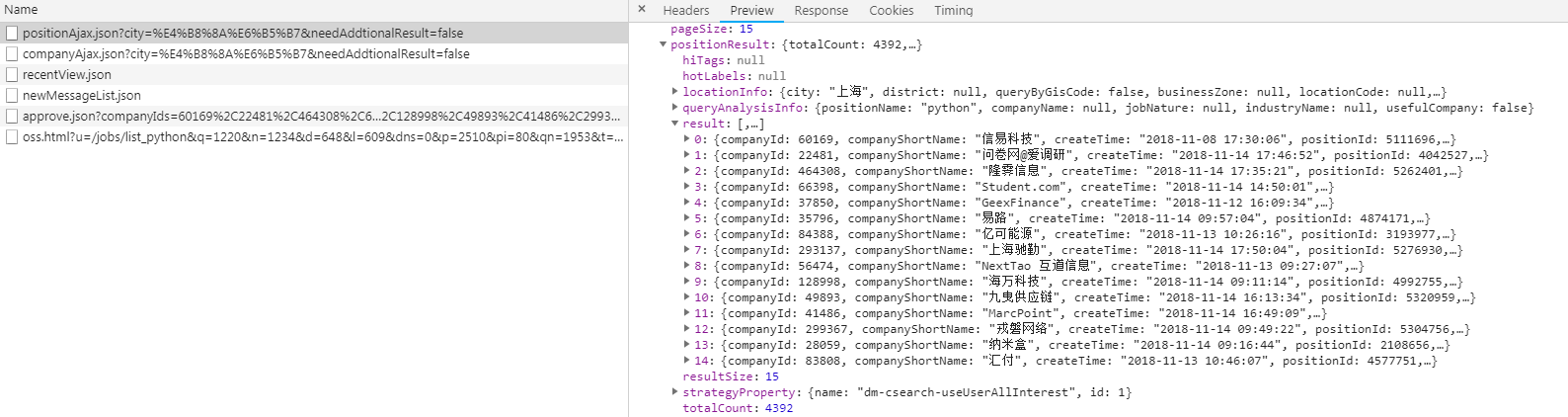
要想我们的爬虫不被检测出来,我们可以使用代理IP,而网上有很多提供免费代理的网站,比如西刺代理、快代理、89免费代理等等,我们可以爬取一些免费的代理然后搭建我们的代理池,使用的时候直接从里面进行调用就好了。然后通过观察可以发现,拉勾网最多显示30页职位信息,一页显示15条,也就是说最多显示450条职位信息。在ajax接口返回的结果中可以看到有一个totalCount字段,而这个字段表示的就是查询结果的数量,获取到这个值之后就能知道总共有多少页职位信息了。对于爬取下来的结果,保存在MongoDB数据库中。
二、主要代码:
proxies.py(爬取免费代理并验证其可用性,然后生成代理池)
 import requests

 import re

 class Proxies:

     def __init__(self):

         self.proxy_list = []

         self.headers = {

             "User-Agent": "Mozilla/5.0 (Windows NT 10.0; WOW64) AppleWebKit/537.36 (KHTML, like Gecko) "

                           "Chrome/45.0.2454.101 Safari/537.36",

             'Accept-Encoding': 'gzip, deflate, sdch',

         }

     # 爬取西刺代理的国内高匿代理

     def get_proxy_nn(self):

         proxy_list = []

         res = requests.get("http://www.xicidaili.com/nn", headers=self.headers)

         ip_list = re.findall('<td>(\d+\.\d+\.\d+\.\d+)</td>', res.text)

         port_list = re.findall('<td>(\d+)</td>', res.text)

         for ip, port in zip(ip_list, port_list):

             proxy_list.append(ip + ":" + port)

         return proxy_list

     # 验证代理是否能用

     def verify_proxy(self, proxy_list):

         for proxy in proxy_list:

             proxies = {

                 "http": proxy

             }

             try:

                 if requests.get('http://www.baidu.com', proxies=proxies, timeout=2).status_code == 200:

                     print('success %s' % proxy)

                     if proxy not in self.proxy_list:

                         self.proxy_list.append(proxy)

             except:

                 print('fail %s' % proxy)

     # 保存到proxies.txt里

     def save_proxy(self):

         # 验证代理池中的IP是否可用

         print("开始清洗代理池...")

         with open("proxies.txt", 'r', encoding="utf-8") as f:

             txt = f.read()

         # 判断代理池是否为空

         if txt != '':

             self.verify_proxy(txt.strip().split('\n'))

         else:

             print("代理池为空!\n")

         print("开始存入代理池...")

         # 把可用的代理添加到代理池中

         with open("proxies.txt", 'w', encoding="utf-8") as f:

             for proxy in self.proxy_list:

                 f.write(proxy + "\n")

 if __name__ == '__main__':

     p = Proxies()

     results = p.get_proxy_nn()

     print("爬取到的代理数量", len(results))

     print("开始验证:")

     p.verify_proxy(results)

     print("验证完毕:")

     print("可用代理数量:", len(p.proxy_list))

     p.save_proxy()
在middlewares.py中添加如下代码:
 class LaGouProxyMiddleWare(object):

     def process_request(self, request, spider):

         import random

         import requests

         with open("具体路径\proxies.txt", 'r', encoding="utf-8") as f:

             txt = f.read()

         proxy = ""

         flag = 0

         for i in range(10):

             proxy = random.choice(txt.split('\n'))

             proxies = {

                 "http": proxy

             }

             if requests.get('http://www.baidu.com', proxies=proxies, timeout=2).status_code == 200:

                 flag = 1

                 break

         if proxy != "" and flag:

             print("Request proxy is {}".format(proxy))

             request.meta["proxy"] = "http://" + proxy

         else:

             print("没有可用的IP!")
然后还要在settings.py中添加如下代码,这样就能使用代理IP了:
 SPIDER_MIDDLEWARES = {

     'LaGou.middlewares.LaGouProxyMiddleWare': 543,

 }
在item.py中添加如下代码:
 import scrapy

 class LaGouItem(scrapy.Item):

     city = scrapy.Field()  # 城市

     salary = scrapy.Field()  # 薪水

     position = scrapy.Field()  # 职位

     education = scrapy.Field()  # 学历要求

     company_name = scrapy.Field()  # 公司名称

     company_size = scrapy.Field()  # 公司规模

     finance_stage = scrapy.Field()  # 融资阶段
在pipeline.py中添加如下代码:
 import pymongo

 class LaGouPipeline(object):

     def __init__(self):

         conn = pymongo.MongoClient(host="127.0.0.1", port=27017)

         self.col = conn['Spider'].LaGou

     def process_item(self, item, spider):

         self.col.insert(dict(item))

         return item
在spiders文件夹下新建一个spider.py,代码如下:
 import json

 import scrapy

 import codecs

 import requests

 from time import sleep

 from LaGou.items import LaGouItem

 class LaGouSpider(scrapy.Spider):

     name = "LaGouSpider"

     def start_requests(self):

         # city = input("请输入城市:")

         # position = input("请输入职位方向:")

         city = "上海"

         position = "python"

         url = "https://www.lagou.com/jobs/positionAjax.json?px=default&needAddtionalResult=false&city={}".format(city)

         headers = {

             "Referer": "https://www.lagou.com/jobs/list_{}?city={}&cl=false&fromSearch=true&labelWords=&suginput=".format(codecs.encode(position, 'utf-8'), codecs.encode(city, 'utf-8')),

             "Cookie": "_ga=GA1.2.2138387296.1533785827; user_trace_token=20180809113708-7e257026-9b85-11e8-b9bb-525400f775ce; LGUID=20180809113708-7e25732e-9b85-11e8-b9bb-525400f775ce; index_location_city=%E6%AD%A6%E6%B1%89; LGSID=20180818204040-ea6a6ba4-a2e3-11e8-a9f6-5254005c3644; JSESSIONID=ABAAABAAAGFABEFFF09D504261EB56E3CCC780FB4358A5E; Hm_lvt_4233e74dff0ae5bd0a3d81c6ccf756e6=1534294825,1534596041,1534596389,1534597802; TG-TRACK-CODE=search_code; Hm_lpvt_4233e74dff0ae5bd0a3d81c6ccf756e6=1534599373; LGRID=20180818213613-acc3ccc9-a2eb-11e8-9251-525400f775ce; SEARCH_ID=f20ec0fa318244f7bcc0dd981f43d5fe",

             "User-Agent": "Mozilla/5.0 (Windows NT 6.1; WOW64) AppleWebKit/537.36 (KHTML, like Gecko) Chrome/53.0.2785.89 Safari/537.36"

         }

         data = {

             "first": "true",

             "pn": 1,

             "kd": position

         }

         res = requests.post(url, headers=headers, data=data)

         # 获取相关职位结果数目

         count = res.json()['content']['positionResult']['totalCount']

         # 由于最多显示30页,也就是最多显示450条职位信息

         page_count = count // 15 + 1 if count <= 450 else 30

         for i in range(page_count):

             sleep(5)

             yield scrapy.FormRequest(

                 url=url,

                 formdata={

                     "first": "true",

                     "pn": str(i + 1),

                     "kd": position

                 },

                 callback=self.parse

             )

     def parse(self, response):

         try:

             # 解码并转成json格式

             js = json.loads(response.body.decode('utf-8'))

             result = js['content']['positionResult']['result']

             item = LaGouItem()

             for i in result:

                 item['city'] = i['city']

                 item['salary'] = i['salary']

                 item['position'] = i['positionName']

                 item['education'] = i['education']

                 item['company_name'] = i['companyFullName']

                 item['company_size'] = i['companySize']

                 item['finance_stage'] = i['financeStage']

                 yield item

         except:

             print(response.body)
三、运行结果:

由于使用的是免费代理,短时间内就失效了,所以会碰上爬取不到数据的情况,所以推荐使用付费代理。
【Python3爬虫】拉勾网爬虫的更多相关文章
- pyqt与拉勾网爬虫的结合
人力部需要做互联网金融行业的从业人员薪酬分析,起初说的是写脚本,然后他们自己改.但这样不太好,让人事部来修改py脚本不太好,这需要安装py环境和一些第三方包,万一脚本改来改去弄错了,就运行不起来了. ...
- python3爬虫--反爬虫应对机制
python3爬虫--反爬虫应对机制 内容来源于: Python3网络爬虫开发实战: 网络爬虫教程(python2): 前言: 反爬虫更多是一种攻防战,针对网站的反爬虫处理来采取对应的应对机制,一般需 ...
- python3编写网络爬虫20-pyspider框架的使用
二.pyspider框架的使用 简介 pyspider是由国人binux 编写的强大的网络爬虫系统 github地址 : https://github.com/binux/pyspider 官方文档 ...
- (Pyhton爬虫03)爬虫初识
原本的想法是这样的:博客整理知识学习的同时,也记录点心情...集中式学习就没这么多好记录的了! 要学习一门技术,首先要简单认识一下爬虫!其实可以参考爬虫第一章! 整体上介绍该技术包含技能,具体能做什么 ...
- Python 爬虫1——爬虫简述
Python除了可以用来开发Python Web之后,其实还可以用来编写一些爬虫小工具,可能还有人不知道什么是爬虫的. 一.爬虫的定义: 爬虫——网络爬虫(又被称为网页蜘蛛,网络机器人,在FOAF社区 ...
- 【java爬虫】---爬虫+基于接口的网络爬虫
爬虫+基于接口的网络爬虫 上一篇讲了[java爬虫]---爬虫+jsoup轻松爬博客,该方式有个很大的局限性,就是你通过jsoup爬虫只适合爬静态网页,所以只能爬当前页面的所有新闻.如果需要爬一个网站 ...
- [爬虫]Python爬虫基础
一.什么是爬虫,爬虫能做什么 爬虫,即网络爬虫,大家可以理解为在网络上爬行的一直蜘蛛,互联网就比作一张大网,而爬虫便是在这张网上爬来爬去的蜘蛛咯,如果它遇到资源,那么它就会抓取下来.比如它在抓取一个网 ...
- PYTHON爬虫实战_垃圾佬闲鱼爬虫转转爬虫数据整合自用二手急速响应捡垃圾平台_3(附源码持续更新)
说明 文章首发于HURUWO的博客小站,本平台做同步备份发布. 如有浏览或访问异常图片加载失败或者相关疑问可前往原博客下评论浏览. 原文链接 PYTHON爬虫实战_垃圾佬闲鱼爬虫转转爬虫数据整合自用二 ...
- python3拉勾网爬虫之(您操作太频繁,请稍后访问)
你是否经历过这个:那就对了~因为需要post和相关的cookie来请求~所以,一个简单的代码爬拉钩~~~
随机推荐
- ubuntu频繁出现 安装包依赖关系
折腾了一下午,还差点重装一次,最后记下解决办法,引以为戒! 第一步,备份官方的默认源 避免自己手贱操作失误,重装系统太费时间 cp /etc/apt/sources.list /etc/apt/sou ...
- supervisor 配置程序挂起自启动
使用 supervisor 服务,将程序监控起来,如果程序挂掉了,可以实现自启动 编写 c++ 程序 test.c #include <stdio.h> #include <stri ...
- 动态DP之全局平衡二叉树
目录 前置知识 全局平衡二叉树 大致介绍 建图过程 修改过程 询问过程 时间复杂度的证明 板题 前置知识 在学习如何使用全局平衡二叉树之前,你首先要知道如何使用树链剖分解决动态DP问题.这里仅做一个简 ...
- Linux grep 命令详解
简介grep (global search regular expression(RE) and print out the line,全面搜索正则表达式并把行打印出来)是一种强大的文本搜索工具,它能 ...
- BZOJ.4842.[NEERC2016]Delight for a Cat(费用流)
BZOJ 参考这儿. 首先如果一个活动的时间满足条件,那么另一个活动也一定满足.还有就是这题就是费用流没有为什么.不妨假设最初所有时间都用来睡觉,那么我们要对每个\(k\)大小区间选出\([t2,k- ...
- PHP中获取某个网页或文件内容的方法
1. 通过file_get_contents()函数$contents = file_get_contents('http://demo.com/index.php');echo $contents; ...
- VMware Workstation Pro下载密钥
热门虚拟机软件VMware Workstation Pro现已更新至14.1.2,14.0主要更新了诸多客户机操作系统版本,此外全面兼容Wind10创建者更新.12.0之后属于大型更新,专门为Win1 ...
- json格式的数据及遍历:
代码: <!DOCTYPE html> <html lang="en"> <head> <meta charset="UTF-8 ...
- docker之使用System.Drawing生成图片缺少Gdiplus.dll错误
1.在docker 上找到并运行需要System.Drawing的镜像 然后退出执行另一语句 docker run -it container01 进入镜像以方便安装gdiplus docker ex ...
- vue 格式化银行卡(信用卡)每4位一个符号隔断
问题 在做银行卡输入框时有一个需求如题,这里举例用-隔断 调查 查看了很多大公司网站的银行卡输入,发现还有有很多缺陷的: 有的是在中间删除,光标会跳到最后: 有的是能删除掉中间隔断符的: 等等,逻辑感 ...