
Spring Boot Cache配置 序列化成JSON字符串
当我们使用@Cacheable注解的时候会将返回的对象缓存起来,我们会发现默认缓存的值是二进制的,不方便查看,为此我们自定义序列化配置,改成JSON格式的
配置如下:
pom.xml
<?xml version="1.0" encoding="UTF-8"?>

<project xmlns="http://maven.apache.org/POM/4.0.0" xmlns:xsi="http://www.w3.org/2001/XMLSchema-instance"

    xsi:schemaLocation="http://maven.apache.org/POM/4.0.0 http://maven.apache.org/xsd/maven-4.0.0.xsd">

    <modelVersion>4.0.0</modelVersion>

    <groupId>com.cjs.example</groupId>

    <artifactId>cjs-springsecurity-example</artifactId>

    <version>0.0.1-SNAPSHOT</version>

    <packaging>jar</packaging>

    <name>cjs-springsecurity-example</name>

    <description></description>

    <parent>

        <groupId>org.springframework.boot</groupId>

        <artifactId>spring-boot-starter-parent</artifactId>

        <version>2.0.2.RELEASE</version>

        <relativePath/> <!-- lookup parent from repository -->

    </parent>

    <properties>

        <project.build.sourceEncoding>UTF-8</project.build.sourceEncoding>

        <project.reporting.outputEncoding>UTF-8</project.reporting.outputEncoding>

        <java.version>1.8</java.version>

    </properties>

    <dependencies>

        <dependency>

            <groupId>org.springframework.boot</groupId>

            <artifactId>spring-boot-starter-cache</artifactId>

        </dependency>

        <dependency>

            <groupId>org.springframework.boot</groupId>

            <artifactId>spring-boot-starter-data-redis</artifactId>

        </dependency>

        <dependency>

            <groupId>org.springframework.boot</groupId>

            <artifactId>spring-boot-starter-security</artifactId>

        </dependency>

        <dependency>

            <groupId>org.springframework.boot</groupId>

            <artifactId>spring-boot-starter-thymeleaf</artifactId>

        </dependency>

        <dependency>

            <groupId>org.springframework.boot</groupId>

            <artifactId>spring-boot-starter-web</artifactId>

        </dependency>

        <dependency>

            <groupId>org.projectlombok</groupId>

            <artifactId>lombok</artifactId>

            <optional>true</optional>

        </dependency>

        <dependency>

            <groupId>org.springframework.boot</groupId>

            <artifactId>spring-boot-starter-test</artifactId>

            <scope>test</scope>

        </dependency>

        <dependency>

            <groupId>org.springframework.security</groupId>

            <artifactId>spring-security-test</artifactId>

            <scope>test</scope>

        </dependency>

    </dependencies>

    <build>

        <plugins>

            <plugin>

                <groupId>org.springframework.boot</groupId>

                <artifactId>spring-boot-maven-plugin</artifactId>

            </plugin>

        </plugins>

    </build>

</project>
application.yml
spring:

  cache:

    type: redis

    redis:

      cache-null-values: false

      time-to-live: 3600000ms

  redis:

    host: 10.123.52.189

    port:

    database:

    password: 自己的密码

logging:

  level:

    root: info
RedisConfig.java
package com.cjs.example.config;

import com.fasterxml.jackson.annotation.JsonAutoDetect;

import com.fasterxml.jackson.annotation.PropertyAccessor;

import com.fasterxml.jackson.databind.ObjectMapper;

import org.springframework.beans.factory.annotation.Autowired;

import org.springframework.cache.annotation.CachingConfigurerSupport;

import org.springframework.cache.annotation.EnableCaching;

import org.springframework.context.annotation.Bean;

import org.springframework.context.annotation.Configuration;

import org.springframework.data.redis.cache.RedisCacheConfiguration;

import org.springframework.data.redis.cache.RedisCacheManager;

import org.springframework.data.redis.cache.RedisCacheWriter;

import org.springframework.data.redis.connection.RedisConnectionFactory;

import org.springframework.data.redis.core.RedisTemplate;

import org.springframework.data.redis.serializer.Jackson2JsonRedisSerializer;

import org.springframework.data.redis.serializer.RedisSerializationContext;

import org.springframework.data.redis.serializer.StringRedisSerializer;

@EnableCaching

@Configuration

public class RedisConfig extends CachingConfigurerSupport {

    @Autowired

    private RedisConnectionFactory redisConnectionFactory;

    @Bean

    public RedisTemplate<String, Object> redisTemplate(RedisConnectionFactory redisConnectionFactory) {

        Jackson2JsonRedisSerializer<Object> serializer = new Jackson2JsonRedisSerializer<Object>(Object.class);

        ObjectMapper objectMapper = new ObjectMapper();

        objectMapper.setVisibility(PropertyAccessor.ALL, JsonAutoDetect.Visibility.ANY);

        objectMapper.enableDefaultTyping(ObjectMapper.DefaultTyping.NON_FINAL);

        serializer.setObjectMapper(objectMapper);

        RedisTemplate<String, Object> redisTemplate = new RedisTemplate<>();

        redisTemplate.setConnectionFactory(redisConnectionFactory);

        redisTemplate.setKeySerializer(new StringRedisSerializer());

        redisTemplate.setValueSerializer(serializer);

        redisTemplate.setHashKeySerializer(new StringRedisSerializer());

        redisTemplate.setHashValueSerializer(serializer);

        redisTemplate.afterPropertiesSet();

        return redisTemplate;

    }

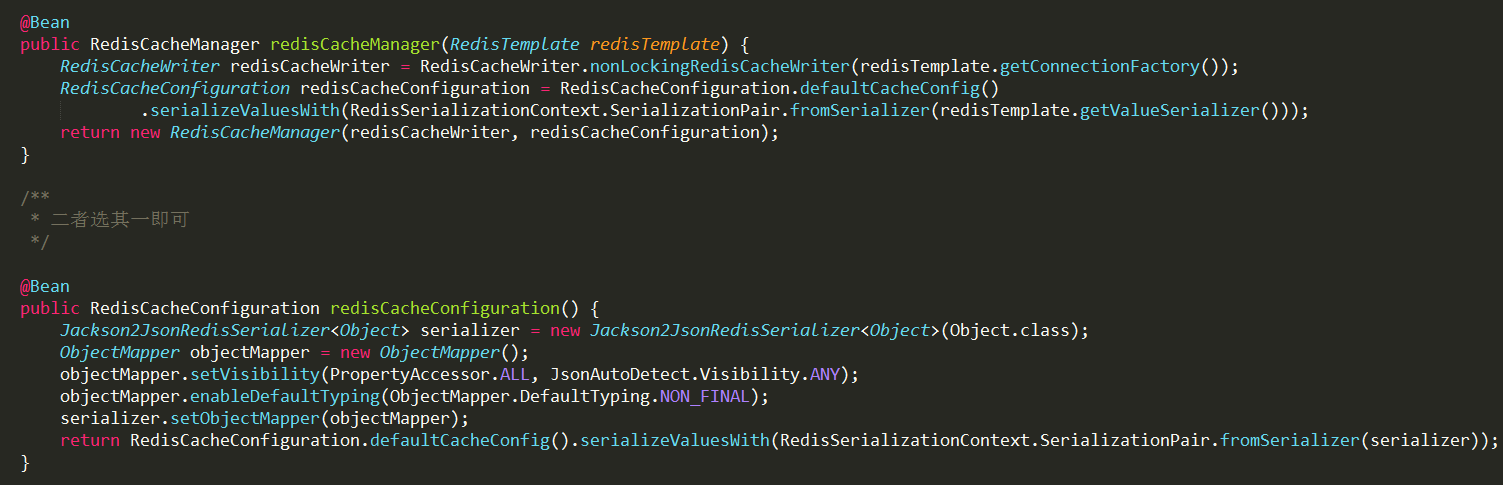
    @Bean

    public RedisCacheManager redisCacheManager(RedisTemplate redisTemplate) {

        RedisCacheWriter redisCacheWriter = RedisCacheWriter.nonLockingRedisCacheWriter(redisTemplate.getConnectionFactory());

        RedisCacheConfiguration redisCacheConfiguration = RedisCacheConfiguration.defaultCacheConfig()

                .serializeValuesWith(RedisSerializationContext.SerializationPair.fromSerializer(redisTemplate.getValueSerializer()));

        return new RedisCacheManager(redisCacheWriter, redisCacheConfiguration);

    }

    /**

     * 二者选其一即可

     */

//    @Bean

//    public RedisCacheConfiguration redisCacheConfiguration() {

//        Jackson2JsonRedisSerializer<Object> serializer = new Jackson2JsonRedisSerializer<Object>(Object.class);

//        ObjectMapper objectMapper = new ObjectMapper();

//        objectMapper.setVisibility(PropertyAccessor.ALL, JsonAutoDetect.Visibility.ANY);

//        objectMapper.enableDefaultTyping(ObjectMapper.DefaultTyping.NON_FINAL);

//        serializer.setObjectMapper(objectMapper);

//        return RedisCacheConfiguration.defaultCacheConfig().serializeValuesWith(RedisSerializationContext.SerializationPair.fromSerializer(serializer));

//    }

}
UserServiceImpl.java
package com.cjs.example.service.impl;

import com.cjs.example.dao.UserDao;

import com.cjs.example.entity.SysUser;

import com.cjs.example.service.UserService;

import org.springframework.beans.factory.annotation.Autowired;

import org.springframework.cache.annotation.Cacheable;

import org.springframework.stereotype.Service;

@Service

public class UserServiceImpl implements UserService {

    @Autowired

    private UserDao userDao;

    @Cacheable(cacheNames = "authority", key = "#username")

    @Override

    public SysUser getUserByName(String username) {

        return userDao.selectByName(username);

    }

}
反复看文档,一遍又一遍
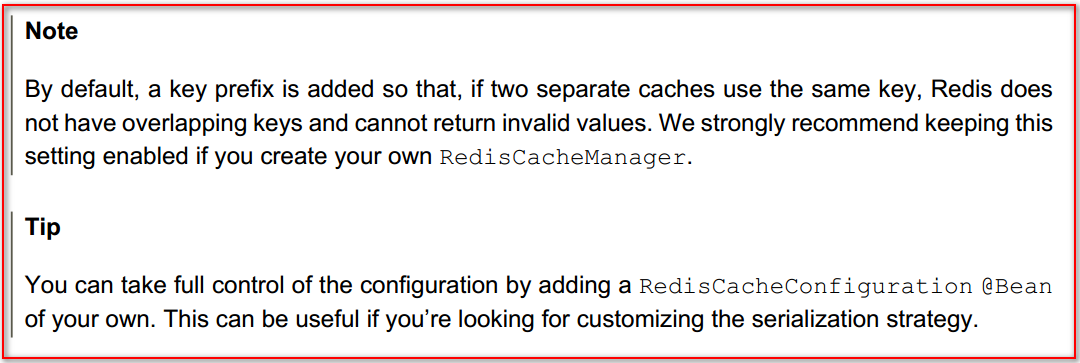
最最重要的是
代码上传至https://github.com/chengjiansheng/cjs-springsecurity-example
Spring Boot Cache配置 序列化成JSON字符串的更多相关文章
- C#将对象序列化成JSON字符串
C#将对象序列化成JSON字符串 public string GetJsonString() { List<Product> products = new List<Product& ...
- 使用 EntityFramework后把一个对象序列化成json字符串引起循环引用的问题
先看一个T4模板生成的model实体类 著作权归作者所有. 商业转载请联系作者获得授权,非商业转载请注明出处. 作者:卷猫 链接:http://anneke.cn/ArticleInfo/Detial ...
- SpringMVC将表单对象序列化成Json字符串提交,以List接收
出自:http://blog.csdn.net/m0_37595732/article/details/71440853 HTML <%@ page language="java&qu ...
- .net 将List序列化成Json字符串
将List类型转化为Json,是我们平常开发时最常见的了.在使用中,有很多种方法,也可以使用. 第一种 第三方组件:Newtonsoft.Json.dll //转化成Json Newtonsoft.J ...
- 对象序列化成Json字符串 及 反序列化成对象
一. public static string JsonSerializer<T>(T t) { DataContractJsonSerializer ...
- jackson2.8.4java对象序列化成json字符串格式化时间
public class User {private int id; private Date birthday; private double money; private String name; ...
- 转:spring boot log4j2配置(使用log4j2.yml文件)---YAML 语言教程
转:spring boot log4j2配置(使用log4j2.yml文件) - CSDN博客http://blog.csdn.net/ClementAD/article/details/514988 ...
- (36)Spring Boot Cache理论篇【从零开始学Spring Boot】
Spring Boot Cache理论篇 在上一篇中我们介绍了Spring Boot集成Redis的实战例子,里面使用到了Spring Cache,那么什么是Spring Cache呢,本章将会做一个 ...
- 玩转spring boot——properties配置
前言 在以往的java开发中,程序员最怕大量的配置,是因为配置一多就不好统一管理,经常出现找不到配置的情况.而项目中,从开发测试环境到生产环境,往往需要切换不同的配置,如测试数据库连接换成生产数据库连 ...
随机推荐
- java时间处理,获取当前时间的小时,天,本周周几,本周周一的日期,本月一号的日期
1.时间转时间戳 public static long strToTimestamp(String dateTimeStr) throws Exception { Timestamp time = T ...
- 20175305张天钰《java程序设计》第七周学习总结
<java程序设计>第七周学习总结 第八章 常用实用类 1.String类 1.String类不可以有子类. 2.用户无法输出String对象的引用,输出的是字符序列 3.构造方法:Str ...
- angularjs和ajax的结合使用 (三)
转眼九月份了,忙忙碌碌 发现今年还没开过张,写一篇吧. 15年在空闲时就倒腾过angularjs那玩意儿 ,觉得还是挺好的,李金龙那厚厚的一本书,只不过没有系统化应用.最主要的是原来有一个东西没有用到 ...
- 期末Java Web大作业----简易的学生管理系统
学生信息管理系统(大作业) 2018-12-21:此文章已在我的网站更新,添加视图介绍等信息,源码请移步下载https://www.jeson.xin/javaweb-sims.html PS:首先不 ...
- oracle主键和索引
主键:能够唯一标识一条记录的字段为主键(亦或主码),不能重复的,不允许为空.作用:用来保证数据完整性个数:主键只能有一个 索引:作用:是提高查询排序的速度个数:一个表可以有多个索引 常用索引类型:No ...
- 2018-4-5-cadence skill
skill 是 Cadence 提供的二次开发语言,可以做很多有用的二次开发. 开发参考手册:<algroskill><sklangref><sklanguser> ...
- 使用Jsoup实现java爬虫(非原创)
1,查看页面源代码,使用css或者JQuery选择器方式或元素节点选择 例如: 或者写成:Elements elements1 = Jsoup.connect("http://jb.999a ...
- 记录一次大量CLOSE_WAIT的情况
近期的项目中,有一个特殊的需求,对于每个客户端程序有若干个机构,对于每个机构有不同的客户端证书,程序间隔一段时间向服务端进行请求,根据请求的成功与否更新各机构的状态(如正常,证书未配置,证书过期等). ...
- Python 3.5 filter
filter(F, L) F: 函数.L:范围 filter的功能是:用函数F把L范围内的参数做过滤 通常和list一起使用,把过滤后的参数做成列表 list(filter(lambda n:not ...
- 【尺取法】Jurisdiction Disenchantment
[尺取法]Jurisdiction Disenchantment PROBLEM 时间限制: 1 Sec 内存限制: 128 MB 题目描述 The Super League of Paragons ...