
IIS+nginx反向代理 负载均衡
本文没有过多的讲述,只讲述重点地方。由这两个转自的文章进行中和
1.nginx+iis实现负载均衡(这篇文章主要是有第2篇文章的工具)
2.nginx+iis使用(这篇文章讲得很详细,配置文件直接复制,然后修改下,然后把官网下载的配置文件替换了就可以使用了)
如下是配置文件的路径
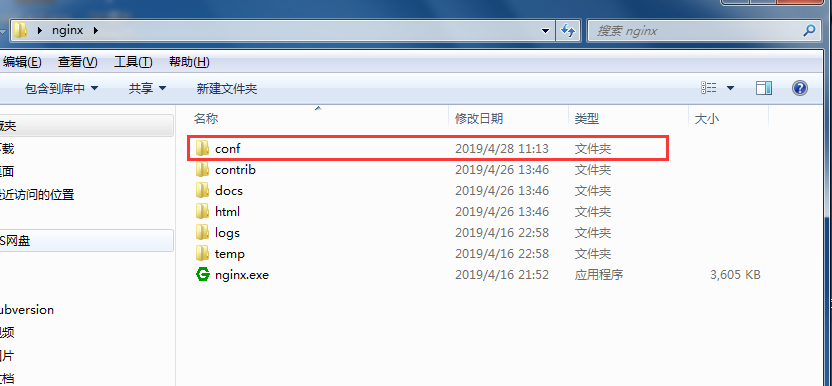
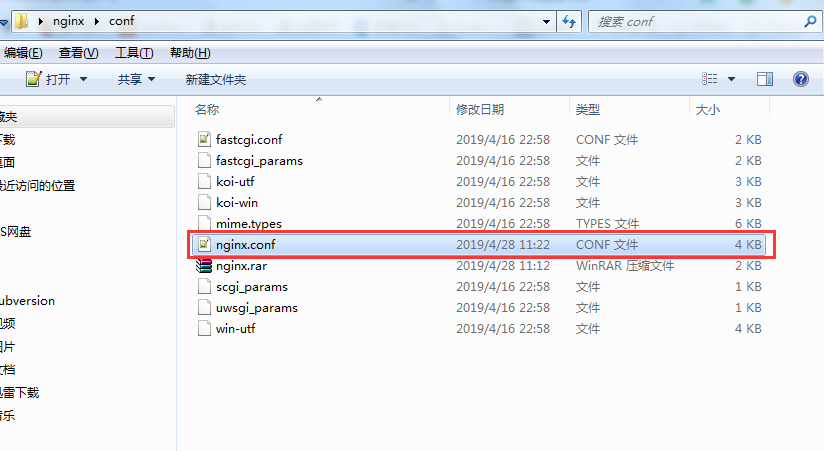
主要修改的地方我就标红了
#user  nobody;

worker_processes  ;

#error_log  logs/error.log;

#error_log  logs/error.log  notice;

#error_log  logs/error.log  info;

#pid        logs/nginx.pid;

events {

    worker_connections  ;

}

http {

    include       mime.types;

    default_type  application/octet-stream;

    #log_format  main  '$remote_addr - $remote_user [$time_local] "$request" '

    #                  '$status $body_bytes_sent "$http_referer" '

    #                  '"$http_user_agent" "$http_x_forwarded_for"';

    #access_log  logs/access.log  main;

    sendfile        on;

    #tcp_nopush     on;

    #keepalive_timeout  ;

    keepalive_timeout  ;

    #gzip  on;

   #服务器集群名称为Jq_one

    upstream ngintest.com{

    server  192.168.1.240:810 weight=4;

    server  192.168.1.240:811 weight=4;

    }

    server {

        listen       ;

        server_name  ngintest.com;

        #charset koi8-r;

        #access_log  logs/host.access.log  main;

        location / {

            root   html;

            index  index.aspx index.html index.htm;

        #指向集群名称为Jq_one

        proxy_pass         http://ngintest.com;

        #设置主机头和客户端真实地址,以便服务器获取客户端真实IP

        proxy_set_header   Host             $host;

        proxy_set_header   X-Real-IP        $remote_addr;

        proxy_set_header   X-Forwarded-For  $proxy_add_x_forwarded_for;

        }

        #error_page                /.html;

        # redirect server error pages to the static page /50x.html

        #

        error_page        /50x.html;

        location = /50x.html {

            root   html;

        }

        # proxy the PHP scripts to Apache listening on 127.0.0.1:

        #

        #location ~ \.php$ {

        #    proxy_pass   http://127.0.0.1;

        #}

        # pass the PHP scripts to FastCGI server listening on 127.0.0.1:

        #

        #location ~ \.php$ {

        #    root           html;

        #    fastcgi_pass   127.0.0.1:;

        #    fastcgi_index  index.php;

        #    fastcgi_param  SCRIPT_FILENAME  /scripts$fastcgi_script_name;

        #    include        fastcgi_params;

        #}

        # deny access to .htaccess files, if Apache's document root

        # concurs with nginx's one

        #

        #location ~ /\.ht {

        #    deny  all;

        #}

    }

    # another virtual host using mix of IP-, name-, and port-based configuration

    #

    #server {

    #    listen       ;

    #    listen       somename:;

    #    server_name  somename  alias  another.alias;

    #    location / {

    #        root   html;

    #        index  index.html index.htm;

    #    }

    #}

    # HTTPS server

    #

    #server {

    #    listen        ssl;

    #    server_name  localhost;

    #    ssl_certificate      cert.pem;

    #    ssl_certificate_key  cert.key;

    #    ssl_session_cache    shared:SSL:1m;

    #    ssl_session_timeout  5m;

    #    ssl_ciphers  HIGH:!aNULL:!MD5;

    #    ssl_prefer_server_ciphers  on;

    #    location / {

    #        root   html;

    #        index  index.html index.htm;

    #    }

    #}

}
IIS+nginx反向代理 负载均衡的更多相关文章
- Nginx 反向代理 负载均衡 虚拟主机配置
Nginx 反向代理 负载均衡 虚拟主机配置 通过本章你将学会利用Nginx配置多台虚拟主机,清楚代理服务器的作用,区分正向代理和反向代理的区别,搭建使用Nginx反向搭理和负载均衡,了解Nginx常 ...
- Nginx 反向代理 负载均衡 虚拟主机
Nginx 反向代理 负载均衡 虚拟主机配置 通过本章你将学会利用Nginx配置多台虚拟主机,清楚代理服务器的作用,区分正向代理和反向代理的区别,搭建使用Nginx反向搭理和负载均衡,了解Nginx常 ...
- 十.nginx反向代理负载均衡服务实践部署
期中集群架构-第十章-nginx反向代理负载均衡章节章节====================================================================== 0 ...
- 【转】Nginx 反向代理 负载均衡 虚拟主机配置
原文:http://www.cnblogs.com/itdragon/p/8059000.html Nginx 反向代理 负载均衡 虚拟主机配置 通过本章你将学会利用Nginx配置多台虚拟主机,清楚代 ...
- Centos7.4 Nginx反向代理+负载均衡配置
Ningx是一款高性能的HTTP和反向代理服务器,配置起来也比较简单. 测试环境: 172.16.65.190 Nginx-反向代理 172.16.65.191 Ningx-Web 172.16.65 ...
- 如何使用Weave以及Docker搭建Nginx反向代理/负载均衡服务器
Hi, 今天我们将会学习如何使用 Weave 和 Docker 搭建 Nginx 的反向代理/负载均衡服务器.Weave 可以创建一个虚拟网络将 Docker 容器彼此连接在一起,支持跨主机部署及自动 ...
- 项目实战2.2—nginx 反向代理负载均衡、动静分离和缓存的实现
实验一:实现反向代理负载均衡且动静分离 1.环境准备: 机器名称 IP配置 服务角色 备注 nginx VIP:172.17.11.11 反向代理服务器 开启代理功能 设置监控,调度 rs01 RIP ...
- 项目实战2.1—nginx 反向代理负载均衡、动静分离和缓存的实现
总项目流程图,详见 http://www.cnblogs.com/along21/p/8000812.html 实验一:实现反向代理负载均衡且动静分离 1.环境准备: 机器名称 IP配置 服务角色 备 ...
- 项目实战02:nginx 反向代理负载均衡、动静分离和缓存的实现
目录 实验一:实现反向代理负载均衡且动静分离 1.环境准备: 2.下载编译安装tengine 3.设置代理服务器的配置文件 4.启动tengine服务 5.开启后端的web服务 6.测试 实验二:ng ...
随机推荐
- Django(八)上:Model操作和Form操作
↑↑↑点上面的”+”号展开目录 Model和Form以及ModelForm简介 Model操作: 创建数据库表结构 操作数据库表 做一部分的验证 Form操作: 数据验证(强大) ModelForm ...
- Activiti6-TaskService(学习笔记)重要
任务管理服务: 可以看出来,TaskService操作对象,主要针对于UserTask, 对于业务方来说,最重要的就是用户任务,可以对用户任务进行增删改查的管理.可以对相关流程的控制.也可以设置一些用 ...
- Jetson TX1 install Opencv3
https://jkjung-avt.github.io/opencv3-on-tx2/ 注意:在编译的时候会遇到内存空间不足的情况,可以插入U盘,将程序拷贝到U盘内编译,然后安装到Jetson上.U ...
- Docker常用镜像
Docker,具有快捷方便的特性,机器上不需要安装软件和进行各种配置,拉取镜像,一行命令即可启动服务,不使用时,一行命令关闭容器即可,快捷方便,干净.利索.建议将本地的redis.mysql.kafk ...
- 接口测试(jmeter和postman 接口使用)
接口测试基础知识 接口测试主要用于检测外部系统与系统之间以及内部各个子系统之间的交互点.把前端(client)和后端(server)联系起来,测试的重点是要检查数据的交换,传递和控制管理过程,以及系统 ...
- 触发器SQL
CREATE TRIGGER FUEL.HDGJcoaldayexpend1_insertTRIGGER AFTER INSERT ON FUEL.coaldayexpend1 REFERENCING ...
- Go语言中DateTime知识点
一.基本使用 ①从属于time这个包 ②一般使用都是使用 time.Time 这个类型表示时间 ,time包中还有一些常量,源码如下 // Common durations. There is no ...
- Windows 上连接本地 Linux虚拟机上的 mysql 数据库
查看本机ip ifconfig 查看当前的 3306 端口状态 netstat -an|grep 3306 当前是外部无法连接状态 修改访问权限 默认的 mysql 是只能本机连接, 因此需要修改配 ...
- 常规 nginx 代理apache
nginx: server { server_name www.xx.com xx.com; access_log /data/wwwlogs/www.xx.com_nginx.log combine ...
- 转载:原来JavaScript的闭包是这么回事!
相关阅读:https://www.itcodemonkey.com/article/8565.html