
TCPDF 背景图片透明度
1、TCPDF 背景图片透明度
参考:https://bbs.csdn.net/topics/392364981
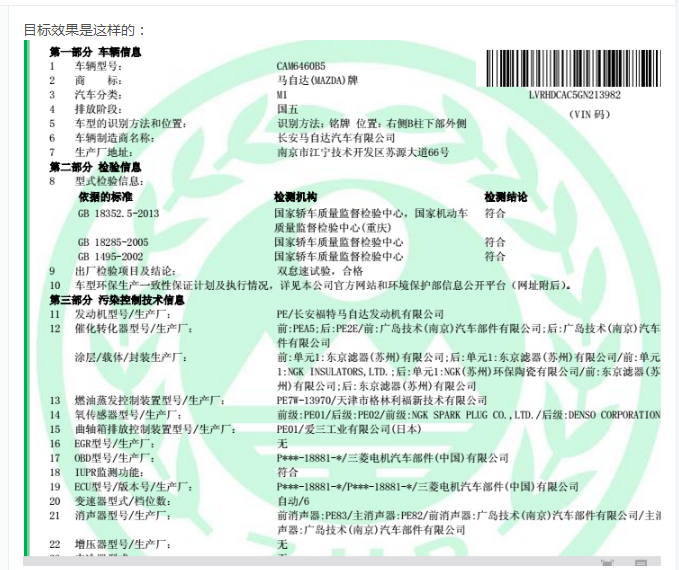
效果:
2、画一条线:
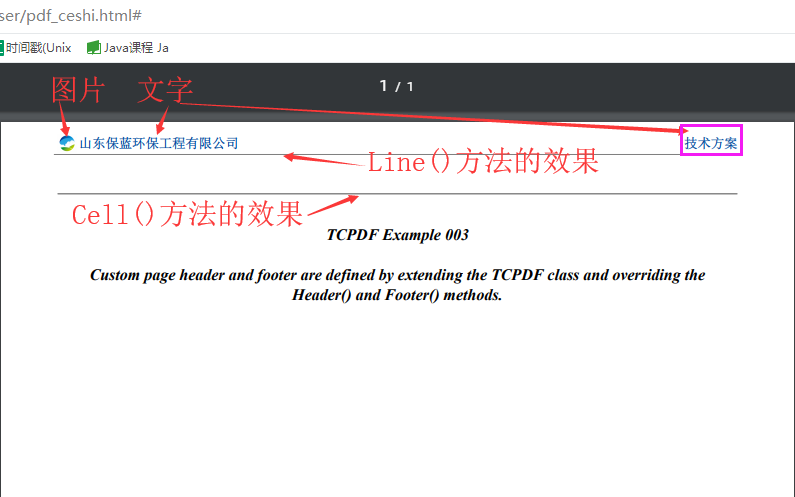
2.1方法解说
/*画一条线:
x1:线条起点x坐标
y1:线条起点y坐标
x2:线条终点x坐标
y2:线条终点y坐标
style:SetLineStyle的效果一样
*/
// $pdf->Line($x1, $y1, $x2, $y2, $style=array());
2.2方法使用:
/*线的颜色*/

$this->SetLineStyle(array('width' => 0, 'cap' => 'butt', 'join' => 'miter', 'dash' => '0', 'color' => array(220, 20,60)));

/*画一条线*/

$this->Line(1, 100, 100, 1, $style=array());

/*加入一条下划线   下划线颜色默认为黑色,用此方法【SetLineStyle()】可以自定义线的颜色  */

$this->Cell(180, 0, '', 1, 0, 'C', 0, '', 0, true);
2.3效果:
3.自定义页眉页脚:
/*

 *

 * */

function zidingyi_yemei(){

//============================================================+

// File name   : example_003.php

// Begin       : 2008-03-04

// Last Update : 2013-05-14

//

// Description : Example 003 for TCPDF class

//               Custom Header and Footer

//

// Author: Nicola Asuni

//

// (c) Copyright:

//               Nicola Asuni

//               Tecnick.com LTD

//               www.tecnick.com

//               info@tecnick.com

//============================================================+

    /**

     * Creates an example PDF TEST document using TCPDF

     * @package com.tecnick.tcpdf

     * @abstract TCPDF - Example: Custom Header and Footer

     * @author Nicola Asuni

     * @since 2008-03-04

     */

// Include the main TCPDF library (search for installation path).

    require_once('ThinkPHP/Library/Vendor/tcpdf/tcpdf.php');

// Extend the TCPDF class to create custom Header and Footer

    class MYPDF extends TCPDF {

        //Page header

        /*public function Header() {

            // Logo

            $image_file = K_PATH_IMAGES.'bl_logo.png';

            $this->Image($image_file, 10, 10, 15, '', 'JPG', '', 'T', false, 300, '', false, false, 0, false, false, false);

            // Set font

            $this->SetFont('helvetica', 'B', 20);

            // Title

            $this->Cell(0, 15, '<< TCPDF Example 003 >>', 0, false, 'C', 0, '', 0, false, 'M', 'M');

        }

        // Page footer

        public function Footer() {

            // Position at 15 mm from bottom

            $this->SetY(-15);

            // Set font

            $this->SetFont('helvetica', 'I', 8);

            // Page number

            $this->Cell(0, 10, 'Page '.$this->getAliasNumPage().'/'.$this->getAliasNbPages(), 0, false, 'C', 0, '', 0, false, 'T', 'M');

        }*/

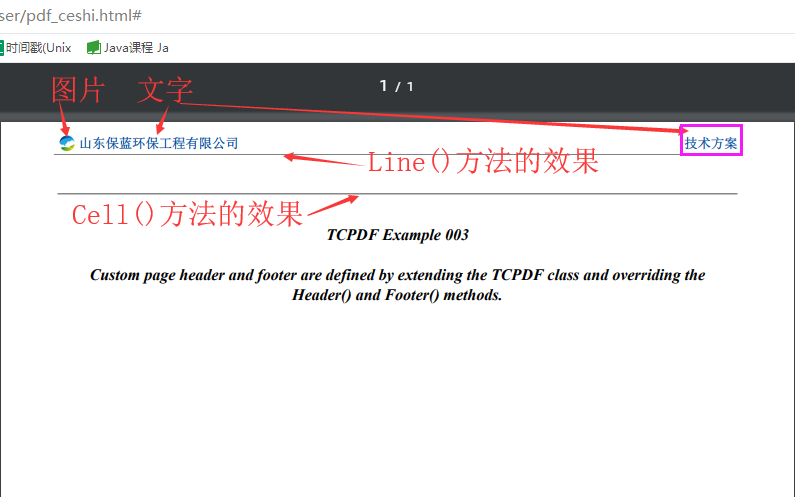
        //Page header 自定义页眉

        public function Header() {

            $this->SetFont('stsongstdlight', '', 10);

            $this->SetHeaderData('', '', ''.' 001', '', array(0,64,255), array(0,64,128));

            // Title

            $this->SetY(1);

            $image_file = K_PATH_IMAGES.'bl_logo.png';

            $this->SetY(1);

            $this->Image($image_file, 15, 3.2, 5, '', 'PNG', '', 'T', false, 300, '', false, false, 0, false, false, false);

            $this->SetY(3.7);

            $left_text = '<p style="text-indent: 20px; color: #00489A; font-weight: bold;">山东保蓝环保工程有限公司</p>';

            //$this->Write(0, $left_text, '', 0, 'L', true, 0, false, false, 0);

            $this->writeHTML($left_text, 1, false, true, false, 'L');

            $this->SetY(3.7);

            $right_text = '<p style="color: #00489A; font-weight: bold;">技术方案</p>';

            $this->writeHTML($right_text, 1, false, true, false, 'R');

            /*$this->Cell(0, 10, '       山东保蓝环保工程有限公司', 0, 0, 'L');

            $this->Cell(0, 10, '技术方案', 0, 0, 'R');*/

            //$this->SetX(1);

            $this->SetY(9);

            /*页眉下划线颜色*/

            $this->SetLineStyle(array('width' => 0, 'cap' => 'butt', 'join' => 'miter', 'dash' => '0', 'color' => array(128,128,128)));

            /*靠左面的距离,左上角的距离 ,长度,右上角的距离*/

            $this->Line(14, 8.6, 196, 8.6, $style=array());

            $this->SetY(19);

            /*页眉下划线*/

            $this->Cell(180, 0, '', 1, 0, 'C', 0, '', 0, true);

        }

        // Page footer 自定义页脚

        public function Footer() {

            // Position at 15 mm from bottom

            $this->SetY(-15);

            // Set font

            $this->SetFont('helvetica', 'I', 8);

            // Page number

            $this->Cell(0, 10, ' '.$this->getAliasNumPage().' / '.$this->getAliasNbPages(), 0, false, 'C', 0, '', 0, false, 'T', 'M');

        }

        /*function Header() //设定页眉

        {

            $this->SetFont('stsongstdlight','',10);

            $this->Write(10,'IPv6协议一致性测试报告','',false,'C');

            $this->Ln(20);

        }

        function Footer() //设定页脚

        {

            $this->SetY(-15);

            $this->SetFont('stsongstdlight','',10);

            $this->Cell(0,10,'第'.$this->PageNo().'页',0,0,'R');

        }*/

    }

// create new PDF document

    $pdf = new MYPDF(PDF_PAGE_ORIENTATION, PDF_UNIT, PDF_PAGE_FORMAT, true, 'UTF-8', false);

// set document information

    $pdf->SetCreator(PDF_CREATOR);

    $pdf->SetAuthor('Nicola Asuni');

    $pdf->SetTitle('TCPDF Example 003');

    $pdf->SetSubject('TCPDF Tutorial');

    $pdf->SetKeywords('TCPDF, PDF, example, test, guide');

// set default header data

    $pdf->SetHeaderData(PDF_HEADER_LOGO, PDF_HEADER_LOGO_WIDTH, PDF_HEADER_TITLE, PDF_HEADER_STRING);

// set header and footer fonts

    $pdf->setHeaderFont(Array(PDF_FONT_NAME_MAIN, '', PDF_FONT_SIZE_MAIN));

    $pdf->setFooterFont(Array(PDF_FONT_NAME_DATA, '', PDF_FONT_SIZE_DATA));

// set default monospaced font

    $pdf->SetDefaultMonospacedFont(PDF_FONT_MONOSPACED);

// set margins

    $pdf->SetMargins(PDF_MARGIN_LEFT, PDF_MARGIN_TOP, PDF_MARGIN_RIGHT);

    $pdf->SetHeaderMargin(PDF_MARGIN_HEADER);

    $pdf->SetFooterMargin(PDF_MARGIN_FOOTER);

// set auto page breaks

    $pdf->SetAutoPageBreak(TRUE, PDF_MARGIN_BOTTOM);

// set image scale factor

    $pdf->setImageScale(PDF_IMAGE_SCALE_RATIO);

// set some language-dependent strings (optional)

    if (@file_exists(dirname(__FILE__).'/lang/eng.php')) {

        require_once(dirname(__FILE__).'/lang/eng.php');

        $pdf->setLanguageArray($l);

    }

// ---------------------------------------------------------

// set font

    $pdf->SetFont('times', 'BI', 12);

// add a page

    $pdf->AddPage();

// set some text to print

    $txt = <<<EOD

TCPDF Example 003

Custom page header and footer are defined by extending the TCPDF class and overriding the Header() and Footer() methods.

EOD;

// print a block of text using Write()

    $pdf->Write(0, $txt, '', 0, 'C', true, 0, false, false, 0);

// ---------------------------------------------------------

//Close and output PDF document

    $pdf->Output('example_003.pdf', 'I');

//============================================================+

// END OF FILE

//============================================================+

}
效果:

TCPDF 背景图片透明度的更多相关文章
- TextView字体和背景图片 设置透明度
背景图片透明度设置 viewHolder.relative_layout.getBackground().setAlpha(225); 0 --- 225 ((TextView)tv). ...
- android设置背景图片透明
设置Activiyt为透明可以在Activity中引用系统透明主题android:theme="@android:style/Theme.Translucent" 设置背景图片透明 ...
- Hexo瞎折腾系列(2) - 添加背景图片轮播
动态背景图片插件jquery-backstretch jquery-backstretch是一款简单的jQuery插件,可以用来设置动态的背景图片,以下是官方网站的介绍. A simple jQuer ...
- app引导页(背景图片切换加各个页面动画效果)
前言:不知不觉中又加班到了10点半,整个启动页面做了一天多的时间,一共有三个页面,每个页面都有动画效果,动画效果调试起来麻烦,既要跟ios统一,又要匹配各种不同的手机,然后产品经理还有可能在中途改需求 ...
- 解决android:background背景图片被拉伸问题
ImageView中XML属性src和background的区别: background会根据ImageView组件给定的长宽进行拉伸,而src就存放的是原图的大小,不会进行拉伸.src是图片内容(前 ...
- Duilib技巧:背景图片平铺
贴图的描述 方式有两种 // 1.aaa.jpg // 2.file='aaa.jpg' res='' restype='0' dest='0,0,0,0' source='0,0,0,0 ...
- WPF 渐隐渐现切换背景图片
最近学习WPF,尝试着自己做一些小玩意,也遇到了一些问题,于是整理记录以便日后查阅. 我们都知道WPF可以实现一些很炫的效果,然而有时候为达到这个目的却并不是一件很容易的事情.比如:在软件中我希望能够 ...
- html之改变图片透明度而不改变文字的透明度--两种方法实现
图片与图片上的文字设置不同的透明度的两种方法: 第一种方法:背景图+定位+background: url(timg.jpg)no-repeat; <!DOCTYPE html> <h ...
- 设置VS2017背景图片
设置方法很简单:安装扩展ClaudiaIDE 1.在这里下载扩展,https://visualstudiogallery.msdn.microsoft.com/9ba50f8d-f30c-4e33-a ...
随机推荐
- 微信小程序开发学习(一)
一.各种JSON配置 1.小程序配置app.json 为小程序全局配置,包括所有页面路径.界面表现.网络超时时间.底部tab等,类比APP开发中manifest配置. 2.工具配置project.co ...
- .net core WebAPI 初探及连接MySQL
1. 前言 笔者最近跟着微软官方文档学习.net core WebAPI,但发现其对 WebAPI 连接数据库.读取数据库方面讲得不够细致明了.写此文的目的,即实现 .net core WebAPI ...
- Flask+SQLAlchemy+alembic+Flask-RESTful使用
前言 其实准备把这篇删掉,先写Flask-restful相关的,后来想想大体框架还是先写出来,这两天踩了很多坑,有的谷歌也没有答案.一直摸索也总算是开始了. 正文 SQLAlchemy/alembic ...
- 生产宕机dunp配置
修改线程数 <self-tuning-thread-pool-size-min>100</self-tuning-thread-pool-size-min> <self- ...
- java ReentrantLock 公平锁 非公平锁 测试
package reentrantlock; import java.util.ArrayList; import java.util.concurrent.locks.ReentrantLock; ...
- [原创]基于Zynq SDIO WIFI 2.4G/5G SotfAP STA
支持正基WiFi模块.高通WiFi模块: 2.4G速率: 5G AC速率: 支持SoftAP.STA模式:
- HDU - 1827 Summer Holiday (强连通)
<题目链接> 题目大意: 听说lcy帮大家预定了新马泰7日游,Wiskey真是高兴的夜不能寐啊,他想着得快点把这消息告诉大家,虽然他手上有所有人的联系方式,但是一个一个联系过去实在太耗时间 ...
- python基础其他
目录: 一.Python为什么受欢迎的本质,知道的人寥寥无几? 二.PyCharm的模板设置 三.pycharm的一些快捷键 四.PyCharm最新2018激活 五.python虚拟环境--virtu ...
- HeadDoc自动注释语法
记录于2013/4/23: 关于HeaderDoc注释和标签的简要介绍 每个HeaderDoc注释可分为顶级标签和第二级标签: (1)顶级标签:宣布API的声明类型 (function, struct ...
- Unity Shader Graph 小功能实现(一)边缘发光
在Unity 2018.2 版本正式启用了高清渲染管线,shader可视化编程. 现在我们就尝尝鲜,来实现了个物体边缘发光的shader效果. 准备 点击Windos->Package Mang ...