
python简单爬虫 使用pandas解析表格,不规则表格
url = http://www.hnu.edu.cn/xyxk/xkzy/zylb.htm
部分表格如图:
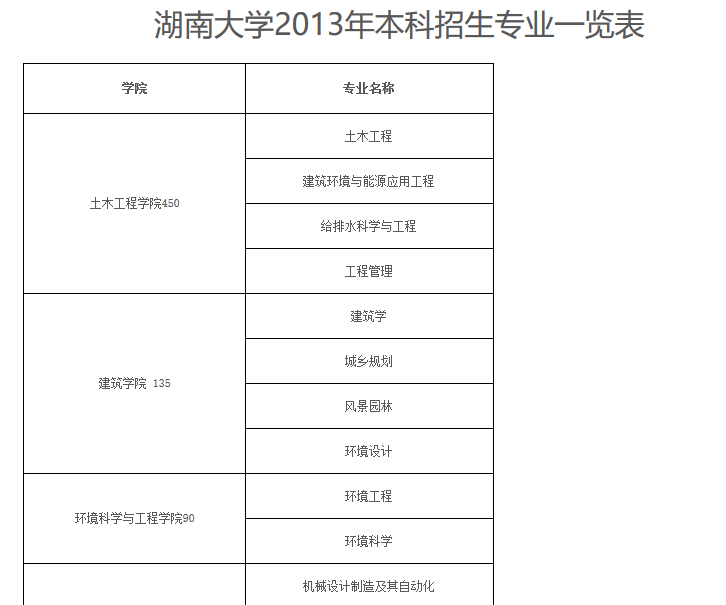
部分html代码:
<table class="MsoNormalTable" style="width:353.0pt;margin-left:4.65pt;border-collapse:collapse;border:none;    mso-border-alt:solid windowtext .5pt;mso-padding-alt:0cm 5.4pt 0cm 5.4pt;    mso-border-insideh:.5pt solid windowtext;mso-border-insidev:.5pt solid windowtext" width="471" cellspacing="0" cellpadding="0" border="1">

 <tbody>

  <tr class="firstRow" style="mso-yfti-irow:0;mso-yfti-firstrow:yes;height:36.75pt">

   <td style="width:170.0pt;border:solid windowtext 1.0pt;mso-border-alt:            solid windowtext .5pt;padding:0cm 5.4pt 0cm 5.4pt;height:36.75pt" width="227"><p class="MsoNormal" style="text-align:center;margin-top:6.0pt;margin-right:0cm;            margin-bottom:6.0pt;margin-left:0cm;mso-para-margin-top:.5gd;mso-para-margin-right:            0cm;mso-para-margin-bottom:.5gd;mso-para-margin-left:0cm;            mso-pagination:widow-orphan"><strong><span style="font-size:9.0pt;font-family:            宋体;mso-bidi-font-family:宋体;mso-font-kerning:0pt">学院<span lang="EN-US">

        <o:p></o:p></span></span></strong></p></td>

   <td style="width:183.0pt;border:solid windowtext 1.0pt;            border-left:none;mso-border-left-alt:solid windowtext .5pt;mso-border-alt:            solid windowtext .5pt;padding:0cm 5.4pt 0cm 5.4pt;height:36.75pt" width="244" nowrap=""><p class="MsoNormal" style="text-align:center;margin-top:6.0pt;margin-right:0cm;            margin-bottom:6.0pt;margin-left:0cm;mso-para-margin-top:.5gd;mso-para-margin-right:            0cm;mso-para-margin-bottom:.5gd;mso-para-margin-left:0cm;            mso-pagination:widow-orphan"><strong><span style="font-size:9.0pt;font-family:            宋体;mso-bidi-font-family:宋体;mso-font-kerning:0pt">专业名称<span lang="EN-US">

        <o:p></o:p></span></span></strong></p></td>

  </tr>

  <tr style="mso-yfti-irow:1;height:16.5pt">

   <td rowspan="4" style="width:170.0pt;border:solid windowtext 1.0pt;            border-top:none;mso-border-top-alt:solid windowtext .5pt;mso-border-alt:solid windowtext .5pt;            padding:0cm 5.4pt 0cm 5.4pt;height:16.5pt" width="227"><p class="MsoNormal" style="text-align:center;margin-top:6.0pt;margin-right:0cm;            margin-bottom:6.0pt;margin-left:0cm;mso-para-margin-top:.5gd;mso-para-margin-right:            0cm;mso-para-margin-bottom:.5gd;mso-para-margin-left:0cm;            mso-pagination:widow-orphan"><span style="font-size:9.0pt;font-family:宋体;            mso-bidi-font-family:宋体;mso-font-kerning:0pt">土木工程学院<span lang="EN-US">450

       <o:p></o:p></span></span></p></td>

   <td style="width:183.0pt;border-top:none;border-left:none;            border-bottom:solid windowtext 1.0pt;border-right:solid windowtext 1.0pt;            mso-border-top-alt:solid windowtext .5pt;mso-border-left-alt:solid windowtext .5pt;            mso-border-alt:solid windowtext .5pt;padding:0cm 5.4pt 0cm 5.4pt;height:16.5pt" width="244" nowrap=""><p class="MsoNormal" style="text-align:center;margin-top:6.0pt;margin-right:0cm;            margin-bottom:6.0pt;margin-left:0cm;mso-para-margin-top:.5gd;mso-para-margin-right:            0cm;mso-para-margin-bottom:.5gd;mso-para-margin-left:0cm;            mso-pagination:widow-orphan"><span style="font-size:9.0pt;font-family:宋体;            mso-bidi-font-family:宋体;mso-font-kerning:0pt">土木工程<span lang="EN-US">

       <o:p></o:p></span></span></p></td>

  </tr>

    ......

 </tbody>

</table>
用pandas解析表格,代码如下:
import pandas as pd

url = 'http://www.hnu.edu.cn/xyxk/xkzy/zylb.htm'

table = pd.read_html(url)

pd.set_option('display.max_rows', None)  # 显示全部的行

with open("湖南大学学院与专业.txt", "wt", encoding='utf8') as out_file:  # 保存为txt文件

    for i in table:

        out_file.write(str(i)+'\n')
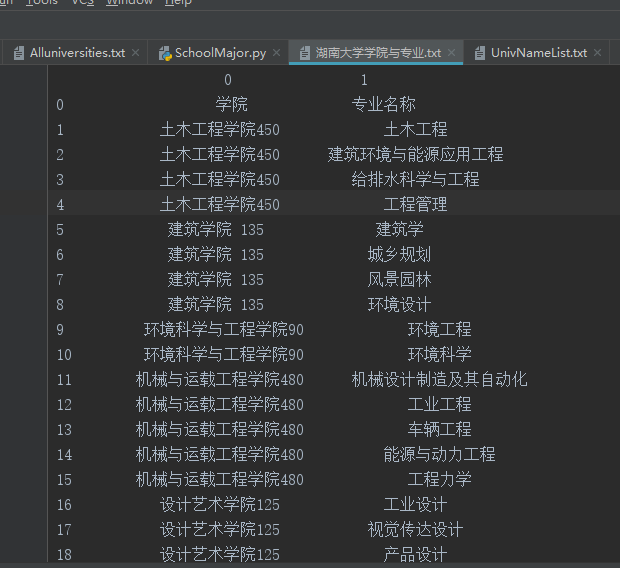
运行结果如下(部分):
非常简洁高效!
python简单爬虫 使用pandas解析表格,不规则表格的更多相关文章
- python简单爬虫 用lxml解析页面中的表格
目标:爬取湖南大学2018年在各省的录取分数线,存储在txt文件中 部分表格如图: 部分html代码: <table cellspacing="0" cellpadding= ...
- Python简单爬虫入门三
我们继续研究BeautifulSoup分类打印输出 Python简单爬虫入门一 Python简单爬虫入门二 前两部主要讲述我们如何用BeautifulSoup怎去抓取网页信息以及获取相应的图片标题等信 ...
- Python简单爬虫入门二
接着上一次爬虫我们继续研究BeautifulSoup Python简单爬虫入门一 上一次我们爬虫我们已经成功的爬下了网页的源代码,那么这一次我们将继续来写怎么抓去具体想要的元素 首先回顾以下我们Bea ...
- GJM : Python简单爬虫入门(二) [转载]
感谢您的阅读.喜欢的.有用的就请大哥大嫂们高抬贵手"推荐一下"吧!你的精神支持是博主强大的写作动力以及转载收藏动力.欢迎转载! 版权声明:本文原创发表于 [请点击连接前往] ,未经 ...
- Python 简单爬虫案例
Python 简单爬虫案例 import requests url = "https://www.sogou.com/web" # 封装参数 wd = input('enter a ...
- python简单爬虫一
简单的说,爬虫的意思就是根据url访问请求,然后对返回的数据进行提取,获取对自己有用的信息.然后我们可以将这些有用的信息保存到数据库或者保存到文件中.如果我们手工一个一个访问提取非常慢,所以我们需要编 ...
- Python简单爬虫
爬虫简介 自动抓取互联网信息的程序 从一个词条的URL访问到所有相关词条的URL,并提取出有价值的数据 价值:互联网的数据为我所用 简单爬虫架构 实现爬虫,需要从以下几个方面考虑 爬虫调度端:启动爬虫 ...
- python 简单爬虫(beatifulsoup)
---恢复内容开始--- python爬虫学习从0开始 第一次学习了python语法,迫不及待的来开始python的项目.首先接触了爬虫,是一个简单爬虫.个人感觉python非常简洁,相比起java或 ...
- Python简单爬虫记录
为了避免自己忘了Python的爬虫相关知识和流程,下面简单的记录一下爬虫的基本要求和编程问题!! 简单了解了一下,爬虫的方法很多,我简单的使用了已经做好的库requests来获取网页信息和Beauti ...
随机推荐
- VueJs第1天
Vue.js是一个轻巧的.高性能.可组件化的MVVM库. Vue是一套用于构建用户界面的渐进式框架 渐进增强(progressive enhancement):针对低版本浏览器进行构建页面,保证最基本 ...
- [FJOI2018]领导集团问题 mulitset合并
P4577 [FJOI2018]领导集团问题 链接 luogu bzoj 他是个重题 bzoj4919: [Lydsy1706月赛]大根堆 代码改改就过了 思路 求树上的lis,要好好读题目的!!! ...
- 人生苦短,我用Python——博客目录
计算机基础 计算机硬件基础知识 操作系统基础 Python基础 Windows环境下Python2和Python3的安装 交互式环境与变量的使用 简单介绍Python基本数据类型及程序交互 基本运算符 ...
- Git 与 GitHub 简介
Git 与 GitHub 的来历 Linux 之父 Linus 在 1991 年创建开源的 Linux 操作系统之后,多年来依靠全世界广大热心志愿者的共同建设,经过长足发展,现已成为世界上最大的服务器 ...
- [转载]去除文件中的^M
用/bin/cat -v /etc/profile看到很多^M,是因为Windows下的换行符的原因. 现在在linux下面删了就行,我用的第一种方法. 第一种方法 (先yum install -y ...
- Request类源码分析
通过APIView进入找到Request的源码 可以看见一堆属性和方法,其中request.data其实是一个方法,被包装成一个属性 继续看__getattr__和query_params方法: 代码 ...
- ssm框架如果想要跨域请求,cors跨域
<!-- 跨域 --> <mvc:cors> <mvc:mapping path="/**"/> </mvc:cors> 在spri ...
- loadrunner 参数化取值方式详解
参数化对话框中与参数取值方式有关的区域如下: 改变参数化的取值方式,关键在于Select next row和Update value on这两个选项. Select next row包括以下选项: S ...
- winform SerialPort串口通信问题
一.串口通信简介串行接口(串口)是一种可以将接受来自CPU的并行数据字符转换为连续的串行数据流发送出去,同时可将接受的串行数据流转换为并行的数据字符供给CPU的器件.一般完成这种功能的电路,我们称为串 ...
- Python自学:第三章 使用del语句删除元素
motorcycles = ["honda", "yamaha", "suzuki"] print(motorcycles) del mot ...