
Angular7.1.4+Typescript3.1框架学习(二)
接着第一部分,这篇文章就 Angular cli进行介绍总结:
1. ng g:列出当前命令
ng g
需在angular工程文件夹下执行:
C:\Users\zb\angulardemo\heroes>ng g

Generates and/or modifies files based on a schematic.

usage: ng generate <schematic> [options]

arguments:

  schematic

    The schematic or collection:schematic to generate.

options:

  --defaults

    When true, disables interactive input prompts for options with a default.

  --dry-run (-d)

    When true, runs through and reports activity without writing out results.

  --force (-f)

    When true, forces overwriting of existing files.

  --help

    Shows a help message for this command in the console.

  --interactive

    When false, disables interactive input prompts.

Available Schematics:

  Collection "@schematics/angular" (default):

    appShell

    application

    class

    component

    directive

    enum

    guard

    interface

    library

    module

    pipe

    service

    serviceWorker

    universal
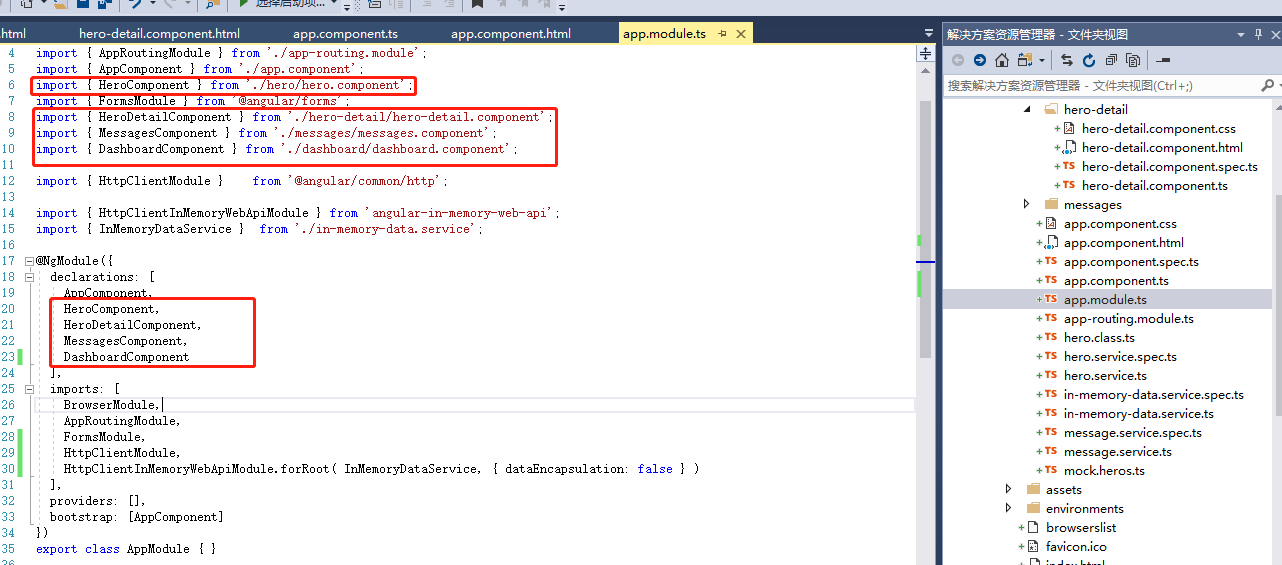
2. ng generate component component-name:该命令会把生成的组件,
添加到 src/app/app.module.ts 文件中 @NgModule 的 declarations 列表中声明:
3. ng generate service: 创建服务文件
ng generate service hero
该命令会在 src/app/hero.service.ts 中生成 HeroService 类的骨架。 HeroService类的代码如下:
import { Injectable } from '@angular/core';

@Injectable({

  providedIn: 'root',

})

export class HeroService {

  constructor() { }

}
4. ng generate module app-routing --flat --module=app:添加 AppRoutingModule
ng generate module app-routing --flat --module=app
--flat把这个文件放进了src/app中,而不是单独的目录中。--module=app告诉CLI把它注册到AppModule的imports数组中。
生成的代码如下:
import { NgModule } from '@angular/core';

import { CommonModule } from '@angular/common';

@NgModule({

  imports: [

    CommonModule

  ],

  declarations: []

})

export class AppRoutingModule { }
Angular7.1.4+Typescript3.1框架学习(二)的更多相关文章
- Angular7.1.4+Typescript3.1框架学习(一)
起因:学习ionic4之前先学习下angular+ts 以win10为开发平台:当前最新版本为angular7;根据官网资料做如下总结: 1. angular安装 前提:Node.js 的 8.x 或 ...
- Angular7.1.4+Typescript3.1框架学习(三)
接着第二部分,这部分介绍常见angular指令使用 1. 在父页面文件中添加组件(通过ng命令生成的component) <app-messages></app-messages&g ...
- Struts2框架学习(二) Action
Struts2框架学习(二) Action Struts2框架中的Action类是一个单独的javabean对象.不像Struts1中还要去继承HttpServlet,耦合度减小了. 1,流程 拦截器 ...
- Android 学习笔记之AndBase框架学习(二) 使用封装好的进度框,Toast框,弹出框,确认框...
PS:渐渐明白,在实验室呆三年都不如在企业呆一年... 学习内容: 1.使用AbActivity内部封装的方法实现进度框,Toast框,弹出框,确认框... AndBase中AbActivity封 ...
- WebGL------osg框架学习二
今天我们继续来学习osg.js框架.上一篇我们介绍了DrawActor对象绘制操作类和Drawable可绘制对象类,我们大致知道了osg对Drawable可绘制对象的绘制流程管理.今天我们要继续介绍S ...
- Hibernate框架学习(二)——api详解
一.Configuration对象 功能:配置加载类,用于加载主配置,orm元数据加载. //1.创建,调用空参构造(还没有读配置文件) Configuration conf=new Configur ...
- python flask框架学习(二)——第一个flask程序
第一个flask程序 学习自:知了课堂Python Flask框架——全栈开发 1.用pycharm新建一个flask项目 2.运行程序 from flask import Flask # 创建一个F ...
- Castle ActiveRecord框架学习(二):快速搭建简单博客网站
一.数据库 1.数据表 Category:类别标签表(字段Type=1为类别,Type=2为标签) Category_Post:类别标签与文章中间表 Post:文章表 Comment:评论表 2.数据 ...
- Spring框架学习(二)
一.依赖注入的三种注入方式 Spring框架为我们提供了三种注入方式:set注入.构造方法注入和接口注入. 1.set注入 规律:无论给什么赋值,配置文件中<property>标签的nam ...
随机推荐
- 接触node第一步
趁着工作不忙,今天来系统记录一下安装node环境: 1.node下载地址为:https://nodejs.org/en/,检查是否安装成功:如果输出版本号,说明我们安装node环境成功:node -v ...
- Java8-Map
1.Staff实体 public class Staff { private String name; private int age; private String address; public ...
- Java8过滤器(Filter)
1.在Java之前对List进行过滤的方式 public class BeforeJava8 { public static void main(String[] args) { List<Pe ...
- 【js】关于this指针-理解call、apply、bind
首次讲解视频,听了一下,录音声音太小(暂不知道该怎么调节),老是咳咳,不太流畅.暂时不理想,日后继续努力.(能写出来还不够,还要会说出来) 首先,this指针只存在于函数(function)中.用于指 ...
- postgres跨平台开发坑之空值
ngx_lua架构下查询linux版postgres时,如果目标字段的值返回空,则返回结果为 ngx.null,同样的代码如果查询windows版postgres时,如果目标字段的值返回空,则返回结果 ...
- element-ui 2.4.3 如何实现对form部分字段验证的解决方法?
这是实际项目中的一个例子: 新增人员信息功能: 必填:姓名 .电话(验证电话格式): 非必填:备注.微信.邮箱(验证邮箱格式) 必填验证: 邮箱格式验证: 今天偶然看到 element-ui 2.4. ...
- FUTABA 13-ST-84GINK + DS3231 时钟
收拾东西的时候又看到之前收拾的vfd相关的盒子,偶然又加的群,又买了两种屏试水. 大的买屏还送vfd变压器,这玩意卖的少,一个5块,不买血亏!不知道什么时候开始早已没有DIY是省钱这种观念了.草... ...
- netty初试
netty官网:点击进入 学习netty之实现一个丢弃服务器 环境: JDK1.8 netty5.0+ 步骤: 实现一个丢弃服务器 实现一个客户端发送数据 丢弃服务器的创建 //用于接受客户端的的连接 ...
- MySQL数据库的sql语句的导出与导入
1.MySQL数据库的导出 (1)选择对应的数据库 (2)点击右键选择Dump SQL File (3)会出现保存框,选择保存的位置,名称不建议重新起名 (4)点击保存出现 (5)点击Close就可以 ...
- Elasticsearch .net client NEST使用说明 2.x -更新版
Elasticsearch .net client NEST使用说明 目录: Elasticsearch .net client NEST 5.x 使用总结 elasticsearch_.net_cl ...