
30分钟了解Springboot整合Shiro
项目结构截图:
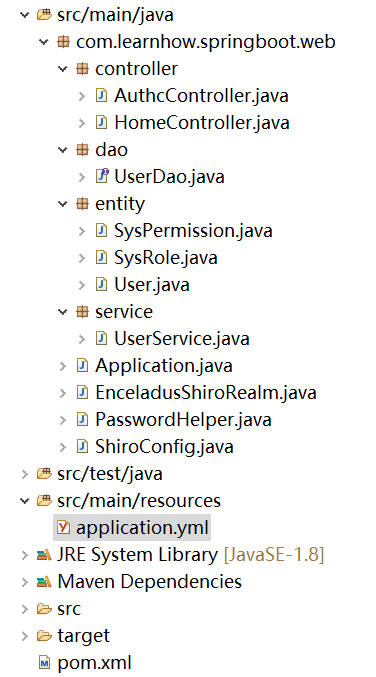
项目在结构上没有任何特殊之处,基本就是MVC的传统结构重点需要关注的是3个Entity类、2个Controller类和1个Config类。
首先,提供pom的完整文档结构:

<project xmlns="http://maven.apache.org/POM/4.0.0"

    xmlns:xsi="http://www.w3.org/2001/XMLSchema-instance"

    xsi:schemaLocation="http://maven.apache.org/POM/4.0.0 http://maven.apache.org/xsd/maven-4.0.0.xsd">

    <modelVersion>4.0.0</modelVersion>

    <groupId>com.learnhow.springboot</groupId>

    <artifactId>web</artifactId>

    <version>0.0.1-SNAPSHOT</version>

    <packaging>jar</packaging>

    <name>web</name>

    <url>http://maven.apache.org</url>

    <parent>

        <groupId>org.springframework.boot</groupId>

        <artifactId>spring-boot-starter-parent</artifactId>

        <version>2.0.4.RELEASE</version>

        <relativePath /> <!-- lookup parent from repository -->

    </parent>

    <properties>

        <project.build.sourceEncoding>UTF-8</project.build.sourceEncoding>

        <java.version>1.8</java.version>

    </properties>

    <dependencies>

        <dependency>

            <groupId>org.springframework.boot</groupId>

            <artifactId>spring-boot-starter</artifactId>

        </dependency>

        <dependency>

            <groupId>org.springframework.boot</groupId>

            <artifactId>spring-boot-starter-test</artifactId>

            <scope>test</scope>

        </dependency>

        <dependency>

            <groupId>org.springframework.boot</groupId>

            <artifactId>spring-boot-starter-web</artifactId>

        </dependency>

        <dependency>

            <groupId>org.springframework.boot</groupId>

            <artifactId>spring-boot-starter-data-jpa</artifactId>

        </dependency>

        <dependency>

            <groupId>mysql</groupId>

            <artifactId>mysql-connector-java</artifactId>

        </dependency>

        <dependency>

            <groupId>org.apache.shiro</groupId>

            <artifactId>shiro-spring</artifactId>

            <version>1.4.0</version>

        </dependency>

        <dependency>

            <groupId>org.springframework.boot</groupId>

            <artifactId>spring-boot-devtools</artifactId>

            <optional>true</optional>

        </dependency>

    </dependencies>

    <build>

        <plugins>

            <plugin>

                <groupId>org.springframework.boot</groupId>

                <artifactId>spring-boot-maven-plugin</artifactId>

                <configuration>

                    <fork>true</fork>

                </configuration>

            </plugin>

        </plugins>

    </build>

</project>
其次,创建数据库和表结构。由于我们采用jpa作为数据库持久层框架,因此我们将建表的任务交给框架自动完成,我们只需要在entity中写清楚对应关系即可。
CREATE DATABASE enceladus; // enceladus是数据库的名称
application.yml
server:

   port: 8088

spring:

   application:

      name: shiro

   datasource:

      url: jdbc:mysql://192.168.31.37:3306/enceladus

      username: root

      password: 12345678

      driver-class-name: com.mysql.jdbc.Driver

   jpa:

      database: mysql

      showSql: true

      hibernate:

         ddlAuto: update

      properties:

         hibernate:

            dialect: org.hibernate.dialect.MySQL5Dialect

            format_sql: true
最基础的Shiro配置至少需要三张主表分别代表用户(user)、角色(role)、权限(permission),用户和角色,角色与权限之间都是ManyToMany的对应关系,不熟悉实体对应关系的小伙伴可以先去熟悉一下Hibernate。
User.java
SysRole.java
SysPermission.java
在注明对应关系以后,jpa会帮助我们创建3张实体表和2张中间表:
最后我们还需要初始化一些基础数据:
INSERT INTO `permission_t` VALUES (1, 'Retrieve');

INSERT INTO `permission_t` VALUES (2, 'Create');

INSERT INTO `permission_t` VALUES (3, 'Update');

INSERT INTO `permission_t` VALUES (4, 'Delete');

INSERT INTO `role_t` VALUES (1, 'guest');

INSERT INTO `role_t` VALUES (2, 'user');

INSERT INTO `role_t` VALUES (3, 'admin');

INSERT INTO `role_permission_t` VALUES (1, 1);

INSERT INTO `role_permission_t` VALUES (1, 2);

INSERT INTO `role_permission_t` VALUES (2, 2);

INSERT INTO `role_permission_t` VALUES (3, 2);

INSERT INTO `role_permission_t` VALUES (1, 3);

INSERT INTO `role_permission_t` VALUES (2, 3);

INSERT INTO `role_permission_t` VALUES (3, 3);

INSERT INTO `role_permission_t` VALUES (4, 3);
至此,前期的准备工作已经完成。下面为了让Shiro能够在项目中生效我们需要通过代码的方式提供配置信息。Shiro的安全管理提供了两个层面的控制:(1)用户认证:需要用户通过登陆证明你是你自己。(2)权限控制:在证明了你是你自己的基础上系统为当前用户赋予权限。后者我们已经在数据库中完成了大部分配置。
用户认证的常规手段就是登陆认证,在目前的情况下我们认为只有用户自己知道登陆密码。不过Shiro为我们做的更多,它还提供了一套能够很方便我们使用的密码散列算法。因为普通的散列技巧可以很容易的通过暴力手段破解,我们可以在散列的过程中加入一定的算法复杂度(增加散列次数与Salt)从而解决这样的问题。
import org.apache.shiro.crypto.RandomNumberGenerator;

import org.apache.shiro.crypto.SecureRandomNumberGenerator;

import org.apache.shiro.crypto.hash.SimpleHash;

import org.apache.shiro.util.ByteSource;

import com.learnhow.springboot.web.entity.User;

public class PasswordHelper {

    private RandomNumberGenerator randomNumberGenerator = new SecureRandomNumberGenerator();

    public static final String ALGORITHM_NAME = "md5"; // 基础散列算法

    public static final int HASH_ITERATIONS = 2; // 自定义散列次数

    public void encryptPassword(User user) {

        // 随机字符串作为salt因子,实际参与运算的salt我们还引入其它干扰因子

        user.setSalt(randomNumberGenerator.nextBytes().toHex());

        String newPassword = new SimpleHash(ALGORITHM_NAME, user.getPassword(),

                ByteSource.Util.bytes(user.getCredentialsSalt()), HASH_ITERATIONS).toHex();

        user.setPassword(newPassword);

    }

}
这个类帮助我们解决用户注册的密码散列问题,当然我们还需要使用同样的算法来保证在登陆的时候密码能够被散列成相同的字符串。如果两次散列的结果不同系统就无法完成密码比对,因此在计算散列因子的时候我们不能引入变量,例如我们可以将username作为salt因子加入散列算法,但是不能选择password或datetime,具体原因各位请手动测试。
另外为了帮助Shiro能够正确为当前登陆用户做认证和赋权,我们需要实现自定义的Realm。具体来说就是实现doGetAuthenticationInfo和doGetAuthorizationInfo,这两个方法前者负责登陆认证后者负责提供一个权限信息。
import org.apache.shiro.authc.AuthenticationException;

import org.apache.shiro.authc.AuthenticationInfo;

import org.apache.shiro.authc.AuthenticationToken;

import org.apache.shiro.authc.SimpleAuthenticationInfo;

import org.apache.shiro.authz.AuthorizationInfo;

import org.apache.shiro.authz.SimpleAuthorizationInfo;

import org.apache.shiro.realm.AuthorizingRealm;

import org.apache.shiro.subject.PrincipalCollection;

import org.apache.shiro.util.ByteSource;

import org.springframework.beans.factory.annotation.Autowired;

import com.learnhow.springboot.web.entity.SysPermission;

import com.learnhow.springboot.web.entity.SysRole;

import com.learnhow.springboot.web.entity.User;

import com.learnhow.springboot.web.service.UserService;

public class EnceladusShiroRealm extends AuthorizingRealm {

    @Autowired

    private UserService userService;

    @Override

    protected AuthorizationInfo doGetAuthorizationInfo(PrincipalCollection principals) {

        SimpleAuthorizationInfo authorizationInfo = new SimpleAuthorizationInfo();

        String username = (String) principals.getPrimaryPrincipal();

        User user = userService.findUserByName(username);

        for (SysRole role : user.getRoles()) {

            authorizationInfo.addRole(role.getRole());

            for (SysPermission permission : role.getPermissions()) {

                authorizationInfo.addStringPermission(permission.getName());

            }

        }

        return authorizationInfo;

    }

    @Override

    protected AuthenticationInfo doGetAuthenticationInfo(AuthenticationToken token) throws AuthenticationException {

        String username = (String) token.getPrincipal();

        User user = userService.findUserByName(username);

        if (user == null) {

            return null;

        }

        SimpleAuthenticationInfo authenticationInfo = new SimpleAuthenticationInfo(user.getUsername(), user.getPassword(),

                ByteSource.Util.bytes(user.getCredentialsSalt()), getName());

        return authenticationInfo;

    }

}
还记得前面我们说过,认证的时候我们需要提供相同的散列算法吗?可是在上面的代码里,我们并未提供。那么Shiro是怎么做的呢?AuthorizingRealm是一个抽象类,我们会在另外的配置文件里向它提供基础算法与散列次数这两个变量。
import java.util.HashMap;

import java.util.Map;

import org.apache.shiro.authc.credential.HashedCredentialsMatcher;

import org.apache.shiro.mgt.SecurityManager;

import org.apache.shiro.spring.web.ShiroFilterFactoryBean;

import org.apache.shiro.web.mgt.DefaultWebSecurityManager;

import org.springframework.context.annotation.Bean;

import org.springframework.context.annotation.Configuration;

@Configuration

public class ShiroConfig {

    @Bean

    public ShiroFilterFactoryBean shirFilter(SecurityManager securityManager) {

        ShiroFilterFactoryBean shiroFilterFactoryBean = new ShiroFilterFactoryBean();

        shiroFilterFactoryBean.setSecurityManager(securityManager);

        Map<String, String> filterChainDefinitionMap = new HashMap<String, String>();

        shiroFilterFactoryBean.setLoginUrl("/login");

        shiroFilterFactoryBean.setUnauthorizedUrl("/unauthc");

        shiroFilterFactoryBean.setSuccessUrl("/home/index");

        filterChainDefinitionMap.put("/*", "anon");

        filterChainDefinitionMap.put("/authc/index", "authc");

        filterChainDefinitionMap.put("/authc/admin", "roles[admin]");

        filterChainDefinitionMap.put("/authc/renewable", "perms[Create,Update]");

        filterChainDefinitionMap.put("/authc/removable", "perms[Delete]");

        shiroFilterFactoryBean.setFilterChainDefinitionMap(filterChainDefinitionMap);

        return shiroFilterFactoryBean;

    }

    @Bean

    public HashedCredentialsMatcher hashedCredentialsMatcher() {

        HashedCredentialsMatcher hashedCredentialsMatcher = new HashedCredentialsMatcher();

        hashedCredentialsMatcher.setHashAlgorithmName(PasswordHelper.ALGORITHM_NAME); // 散列算法

        hashedCredentialsMatcher.setHashIterations(PasswordHelper.HASH_ITERATIONS); // 散列次数

        return hashedCredentialsMatcher;

    }

    @Bean

    public EnceladusShiroRealm shiroRealm() {

        EnceladusShiroRealm shiroRealm = new EnceladusShiroRealm();

        shiroRealm.setCredentialsMatcher(hashedCredentialsMatcher()); // 原来在这里

        return shiroRealm;

    }

    @Bean

    public SecurityManager securityManager() {

        DefaultWebSecurityManager securityManager = new DefaultWebSecurityManager();

        securityManager.setRealm(shiroRealm());

        return securityManager;

    }

    @Bean

    public PasswordHelper passwordHelper() {

        return new PasswordHelper();

    }

}
接下来,我们将目光集中到上文的shirFilter方法中。Shiro通过一系列filter来控制访问权限,并在它的内部为我们预先定义了多个过滤器,我们可以直接通过字符串配置这些过滤器。
常用的过滤器如下:
authc:所有已登陆用户可访问
roles:有指定角色的用户可访问,通过[ ]指定具体角色,这里的角色名称与数据库中配置一致
perms:有指定权限的用户可访问,通过[ ]指定具体权限,这里的权限名称与数据库中配置一致
anon:所有用户可访问,通常作为指定页面的静态资源时使用
为了测试方便我们不引入页面配置直接通过rest方式访问
不受权限控制访问的地址
import org.apache.shiro.SecurityUtils;

import org.apache.shiro.authc.IncorrectCredentialsException;

import org.apache.shiro.authc.UnknownAccountException;

import org.apache.shiro.authc.UsernamePasswordToken;

import org.apache.shiro.subject.Subject;

import org.springframework.beans.factory.annotation.Autowired;

import org.springframework.web.bind.annotation.GetMapping;

import org.springframework.web.bind.annotation.RequestMapping;

import org.springframework.web.bind.annotation.RequestParam;

import org.springframework.web.bind.annotation.RestController;

import com.learnhow.springboot.web.PasswordHelper;

import com.learnhow.springboot.web.entity.User;

import com.learnhow.springboot.web.service.UserService;

@RestController

@RequestMapping

public class HomeController {

    @Autowired

    private UserService userService;

    @Autowired

    private PasswordHelper passwordHelper;

    @GetMapping("login")

    public Object login() {

        return "Here is Login page";

    }

    @GetMapping("unauthc")

    public Object unauthc() {

        return "Here is Unauthc page";

    }

    @GetMapping("doLogin")

    public Object doLogin(@RequestParam String username, @RequestParam String password) {

        UsernamePasswordToken token = new UsernamePasswordToken(username, password);

        Subject subject = SecurityUtils.getSubject();

        try {

            subject.login(token);

        } catch (IncorrectCredentialsException ice) {

            return "password error!";

        } catch (UnknownAccountException uae) {

            return "username error!";

        }

        User user = userService.findUserByName(username);

        subject.getSession().setAttribute("user", user);

        return "SUCCESS";

    }

    @GetMapping("register")

    public Object register(@RequestParam String username, @RequestParam String password) {

        User user = new User();

        user.setUsername(username);

        user.setPassword(password);

        passwordHelper.encryptPassword(user);

        userService.saveUser(user);

        return "SUCCESS";

    }

}
需要指定权限可以访问的地址
import org.apache.shiro.SecurityUtils;

import org.apache.shiro.subject.Subject;

import org.springframework.web.bind.annotation.GetMapping;

import org.springframework.web.bind.annotation.RequestMapping;

import org.springframework.web.bind.annotation.RestController;

import com.learnhow.springboot.web.entity.User;

@RestController

@RequestMapping("authc")

public class AuthcController {

    @GetMapping("index")

    public Object index() {

        Subject subject = SecurityUtils.getSubject();

        User user = (User) subject.getSession().getAttribute("user");

        return user.toString();

    }

    @GetMapping("admin")

    public Object admin() {

        return "Welcome Admin";

    }

    // delete

    @GetMapping("removable")

    public Object removable() {

        return "removable";

    }

    // insert & update

    @GetMapping("renewable")

    public Object renewable() {

        return "renewable";

    }

}
30分钟了解Springboot整合Shiro的更多相关文章
- 转:30分钟了解Springboot整合Shiro
引自:30分钟了解Springboot整合Shiro 前言:06年7月的某日,不才创作了一篇题为<30分钟学会如何使用Shiro>的文章.不在意之间居然斩获了22万的阅读量,许多人因此加了 ...
- 30分钟学会如何使用Shiro
本篇内容大多总结自张开涛的<跟我学Shiro>原文地址:http://jinnianshilongnian.iteye.com/blog/2018936 我并没有全部看完,只是选择了一部分 ...
- SpringBoot整合Shiro实现权限控制,验证码
本文介绍 SpringBoot 整合 shiro,相对于 Spring Security 而言,shiro 更加简单,没有那么复杂. 目前我的需求是一个博客系统,有用户和管理员两种角色.一个用户可能有 ...
- SpringBoot整合Shiro权限框架实战
什么是ACL和RBAC ACL Access Control list:访问控制列表 优点:简单易用,开发便捷 缺点:用户和权限直接挂钩,导致在授予时的复杂性,比较分散,不便于管理 例子:常见的文件系 ...
- SpringBoot系列十二:SpringBoot整合 Shiro
声明:本文来源于MLDN培训视频的课堂笔记,写在这里只是为了方便查阅. 1.概念:SpringBoot 整合 Shiro 2.具体内容 Shiro 是现在最为流行的权限认证开发框架,与它起名的只有最初 ...
- SpringBoot 整合 Shiro 密码登录与邮件验证码登录(多 Realm 认证)
导入依赖(pom.xml) <!--整合Shiro安全框架--> <dependency> <groupId>org.apache.shiro</group ...
- 补习系列(6)- springboot 整合 shiro 一指禅
目标 了解ApacheShiro是什么,能做什么: 通过QuickStart 代码领会 Shiro的关键概念: 能基于SpringBoot 整合Shiro 实现URL安全访问: 掌握基于注解的方法,以 ...
- SpringBoot整合Shiro实现基于角色的权限访问控制(RBAC)系统简单设计从零搭建
SpringBoot整合Shiro实现基于角色的权限访问控制(RBAC)系统简单设计从零搭建 技术栈 : SpringBoot + shiro + jpa + freemark ,因为篇幅原因,这里只 ...
- springboot整合Shiro功能案例
Shiro 核心功能案例讲解 基于SpringBoot 有源码 从实战中学习Shiro的用法.本章使用SpringBoot快速搭建项目.整合SiteMesh框架布局页面.整合Shiro框架实现用身份认 ...
随机推荐
- 痞子衡嵌入式:ARM Cortex-M内核那些事(3)- 功能模块
大家好,我是痞子衡,是正经搞技术的痞子.今天痞子衡给大家介绍的是ARM Cortex-M功能模块. ARM Cortex-M处理器家族发展至今(2016),已有5代产品,分别是CM0/CM0+.CM1 ...
- spring学习(五) ———— 整合web项目(SSM)
一.SSM框架整合 1.1.整合思路 从底层整合起,也就是先整合mybatis与spring,然后在编写springmvc. 1.2.开发需求 查询商品列表(从数据库中查询) 1.3.创建web工程 ...
- #5 Python面向对象(四)
前言 本节将是Python面向对象的最后一篇博文了,这节将记录类的特殊方法.特殊成员方法.旧类和新类的不同,以及一些其他知识.Go! 一.类的特殊方法 Python有三种特殊方法:实例方法.静态方法. ...
- sed从入门到深入的使用心得
本人已经此系列的sed文章整理到pdf中,欢迎下载:玩透sed:探究sed原理 sed系列文章: sed修炼系列(一):花拳绣腿之入门篇sed修炼系列(二):武功心法(info sed翻译+注解)se ...
- Spring Cloud Alibaba基础教程:Nacos配置的多环境管理
前情回顾: <Spring Cloud Alibaba基础教程:使用Nacos实现服务注册与发现> <Spring Cloud Alibaba基础教程:支持的几种服务消费方式> ...
- Smobiler 4.4 更新预告 Part 1(Smobiler能让你在Visual Studio上开发APP)
在4.4版本中,大家对产品优化的一些建议和意见进行了相应的优化和修复,同时,还新增了一些令人激动的功能和插件. 下面先为大家介绍4.4版本中Smobiler的优化和修复: 优化 1, PageView ...
- 第5章 支持和咨询选项 - Identity Server 4 中文文档(v1.0.0)
我们为IdentityServer提供了多种免费和商业支持和咨询选项. 5.1 免费支持 免费支持是基于社区的,并使用公共论坛 5.1.1 StackOverflow StackOverflow 社区 ...
- 【转载】 C#检测输入的内容中是否含有中文
在C#开发中,可以结合正则表达式,来检测输入的内容中是否包含中文,Regex类是C#中有关正则表达式处理的相关类,功能强大,我们只需要设置好规则,即可很快检测出输入的字符串内容中是否含有中文信息. R ...
- Java开发笔记(二十八)布尔包装类型
前面介绍了数值包装类型,因为不管是整数还是小数,它们的运算操作都是类似的,所以只要学会了Integer的用法,其它数值包装类型即可一并掌握.但是对于布尔类型boolean来说,该类型定义的是“true ...
- 【设计原则和编程技巧】单一职责原则 (Single Responsibility Principle, SRP)
单一职责原则 (Single Responsibility Principle, SRP) 单一职责原则在设计模式中常被定义为“一个类应该只有一个发生变化的原因”,若我们有两个动机去改写一个方法,那这 ...