
centos6.5使用Google auth进行双因子认证
阿里云相关链接
https://www.aliyun.com/product/ecs?source=5176.11533457&userCode=kv73ipbs&type=copy
1、环境
系统:centos6.5 x86_64
[root@uu ~]# uname -a
Linux uu 2.6.32-642.el6.x86_64 #1 SMP Wed Apr 13 00:51:26 EDT 2016 x86_64 x86_64 x86_64 GNU/Linux
要求:
时间同步
关闭SELinux
2、安装
升级git
1.7.1版本过低,现在github不支持1.7.1的git 客户端的下载了,只有从网上下载高一点的版本,并安装。
yum install curl-devel expat-devel gettext-devel openssl-devel zlib-devel -y

yum install gcc perl-ExtUtils-MakeMaker -y

yum remove git -y

yum update -y nss curl libcurl

cd /usr/src

wget https://www.kernel.org/pub/software/scm/git/git-2.1.2.tar.gz

wget https://www.kernel.org/pub/software/scm/git/git-2.1.2.tar.gz --no-check-certificate

tar xzf git-2.1..tar.gz

cd git-2.1.

make prefix=/usr/local/git all

make prefix=/usr/local/git install

echo "export PATH=$PATH:/usr/local/git/bin" >> /etc/bashrc

source /etc/bashrc

#配置git不认证https

git config --global http.sslVerify false
3、安装Google auth
yum install -y git automake libtool pam-devel -y

git clone https://github.com/google/google-authenticator-libpam.git

cd google-authenticator-libpam/

./bootstrap.sh

./configure

make && make install

cp /usr/local/lib/security/pam_google_authenticator.so /lib64/security/
4、安装认证二维码
这一步可不做,没有图形二维码就手动输入程序给出的密钥。
yum install -y git qrencode
5、配置ssh服务
5.1、修改/etc/pam.d/sshd
在/etc/pam.d/sshd里添加下面这条【#放在auth include password-auth之前】
vim /etc/pam.d/sshd

auth       required     pam_google_authenticator.so no_increment_hotp
5.2、修改/etc/ssh/sshd_config
vim /etc/ssh/sshd_config

    PasswordAuthentication  yes

    ChallengeResponseAuthentication yes

    UsePAM yes

/etc/init.d/sshd restart
6、配置Google auth
google-authenticator
6.1、添加主机
有2种方式:
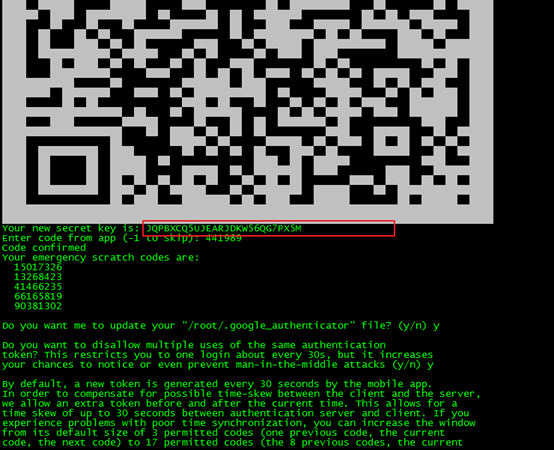
输入“y”后,会有一个二维码
1、用手机谷歌验证器扫描这个二维码即可添加主机。
2、手动输入二维码下面的密钥添加。
然后剩下的会出现5个问题,根据提示全部选“y”即可。

6.2、客户端
我的是华为手机,贴一下华为应用市场的链接
http://a.vmall.com/uowap/index.html#/detailApp/C63790
APP在应用市场搜索谷歌认证器。
可根据需要添加多个客户端。


7、登录

输入手机动态口令

输入登录用户的密码

8、说明
[root@uu ~]# google-authenticator

Do you want authentication tokens to be time-based (y/n) y

Warning: pasting the following URL into your browser exposes the OTP secret to Google:

  https://www.google.com/chart?chs=200x200&chld=M|0&cht=qr&chl=otpauth://totp/root@uu%3Fsecret%3DJQPBXCQ5UJEARJDKW56QG7PX5M%26issuer%3Duu

Your new secret key is: JQPBXCQ5UJEARJDKW56QG7PX5M
Enter code from app (-1 to skip): 441989
Code confirmed
Your emergency scratch codes are:
15017326
13268423
41466235
66165819
90381302
Do you want me to update your "/root/.google_authenticator" file? (y/n) y
Do you want to disallow multiple uses of the same authentication
token? This restricts you to one login about every 30s, but it increases
your chances to notice or even prevent man-in-the-middle attacks (y/n) y
By default, a new token is generated every 30 seconds by the mobile app.
In order to compensate for possible time-skew between the client and the server,
we allow an extra token before and after the current time. This allows for a
time skew of up to 30 seconds between authentication server and client. If you
experience problems with poor time synchronization, you can increase the window
from its default size of 3 permitted codes (one previous code, the current
code, the next code) to 17 permitted codes (the 8 previous codes, the current
code, and the 8 next codes). This will permit for a time skew of up to 4 minutes
between client and server.
Do you want to do so? (y/n) y
If the computer that you are logging into isn't hardened against brute-force
login attempts, you can enable rate-limiting for the authentication module.
By default, this limits attackers to no more than 3 login attempts every 30s.
Do you want to enable rate-limiting? (y/n) y
上述共需回答5个y
第1个:问你是否想做一个基于时间的令牌
第2个:是否更新你的google认证文件,由于第一次设置,所以一定选y
第3个:是否禁止口令多用,这里选择y,禁止它,以防止中间人欺骗。
第4个:默认情况,1个口令的有效期是30s,这里是为了防止主机时间和口令客户端时间不一致,设置的误差,可以选择y,也可选n,看要求严谨程度
第5个:是否打开尝试次数限制,默认情况,30s内不得超过3次登陆测试,防止别人暴力破解。
并且上面这些设置将被存储在用户的〜/.google_authenticator文件中,emergency scratch codes 中的5个代码是紧急代码,务必牢记,这是在你的动态口令无法使用的情况下使用的,记住,用一个失效一个。后期可以登陆上去后,重新生成!!
centos6.5使用Google auth进行双因子认证的更多相关文章
- 强制禁用gitlab的双因子认证:Two-Factor Authentication
(一)问题描述: 此博客解决如下问题:禁用gitlab的双因子认证 禁用前,如图(此时,你在gitlab中什么也干不了) (二)思路分析: 百度了很多方法,都不可靠(如不可靠的说明:https://s ...
- odoo12之应用:一、双因子验证(Two-factor authentication, 2FA)(HOTP,TOTP)附源码
前言 双因子认证:双因子认证(2FA)是指结合密码以及实物(信用卡.SMS手机.令牌或指纹等生物标志)两种条件对用户进行认证的方法.--百度百科 跟我一样"老"的网瘾少年想必一定见 ...
- Linux 利用Google Authenticator实现ssh登录双因素认证
1.介绍 双因素认证:双因素身份认证就是通过你所知道再加上你所能拥有的这二个要素组合到一起才能发挥作用的身份认证系统.双因素认证是一种采用时间同步技术的系统,采用了基于时间.事件和密钥三变量而产生的一 ...
- (诊断)解决GitHub使用双因子身份认证“Two-Factor Athentication”后无法git push 代码的“fatal: Authentication failed for ...”错误
在GitHub上采取双因子身份认证后,在git push 的时候将会要求填写用户的用户名和密码,用户名就是用户在GitHub上申请的用户名,但是密码不是普通登录GitHub的密码. 一旦采取双因子身份 ...
- Linux 之 利用Google Authenticator实现用户双因素认证
一.介绍:什么是双因素认证 双因素身份认证就是通过你所知道再加上你所能拥有的这二个要素组合到一起才能发挥作用的身份认证系统.双因素认证是一种采用时间同步技术的系统,采用了基于时间.事件和密钥三变量而产 ...
- 双因子方差分析|adjusted R|强度|SSA|SSE|SST|
应用统计学 方差分析的基本假设: 组间组平均与总平均的不同是由treatment引发的.单个值与组平均的不同是由组内error引发的. 如果没有处理误差SSA=SSE,所以右尾假设如果F>1则处 ...
- 业余草双因素认证(2FA)教程
所谓认证(authentication)就是确认用户的身份,是网站登录必不可少的步骤.密码是最常见的认证方法,但是不安全,容易泄露和冒充.越来越多的地方,要求启用双因素认证(Two-factor au ...
- 双因素认证(2FA)教程
所谓认证(authentication)就是确认用户的身份,是网站登录必不可少的步骤. 密码是最常见的认证方法,但是不安全,容易泄露和冒充. 越来越多的地方,要求启用 双因素认证(Two-factor ...
- linxu ssh 双端认证 不成功之authorized_keys
linxu ssh 双端认证 不成功之authorized_keys liunx双端认证可以让我们更简便的在两台服务器之间传输文件,配置暂且不说,网上有大部分的文章可以搜索到,今天我要说的是在不成功的 ...
随机推荐
- 通过Hack方式实现SDC中Stage配置联动刷新
目录 问题描述 如何从外部获取下拉列表参数 如何实现根据下拉列表选项动态刷新 总结 问题描述 最近项目组准备开发一个IoT平台项目,需要使用到StreamSets DataCollector组件进行数 ...
- 转载skbbuf整理笔记
1.http://blog.csdn.net/yuzhihui_no1/article/details/38666589 2.http://blog.csdn.net/yuzhihui_no1/art ...
- AppCan
启动服务 将app程序寄宿在计算机上,在计算机上调试:访问服务地址,将appToken值复制一下 在浏览器输入192.168.2.102:3000/appToken的值/文件路径后即可调试 入口文件 ...
- 2018-2019-2 20175235 实验二《Java面向对象程序设计》实验报告
实验内容: 1. 初步掌握单元测试和TDD 2. 理解并掌握面向对象三要素:封装.继承.多态 3. 初步掌握UML建模 4. 熟悉S.O.L.I.D原则 5. 了解设计模式 一.单元测试 1伪代码 百 ...
- Appnium-API-Execute Mobile Command
Execute Mobile Command Java:driver.executeScript("mobile: scroll", ImmutableMap.of("d ...
- find 命令局部小结之 xtime
大家在使用find命令的时候往往会使用它的 -name 或者 -xtime,在这里就说下他的xtime. find / -mtime +7 .find / -mtime -7.find / -mti ...
- jmeter创建时间函数
固定格式的年月日 ${__time(yyyyMMdd,)} 20151214 //返回年月日 ${__time(HHmmss,)} 092816 //返回时分秒 ${__time(yyyyMMdd-H ...
- requests库写接口测试框架初学习
学习网址: https://docs.microsoft.com/en-us/openspecs/windows_protocols/ms-dscpm/ff75b907-415d-4220-89 ...
- UNIX哲理名言(中英文对照)
UNIX 的特点: Everything (including hardware) is a file.所有的事物(甚至硬件本身)都是一个的文件. Configuration data stored ...
- WebStorm远程调试Node.js
1.服务启动IP及端口,如果是云服务,IP选用服务器内网IP.同时需要防火墙需要添加端口. #添加端口 $ firewall-cmd --zone=public --add-port=9229/tcp ...