
springboot中配置主从redis
测试redis的主从配置
redis实例
文件夹名称如下
redis_master_s

redis_slaver1_s

redis_slaver2_s
redis.conf文件
master的redis.conf文件(其余是默认设置)
 port 6379

 daemonize yes

 # 这个文件夹要改成自己的目录

 dir "/Users/vobile_lzl/redis_master_s"
slaver1的redis.conf文件
 port 6378

 # 主服务器端口为6379

 slaveof 127.0.0.1 6379

 dir "/Users/vobile_lzl/redis_slaver1_s"
slaver2的redis.conf文件
 port 6377

 # 主服务器端口为6379

 slaveof 127.0.0.1 6379

 dir "/Users/vobile_lzl/redis_slaver2_s"
这个主从服务器就配置好了。
启动服务(命令大致如此)
./redis-server redis.conf
测试一下主从复制的功能
1. 主服务器写入,从服务器可以读取到
2. 从服务器不能写入
注意端口,6379表示主服务器,6377、6378是从服务器
127.0.0.1:6379> set name lzl

OK

127.0.0.1:6377> get name

"lzl"

127.0.0.1:6378> get name

"lzl"

# 从服务器不能写入

127.0.0.1:6378> set name lzl

(error) READONLY You can't write against a read only slave.

127.0.0.1:6377> set nam fdk

(error) READONLY You can't write against a read only slave.
sentinel.conf文件
sentinel是哨兵,用于监视主从服务器的运行状况,如果主服务器挂掉,会在从服务器中选举一个作为主服务器。
配置文件如下
master的sentinel.conf
 port 26379

 # 初次配置时的状态,这个sentinel会自动更新

 sentinel monitor mymaster 127.0.0.1 6379 2

 daemonize yes

 logfile "./sentinel_log.log"
slaver1的sentinel.conf
 port 26378

 # 初次配置时的状态,这个sentinel会自动更新

 sentinel monitor mymaster 127.0.0.1 6379 2

 daemonize yes

 logfile "./sentinel_log.log"
slaver2的sentinel.conf
 port 26377

 # 初次配置时的状态,这个sentinel会自动更新

 sentinel monitor mymaster 127.0.0.1 6379 2

 daemonize yes

 logfile "./sentinel_log.log"
再次启动redis所有的服务端
./redis-server redis.conf

./redis-server sentinel.conf --sentinel
分别开启redis的客户端
./redis-cli

./redis-cli -h 127.0.0.1 -p 6378

./redis-cli -h 127.0.0.1 -p 6377
使用一下命令查看三个redis服务的状态
info replication
master
role:master
127.0.0.1:6379> info replication

# Replication

role:master

connected_slaves:2

slave0:ip=127.0.0.1,port=6378,state=online,offset=4102,lag=1

slave1:ip=127.0.0.1,port=6377,state=online,offset=4102,lag=1

master_repl_offset:4102

repl_backlog_active:1

repl_backlog_size:1048576

repl_backlog_first_byte_offset:2

repl_backlog_histlen:4101
slaver1
127.0.0.1:6378> info replication

# Replication

role:slave

master_host:127.0.0.1

master_port:6379

master_link_status:up

master_last_io_seconds_ago:0

master_sync_in_progress:0

slave_repl_offset:15931

slave_priority:100

slave_read_only:1

connected_slaves:0

master_repl_offset:0

repl_backlog_active:0

repl_backlog_size:1048576

repl_backlog_first_byte_offset:0

repl_backlog_histlen:0
slaver2
127.0.0.1:6377> info replication

# Replication

role:slave

master_host:127.0.0.1

master_port:6379

master_link_status:up

master_last_io_seconds_ago:1

master_sync_in_progress:0

slave_repl_offset:21629

slave_priority:100

slave_read_only:1

connected_slaves:0

master_repl_offset:0

repl_backlog_active:0

repl_backlog_size:1048576

repl_backlog_first_byte_offset:0

repl_backlog_histlen:0
将master服务杀死
vobile-lzldeMacBook-Pro:~ vobile_lzl$ ps -ef | grep redis

  501 13258     1   0  9:52下午 ??         0:00.37 ./redis-server *:6379

  kill -9 13258
再次查看master的状态
说明master已经宕机
127.0.0.1:6379> info replication

Could not connect to Redis at 127.0.0.1:6379: Connection refused
再观察一段时间,6377的从服务器成为主服务器
127.0.0.1:6377> info replication

# Replication

role:master

connected_slaves:0

master_repl_offset:0

repl_backlog_active:0

repl_backlog_size:1048576

repl_backlog_first_byte_offset:0

repl_backlog_histlen:0
恢复主服务器,并设置为master
springboot中配置主从redis
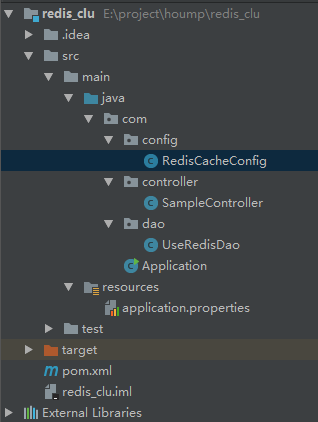
RedisCacheConfig
 package com.config;

 import com.fasterxml.jackson.annotation.JsonAutoDetect;

 import com.fasterxml.jackson.annotation.PropertyAccessor;

 import com.fasterxml.jackson.databind.ObjectMapper;

 import org.springframework.beans.factory.annotation.Value;

 import org.springframework.boot.autoconfigure.EnableAutoConfiguration;

 import org.springframework.cache.annotation.CachingConfigurerSupport;

 import org.springframework.cache.annotation.EnableCaching;

 import org.springframework.cache.interceptor.KeyGenerator;

 import org.springframework.context.annotation.Bean;

 import org.springframework.context.annotation.Configuration;

 import org.springframework.data.redis.cache.RedisCacheManager;

 import org.springframework.data.redis.connection.RedisNode;

 import org.springframework.data.redis.connection.RedisSentinelConfiguration;

 import org.springframework.data.redis.connection.jedis.JedisConnectionFactory;

 import org.springframework.data.redis.core.RedisTemplate;

 import org.springframework.data.redis.serializer.Jackson2JsonRedisSerializer;

 import org.springframework.data.redis.serializer.StringRedisSerializer;

 import java.lang.reflect.Method;

 /**

  * @author zhujinmin6

  */

 @Configuration

 @EnableAutoConfiguration

 @EnableCaching //加上这个注解是的支持缓存注解

 public class RedisCacheConfig extends CachingConfigurerSupport {

     @Value("${spring.redis.host}")

     private String host;

     @Value("${spring.redis.port}")

     private int port;

     @Value("${spring.redis.timeout}")

     private int timeout;

     @Value("${spring.redis.database}")

     private int database;

     @Value("${spring.redis.password}")

     private String password;

     @Value("${spring.redis.sentinel.nodes}")

     private String redisNodes;

     @Value("${spring.redis.sentinel.master}")

     private String master;

     /**

      * redis哨兵配置

      * @return

      */

     @Bean

     public RedisSentinelConfiguration redisSentinelConfiguration(){

         RedisSentinelConfiguration configuration = new RedisSentinelConfiguration();

         String[] host = redisNodes.split(",");

         for(String redisHost : host){

             String[] item = redisHost.split(":");

             String ip = item[0];

             String port = item[1];

             configuration.addSentinel(new RedisNode(ip, Integer.parseInt(port)));

         }

         configuration.setMaster(master);

         return configuration;

     }

     /**

      * 连接redis的工厂类

      *

      * @return

      */

     @Bean

     public JedisConnectionFactory jedisConnectionFactory() {

         JedisConnectionFactory factory = new JedisConnectionFactory(redisSentinelConfiguration());

         factory.setHostName(host);

         factory.setPort(port);

         factory.setTimeout(timeout);

         factory.setPassword(password);

         factory.setDatabase(database);

         return factory;

     }

     /**

      * 配置RedisTemplate

      * 设置添加序列化器

      * key 使用string序列化器

      * value 使用Json序列化器

      * 还有一种简答的设置方式,改变defaultSerializer对象的实现。

      *

      * @return

      */

     @Bean

     public RedisTemplate<Object, Object> redisTemplate() {

         //StringRedisTemplate的构造方法中默认设置了stringSerializer

         RedisTemplate<Object, Object> template = new RedisTemplate<>();

         //设置开启事务

         template.setEnableTransactionSupport(true);

         //set key serializer

         StringRedisSerializer stringRedisSerializer = new StringRedisSerializer();

         template.setKeySerializer(stringRedisSerializer);

         template.setHashKeySerializer(stringRedisSerializer);

         template.setConnectionFactory(jedisConnectionFactory());

         template.afterPropertiesSet();

         return template;

     }

     /**

      * 设置RedisCacheManager

      * 使用cache注解管理redis缓存

      *

      * @return

      */

     @Override

     @Bean

     public RedisCacheManager cacheManager() {

         RedisCacheManager redisCacheManager = new RedisCacheManager(redisTemplate());

         return redisCacheManager;

     }

     /**

      * 自定义生成redis-key

      *

      * @return

      */

     @Override

     public KeyGenerator keyGenerator() {

         return new KeyGenerator() {

             @Override

             public Object generate(Object o, Method method, Object... objects) {

                 StringBuilder sb = new StringBuilder();

                 sb.append(o.getClass().getName()).append(".");

                 sb.append(method.getName()).append(".");

                 for (Object obj : objects) {

                     sb.append(obj.toString());

                 }

                 System.out.println("keyGenerator=" + sb.toString());

                 return sb.toString();

             }

         };

     }

 }
SampleController
package com.controller;

import com.dao.UseRedisDao;

import org.springframework.beans.factory.annotation.Autowired;

import org.springframework.web.bind.annotation.RequestMapping;

import org.springframework.web.bind.annotation.RestController;

/**

 * @author zhujinming6

 * @create 2017-10-24 9:25

 **/

@RestController

@RequestMapping("/sample")

public class SampleController {

    @Autowired

    private UseRedisDao useRedisDao;

    @RequestMapping("/hi")

    public String sayHello(String key,String value){

        useRedisDao.setValue(key,value);

        return useRedisDao.getValue(key);

    }

}
UseRedisDao
package com.dao;

import org.springframework.beans.factory.annotation.Autowired;

import org.springframework.data.redis.core.HashOperations;

import org.springframework.data.redis.core.ListOperations;

import org.springframework.data.redis.core.RedisTemplate;

import org.springframework.data.redis.core.ValueOperations;

import org.springframework.stereotype.Repository;

import javax.annotation.PostConstruct;

import java.util.Map;

/**

 * @Author: zhujinmin6

 * @Date: create in 15:44 17/9/21.

 * @description:整合redis的实例,简单了解RedisTemplate的API

 */

@Repository

public class UseRedisDao {

    @Autowired

    private RedisTemplate<Object,Object> redisTemplate;

    private ValueOperations<Object,Object> valueOperations;

    private ListOperations<Object,Object> listOperations;

    private HashOperations hashOperations;

    @PostConstruct

    public void getValueOperation(){

        valueOperations = redisTemplate.opsForValue();

        listOperations = redisTemplate.opsForList();

        hashOperations = redisTemplate.opsForHash();

    }

    public void setValue(String key, String value){

        valueOperations.set(key, value);

    }

    public String getValue(String key){

        return (String) valueOperations.get(key);

    }

    public void addList(String key, String value){

        listOperations.leftPush(key, value);

    }

    public Long getListSize(String key){

        return listOperations.size(key);

    }

    public void setHashMap(String key, Map map){

        hashOperations.putAll(key, map);

    }

    public Map getHashMap(String key){

        return hashOperations.entries(key);

    }

}
Application
package com;

import org.springframework.beans.factory.annotation.Autowired;

import org.springframework.boot.SpringApplication;

import org.springframework.boot.autoconfigure.EnableAutoConfiguration;

import org.springframework.boot.autoconfigure.SpringBootApplication;

import org.springframework.boot.builder.SpringApplicationBuilder;

import org.springframework.boot.web.servlet.ServletComponentScan;

import org.springframework.boot.web.support.SpringBootServletInitializer;

import org.springframework.context.annotation.Bean;

import org.springframework.context.annotation.EnableAspectJAutoProxy;

import org.springframework.context.annotation.ImportResource;

/**

 * Web容器启动主类

 * @author zhujinmin6

 */

@SpringBootApplication(scanBasePackages = { "com" })

@EnableAutoConfiguration

@ServletComponentScan

public class Application extends  SpringBootServletInitializer {

    public static void main(String [] args){

        SpringApplication.run(Application.class,args);

    }

    @Override

    protected SpringApplicationBuilder configure(SpringApplicationBuilder application) {

        return application.sources(Application.class);

    }

}
pom.xml
<?xml version="1.0" encoding="UTF-8"?>

<project xmlns="http://maven.apache.org/POM/4.0.0"

         xmlns:xsi="http://www.w3.org/2001/XMLSchema-instance"

         xsi:schemaLocation="http://maven.apache.org/POM/4.0.0 http://maven.apache.org/xsd/maven-4.0.0.xsd">

    <modelVersion>4.0.0</modelVersion>

    <groupId>redis_clu</groupId>

    <artifactId>redis_clu</artifactId>

    <version>1.0-SNAPSHOT</version>

    <parent>

        <groupId>org.springframework.boot</groupId>

        <artifactId>spring-boot-starter-parent</artifactId>

        <version>1.4.3.RELEASE</version>

        <relativePath/> <!-- lookup parent from repository -->

    </parent>

    <properties>

        <project.build.sourceEncoding>UTF-8</project.build.sourceEncoding>

        <project.reporting.outputEncoding>UTF-8</project.reporting.outputEncoding>

        <java.version>1.8</java.version>

    </properties>

    <dependencies>

        <dependency>

            <groupId>org.springframework.boot</groupId>

            <artifactId>spring-boot-starter-thymeleaf</artifactId>

        </dependency>

        <dependency>

            <groupId>org.springframework.boot</groupId>

            <artifactId>spring-boot-starter-test</artifactId>

            <scope>test</scope>

        </dependency>

        <dependency>

            <groupId>org.thymeleaf.extras</groupId>

            <artifactId>thymeleaf-extras-springsecurity4</artifactId>

        </dependency>

        <!-- spring boot and redis-->

        <dependency>

            <groupId>org.springframework.boot</groupId>

            <artifactId>spring-boot-starter-data-redis</artifactId>

            <version>1.5.7.RELEASE</version>

        </dependency>

    </dependencies>

    <build>

        <plugins>

            <plugin>

                <groupId>org.springframework.boot</groupId>

                <artifactId>spring-boot-maven-plugin</artifactId>

            </plugin>

        </plugins>

    </build>

</project>
application.properties
#springSession \u9009\u62E9\u540C\u6B65session\u7684\u5916\u90E8\u7F13\u5B58

#spring.session.store-type=redis

#========================redis \u914D\u7F6E=============================

# Redis\u6570\u636E\u5E93\u7D22\u5F15\uFF08\u9ED8\u8BA4\u4E3A0\uFF09,\u5982\u679C\u8BBE\u7F6E\u4E3A1\uFF0C\u90A3\u4E48\u5B58\u5165\u7684key-value\u90FD\u5B58\u653E\u5728select 1\u4E2D

spring.redis.database=0

# Redis\u670D\u52A1\u5668\u5730\u5740

spring.redis.host=localhost

# Redis\u670D\u52A1\u5668\u8FDE\u63A5\u7AEF\u53E3

spring.redis.port=6379

# Redis\u670D\u52A1\u5668\u8FDE\u63A5\u5BC6\u7801\uFF08\u9ED8\u8BA4\u4E3A\u7A7A\uFF09

spring.redis.password=

#\u8FDE\u63A5\u6C60\u6700\u5927\u8FDE\u63A5\u6570\uFF08\u4F7F\u7528\u8D1F\u503C\u8868\u793A\u6CA1\u6709\u9650\u5236\uFF09

spring.redis.pool.max-active=8

# \u8FDE\u63A5\u6C60\u6700\u5927\u963B\u585E\u7B49\u5F85\u65F6\u95F4\uFF08\u4F7F\u7528\u8D1F\u503C\u8868\u793A\u6CA1\u6709\u9650\u5236\uFF09

spring.redis.pool.max-wait=-1

# \u8FDE\u63A5\u6C60\u4E2D\u7684\u6700\u5927\u7A7A\u95F2\u8FDE\u63A5

spring.redis.pool.max-idle=8

# \u8FDE\u63A5\u6C60\u4E2D\u7684\u6700\u5C0F\u7A7A\u95F2\u8FDE\u63A5

spring.redis.pool.min-idle=0

# \u8FDE\u63A5\u8D85\u65F6\u65F6\u95F4\uFF08\u6BEB\u79D2\uFF09

spring.redis.timeout=0

### \u4E3B\u4ECE\u914D\u7F6E

# name of Redis server  \u54E8\u5175\u76D1\u542C\u7684Redis server\u7684\u540D\u79F0

spring.redis.sentinel.master=mymaster

# comma-separated list of host:port pairs  \u54E8\u5175\u7684\u914D\u7F6E\u5217\u8868

spring.redis.sentinel.nodes=127.0.0.1:26379,127.0.0.1:26378,127.0.0.1:26377
启动成功

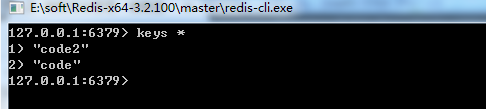
调用redis
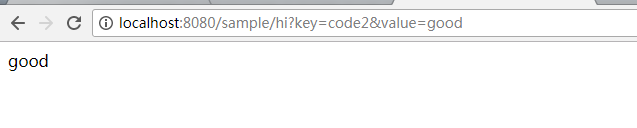
结果
博主开源项目:https://github.com/Enast/hummer,走过路过,请点个赞
springboot中配置主从redis的更多相关文章
- 在SpringBoot中配置aop
前言 aop作为spring的一个强大的功能经常被使用,aop的应用场景有很多,但是实际的应用还是需要根据实际的业务来进行实现.这里就以打印日志作为例子,在SpringBoot中配置aop 已经加入我 ...
- SpringBoot(八):SpringBoot中配置字符编码 Springboot中文乱码处理
SpringBoot中配置字符编码一共有两种方式 方式一: 使用传统的Spring提供的字符编码过滤器(和第二种比较,此方式复杂,由于时间原因这里先不介绍了,后续补上) 方式二(推荐使用) 在appl ...
- spring-boot 中实现标准 redis 分布式锁
一,前言 redis 现在已经成为系统缓存的必备组件,针对缓存读取更新操作,通常我们希望当缓存过期之后能够只有一个请求去更新缓存,其它请求依然使用旧的数据.这就需要用到锁,因为应用服务多数以集群方式部 ...
- 在SpringBoot中配置定时任务
前言 之前在spring中使用过定时任务,使用注解的方式配置很方便,在SpringBoot中的配置基本相同,只是原来在spring中的xml文件的一些配置需要改变,在SpringBoot中也非常简单. ...
- springboot中配置过滤器以及可能出现的问题
在springboot添加过滤器有两种方式: 1.通过创建FilterRegistrationBean的方式(建议使用此种方式,统一管理,且通过注解的方式若不是本地调试,如果在filter中需要增加c ...
- redis(Springboot中封装整合redis,java程序如何操作redis的5种基本数据类型)
平常测试redis操作命令,可能用的是cmd窗口 操作redis,记录一下 java程序操作reids, 操作redis的方法 可以用Jedis ,在springboot 提供了两种 方法操作 Red ...
- Django中配置用Redis做缓存和session
django-redis文档: http://django-redis-chs.readthedocs.io/zh_CN/latest/# 一.在Django中配置 # Django的缓存配置 CAC ...
- Mybatis源码解读-SpringBoot中配置加载和Mapper的生成
本文mybatis-spring-boot探讨在springboot工程中mybatis相关对象的注册与加载. 建议先了解mybatis在spring中的使用和springboot自动装载机制,再看此 ...
- SpringBoot中配置起动时的数据库初始化角本
一.简介 我们使用SpringBoot + JPA时,需要程序在启动时执行数据表的初始化或者数据库记录的初始化.一般数据表的初始化可以通过在Spring Boot的application.proper ...
随机推荐
- mui笔记
1.关闭当前页面执行上一个页面的方法 var preview = plus.webview.currentWebview().opener() //获取当前窗口的创建者,即A preview.eval ...
- codefirst configuration
codefirst 书写配置类,用于entity与数据库中表或view映射 1.对应表或视图都用this.ToTable("SimpleCompanyLoanView", &quo ...
- CFA
拜耳色彩滤波阵列(Bayer Color Filter Array, CFA)是非常有名的彩色图片的数字采集格式.由1/2的G,1/4得R,1/4的B组成. 当Image Sensor向外逐行输出数据 ...
- zw版【转发·台湾nvp系列Delphi例程】HALCON ZoomImageFactor2
zw版[转发·台湾nvp系列Delphi例程]HALCON ZoomImageFactor2 procedure TForm1.Button1Click(Sender: TObject);var op ...
- fafu 1413
叉积的运用 ,不断的用叉积去判断 最小的拼图, 刚开始对点进行排序,每个人的排序规则不同做法可能不同,我是按照点的x轴进行x轴相同用y小的在前面,然后每个点按照最下的点开始进行查找 每次从一个点出发然 ...
- HashMap、HashTable、ConcurrentHashMap的区别
一.相关概念 1.Map的概念 javadoc中对Map的解释如下: An objectthat maps keys to values . Amap cannot contain duplicate ...
- Code Blocks+gtest环境配置
本文仅介绍Code::Blocks+gtest环境配置,gtest具体使用方法请参考: 玩转Google开源C++单元测试框架Google Test系列(gtest)(总) http://www.cn ...
- click 在网页测试手机模式下无效,不能执行。调成非手机模式即可
click 在网页测试手机模式下无效,不能执行. 调成非手机模式即可
- Js基础知识5-函数返回值、函数参数、函数属性、函数方法
函数返回值 所有函数都有返回值,没有return语句时,默认返回内容为undefined,和其他面向对象的编程语言一样,return语句不会阻止finally子句的执行. function testF ...
- jquery基础框架
(function(window,undefined){ var arr = [], push = arr.push, slice = arr.slice; //首先要做的就是封装一个parseHtm ...