
【Miktex】使用教程以及数学符号整理总结
LaTeX是当今世界上最流行和使用最为广泛的 TeX格式。它构筑在 Plain TeX的基础之上,并加进了很多的功能以使得使用者可以更为方便的利用 TeX的强大功能。使用 LaTeX基本上不需要使用者自己设计命令和宏等,因为 LaTeX已经替你做好了。
一、下载安装
下载地址:http://www.miktex.org/download
二、数学公式
1、数学公式的前后要加上 $ 或 \( 和 \)
比如:$f(x) = 3x + 7$ 和 \(f(x) = 3x + 7\) 效果是一样的;
如果用 \[ 和 \],或者使用 $$ 和 $$,则该公式独占一行;
如果用 \begin{equation} 和 \end{equation},则公式除了独占一行还会自动被添加序号, 如何公式不想编号则使用 \begin{equation*} 和 \end{equation*}.
2、字符
普通字符在数学公式中含义一样,除了
# $ % & ~ _ ^ \ { }
若要在数学环境中表示这些符号# $ % & _ { },需要分别表示为\# \$ \% \& \_ \{ \},即在个字符前加上\。
3、上标和下标
用 ^ 来表示上标,用 _ 来表示下标,看一简单例子:
$$\sum_{i=1}^n a_i=0$$
$$f(x)=x^{x^x}$$
效果:

这里有更多的LaTeX上标下标的设置
4、希腊字母
更多请参见这里
5、数学函数
例如sin x, 输入应该为\sin x
6、在公式中插入文本可以通过 \mbox{text} 在公式中添加text
比如:
\documentclass{article}
\usepackage{CJK}
\begin{CJK*}{GBK}{song}
\begin{document}
$$\mbox{对任意的$x>0$}, \mbox{有 }f(x)>0. $$
\end{CJK*}
\end{document}
效果:

7、分数及开方
\frac{numerator}{denominator} \sqrt{expression_r_r_r}表示开平方,
\sqrt[n]{expression_r_r_r} 表示开 n 次方.
8、省略号(3个点)
\ldots 表示跟文本底线对齐的省略号;\cdots 表示跟文本中线对齐的省略号,
比如:

表示为 $$f(x_1,x_x,\ldots,x_n) = x_1^2 + x_2^2 + \cdots + x_n^2 $$
9、括号和分隔符
() 和 [ ] 和 | 对应于自己;
{} 对应于 \{ \};
|| 对应于 \|。
当要显示大号的括号或分隔符时,要对应用 \left 和 \right,如:
\[f(x,y,z) = 3y^2 z \left( 3 + \frac{7x+5}{1 + y^2} \right).\]对应于
\left. 和 \right. 只用与匹配,本身是不显示的,比如,要输出:

则用 $$\left. \frac{du}{dx} \right|_{x=0}.$$
10、多行的数学公式

可以表示为:
\begin{eqnarray*}
\cos 2\theta & = & \cos^2 \theta - \sin^2 \theta \\
& = & 2 \cos^2 \theta - 1.
\end{eqnarray*}
其中&是对其点,表示在此对齐。
*使latex不自动显示序号,如果想让latex自动标上序号,则把*去掉
11、矩阵

表示为:
The \emph{characteristic polynomial} $\chi(\lambda)$ of the
$3 \times 3$~matrix
\[ \left( \begin{array}{ccc}
a & b & c \\
d & e & f \\
g & h & i \end{array} \right)\]
is given by the formula
\[ \chi(\lambda) = \left| \begin{array}{ccc}
\lambda - a & -b & -c \\
-d & \lambda - e & -f \\
-g & -h & \lambda - i \end{array} \right|.\]
c表示向中对齐,l表示向左对齐,r表示向右对齐。
12、导数、极限、求和、积分(Derivatives, Limits, Sums and Integrals)
The expression_r_r_rs

are obtained in LaTeX by typing
\frac{du}{dt} and \frac{d^2 u}{dx^2}
respectively. The mathematical symbol  is produced using \partial. Thus the Heat Equation

is obtained in LaTeX by typing
\[ \frac{\partial u}{\partial t}
= h^2 \left( \frac{\partial^2 u}{\partial x^2}
+ \frac{\partial^2 u}{\partial y^2}
+ \frac{\partial^2 u}{\partial z^2}\right)\]
To obtain mathematical expression_r_r_rs such as

in displayed equations we type \lim_{x \to +\infty}, \inf_{x > s} and \sup_K respectively. Thus to obtain

(in LaTeX) we type
\[ \lim_{x \to 0} \frac{3x^2 +7x^3}{x^2 +5x^4} = 3.\]
Added by Goldman2000@126:-------------------------
To compulsively display "u \to \infty" under the limit,

we type in LaTeX
\frac{1}{\lim_{u \rightarrow \infty}}, \frac{1}{\lim\limits_{u \rightarrow \infty}} or
\frac{1}{ \displaystyle \lim_{u \rightarrow \infty}} respectively.
Ended by Goldman2000@126: -------------------------
To obtain a summation sign such as

we type \sum_{i=1}^{2n}. Thus

is obtained by typing
\[ \sum_{k=1}^n k^2 = \frac{1}{2} n (n+1).\]
We now discuss how to obtain integrals in mathematical documents. A typical integral is the following:

This is typeset using
\[ \int_a^b f(x)\,dx.\]
The
integral sign is typeset using the control sequence \int, and the
limits of integration (in this case a and b are treated as a subscript
and a superscript on the integral sign.
Most integrals occurring in mathematical documents begin with an integral sign and contain one or more instances of d followed by another (Latin or Greek) letter, as in dx, dy and dt. To obtain the correct appearance one should put extra space before the d, using \,. Thus


and

are obtained by typing
\[ \int_0^{+\infty} x^n e^{-x} \,dx = n!.\]
\[ \int \cos \theta \,d\theta = \sin \theta.\]
\[ \int_{x^2 + y^2 \leq R^2} f(x,y)\,dx\,dy
= \int_{\theta=0}^{2\pi} \int_{r=0}^R
f(r\cos\theta,r\sin\theta) r\,dr\,d\theta.\]
and
\[ \int_0^R \frac{2x\,dx}{1+x^2} = \log(1+R^2).\]
respectively.
In some multiple integrals (i.e., integrals containing more than one integral sign) one
finds that LaTeX puts too much space between the integral signs. The
way to improve the appearance of of the integral is to use the control
sequence \! to remove a thin strip of unwanted space. Thus, for example,
the multiple integral

is obtained by typing
\[ \int_0^1 \! \int_0^1 x^2 y^2\,dx\,dy.\]
Had we typed
\[ \int_0^1 \int_0^1 x^2 y^2\,dx\,dy.\]
we would have obtained

A particularly noteworthy example comes when we are typesetting a multiple integral such as

Here we use \! three times to obtain suitable spacing between the integral signs. We typeset this integral using
\[ \int \!\!\! \int_D f(x,y)\,dx\,dy.\]
Had we typed
\[ \int \int_D f(x,y)\,dx\,dy.\]
we would have obtained

The following (reasonably complicated) passage exhibits a number of the features which we have been discussing:

One would typeset this in LaTeX by typing In non-relativistic wave mechanics, the wave function
$\psi(\mathbf{r},t)$ of a particle satisfies the
\emph{Schr\"{o}dinger Wave Equation}
\[ i\hbar\frac{\partial \psi}{\partial t}
= \frac{-\hbar^2}{2m} \left(
\frac{\partial^2}{\partial x^2}
+ \frac{\partial^2}{\partial y^2}
+ \frac{\partial^2}{\partial z^2}
\right) \psi + V \psi.\]
It is customary to normalize the wave equation by
demanding that
\[ \int \!\!\! \int \!\!\! \int_{\textbf{R}^3}
\left| \psi(\mathbf{r},0) \right|^2\,dx\,dy\,dz = 1.\]
A simple calculation using the Schr\"{o}dinger wave
equation shows that
\[ \frac{d}{dt} \int \!\!\! \int \!\!\! \int_{\textbf{R}^3}
\left| \psi(\mathbf{r},t) \right|^2\,dx\,dy\,dz = 0,\]
and hence
\[ \int \!\!\! \int \!\!\! \int_{\textbf{R}^3}
\left| \psi(\mathbf{r},t) \right|^2\,dx\,dy\,dz = 1\]
for all times~$t$. If we normalize the wave function in this
way then, for any (measurable) subset~$V$ of $\textbf{R}^3$
and time~$t$,
\[ \int \!\!\! \int \!\!\! \int_V
\left| \psi(\mathbf{r},t) \right|^2\,dx\,dy\,dz\]
represents the probability that the particle is to be found
within the region~$V$ at time~$t$.
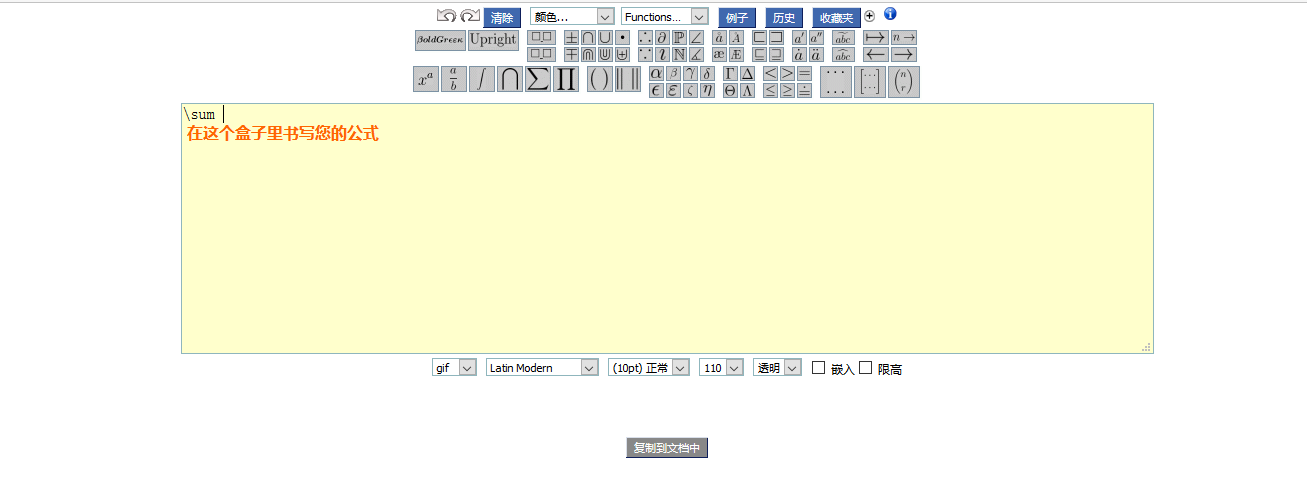
三、在线公式编辑器
http://latex.codecogs.com/eqneditor/editor.php
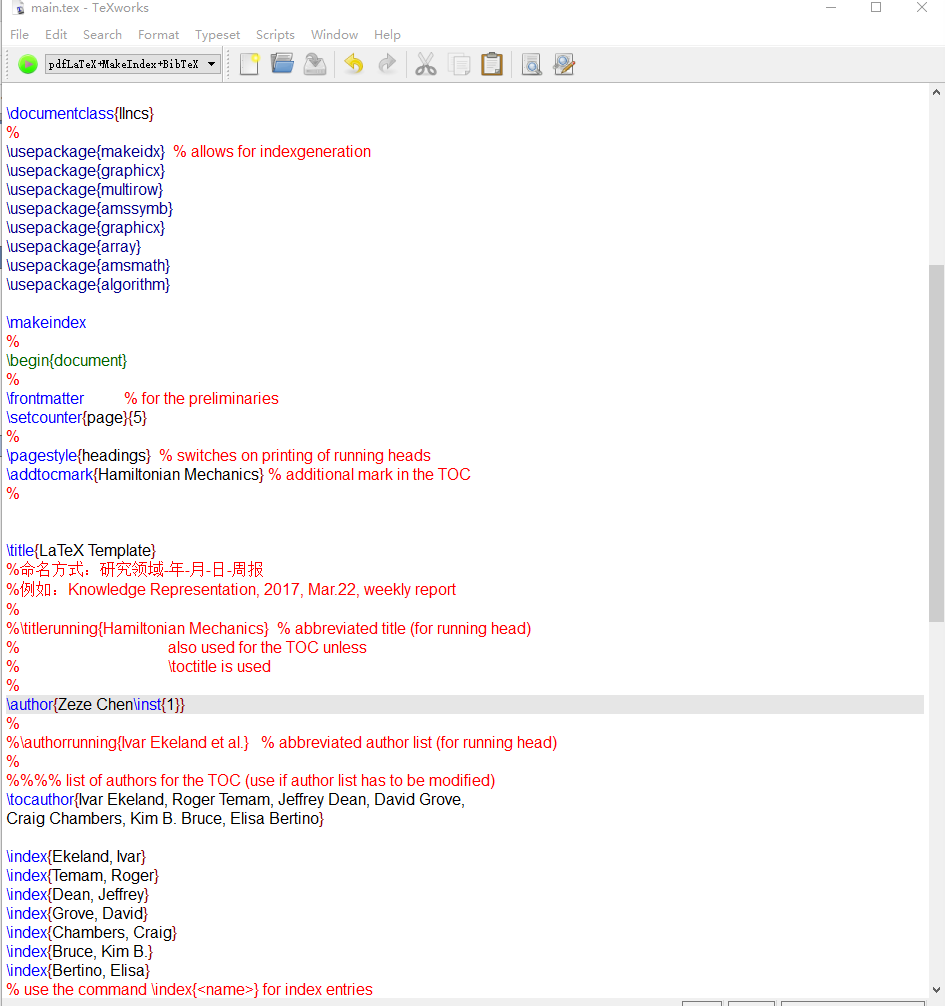
四、Miktex模板
% This is LLNCSDE2.TEX, a variation of LLNCS.DEM

% (the demonstration file of

% the LaTeX macro package from Springer-Verlag

% for Lecture Notes in Computer Science,

% version 2.3 for LaTeX2e),

% which can be used by volume editors for the preparation

% of the front matter pages and the author index

%

% Last changes: 16.10.2006, Frank Holzwarth (texhelp@springer.de)

%

%%%%%%%%%%%%%%%%%%%%%%%%%%%%%%%%%%%%%%%%%%%%%%%%%%%%%%%%%%%%%%%%%%%%%

% In order to generate an Author Index do the following:

% After TeXing this document start the program MakeIndex by typing

% MAKEINDX -S SPRMINDX.STY <filename>

% (generates an IND file for the Author Index)

% into the DOS command line.

% (At other systems you may have to use the command MAKEINDEX.)

% Now TeX this file once again, then you will get an Author Index.

% TeX this file once more, then the TOC will be complete.

%%%%%%%%%%%%%%%%%%%%%%%%%%%%%%%%%%%%%%%%%%%%%%%%%%%%%%%%%%%%%%%%%%%%%

\documentclass{llncs}

%

\usepackage{makeidx}  % allows for indexgeneration

\usepackage{graphicx}

\usepackage{multirow}

\usepackage{amssymb}

\usepackage{graphicx}

\usepackage{array}

\usepackage{amsmath}

\usepackage{algorithm}

\makeindex

%

\begin{document}

%

\frontmatter          % for the preliminaries

\setcounter{page}{5}

%

\pagestyle{headings}  % switches on printing of running heads

\addtocmark{Hamiltonian Mechanics} % additional mark in the TOC

%

\title{LaTeX Template}

%命名方式:研究领域-年-月-日-周报

%例如:Knowledge Representation, 2017, Mar.22, weekly report

%

%\titlerunning{Hamiltonian Mechanics}  % abbreviated title (for running head)

%                                     also used for the TOC unless

%                                     \toctitle is used

%

\author{Zeze Chen\inst{1}}

%

%\authorrunning{Ivar Ekeland et al.}   % abbreviated author list (for running head)

%

%%%% list of authors for the TOC (use if author list has to be modified)

\tocauthor{Ivar Ekeland, Roger Temam, Jeffrey Dean, David Grove,

Craig Chambers, Kim B. Bruce, Elisa Bertino}

\index{Ekeland, Ivar}

\index{Temam, Roger}

\index{Dean, Jeffrey}

\index{Grove, David}

\index{Chambers, Craig}

\index{Bruce, Kim B.}

\index{Bertino, Elisa}

% use the command \index{<name>} for index entries

%

\institute{Princeton University, Princeton NJ 08544, USA,\\

\email{I.Ekeland@princeton.edu},\\ WWW home page:

\texttt{http://users/\homedir iekeland/web/welcome.html}

}

\maketitle              % typeset the title of the contribution

\abstract{2017.3.22. \\ \textbf{Keyword:} XXX; XXX; XXX.}

\section{First Paper}

Well, it is just testing. I don't know what will happen...

\begin{equation}

e^{\pi{i}}+1=0

\end{equation}

\section{Second Paper}

another testing...

\begin{eqnarray*}

\cos 2\theta & = & \cos^2 \theta - \sin^2 \theta \\

& = & 2 \cos^2 \theta - 1.

\end{eqnarray*}

\section{Third Paper}

testing...

\begin{figure}

\centering

\includegraphics[width=0.5\textwidth]{fig.png}

\caption{Test figure}

\label{Figure name}

\end{figure}

\end{document}
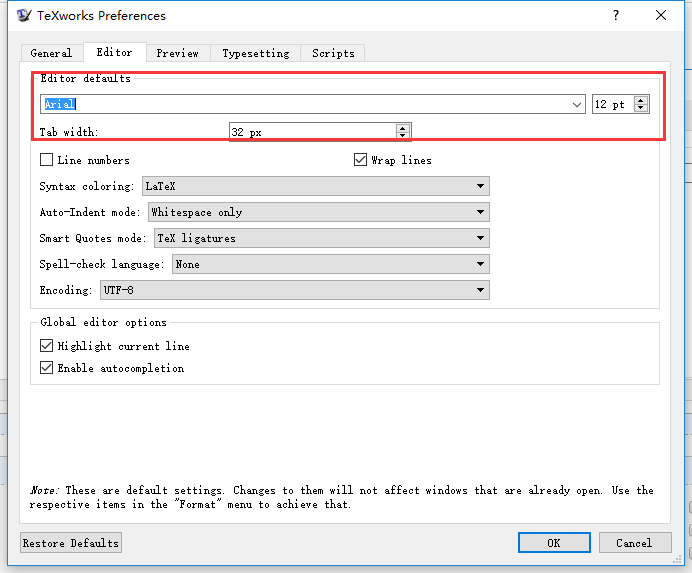
五、默认字体设置
Preference->Editor
【Miktex】使用教程以及数学符号整理总结的更多相关文章
- Latex所有常用数学符号整理
原文地址:https://blog.csdn.net/ying_xu/article/details/51240291 这段时间用Latex很多,常常需要查阅相关特殊的符号,这里做一个整理,也方便大家 ...
- [转]LaTex常用数学符号整理
转载自 http://blog.csdn.net/ying_xu/article/details/51240291 (自己保存方便查阅,侵删) 另一个网站 Markdown 添加 Latex 数学公式 ...
- Latex 数学符号
本文完全转自 <常用数学符号的 LaTeX 表示方法>,在此转载仅仅为了便于查阅,谨向原作者致以崇高的敬意. 常用数学符号的 LaTeX 表示方法 (以下内容主要摘自“一份不太简短的 LA ...
- 数学符号“s.t.”的意义
在优化问题的求解中,如线性规划.非线性规划问题等,经常会遇到数学符号“s.t.”,它的意思是什么呢? “s.t.”,指 subject to,受限制于.... 例如: 目标函数:min {x+2} 约 ...
- LaTeX常用数学符号表示方法
转自:http://www.mohu.org/info/symbols/symbols.htm 常用数学符号的 LaTeX 表示方法 (以下内容主要摘自“一份不太简短的 LATEX2e 介绍”) 1. ...
- LaTeX常用数学符号
之前在写博客做笔记时经常会在Word或WPS里写好数学公式再截图上传,一直觉得这样很low.现在实在是不想再去截图上传了,于是决定开始学一下LaTeX.在博客园中使用数学公式的设置可以参考在博客园使用 ...
- 数学符号π (Pi)、Σ(Capital Sigma)、μ (Mu) 、σ(sigma)、∏(capital pi), ∫(Integral Symbol)的来历
1.π (Pi; periphery/周长) March 14 marks Pi Day, the holiday commemorating the mathematical constant π ...
- 常用数学符号的 LaTeX 表示方法
常用数学符号的 LaTeX 表示方法 (以下内容主要摘自"一份不太简短的 LATEX2e 介绍") 1.指数和下标可以用^和_后加相应字符来实现.比如: 2.平方根(square ...
- LaTex Verbatim 环境下使用数学符号
参考: Write math and make a box with alltt environment LaTex Verbatim 环境下使用数学符号 在 Verbatim 环境下使用数学符号,需 ...
随机推荐
- Ubuntu菜鸟入门(十六)—— 安装视频播放器vlc
sudo add-apt-repository ppa:videolan/master-daily sudo apt-get update sudo apt-get install vlc Ubunt ...
- Hadoop学习:Map/Reduce初探与小Demo实现
原文地址:https://blog.csdn.net/liyong199012/article/details/25423221 一. 概念知识介绍 Hadoop MapReduce是一个用于处 ...
- eclipse导入class文件
右键src文件夹->build path->config build path->library->add class folder->create new folder ...
- windows开机后键盘失灵(非硬件原因)解决办法
今天来了,开机时突然发现输入密码时,键盘不管用了,试了一下键盘没问题,插口也没问题,能进入安全模式,很奇怪,昨天好好的今天却不能用了,找人倒腾了大半天也没搞出来,后来用PE盘消掉了密码,总算进入了系统 ...
- MySQL Cluster
MySQL Cluster MySQL集群一个非共享(shared nothing).分布式.分区系统,使用同步复制机制提供高可用和高性能. MySQL集群使用的是NDB引擎.NDB存储引擎会在节点间 ...
- Linux导出/导入逻辑卷组信息
源主机上操作: 将文件系统umount # umount /u01 再将LV和VG inactive: # lvchange -an /dev/vg_u01/lv_u01 # vgchange -an ...
- maven配置src/resources默认目录
在maven工程中,我们会将配置文件放到,src/main/resources 下面,例如 我们需要确认resource 下的文件 编译之后存放的位置 它编译的路径直接位于classes下面,这个 ...
- InlineModelAdmin
参考博客:https://www.cnblogs.com/linxiyue/p/4074562.html
- curl以cookie的方式登录
curl -o /dev/null -s -w ‘%{time_connect}:%{time_starttransfer}:%{time_total}’ --cookie "UM_dist ...
- Intellij Idea生成serialVersionUID的方法
默认情况下Intellij IDEA是关闭了继承了java.io.Serializable的类生成serialVersionUID的警告.如果需要ide提示生成serialVersionUID,那么需 ...