
css3实现的4种动画特效按钮
今天要给大家介绍的是css3按钮,里面包含四种特效的动画,如下图:
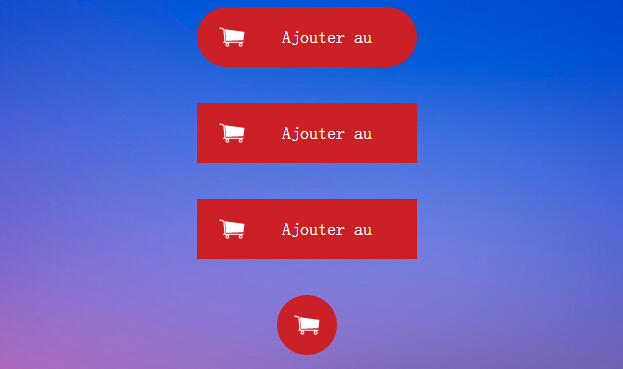
实现html代码:
<div align="center" class="fond">
<br />
<div class="bouton_1">
<a href="#123">
<img src="caddie.png" />
<span class="texteduboutton_1">Ajouter au panier</span></a>
</div>
<br />
<br />
<div class="bouton_2">
<a href="#123">
<img src="caddie.png" />
<span class="texteduboutton_2">Ajouter au panier</span></a>
</div>
<br />
<br />
<div class="bouton_3">
<a href="#123">
<img src="caddie.png" />
<span class="texteduboutton_3">Ajouter au panier</span></a>
</div>
<br />
<br />
<div class="bouton_4">
<a href="#123">
<img src="caddie.png" />
<span class="texteduboutton_4">Add to cart</span></a>
</div>
<br />
<br />
</div>
实现的css代码:
.fond{position:fixed;padding-top:px;top:;left:; right:;bottom:;

  background-image:url(fond_4.jpg);background-size:cover;overflow-y:auto;}

/*///////////////////////////////BOUTON _ 1///////////////////////////////////////*/

.bouton_1{

    width:200px;

    height:40px;

    padding:10px;

    border-radius:40px;

    background-color:#CB2025;

    overflow:hidden;

    -webkit-transition:all 0.2s ease-in;

    -moz-transition:all 0.2s ease-in;

    -ms-transition:all 0.2s ease-in;

    -o-transition:all 0.2s ease-in;

    transition:all 0.2s ease-in;

}

.bouton_1:hover{

    width:40px;

    height:40px;

    border-radius:40px;

    background-color:#60121C;

}

.texteduboutton_1

{

    width:70%;

    padding-right: 10px;

    float:right;

    line-height:40px;

    color:#ffffff;

    font-family:'Roboto';

    font-weight:;

    font-size:18px;

}

/*///////////////////////////////BOUTON _ 2///////////////////////////////////////*/

.bouton_2{

    width:200px;

    height:40px;

    padding:10px;

    background-color:#CB2025;

    overflow:hidden;

    -webkit-transition: all 0.5s ease-out;

    -moz-transition: all 0.5s ease-out;

    -ms-transition: all 0.5s ease-out;

    -o-transition: all 0.5s ease-out;

    transition: all 0.5s ease-out;

}

.bouton_2:hover{

    width:40px;

    height:40px;

    background-color:#60121C;

    -webkit-transform:rotateZ(360deg);

    -moz-transform:rotateZ(360deg);

    -ms-transform:rotateZ(360deg);

    -o-transform:rotateZ(360deg);

    transform:rotateZ(360deg);

}

.texteduboutton_2

{

    width:70%;

    padding-right: 10px;

    float:right;

    line-height:40px;

    color:#ffffff;

    font-family:'Roboto';

    font-weight:;

    font-size:18px;

}

/*///////////////////////////////BOUTON _ 3///////////////////////////////////////*/

.bouton_3{

    overflow:hidden;

    width:200px;

    height:40px;

    padding:10px;

    background-color:#CB2025;

}

.bouton_3:hover{

    width:40px;

    height:40px;

    background-color:#60121C;

    -webkit-animation: anim_trois 1.2s;

    -moz-animation: anim_trois 1.2s;

    -ms-animation: anim_trois 1.2s;

    -o-animation: anim_trois 1.2s;

    animation: anim_trois 1.2s;

}

.texteduboutton_3

{

    width:70%;

    padding-right: 10px;

    float:right;

    line-height:40px;

    color:#ffffff;

    font-family:'Roboto';

    font-weight:;

    font-size:18px;

}

@-webkit-keyframes anim_trois {

    0% {

        width:200px;

        -webkit-transform: perspective( 600px ) rotateY( 0deg );

    }

    50% {

        width:40px;

        height:40px;

        -webkit-transform: perspective( 600px ) rotateY( 0deg );

    }

    100% {

        width:40px;

        height:40px;

        background-color:#60121C;

        -webkit-transform: perspective( 600px ) rotateY( 180deg );

    }

}

@-moz-keyframes anim_trois {

    0% {

        width:200px;

        -moz-transform: perspective( 600px ) rotateY( 0deg );

    }

    50% {

        width:40px;

        height:40px;

        -moz-transform: perspective( 600px ) rotateY( 0deg );

    }

    100% {

        width:40px;

        height:40px;

        background-color:#60121C;

        -moz-transform: perspective( 600px ) rotateY( 180deg );

    }

}

@-ms-keyframes anim_trois {

    0% {

        width:200px;

        -ms-transform: perspective( 600px ) rotateY( 0deg );

    }

    50% {

        width:40px;

        height:40px;

        -ms-transform: perspective( 600px ) rotateY( 0deg );

    }

    100% {

        width:40px;

        height:40px;

        background-color:#60121C;

        -ms-transform: perspective( 600px ) rotateY( 180deg );

    }

}

@-o-keyframes anim_trois {

    0% {

        width:200px;

        -o-transform: perspective( 600px ) rotateY( 0deg );

    }

    50% {

        width:40px;

        height:40px;

        -o-transform: perspective( 600px ) rotateY( 0deg );

    }

    100% {

        width:40px;

        height:40px;

        background-color:#60121C;

        -o-transform: perspective( 600px ) rotateY( 180deg );

    }

}

@keyframes anim_trois {

    0% {

        width:200px;

        transform: perspective( 600px ) rotateY( 0deg );

    }

    50% {

        width:40px;

        height:40px;

        transform: perspective( 600px ) rotateY( 0deg );

    }

    100% {

        width:40px;

        height:40px;

        background-color:#60121C;

        transform: perspective( 600px ) rotateY( 180deg );

    }

}

/*///////////////////////////////BOUTON _ 4///////////////////////////////////////*/

.bouton_4{

    width:40px;

    height:40px;

    padding:10px;

    border-radius:40px;

    background-color:#CB2025;

    overflow:hidden;

    -webkit-transition:all 0.2s ease-in;

    -moz-transition:all 0.2s ease-in;

    -ms-transition:all 0.2s ease-in;

    -o-transition:all 0.2s ease-in;

    transition:all 0.2s ease-in;

}

.bouton_4:hover{

    width:200px;

    height:40px;

    border-radius:40px;

    background-color:#97bf0d;

}

.texteduboutton_4

{

    width:70%;

    padding-right: 10px;

    float:right;

    line-height:40px;

    color:#ffffff;

    font-family:'Roboto';

    font-weight:;

    font-size:18px;

}
注:本文爱编程原创文章,转载请注明原文地址:http://www.w2bc.com/Article/4762
css3实现的4种动画特效按钮的更多相关文章
- CSS3鼠标悬停8种动画特效
在线演示 本地下载
- 基于jQ+CSS3页面滚动内容元素动画特效
今天给大家分享一款基于jQ+CSS3页面滚动内容元素动画特效.这是一款基于jQuery+CSS3实现的页面滚动代码.该实例适用于适用浏览器:360.FireFox.Chrome.Safari.Oper ...
- 一款jquery和css3实现的卡通人物动画特效
之前为大家分享了很多jquery和css3的动画实例.今天给大家带来一款非常炫的jquery和css3实现的卡通人物动画特效.效果图如下: 在线预览 源码下载 实现的代码. html代码: < ...
- 分享十个CSS3鼠标滑过文字动画特效
介绍10组基于CSS3的鼠标滑过文字动画特效,有上凸.下凹等文字动画.这些炫酷的CSS3文字效果可以让网页变得更加绚丽.效果图如下: 在线预览 源码下载 实现的代码. html代码: <h2 ...
- iOS-各种动画特效
概述 广播跑马灯/弹幕/直播点赞/烟花/雪花等动画特效, 后续增加~ 详细 代码下载:http://www.demodashi.com/demo/10674.html 一.实现功能 1. 广播跑马灯 ...
- 利用CSS3实现div页面淡入动画特效
利用CSS3实现页面淡入动画特效 摘要 利用CSS3动画属性"@keyframes "可实现一些动态特效,具体语法和参数可以网上自行学习.这篇文章主要是实践应用一下这个动画属性 ...
- 纯css3 3D图片立方体旋转动画特效
纯css3 3D立方体模块,鼠标触碰,模块炸开,大立方体中套小立方体 效果展示 手机扫描二维码体验效果: 效果图如下: 源码下载:http://hovertree.com/h/bjaf/0qmul8g ...
- css3动画特效:纯css3制作win8加载动画特效
Windows 8 完整效果如上图:这个里面可能是css冲突,喜欢的可以自己去体征一下: css特效代码: <style type="text/css"> ...
- 10大炫酷的HTML5文字动画特效欣赏
文字是网页中最基本的元素,在CSS2.0时代,我们只能在网页上展示静态的文字,只能改变他的大小和颜色,显得枯燥无味.随着HTML5的发展,现在网页中的文字样式变得越来越丰富了,甚至出现了文字动画,HT ...
随机推荐
- Spring MVC freemarker使用
什么是 FreeMarker? FreeMarker 是一款 模板引擎: 即一种基于模板和要改变的数据, 并用来生成输出文本(HTML网页,电子邮件,配置文件,源代码等)的通用工具. 它不是面向最终用 ...
- Docker 简单查看name和ip
原文地址:https://blog.csdn.net/wen_1108/article/details/78282268 查看docker name: sudo docker inspect -f=' ...
- aaronyang的百度地图API之LBS云与.NET开发 Javascript API 2.0【基本地图的操作】
为了更简单的演示,我们创建个.NET的ASP.NET MVC4项目 好了,上面都是后话,POI说白了,就是你的用户的数据,很多数据,不过没关系,因为你的数据如果存在百度的LBS云上,那么大数据你就不用 ...
- .NET Core 2.0 Cookie中间件 权限验证
:在ConfigureServices添加Cookie中间件,使用自定义Scheme services.AddAuthentication(options=> { options.Default ...
- Android静默安装实现方案,仿360手机助手秒装和智能安装功能
转载请注明出处:http://blog.csdn.net/guolin_blog/article/details/47803149 之前有非常多朋友都问过我.在Android系统中如何才干实现静默安装 ...
- nginx根据http_user_agent防DDOS
前端squid反向代理到nginx nginx根据http_user_agent防DDOS 首先查看访问日志,找出可疑访问 找到http_user_agent 的特征,然后再作过滤 "Moz ...
- [转]Class.forName()的作用与使用总结
1.Class类简介: Java程序在运行时,Java运行时系统一直对所有的对象进行所谓的运行时类型标识.这项信息纪录了每个对象所属的类.虚拟机通常使用运行时类型信息选准正确方法去执行,用来保存这些类 ...
- 使用curator 来管理elasticsearch的index
这里我们参考官网安装curator https://www.cookiesinn.org/elasticsearch_curator_delete_indices/ https://www.elast ...
- Android Studio 1.1.0 切换主题和绑定 代码提示 快捷键
这篇文章用于给刚从eclipse 转用 Android Studio 1.1.0的同学看的. 所以经常会更新的. 至于为什么要转Android Studio 1.1.0呢,就自己想吧.没有人强逼的. ...
- Eclipse中如何安装和使用GrepCode插件 (转)
GrepCode(GC)Eclipse插件允许Eclipse用户在Eclipse IDE中搜索由GrepCode提供的工厂类.本教程介绍如何安装和使用插件.使用Eclipse3.5(Galileo)的 ...