
使用 resizableImageWithCapInsets 方法实现可伸缩图片
之前介绍过通过 stretchableImageWithLeftCapWidth:topCapHeight: 方法来实现可伸缩图片;
可看这篇随笔:使用 stretchableImageWithLeftCapWidth 方法实现可伸缩图片
iOS5 中提供了一个新的 UIImage 对象实例方法:resizableImageWithCapInsets:,可以将图片转换为以某一偏移值为偏移的可伸缩图片(偏移值内的图片内容将不被拉伸或压缩)。
stretchableImageWithLeftCapWidth:topCapHeight: 模式(此方法已经过期,推荐用下面的resizableImageWithCapInsets: 方法);
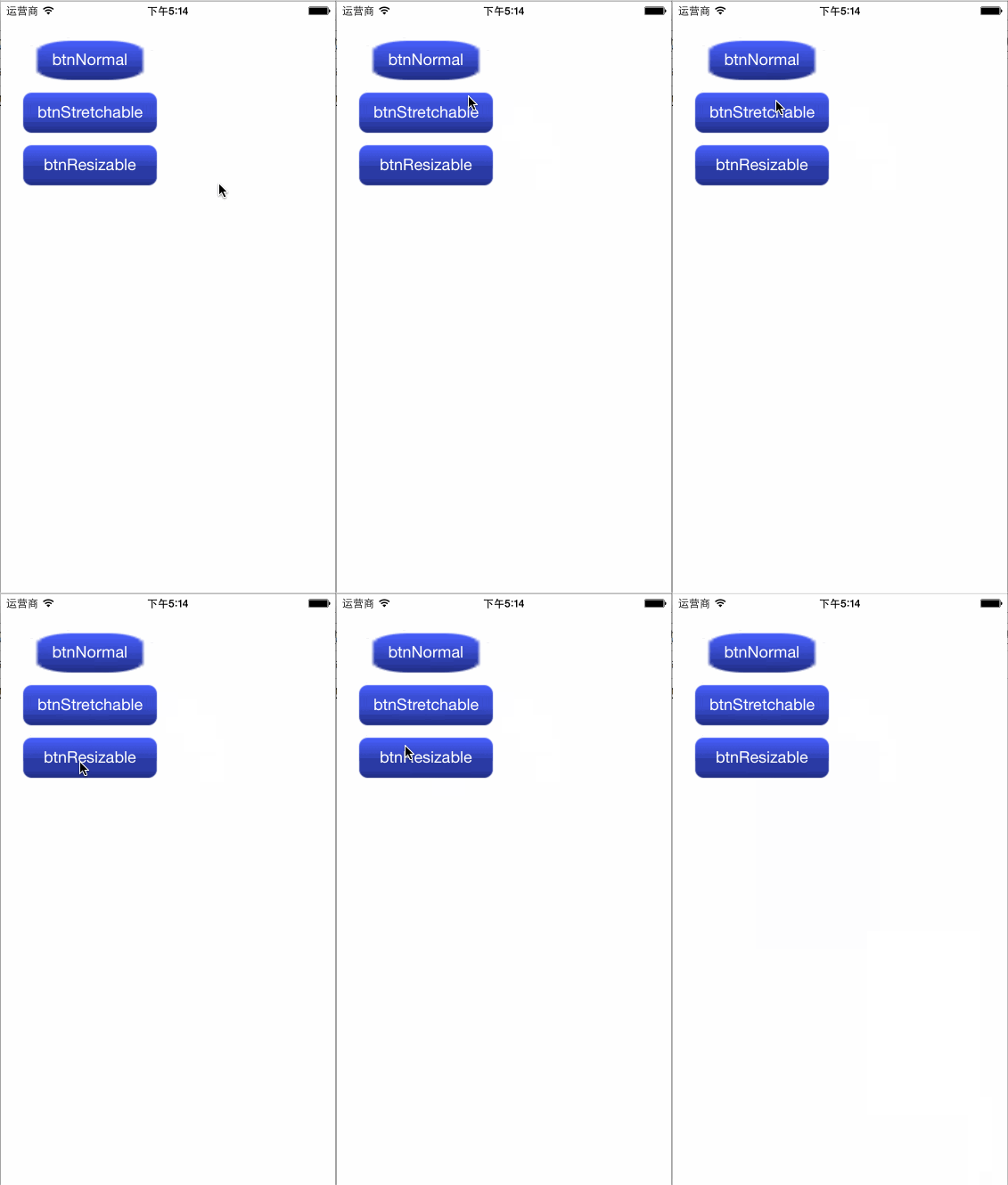
resizableImageWithCapInsets: 模式还能实现类似图片渐变的效果,更灵活控制。
效果如下:
ViewController.h
 #import <UIKit/UIKit.h>

 @interface ViewController : UIViewController

 @end
ViewController.m
 #import "ViewController.h"

 @interface ViewController ()

 - (void)layoutUI;

 @end

 @implementation ViewController

 #define kWidthOfButton 160.0

 #define kHeightOfButton 49.0

 - (void)viewDidLoad {

     [super viewDidLoad];

     [self layoutUI];

 }

 - (void)didReceiveMemoryWarning {

     [super didReceiveMemoryWarning];

     // Dispose of any resources that can be recreated.

 }

 - (void)layoutUI {

     //普通模式

     UIImage *img = [UIImage imageNamed:@"blueButton"]; //size: 39*39

     UIButton *btnNormal = [[UIButton alloc] initWithFrame:CGRectMake(20.0, 40.0, kWidthOfButton, kHeightOfButton)];

     [btnNormal setTitle:@"btnNormal" forState:UIControlStateNormal];

     [btnNormal setBackgroundImage:img forState:UIControlStateNormal];

     [self.view addSubview:btnNormal];

     //stretchableImageWithLeftCapWidth:topCapHeight:模式(此方法已经过期,推荐用下面的resizableImageWithCapInsets:方法)

     UIImage *imgStretchable = [img stretchableImageWithLeftCapWidth:16.0 topCapHeight:16.0];

     UIButton *btnStretchable = [[UIButton alloc] initWithFrame:CGRectMake(20.0, 50.0+kHeightOfButton, kWidthOfButton, kHeightOfButton)];

     [btnStretchable setTitle:@"btnStretchable" forState:UIControlStateNormal];

     [btnStretchable setBackgroundImage:imgStretchable forState:UIControlStateNormal];

     [self.view addSubview:btnStretchable];

     //resizableImageWithCapInsets:模式;相比stretchableImageWithLeftCapWidth:topCapHeight:模式来说,resizableImageWithCapInsets:模式还能实现类似图片渐变的效果,更灵活控制

     UIImage *imgResizable = [img resizableImageWithCapInsets:UIEdgeInsetsMake(30.0, 16.0, 9.0, 16.0)];

     UIButton *btnResizable = [[UIButton alloc] initWithFrame:CGRectMake(20.0, 60.0+(kHeightOfButton*), kWidthOfButton, kHeightOfButton)];

     [btnResizable setTitle:@"btnResizable" forState:UIControlStateNormal];

     [btnResizable setBackgroundImage:imgResizable forState:UIControlStateNormal];

     [self.view addSubview:btnResizable];

 }

 @end
使用 resizableImageWithCapInsets 方法实现可伸缩图片的更多相关文章
- 使用 stretchableImageWithLeftCapWidth 方法实现可伸缩图片
- (UIImage *)stretchableImageWithLeftCapWidth:(NSInteger)leftCapWidth topCapHeight:(NSInteger)topCap ...
- php 图片上传的公共方法(按图片宽高缩放或原图)
写的用于图片上传的公共方法类调用方法: $upload_name='pic';$type = 'logo_val';$file_name = 'logo_' . $user_id .create_st ...
- <canvas>drawImage()方法无法显示图片
在书上看到用<canvas>绘制图像就动手试试,刚开始,我的代码是这样的: <!DOCTYPE html> <html> <head> <meta ...
- WPF:通过BitmapSource的CopyPixels和Create方法来切割图片
原文 WPF:通过BitmapSource的CopyPixels和Create方法来切割图片 BitmapSource是WPF图像的最基本类型,它同时提供两个像素相关的方法就是CopyPixels和C ...
- [Android]ListView的Adapter.getView()方法中延迟加载图片的优化
以下内容为原创,欢迎转载,转载请注明 来自天天博客:http://www.cnblogs.com/tiantianbyconan/p/4139998.html 举个例子吧,以好友列表为例 ListVi ...
- java中getBytes方法可能使图片文件产生的问题
InputStream is = new FileInputStream(fl); ImageInputStream iis = ImageIO.createImageInputStream(is); ...
- createObjectURL方法 实现本地图片预览
ie6 可以直接显示本本地路径的图片 如: <img src="file://c:/3.jpg" /> ~~~网上都说ie7就不支持这种文件系统路径的url,但测试 ...
- 在drawRect:方法中绘制图片,文字以及Core Graphics 框架的了解
p.p1 { margin: 0.0px 0.0px 0.0px 0.0px; font: 11.0px Menlo; color: #000000 } p.p2 { margin: 0.0px 0. ...
- 使用readAsDataURL方法预览图片
使用FileReader接口的readAsDataURL方法实现图片的预览. 在FileReader出现之前,前端的图片预览是这样实现的:把本地图片上传到服务器,服务器把图片地址返回,并把它替换到图片 ...
随机推荐
- WPF Image控件 Source: Byte[] ,BitmapImage 相互转换
文件转为byte[] FileStream fs = new FileStream(filepath, FileMode.Open, FileAccess.Read); byte[] desBytes ...
- 真机调试报错error ==Error Domain=NSURLErrorDomain Code=-1009 "似乎已断开与互联网的连接。"
真机调试报错error ==Error Domain=NSURLErrorDomain Code=-1009 "似乎已断开与互联网的连接." 请注意,错误代码是-1009,网上关于 ...
- 安卓Activity生命周期(转)
http://www.oschina.net/question/54100_27841 启动:onCreate()->onStart()->onResume 当从Activity界面直接按 ...
- OAuth2.0 授权的工作原理
作者:Barret李靖链接:https://www.zhihu.com/question/19781476/answer/81020455来源:知乎著作权归作者所有.商业转载请联系作者获得授权,非商业 ...
- IDEA无法启动debugger,报错Address localhost:1099 is already in use
Address localhost:1099 is already in use http://blog.csdn.net/huazhongkejidaxuezpp/article/details/4 ...
- 【程序练习】——ini格式转换为xml格式
;Configuration of http [http] doamin=www.mysite.com port= cgihome=/cgi-bin ;Configuration of db [d ...
- SpringBoot 中常用注解@Controller/@RestController/@RequestMapping的区别
SpringBoot中常用注解@Controller/@RestController/@RequestMapping的区别 @Controller 处理http请求 @Controller //@Re ...
- Nodejs中export的作用
在上一节,我们编写了一个hello.js文件,这个hello.js文件就是一个模块,模块的名字就是文件名(去掉.js后缀),所以hello.js文件就是名为hello的模块. 我们把hello.js改 ...
- 七牛图片存储api
https://developer.qiniu.com/kodo 属于对象存储 https://www.qiniu.com/prices 如何获取存储文件的外链接 https://developer. ...
- 路由策略和策略路由 & route-map
今天,这个专题应用下route-map,在这个之前,有很多内容需要掌握,不是简单的制定一个路由图就可以了. -------- 本次专题理论的东西居多,但是不是复制黏贴,是加上自己的理解思想. 第一个要 ...