
xpath的常见操作
1. 获取某一个节点下所有的文本数据:
data = response.xpath('//div[@id="zoomcon"]')

content = ''.join(data.xpath('string(.)').extract())
这段代码将获取,div为某一个特定id的所有文本数据:
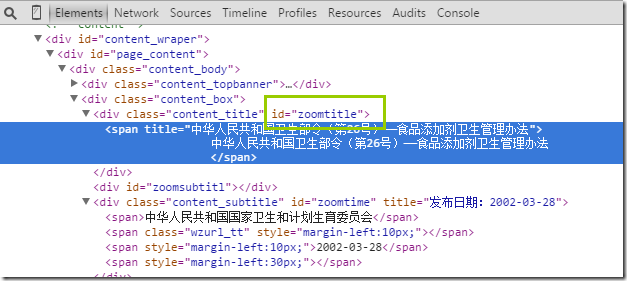
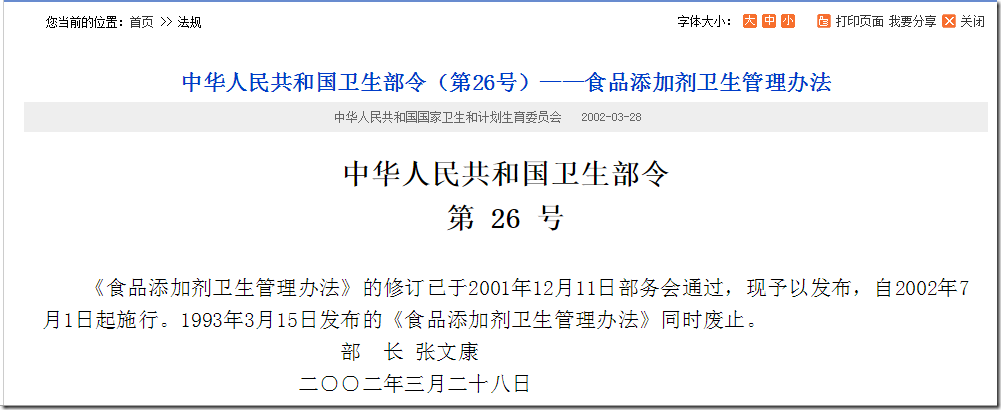
http://www.nhfpc.gov.cn/fzs/s3576/200804/cdbda975a377456a82337dfe1cf176a1.shtml
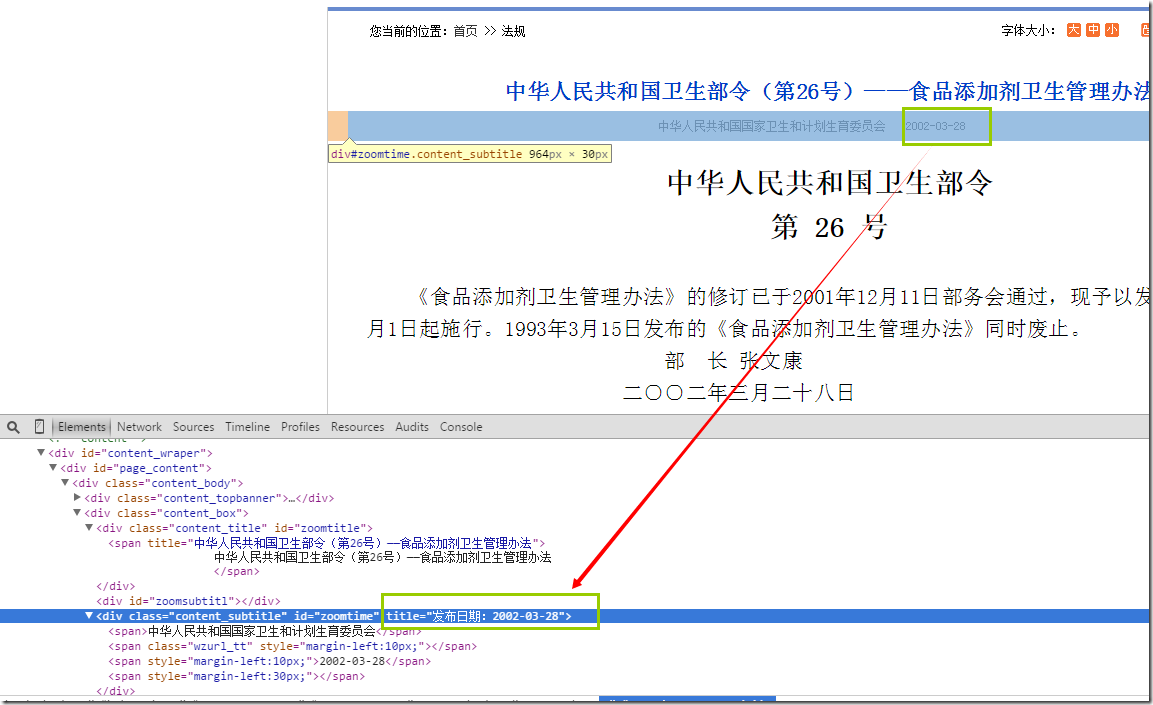
2. 获取html几点属性的值
>>> response.xpath("//div[@id='zoomtime']").extract()

[u'<div class="content_subtitle" id="zoomtime" title="\u53d1\u5e03\u65e5\u671f\uff1a2010-10-26"><span>\u4e2d\u534e\u4eba\u6c11\u5171\u548c\u56fd\u56fd\u5bb6\u536b\u751f\u548c\u8ba1\u5212\u751f\u80b2\u59d4\u5458\u4f1a</span><span class="wzurl_tt" style="margin-left:10px;"></span><span style="margin-left:10px;">2010-10-26</span>\r\n                <span style="margin-left:30px;"></span> </div>']

>>> response.xpath("//div[@id='zoomtime']/@title").extract()

[u'\u53d1\u5e03\u65e5\u671f\uff1a2010-10-26']
这里需要获取的是某一个id下,属性title的值,使用的@title就可以获取到:
scrapy的项目结构:
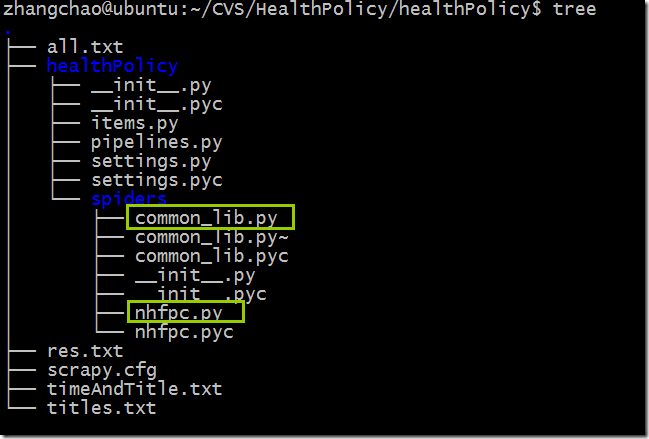
nhfpc.py
# -*- coding: utf-8 -*-

import scrapy

import sys

import hashlib

from scrapy.contrib.spiders import CrawlSpider, Rule

from scrapy.contrib.linkextractors import LinkExtractor

from datetime import *

from common_lib import *

reload(sys)

sys.setdefaultencoding('utf-8')

class NhfpcItem(scrapy.Item):

    url = scrapy.Field()

    name = scrapy.Field()

    description = scrapy.Field()

    size = scrapy.Field()

    dateTime = scrapy.Field()

class NhfpcSpider(scrapy.contrib.spiders.CrawlSpider):

    name = "nhfpc"

    allowed_domains = ["nhfpc.gov.cn"]

    start_urls = (

        'http://www.nhfpc.gov.cn/fzs/pzcfg/list.shtml',

        'http://www.nhfpc.gov.cn/fzs/pzcfg/list_2.shtml',

        'http://www.nhfpc.gov.cn/fzs/pzcfg/list_3.shtml',

        'http://www.nhfpc.gov.cn/fzs/pzcfg/list_4.shtml',

        'http://www.nhfpc.gov.cn/fzs/pzcfg/list_5.shtml',

        'http://www.nhfpc.gov.cn/fzs/pzcfg/list_6.shtml',

        'http://www.nhfpc.gov.cn/fzs/pzcfg/list_7.shtml',

    )

    rules = (

        Rule(

            LinkExtractor(allow='.*\d{6}/.*'),

            callback='parse_item'

        ),

        Rule(

            LinkExtractor(allow='.*201307.*'),

            follow=True,

        ),

    )

    def parse_item(self, response):

        retList =  response.xpath("//div[@id='zoomtitle']/*/text()").extract()

        title = ""

        if len(retList) == 0:

            retList = response.xpath("//div[@id='zoomtitl']/*/text()").extract()

            title =  retList[0].strip()

        else:

            title = retList[0].strip()

        content = ""

        data = response.xpath('//div[@id="zoomcon"]')

        if len(data) == 0:

            data = response.xpath('//div[@id="contentzoom"]')

        content = ''.join(data.xpath('string(.)').extract())

        pubTime = "1970-01-01 00:00:00"

        time = response.xpath("//div[@id='zoomtime']/@title").extract()

        if len(time) == 0 :

            time = response.xpath("//ucmspubtime/text()").extract()

        else:

            time = ''.join(time).split(":")[1]

        pubTime = ''.join(time)

        pubTime = pubTime + " 00:00:00"

        #print pubTime

        #insertTime = datetime.now().strftime("%20y-%m-%d %H:%M:%S")

        insertTime = datetime.now()

        webSite = "nhfpc.gov.cn"

        values = []

        values.append(title)

        md5Url=hashlib.md5(response.url.encode('utf-8')).hexdigest()

        values.append(md5Url)

        values.append(pubTime)

        values.append(insertTime)

        values.append(webSite)

        values.append(content)

        values.append(response.url)

        #print values

        insertDB(values)
common_lib.py
#!/usr/bin/python

#-*-coding:utf-8-*-

'''

This file include all the common routine,that are needed in

the crawler project.

Author: Justnzhang @(uestczhangchao@qq.com)

Time:2014年7月28日15:03:44

'''

import os

import sys

import MySQLdb

from urllib import quote, unquote

import uuid

reload(sys)

sys.setdefaultencoding('utf-8')

def insertDB(dictData):

    print "insertDB"

    print dictData

    id = uuid.uuid1()

    try:

        conn_local = MySQLdb.connect(host='192.168.30.7',user='xxx',passwd='xxx',db='xxx',port=3306)

        conn_local.set_character_set('utf8')

        cur_local = conn_local.cursor()

        cur_local.execute('SET NAMES utf8;')

        cur_local.execute('SET CHARACTER SET utf8;')

        cur_local.execute('SET character_set_connection=utf8;')

        values = []

#        print values

        values.append("2")

        values.append("3")

        values.append("2014-04-11 00:00:00")

        values.append("2014-04-11 00:00:00")

        values.append("6")

        values.append("7")

        cur_local.execute("insert into health_policy values(NULL,%s,%s,%s,%s,%s,%s)",values)

        #print "invinsible seperator line-----------------------------------"

        conn_local.commit()

        cur_local.close()

        conn_local.close()

    except MySQLdb.Error,e:

        print "Mysql Error %d: %s" % (e.args[0], e.args[1])

if __name__ == '__main__':

    values = [1,2,4]

    insertDB(values)
SET FOREIGN_KEY_CHECKS=0;

-- ----------------------------

-- Table structure for health_policy

-- ----------------------------

DROP TABLE IF EXISTS `health_policy`;

CREATE TABLE `health_policy` (

  `hid` int(11) NOT NULL AUTO_INCREMENT,

  `title` varchar(1000) DEFAULT NULL COMMENT '政策标题',

  `md5url` varchar(1000) NOT NULL COMMENT '经过MD5加密后的URL',

  `pub_time` datetime DEFAULT NULL COMMENT '发布时间',

  `inser_time` datetime NOT NULL COMMENT '插入时间',

  `website` varchar(1000) DEFAULT NULL COMMENT '来源网站',

  `content` longtext COMMENT '政策内容',

  `url` varchar(1000) DEFAULT NULL,

  PRIMARY KEY (`hid`)

) ENGINE=InnoDB AUTO_INCREMENT=594 DEFAULT CHARSET=utf8;
xpath的常见操作的更多相关文章
- 动态单链表的传统存储方式和10种常见操作-C语言实现
顺序线性表的优点:方便存取(随机的),特点是物理位置和逻辑为主都是连续的(相邻).但是也有不足,比如:前面的插入和删除算法,需要移动大量元素,浪费时间,那么链式线性表 (简称链表) 就能解决这个问题. ...
- C#路径/文件/目录/I/O常见操作汇总
文件操作是程序中非常基础和重要的内容,而路径.文件.目录以及I/O都是在进行文件操作时的常见主题,这里想把这些常见的问题作个总结,对于每个问题,尽量提供一些解决方案,即使没有你想要的答案,也希望能提供 ...
- X-Cart 学习笔记(四)常见操作
目录 X-Cart 学习笔记(一)了解和安装X-Cart X-Cart 学习笔记(二)X-Cart框架1 X-Cart 学习笔记(三)X-Cart框架2 X-Cart 学习笔记(四)常见操作 五.常见 ...
- 转:jQuery 常见操作实现方式
http://www.cnblogs.com/guomingfeng/articles/2038707.html 一个优秀的 JavaScript 框架,一篇 jQuery 常用方法及函数的文章留存备 ...
- jQuery 常见操作实现方式
一个优秀的 JavaScript 框架,一篇 jQuery 常用方法及函数的文章留存备忘. jQuery 常见操作实现方式 $("标签名") //取html元素 document. ...
- C#路径/文件/目录/I/O常见操作汇总<转载>
文件操作是程序中非常基础和重要的内容,而路径.文件.目录以及I/O都是在进行文件操作时的常见主题,这里想把这些常见的问题作个总结,对于每个问题,尽量提供一些解决方案,即使没有你想要的答案,也希望能提供 ...
- [java学习笔记]java语言基础概述之数组的定义&常见操作(遍历、排序、查找)&二维数组
1.数组基础 1.什么是数组: 同一类型数据的集合,就是一个容器. 2.数组的好处: 可以自动为数组中的元素从零开始编号,方便操作这些数据. 3.格式: (一 ...
- 【转】C#路径/文件/目录/I/O常见操作汇总
文件操作是程序中非常基础和重要的内容,而路径.文件.目录以及I/O都是在进行文件操作时的常见主题,这里想把这些常见的问题作个总结,对于每个问题,尽量提供一些解决方案,即使没有你想要的答案,也希望能提供 ...
- C#路径,文件,目录,I/O常见操作
C#路径,文件,目录,I/O常见操作 文件操作是程序中非常基础和重要的内容,而路径.文件.目录以及I/O都是在进行文件操作时的常见主题,这里想把这些常见的问题作个总结,对于每个问题,尽量提供 ...
随机推荐
- 通用ajax请求方法封装,兼容主流浏览器
ajax简单介绍 没有AJAX会怎么样?普通的ASP.Net每次运行服务端方法的时候都要刷新当前页面. 假设没有AJAX,在youku看视频的过程中假设点击了"顶.踩".评论.评论 ...
- 取代Ant——Maven简介
转载请注明原文地址:http://www.cnblogs.com/ygj0930/p/6625724.html 一:目前开发存在的问题 在没有Maven之前,我们开发一个项目,需要自行导入各种不同的 ...
- edit-distance-动态规划,计算两词之间变换的最小步数
Given two words word1 and word2, find the minimum number of steps required to convert word1 to word2 ...
- wordpress 开源博客系统部署
1.开发工具 server apache 下载地址:http://www.apache.org http://httpd.apache.org/download.cgi 数据库 mys ...
- SICK LMS111激光雷达的使用
LMS111系列是SICK推出的一款用于室外区域防撞.测量及安防的激光扫描器.LMS111同西克其他扫描器一样,采用成熟的ToF原理,非接触式检测,且加入了最新的多次回波检测技术(两次回波),使得LM ...
- Axure 图片轮播(广告通栏图片自动播放效果)
baiduYunpan:http://pan.baidu.com/s/1eRPCy90 里面的“图片轮播”部件即可实现这个功能
- django之创建第8-1个项目-数据库之增删改查/数据库数据显示在html页面
1.为test.DB数据库预先创建下面数据 1 张三 16 2015-01-02 12 李四 17 2015-01-04 13 王五 14 ...
- DXL之通过程序修改Domino的设计
Domino R6中,可以将设计元素导出并产生一个DXL(Domino XML)文档,导出以后,我们可以通过程序代码将DXL文档进行修改,再将修改后的代码导入到Domino数据库.这种方式可以修改设计 ...
- 转 CentOS下php安装mcrypt扩展
(以下步骤均为本人实际操作,可能与你的安装方法有所区别,但我会尽量排除疑惑) 大致步骤(1)安装mcrypt,(2)安装php对mcrypt的扩展,(3)重启apache (1).确认你的linux没 ...
- maven正确的集成命令-U-B
http://healthandbeauty.iteye.com/blog/1618501 在持续集成服务器上使用怎样的 mvn 命令集成项目,这个问题乍一看答案很显然,不就是 mvn clean i ...