
iOS开发-UITapGestureRecognizer手势
手势在iOS开发中是一个比较常用的功能,不过相对来说大家用的比较少,经常刷网易新闻,上次用了一下捏合手势才发现可以调整字体大小。昨天看到一个介绍摇一摇这个功能的,没看到之前一直都觉得摇一摇是微信的专有的,昨天测试了一下知乎,感觉像发现了一个新大陆,随便截了图,效果如下:

扯的有点远了,很多应用的很多功能其实对于大多数而言是没有用到的,不过作为程序员我们还是应该多研究一下。
基础概念
常见的手势有六种,如下图所示:
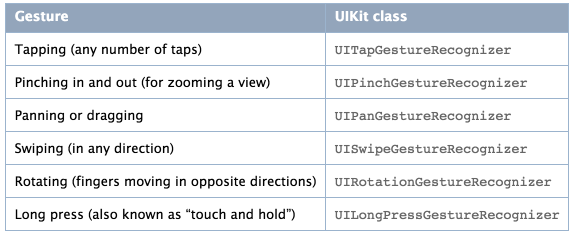
UITapGestureRecognizer(点击,轻触摸)、UIPinchGestureRecognizer(二指往內或往外拨动,捏合手势)、UIPanGestureRecognizer(拖移)、UISwipeGestureRecognizer(滑动,快速移动)、UIRotationGestureRecognizer(旋转)和UILongPressGestureRecognizer(长按),由于微信的缘故应该大多数人对长按比较熟悉,Tap点击也是高频用到的手势。
苹果官方给出了Tap和Pinch的手势的效果图,其他的效果可以私下试一试:

Demo实战
由于有六种手势,基本上大同小异,其中一种会实战,其他的应该也没问题,接下来的的介绍都是以UITapGestureRecognizer为基准的,先来个简单的单击手势:
    UITapGestureRecognizer *oneTapGestureReognizer = [[UITapGestureRecognizer alloc] initWithTarget:self action:@selector(oneTapGestureRecognizer:)];

    oneTapGestureReognizer.delegate = self;

    oneTapGestureReognizer.numberOfTapsRequired = 1;//触摸次数

    [self.view addGestureRecognizer:oneTapGestureReognizer];
响应事件:
-(void)oneTapGestureRecognizer:(UITapGestureRecognizer *)tapGestureRecognizer{

    UIAlertView  *alertView=[[UIAlertView alloc]initWithTitle:@"单指单击" message:@"iOS技术交流群:228407086" delegate:self cancelButtonTitle:@"确定" otherButtonTitles:@"取消", nil];

    [alertView show];

}
效果如下:
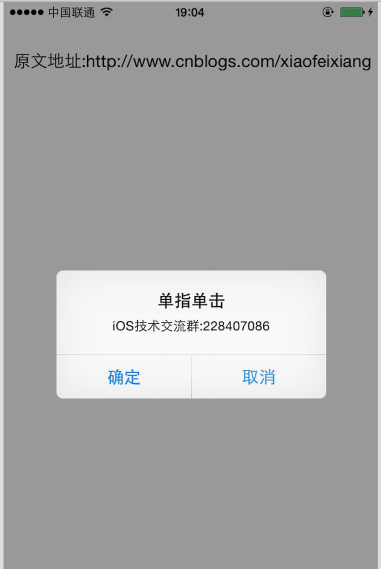
单击手势显得稍微有点弱,我们可以继续修改手指和触摸的次数,来个双指双击看下代码:
  UITapGestureRecognizer *twoTapGestureReognizer = [[UITapGestureRecognizer alloc] initWithTarget:self action:@selector(twoTapGestureRecognizer:)];

    twoTapGestureReognizer.delegate = self;

    twoTapGestureReognizer.numberOfTouchesRequired =2;//手指数

    twoTapGestureReognizer.numberOfTapsRequired=2;//触摸次数

    [self.view addGestureRecognizer:twoTapGestureReognizer];
响应事件如下:
-(void)twoTapGestureRecognizer:(UITapGestureRecognizer *)tapGestureRecognizer{

    UIAlertView  *alertView=[[UIAlertView alloc]initWithTitle:@"手势点击" message:@"iOS技术交流群:228407086" delegate:self cancelButtonTitle:@"确定" otherButtonTitles:@"取消", nil];

    [alertView show];

}
效果就不需要截图了,基本上UITapGestureRecognizer点击差不多就是设置一下手指数量和触摸次数,不过有的时候会出现同一个View上需要手势,按钮需要点击,就是事件被覆盖,需要通过UIGestureRecognizerDelegate中的方法防止事件覆盖。
-(BOOL)gestureRecognizer:(UIGestureRecognizer *)gestureRecognizer shouldReceiveTouch:(UITouch *)touch{

    //设置为NO则不响应

    if ([NSStringFromClass([touch.view class]) isEqualToString:@"UILabel"]) {

        return NO;

    }

    return  YES;

}
上面的代码是为了让截图上的标签不响应触摸的事件,标签其实默认的是没有点击响应事件的,我们可以在标签上面加入触摸事件:
  UILabel *label=[[UILabel alloc]initWithFrame:CGRectMake(10, 44, 380, 30)];

    label.text=@"原文地址:http://www.cnblogs.com/xiaofeixiang";

    [label setUserInteractionEnabled:YES];

    [label addGestureRecognizer:tapGestureRecognizer];

    [self.view addSubview:label];
响应事件:
-(void)tapJumpLink:(UITapGestureRecognizer *)tapGestureRecognizer{

    UILabel  *label=(UILabel *)tapGestureRecognizer.view;

    NSURL  *url=[[NSURL alloc]initWithString:[label.text substringFromIndex:5]];

    [[UIApplication sharedApplication] openURL:url];

}
最终效果如下:

附赠iOS技术交流群:228407086,如果关于博客或者iOS有什么问题,欢迎入群讨论~
iOS开发-UITapGestureRecognizer手势的更多相关文章
- 【转】 iOS开发之手势gesture详解
原文:http://www.cnblogs.com/salam/archive/2013/04/30/iOS_gesture.html 前言 在iOS中,你可以使用系统内置的手势识别 (Gesture ...
- iOS开发之手势gesture详解(一)
前言 在iOS中,你可以使用系统内置的手势识别(GestureRecognizer),也可以创建自己的手势.GestureRecognizer将低级别的转换为高级别的执行行为,是你绑定到view的对象 ...
- iOS开发摇动手势实现详解
1.当设备摇动时,系统会算出加速计的值,并告知是否发生了摇动手势.系统只会运动开始和结束时通知你,并不会在运动发生的整个过程中始终向你报告每一次运动.例如,你快速摇动设备三次,那只会收到一个摇动事件. ...
- iOS开发之手势gesture详解(二)
与其他用户界面控件交互 UIControl子类会覆盖parentView的gesture.例如当用户点击UIButton时,UIButton会接受触摸事件,它的parentView不会接收到.这仅适用 ...
- ios开发之手势处理 之手势识别一
#import "ViewController.h" @interface ViewController ()<UIGestureRecognizerDelegate> ...
- iOS开发 UIPanGestureRecognizer手势抽象类
UIPanGestureRecognizer *panGesture = [[UIPanGestureRecognizer alloc] initWithTarget:self action:@sel ...
- iOS开发: 向右滑动手势功能实现
在navigationController中实现向右滑动 返回功能 系统提供的backbarbuttonitem,不用添加任何代码即可实现向右滑动后退功能,但是往往要对按钮修改样式等时,就需要自定义l ...
- ios开发之手势动作状态细分state,同一视图加入两个手势
1.比方拖拽一个视图.形成类似scrollView的翻页形式 在拖拽的方法里推断拖拽的状态state属性,依据状态不同运行自己须要的效果. 2.同一视图加入两个手势,须要使用手势的代理方法.同意此操作 ...
- iOS开发拓展篇—xib中关于拖拽手势的潜在错误
iOS开发拓展篇—xib中关于拖拽手势的潜在错误 一.错误说明 自定义一个用来封装工具条的类 搭建xib,并添加一个拖拽的手势. 主控制器的代码:加载工具条 封装工具条以及手势拖拽的监听事件 此时运行 ...
随机推荐
- [原创]App性能测试指标篇
[原创]App性能测试指标篇 目前由于苹果,三星等大厂对智能手机的研发及投入,使的智能手机发展非常迅速,每个人手中都有一些离不开生活的App,如:微信,微博,百度或是各游戏App等,但是到底App性能 ...
- android流量统计
研究过一段时间的android流量统计发个自己的总结帖 1 android有一个TrafficStats类可以直接获取 总接受流量TrafficStats.getTotalRxBytes(), 总发送 ...
- Java怎样处理EXCEL的读取
须要包:poi-3.5.jar.poi-ooxml-3.5.jar 实例: [java] view plaincopy public class ProcessExcel { private Work ...
- OpAmp Voltage Follower/Regulator
LDO Regulator High accuracy voltage regulator Vout = 2.5V * (1 + ( 5.6 / 6.8 ) ) = 4.55V Recently th ...
- 快递 API接口
http://www.kuaidi.com/openapi.html http://www.kuaidi100.com/ http://www.cnblogs.com/sususu3/p/577642 ...
- linux C宏定义 转
写好C语言,漂亮的宏定义很重要,使用宏定义可以防止出错,提高可移植性,可读性,方便性等等.下面列举一些成熟软件中常用得宏定义...... 1,防止一个头文件被重复包含 #ifndef COMDEF_H ...
- 在ASP.NET Web API中使用OData的单例模式
从OData v4开始增加了对单例模式的支持,我们不用每次根据主键等来获取某个EDM,就像在C#中使用单例模式一样.实现方式大致需要两步: 1.在需要实现单例模式的导航属性上加上[Singleton] ...
- quartz 2.0 与1.0功能对比
日常开发来说,相对于1.0版,2.0版在使用上有以下几点需要注意的变化 变化一 比1.0多引用了C5.dll C5.dll 一个C#和其他CLI语言的泛型集合类..Net2.0及以上才可以使用.简介地 ...
- 使用Nginx过滤网络爬虫
原文:https://www.liaoxuefeng.com/article/001509844125769eafbb65df0a04430a2d010a24a945bfa000 现在的网络爬虫越来越 ...
- arcgis导oracle多步操作产生错误。请检查每一步的状态值。" 如何解决?
你知你用的什么数据引擎,ADO? 我以前碰过类似的,我有两个方案: 1.升ado到2.7以上 2.不要用microsoft oledb provider for oracle,而要用or ...