
ios开发之--条用第三方地图路线导航
项目里面有位置功能,需要有导航,导航两种实现方式 (集成第三方SDK、URL跳转第三方应用) ,直接集成就不说,下面来说下通过url跳转,
最终效果如如下:
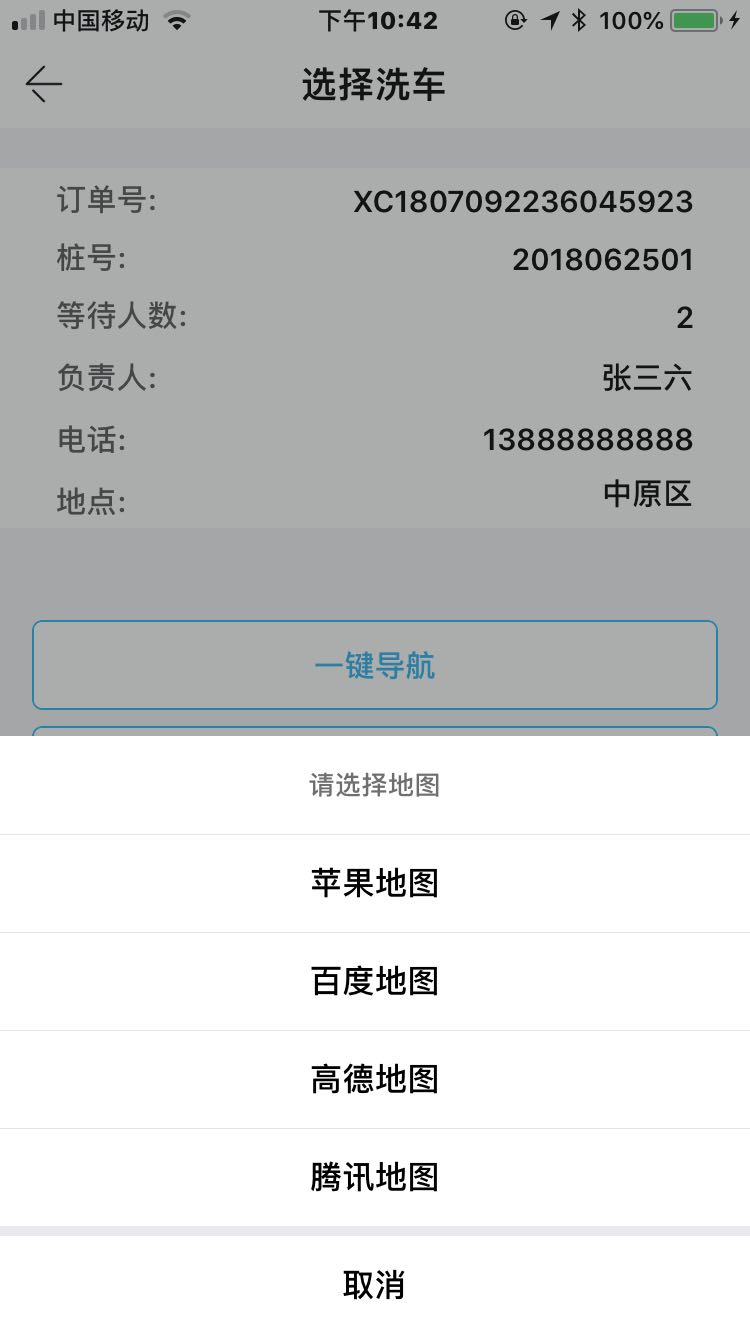
如果手机上安装的有客户端就展示,没有就不展示,文档上面写的很详细的,具体地址如下:
高德地图:https://lbs.amap.com/api/amap-mobile/guide/ios/navi
百度地图:http://lbsyun.baidu.com/index.php?title=uri/api/ios
腾讯地图:http://lbs.qq.com/uri_v1/guide-mobile-navAndRoute.html
国内用的暂时就这些,不过需要注意的是,腾讯地图有一个参数需要注册平台开发者账号才能使用,参数还是必传的,如下图:

具体实现代码如下:
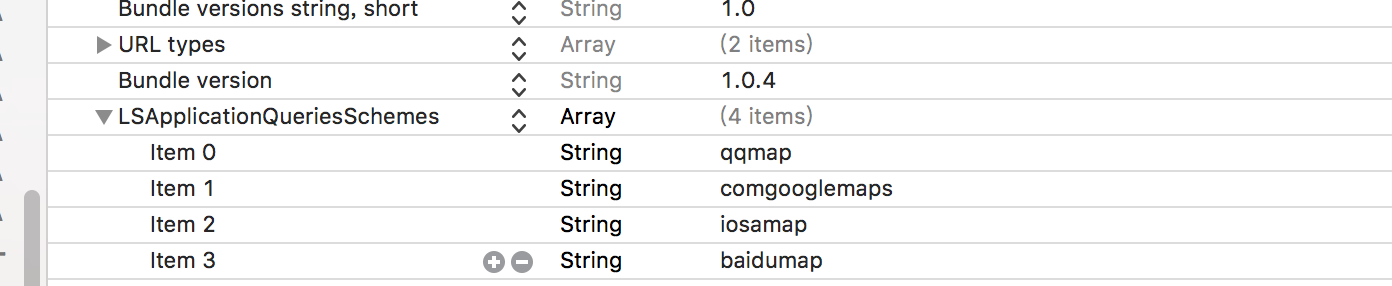
一、添加白名单
二、具体实现代码如下:
-(void)getOpenURL

{

    [self getInstalledMapAppWithEndLocation:destinationCoordinate2D];

    for (int i = ; i < self.maps.count; i ++) {

        NSString *title = [NSString stringWithFormat:@"%@",self.maps[i][@"title"]];

        [_titleMaps addObject:title];

    }

}
#pragma mark 一键导航

- (IBAction)navigationAction:(id)sender {

    // 实例方法

    LCActionSheet *sheet = [[LCActionSheet alloc] initWithTitle:@"请选择地图"

                                                   buttonTitles:_titleMaps

                                                 redButtonIndex:-

                                                       delegate:self];

    [sheet show];

}

-(void)actionSheet:(LCActionSheet *)actionSheet didClickedButtonAtIndex:(NSInteger)buttonIndex

{

    if (buttonIndex != -) {

        if (buttonIndex == ) {

            [self navAppleMap];

            return;

        }

        NSDictionary *dic = self.maps[buttonIndex];

        NSString *urlString = dic[@"url"];

        [[UIApplication sharedApplication] openURL:[NSURL URLWithString:urlString]];

    }

}

//苹果地图

- (void)navAppleMap

{

    CLLocationCoordinate2D gps = [JZLocationConverter bd09ToWgs84:destinationCoordinate2D];

    MKMapItem *currentLoc = [MKMapItem mapItemForCurrentLocation];

    MKMapItem *toLocation = [[MKMapItem alloc] initWithPlacemark:[[MKPlacemark alloc] initWithCoordinate:gps addressDictionary:nil]];

    NSArray *items = @[currentLoc,toLocation];

    NSDictionary *dic = @{

                          MKLaunchOptionsDirectionsModeKey : MKLaunchOptionsDirectionsModeDriving,

                          MKLaunchOptionsMapTypeKey : @(MKMapTypeStandard),

                          MKLaunchOptionsShowsTrafficKey : @(YES)

                          };

    [MKMapItem openMapsWithItems:items launchOptions:dic];

}

#pragma mark - 导航方法

- (NSArray *)getInstalledMapAppWithEndLocation:(CLLocationCoordinate2D)endLocation

{

    //苹果地图

    NSMutableDictionary *iosMapDic = [NSMutableDictionary dictionary];

    iosMapDic[@"title"] = @"苹果地图";

    [self.maps addObject:iosMapDic];

    //百度地图

    if ([[UIApplication sharedApplication] canOpenURL:[NSURL URLWithString:@"baidumap://"]]) {

        NSMutableDictionary *baiduMapDic = [NSMutableDictionary dictionary];

        baiduMapDic[@"title"] = @"百度地图";

        NSString *urlString = [[NSString stringWithFormat:@"baidumap://map/direction?origin=我的位置&destination=%f,%f&mode=driving&src=webapp.navi.yourCompanyName.yourAppName",endLocation.latitude,endLocation.longitude] stringByAddingPercentEncodingWithAllowedCharacters:[NSCharacterSet URLQueryAllowedCharacterSet]];

        baiduMapDic[@"url"] = urlString;

        [self.maps addObject:baiduMapDic];

    }

    //高德地图

    if ([[UIApplication sharedApplication] canOpenURL:[NSURL URLWithString:@"iosamap://"]]) {

        NSMutableDictionary *gaodeMapDic = [NSMutableDictionary dictionary];

        gaodeMapDic[@"title"] = @"高德地图";

        NSString *urlString = [[NSString stringWithFormat:@"iosamap://navi?sourceApplication=applicationName&poiname=fangheng&poiid=BGVIS&lat=%f&lon=%f&dev=1&style=2",endLocation.latitude,endLocation.longitude] stringByAddingPercentEncodingWithAllowedCharacters:[NSCharacterSet URLQueryAllowedCharacterSet]];

        gaodeMapDic[@"url"] = urlString;

        [self.maps addObject:gaodeMapDic];

    }

    //腾讯地图

    if ([[UIApplication sharedApplication] canOpenURL:[NSURL URLWithString:@"qqmap://"]]) {

        NSMutableDictionary *qqMapDic = [NSMutableDictionary dictionary];

        qqMapDic[@"title"] = @"腾讯地图";

        NSString *urlString = [[NSString stringWithFormat:@"qqmap://map/routeplan?type=drive&from=我的位置&to=洗车点&tocoord=%f,%f&referer=OB4BZ-D4W3U-B7VVO-4PJWW-6TKDJ-WPB77",endLocation.latitude,endLocation.longitude] stringByAddingPercentEncodingWithAllowedCharacters:[NSCharacterSet URLQueryAllowedCharacterSet]];

        qqMapDic[@"url"] = urlString;

        [self.maps addObject:qqMapDic];

    }

    return self.maps;

}
然后直接调用getOpenURL方法即可,传经纬度是用CLLocationCoordinate2D直接传的,展示用的是大神写好的第三方库:LCActionSheet,上面的代码可以直接使用,亲测有效!如果变动,请以文档为准!
ios开发之--条用第三方地图路线导航的更多相关文章
- Android开发 PopupWindow弹窗调用第三方地图(百度,高德)实现导航功能
博客描述:后台返回地点的经纬度在地图上进行描点,点击导航弹出PopupWindow进行选择地图操作,如果手机中没有安装地图,提示没有,否则传值调起地图进行导航操作 看一下实现的效果,没图说再多都白搭 ...
- iOS开发---集成ShareSDK实现第三方登录、分享、关注等功能。
(1)官方下载ShareSDK IOS 2.9.6,地址:http://sharesdk.mob.com/Download (2)根据实际情况,引入相关的库,参考官方文档. (3)在项目的AppDel ...
- iOS开发那些事-iOS6苹果地图实用开发
在iOS 6之后,不再使用谷歌地图了,而是使用苹果自己的地图,但是API编程接口没有太大的变化.开发人员不需要再学习很多新东西就能开发地图应用,这是负责任的做法.因此本节介绍的内容也同样适用于iOS5 ...
- iOS开发那些事-iOS6苹果地图有用开发
在iOS 6之后,不再使用谷歌地图了,而是使用苹果自己的地图,可是API编程接口没有太大的变化.开发者不须要再学习非常多新东西就能开发地图应用,这是负责任的做法.因此本节介绍的内容也相同适用于iOS5 ...
- iOS开发--整理常用的第三方资源
一:第三方插件 1:基于响应式编程思想的oc 地址:https://github.com/ReactiveCocoa/ReactiveCocoa 2:hud提示框 地址:https://github. ...
- iOS开发中用到的第三方库概览
前言:记录一下使用过和接触过的第三方库,重要程度与顺序无关 网络请求: AFNetworking:AFNetworking is a delightful networking library for ...
- iOS开发 使用Cocoapods管理第三方类库
每次上github看到一些优秀的代码,总能看到Podfile,也了解是个管理第三方类库的,今天抽时间学习了一下,挺简单的! 作用: 太多 还是复制一下把!!! CocoaPods是什么? ...
- iOS开发--即时通讯常用第三方库
前言 自毕业到现在,从事iOS即时通讯开发已经1年半之久.主要负责Allure开发,目前已上架,可以在苹果商店搜素Allure.Allure模仿微信的交互和设计效果,已经实现微信的大部分功能. 在这里 ...
- iOS开发 - 应用内打开第三方应用并传值
首先说下这个功能, 应该都有接触过. 比方,你下载了一个电子书,然后选择打开方式的时候,可能会看到你手机中已经安装的阅读类App. 或者,你的QQ收到了某个文件,你也能够选择本地的应用来打开. 那这种 ...
随机推荐
- spring sringboot 加载配置文件 多目录配置文件 多级分类配置文件
ResourcePatternResolver resolver = new PathMatchingResourcePatternResolver(); Resource[] resources = ...
- jq 获取当前屏幕高度
alert($(window).height()); //浏览器时下窗口可视区域高度 alert($(document).height()); //浏览器时下窗口文档的高度 alert($(docum ...
- 优雅的运用 Kotlin 的 null safety 特性,而不要简单的直接用 !!双感叹号
对于 Null 的检查是 Kotlin 的特点之一.强制你在编码过程中考虑变量是否可为 null,因此可以避免很多在 Java 中隐藏的 NullPointerException. 但是,当你用插件直 ...
- What is systemvolumeinformation? delete it?
System Volume Information完全可以删除 许多人为了自己的电脑上的System Volume Information不知道而苦恼..我再此给大家介绍一下希望能给你点帮助.. Sy ...
- php时间段判断
<?php function times(){ ini_set('date.timezone','Asia/Shanghai'); $time = date("Y-m-d H:i&qu ...
- thinkphp 伪静态 自定义后缀
<?xml version="1.0" encoding="UTF-8"?> <configuration> <system.we ...
- 第三百七十九节,Django+Xadmin打造上线标准的在线教育平台—xadmin的安装
第三百七十九节,Django+Xadmin打造上线标准的在线教育平台—xadmin的安装 xadmin介绍 xadmin是基于Django的admin开发的更完善的后台管理系统,页面基于Bootstr ...
- 定制库到Maven本地资源库
这里有2个案例,需要手动发出Maven命令包括一个 jar 到 Maven 的本地资源库. 要使用的 jar 不存在于 Maven 的中心储存库中. 您创建了一个自定义的 jar ,而另一个 Mave ...
- win32 数据类型 vs c#
在C#中做很多应用需要使用win32 API,但发现原型函数的一些数据类型看起来非常费劲,甚至在C#中“没有”这种数据类型,查阅了一下资料,数据类型对应关系整理如下,希望对大家有用: BOOL=Sys ...
- ZooKeeper系列
Zookeeper系列(一) ZooKeeper系列(二) ZooKeeper系列(三) ZooKeeper系列(四)