
SQL Server 操作XML数据
1.xml.exist

   输入为XQuery表达式,返回0,1或是Null。0表示不存在,1表示存在,Null表示输入为空

2.xml.value

   输入为XQuery表达式,返回一个SQL Server标量值

3.xml.query

   输入为XQuery表达式,返回一个SQL Server XML类型流

4.xml.nodes

   输入为XQuery表达式,返回一个XML格式文档的一列行集

5.xml.modify

   使用XQuery表达式对XML的节点进行insert , update 和 delete 操作。
下面通过例子对上面的五种操作进行说明:

declare @XMLVar xml = '

<catalog>

       <book category="ITPro">

              <title>Windows Step By Step</title>

              <author>Bill Zack</author>

              <price>49.99</price>

       </book>

       <book category="Developer">

              <title>Developing ADO .NET</title>

              <author>Andrew Brust</author>

              <price>39.93</price>

       </book>

       <book category="ITPro">

              <title>Windows Cluster Server</title>

              <author>Stephen Forte</author>

              <price>59.99</price>

       </book>

</catalog>'

1. xml.exist

   select @XMLVar.exist('/catalog/book')-----返回1

   select @XMLVar.exist('/catalog/book/@category')-----返回1

   select @XMLVar.exist('/catalog/book1')-----返回0

   set @XMLVar = null

   select @XMLVar.exist('/catalog/book')-----返回null

2.xml.value

   select @XMLVar.value('/catalog[1]/book[1]','varchar(MAX)')

   select @XMLVar.value('/catalog[1]/book[2]/@category','varchar(MAX)')

   select @XMLVar.value('/catalog[2]/book[1]','varchar(MAX)')

   结果集为:

   Windows Step By StepBill Zack49.99   Developer   NULL

3.xml.query

   select @XMLVar.query('/catalog[1]/book')

   select @XMLVar.query('/catalog[1]/book[1]')

   select @XMLVar.query('/catalog[1]/book[2]/author')

   结果集分别为:

<book category="ITPro">

  <title>Windows Step By Step</title>

  <author>Bill Zack</author>

  <price>49.99</price>

</book>

<book category="Developer">

  <title>Developing ADO .NET</title>

  <author>Andrew Brust</author>

  <price>39.93</price>

</book>

<book category="ITPro">

  <title>Windows Cluster Server</title>

  <author>Stephen Forte</author>

  <price>59.99</price>

</book>

<book category="ITPro">

  <title>Windows Step By Step</title>

  <author>Bill Zack</author>

  <price>49.99</price>

</book>

<author>Andrew Brust</author>

4.xml.nodes

   select T.c.query('.') as result from @XMLVar.nodes('/catalog/book') as T(c)

   select T.c.query('title') as result from @XMLVar.nodes('/catalog/book') as T(c)

   结果集分别为:

<book category="ITPro"><title>Windows Step By Step</title><author>Bill …………

<book category="Developer"><title>Developing ADO .NET</title><author>Andrew …………

<book category="ITPro"><title>Windows Cluster Server</title><author>Stephen …………

<title>Windows Step By Step</title>

<title>Developing ADO .NET</title>

<title>Windows Cluster Server</title>

 5.xml.modify

SQL Server 2005/2008增加了对XML数据的支持,同时也新增了几种操作XML的方法,本文主要以SQL Server 2008为例介绍如何对XML数据进行insert、update、delete。

SQL Server中新增加了XML.Modify()方法,分别为xml.modify(insert),xml.modify(delete),xml.modify(replace)对应XML的插入,删除和修改操作。

本文以下面XML为例,对三种DML进行说明:

declare @XMLVar xml = '

<catalog>

  <book category="ITPro">

    <title>Windows Step By Step</title>

    <author>Bill Zack</author>

    <price>49.99</price>

  </book>

  <book category="Developer">

    <title>Developing ADO .NET</title>

    <author>Andrew Brust</author>

    <price>39.93</price>

  </book>

  <book category="ITPro">

    <title>Windows Cluster Server</title>

    <author>Stephen Forte</author>

    <price>59.99</price>

  </book>

</catalog>

'

1.XML.Modify(Insert)语句介绍

A.利用as first,at last,before,after四个参数将元素插入指定的位置

set @XMLVar.modify('insert <first name="at first" /> as first into (/catalog[1]/book[1])')

set @XMLVar.modify('insert <last name="at last"/> as last into (/catalog[1]/book[1])')

set @XMLVar.modify('insert <before name="before"/> before (/catalog[1]/book[1]/author[1])')

set @XMLVar.modify('insert <after name="after"/> after (/catalog[1]/book[1]/author[1])')

SELECT @XMLVar.query('/catalog[1]/book[1]');

结果集为:

   1:  <book category="ITPro">

   2:    <first name="at first" />

   3:    <title>Windows Step By Step</title>

   4:    <before name="before" />

   5:    <author>Bill Zack</author>

   6:    <after name="after" />

   7:    <price>49.99</price>

   8:    <last name="at last" />

   9:  </book>

B.将多个元素插入文档中

--方法一:利用变量进行插入

DECLARE @newFeatures xml;

SET @newFeatures = N';

<first>one element</first>

<second>second element</second>'

SET @XMLVar.modify('           )

insert sql:variable("@newFeatures")

into (/catalog[1]/book[1])'

--方法二:直接插入

set @XMLVar.modify(')

insert (<first>one element</first>,<second>second element</second>)

into (/catalog[1]/book[1]/author[1])'

SELECT @XMLVar.query('/catalog[1]/book[1]');

结果集为:

   1:  <book category="ITPro">

   2:    <title>Windows Step By Step</title>

   3:    <author>Bill Zack

   4:      <first>one element</first>

   5:      <second>second element</second>

   6:    </author>

   7:    <price>49.99</price>

   8:    <first>one element</first>

   9:    <second>second element</second>

  10:  </book>

C.将属性插入文档中

--使用变量插入

declare @var nvarchar(10) = '变量插入'

set @XMLVar.modify(

'insert (attribute var {sql:variable("@var")}))

into (/catalog[1]/book[1])'

--直接插入

set @XMLVar.modify(

'insert (attribute name {"直接插入"}))

into (/catalog[1]/book[1]/title[1])'

--多值插入

set @XMLVar.modify(

'insert (attribute Id {"多值插入1"},attribute name {"多值插入2"}) )

into (/catalog[1]/book[1]/author[1])'

SELECT @XMLVar.query('/catalog[1]/book[1]');

结果集为:

   1:  <book category="ITPro" var="变量插入">

   2:    <title name="直接插入">Windows Step By Step</title>

   3:    <author Id="多值插入1" name="多值插入2">Bill Zack</author>

   4:    <price>49.99</price>

   5:  </book>

D.插入文本节点

set @XMLVar.modify(

'insert text{"at first"} as first)

into (/catalog[1]/book[1])'

SELECT @XMLVar.query('/catalog[1]/book[1]');

结果集为:

   1:  <book category="ITPro">

   2:    at first

   3:    <title>Windows Step By Step</title>

   4:    <author>Bill Zack</author>

   5:    <price>49.99</price>

   6:  </book>

注意:插入本文同样具体 as first,as last,before,after四种选项,可以参考A中的使用方法

E.插入注释节点

set @XMLVar.modify(

'insert <!--插入评论-->)

before (/catalog[1]/book[1]/title[1])'

SELECT @XMLVar.query('/catalog[1]/book[1]');

结果集为:

   1:  <book category="ITPro">

   2:    <!--插入评论-->

   3:    <title>Windows Step By Step</title>

   4:    <author>Bill Zack</author>

   5:    <price>49.99</price>

   6:  </book>

注意插入注释节点同样具体 as first,as last,before,after四种选项,可以参考A中的使用方法

F.插入处理指令

set @XMLVar.modify(

'insert <?Program "Instructions.exe" ?>)

before (/catalog[1]/book[1]/title[1])'

SELECT @XMLVar.query('/catalog[1]/book[1]');

结果集为:

   1:  <book category="ITPro">

   2:    <?Program "Instructions.exe" ?>

   3:    <title>Windows Step By Step</title>

   4:    <author>Bill Zack</author>

   5:    <price>49.99</price>

   6:  </book>

注意插入处理指令同样具体 as first,as last,before,after四种选项,可以参考A中的使用方法

G.根据 if 条件语句进行插入

set @XMLVar.modify(

'insert )

if (/catalog[1]/book[1]/title[2]) then

    text{"this is a 1 step"}

else ( text{"this is a 2 step"} )

    into (/catalog[1]/book[1]/price[1])'

SELECT @XMLVar.query('/catalog[1]/book[1]');

结果集为:

   1:  <book category="ITPro">

   2:    <title>Windows Step By Step</title>

   3:    <author>Bill Zack</author>

   4:    <price>49.99this is a 2 step</price>

   5:  </book>

2.XML.Modify(delete)语句介绍

--删除属性

set @XMLVar.modify('delete /catalog[1]/book[1]/@category')

--删除节点

set @XMLVar.modify('delete /catalog[1]/book[1]/title[1]')

--删除内容

set @XMLVar.modify('delete /catalog[1]/book[1]/author[1]/text()')

--全部删除

set @XMLVar.modify('delete /catalog[1]/book[2]')

SELECT @XMLVar.query('/catalog[1]');

结果集为:

   1:  <catalog>

   2:    <book>

   3:      <author />

   4:      <price>49.99</price>

   5:    </book>

   6:    <book category="ITPro">

   7:      <title>Windows Cluster Server</title>

   8:      <author>Stephen Forte</author>

   9:      <price>59.99</price>

  10:    </book>

  11:  </catalog>

3.XML.Modify(replace)语句介绍

--替换属性

set @XMLVar.modify('replace value of(/catalog[1]/book[1]/@category)) with ("替换属性")'

--替换内容

set @XMLVar.modify('replace value of(/catalog[1]/book[1]/author[1]/text()[1])) with("替换内容")'

--条件替换

set @XMLVar.modify('replace value of (/catalog[1]/book[2]/@category))

with(

if(count(/catalog[1]/book)>4) then

    "条件替换1"

else

    "条件替换2")'

SELECT @XMLVar.query('/catalog[1]');

结果集为:

   1:  <catalog>

   2:    <book category="替换属性">

   3:      <title>Windows Step By Step</title>

   4:      <author>替换内容</author>

   5:      <price>49.99</price>

   6:    </book>

   7:    <book category="条件替换2">

   8:      <title>Developing ADO .NET</title>

   9:      <author>Andrew Brust</author>

  10:      <price>39.93</price>

  11:    </book>

  12:    <book category="ITPro">

  13:      <title>Windows Cluster Server</title>

  14:      <author>Stephen Forte</author>

  15:      <price>59.99</price>

  16:    </book>

  17:  </catalog>
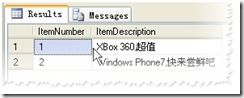
示例1:从XML中解析数据到表变量

DECLARE @ItemTable TABLE(ItemNumber INT PRIMARY KEY,ItemDescription NVARCHAR(300))
SET @ItemMessage=N'<ItemList>
<Item>
<ItemNumber>1</ItemNumber>
<ItemDescription>XBox 360,超值</ItemDescription>
</Item>
<Item>
<ItemNumber>2</ItemNumber>
<ItemDescription>Windows Phone7,快来尝鲜吧</ItemDescription>
</Item>
</ItemList>'
INSERT INTO @ItemTable
(
ItemNumber,
ItemDescription
)
SELECT T.c.value('(ItemNumber/text())[1]','INT'),
T.c.value('(ItemDescription/text())[1]','NVARCHAR(300)')
FROM @ItemMessage.nodes('/ItemList/Item') AS T(c)
SELECT ItemNumber,
ItemDescription
FROM @ItemTable
运行结果:
示例二: 解析带命名空间的XML数据
DECLARE @ItemMessage XML

DECLARE @ItemTable TABLE(ItemNumber INT PRIMARY KEY,ItemDescription NVARCHAR(300))

--包含 XML 命名空间

SET @ItemMessage=N'<ItemList xmlns="http://cd.love.com/SOA">

<Item>

    <ItemNumber>1</ItemNumber>

    <ItemDescription>XBox 360,超值</ItemDescription>

</Item>

<Item>

    <ItemNumber>2</ItemNumber>

    <ItemDescription>Windows Phone7,快来尝鲜吧</ItemDescription>

</Item>

</ItemList>'

--设置命名空间

;WITH XMLNAMESPACES(DEFAULT 'http://cd.love.com/SOA')

INSERT INTO @ItemTable

(

ItemNumber,

ItemDescription

)

SELECT T.c.value('(ItemNumber/text())[1]','INT'),

T.c.value('(ItemDescription/text())[1]','NVARCHAR(300)')

FROM @ItemMessage.nodes('/ItemList/Item') AS T(c)

SELECT ItemNumber,

ItemDescription

FROM @ItemTable
运行结果:
示例三:将 xml tag标签的中值 转为 table 格式
DECLARE @xml xml='<mssql version="10.50.4000" name="Microsoft SQL Server Developer Edition (64-bit)">

  <type name="Windows 7 Main Server">

    <tag KeyValue="enabled">

      <boolean>true</boolean>

    </tag>

    <tag KeyValue="disabled">

      <tag method="Read">

        <type name="Windows 8 virtual pc">

          <tag KeyValue="uniqueKey">

            <string>SQL Server 2008</string>

          </tag>

          <tag KeyValue="value 8GB">

            <string>SQL Server 2000</string>

          </tag>

        </type>

      </tag>

      <tag method="Read">

        <type name="Windows 8 virtual pc">

          <tag KeyValue="primaryKey">

            <string>SQL Server 2008 R2 SP1</string>

          </tag>

          <tag KeyValue="value 8GB">

            <string>SQL Server 2005 SP3</string>

          </tag>

        </type>

      </tag>

      <tag method="Write">

        <type name="Windows Server 2008 virtual pc">

          <tag KeyValue="primaryKey">

            <string>SQL Server 2008 R2 SP2</string>

          </tag>

          <tag KeyValue="value 10GB">

            <string>SQL Server 2012</string>

          </tag>

        </type>

      </tag>

    </tag>

  </type>

</mssql>';

SELECT    b.c.value('@version', 'varchar(100)') [version]

        ,b.c.value('@name', 'varchar(200)') [Name]

        ,f.c.value('@name', 'varchar(200)') [ServerName]

        ,r.c.value('@KeyValue', 'varchar(50)') [KeyValue]

        ,r.c.value('(boolean)[1]', 'varchar(25)') [boolean]

        ,k.c.value('@method', 'varchar(25)') [method]

        ,k.c.value('@name', 'varchar(25)') [virtual_pc]

        ,y.c.value('@KeyValue', 'varchar(25)') [KeyValue]

        ,y.c.value('(string)[1]', 'varchar(25)') [string]

FROM @xml.nodes('mssql') b(c)

        CROSS APPLY b.c.nodes('type')  f(c)

            CROSS APPLY f.c.nodes('tag')  r(c)

                CROSS APPLY f.c.nodes('tag/tag')  k(c)

                        CROSS APPLY f.c.nodes('tag/tag/type/tag')  y(c);
SQL Server 操作XML数据的更多相关文章
- sql server 操作xml例子
sql server 操作xml例子 /* sql xml 入门: --by jinjazz --http://blog.csdn.net/jinjazz 1.xml: 能认识元素.属性和值 2.xp ...
- ADO.NET 快速入门(十二):从 SQL Server 生成 XML 数据
本文演示如何使用2种不同的方法从 SQL Server 生成 XML. 方法1:使用了 SqlCommand 的 ExecuteXmlReader 方法获取 XmlReader,然后使用 Data ...
- SQL Server解析XML数据的方法详解
--下面为多种方法从XML中读取EMAIL DECLARE @x XML SELECT @x = ' <People> <dongsheng> <Info Name=&q ...
- Sql Server系列:数据表操作
表是用来存储数据和操作数据的逻辑结构,用来组织和存储数据,关系数据库中的所有数据都表现为表的形式,数据表由行和列组成.SQL Server中的数据表分为临时表和永久表,临时表存储在tempdb系统数据 ...
- SQL Server对Xml字段的操作
T-Sql操作Xml数据 一.前言 SQL Server 2005 引入了一种称为 XML 的本机数据类型.用户可以创建这样的表,它在关系列之外还有一个或多个 XML 类型的列:此外,还允许带有变量和 ...
- 常见SQL Server导入导出数据的几个工具
摘自:http://www.cnblogs.com/chenxizhang/archive/2011/06/09/2076542.html 在我们的日常工作中,与数据库打交道的机会越来越多.这一篇文章 ...
- T-Sql操作Xml数据(转)
T-Sql操作Xml数据 一.前言 SQL Server 2005 引入了一种称为 XML 的本机数据类型.用户可以创建这样的表,它在关系列之外还有一个或多个 XML 类型的列:此外,还允许带有变量和 ...
- Expression构建DataTable to Entity 映射委托 sqlserver 数据库里面金额类型为什么不建议用float,实例告诉你为什么不能。 sql server 多行数据合并成一列 C# 字符串大写转小写,小写转大写,数字保留,其他除外 从0开始用U盘制作启动盘装Windows10系统(联想R720笔记本)并永久激活方法 纯CSS打造淘宝导航菜单栏 C# Winform
Expression构建DataTable to Entity 映射委托 1 namespace Echofool.Utility.Common { 2 using System; 3 using ...
- sql server 与oracle数据互导的一种思路--sql server链接服务器
思路:通过在sql server数据库中添加链接服务器,可以远程查询oracle数据库的表环境准备,安装sql server数据库,并安装好oracle驱动,在配置好tnsname文件中配置好orac ...
随机推荐
- 第六周-总结&结对编程
1.结对编程 结对编程的Partner依旧是郑蕊师姐(博客:http://www.cnblogs.com/zhengrui0452/) 我们一起改进的是郑蕊师姐做的“四则运算” 郑蕊师姐之前完成四则运 ...
- 【Beta阶段】第六次Scrum Meeting!
每日任务内容: 本次会议为第六次Scrum Meeting会议~ 由于本次会议项目经理召开时间为9:30,在公寓1楼会客室召开,召开时长约30分钟,探讨了本次取得的重大突破后需要继续开展的工作. 队员 ...
- Jquery画折线图、柱状图、饼图
1.今天做了一个折线图,首先需要导js文件.这里有一个demo:http://files.cnblogs.com/files/feifeishi/jquery_zhexiantubingtuzhuzh ...
- github学习心得
1.在GitHub上建立项目登录GitHub后,你可以在右边靠中那里找到一个按钮“New Repository”,点击过后,填入项目名称.说明和网址过后就可以创建.2.配置Git以及上传代码安装Git ...
- Unigine mesh顶点坐标转换精度问题
本问题虽然与Unigine引擎相关,但对其他精度问题也有参考价值. 问题: 将精细模型顶点从自身参考系的相对坐标(类似4378.95020,4561.00000,31.3887463) 转到椭球面世界 ...
- SQL之SELECT语句执行顺序及子句功能
1.select 语句的执行顺序 SELECT a.id,a.`product_name`,a.`agreement_copies` i,b.id as statusId from `opmp_pro ...
- PAT 1022 D进制的A+B
https://pintia.cn/problem-sets/994805260223102976/problems/994805299301433344 输入两个非负10进制整数A和B(<=2 ...
- linux命令学习head和tail
linux命令head和tail是一对:more和less是一对. head和tail https://www.2cto.com/os/201507/414753.html 一个头,一个尾. tail ...
- jvm学习二:类加载器
前一节详细的聊了一下类的加载过程,本节聊一聊类的加载工具,类加载器 --- ClassLoader 本想自己写的,查资料的时候查到一篇大神的文章,写的十分详细 大家直接过去看吧http://blo ...
- atan和unwrap解卷绕
要计算一个系统相频特性,就要用到反正切函数,计算机中反正切函数规定,在一.二象限中的角度为0-pi,三四象限的角度为0--pi. 若一个角度从0变到2pi,但实际得到的结果是0-pi,再由-pi-0, ...