
Zabbix系列之一——zabbix3.4部署
Zabbix简介
zabbix(音同 zæbix)是一个基于WEB界面的提供分布式系统监视以及网络监视功能的企业级的开源解决方案。
zabbix能监视各种网络参数,保证服务器系统的安全运营;并提供灵活的通知机制以让系统管理员快速定位/解决存在的各种问题。
zabbix由2部分构成,zabbix server与可选组件zabbix agent。
zabbix server可以通过SNMP,zabbix agent,ping,端口监视等方法提供对远程服务器/网络状态的监视,数据收集等功能,它可以运行在Linux,Solaris,HP-UX,AIX,Free BSD,Open BSD,OS X等平台上。
官方中文文档:https://www.zabbix.com/documentation/3.4/zh/manual
Zabbix 通过 C/S 模式采集数据,通过 B/S 模式在 web 端展示和配置。
被监控端:主机通过安装 agent 方式采集数据,网络设备通过 SNMP 方式采集数据
Server 端:通过收集 SNMP 和 agent 发送的数据,写入数据库(MySQL,ORACLE 等) ,
再通过 php+apache 在 web 前端展示。
Zabbix 运行条件:
Server:Zabbix Server 需运行在 LAMP(Linux+Apache+Mysql+PHP)环境下(或者
LNMP),对硬件要求低
Agent:目前已有的 agent 基本支持市面常见的 OS,包含 Linux、HPUX、Solaris、Sun 、
windows
SNMP:支持各类常见的网络设备
zabbix优劣势
优点:
开源,无软件成本投入;
Server 对设备性能要求低;
支持设备多,自带多种监控模板;
支持分布式集中管理,有自动发现功能,可以实现自动化监控;
开放式接口,扩展性强,插件编写容易;
当监控的 item 比较多服务器队列比较大时可以采用被动状态,被监控客户端主动从server 端去下载需要监控的 item 然后取数据上传到 server 端。这种方式对服务器的负载比较小。Api 的支持,方便与其他系统结合;
缺点:
需在被监控主机上安装 agent,所有数据都存在数据库里,产生的数据据很大,瓶颈主要在数据库;
Zabbix安装部署
系统环境
|
IP |
主机名 |
功能 |
系统 |
|
192.168.128.165 |
compute |
Zabbix_server |
CentOS 7.4.17 |
|
192.168.128.166 |
controller |
Zabbix_agent |
CentOS 7.4.17 |
1、  先把ip和主机名写入/hosts文件(两台都要)

[root@compute ~]# echo "192.168.128.166   controller" >>/etc/hosts

[root@compute ~]# echo "192.168.128.165   compute" >>/etc/hosts

2、修改yum源(两台都要)

[root@compute~]#wget -O /etc/yum.repos.d/CentOS-Base.repo http://mirrors.aliyun.com/repo/Centos-7.repo

[root@compute ~]# yum clean all && yum makecache

[root@compute ~]# wget -O /etc/yum.repos.d/epel.repo http://mirrors.aliyun.com/repo/epel-7.repo

3、关闭iptables和selinux
时间同步
[root@compute ~]# yum install -y ntp

[root@compute ~]# systemctl start ntpd

加入定时任务中:

* * * * * /usr/sbin/ntpdate time.asia.apple.com && hwclock -w >/dev/null 2>&1
Server端部署
 rpm -i http://repo.zabbix.com/zabbix/3.4/rhel/7/x86_64/zabbix-release-3.4-2.el7.noarch.rpm

 yum install zabbix-server-mysql zabbix-web-mysql zabbix-agent -y

 yum install -y mariadb-server

[root@compute ~]# systemctl start mariadb

[root@compute ~]# systemctl enable mariadb

[root@compute ~]# mysql

Welcome to the MariaDB monitor.  Commands end with ; or \g.

Your MariaDB connection id is 375

Server version: 10.1.20-MariaDB MariaDB Server

Copyright (c) 2000, 2016, Oracle, MariaDB Corporation Ab and others.

Type 'help;' or '\h' for help. Type '\c' to clear the current input statement.

MariaDB [(none)]> create database zabbix character set utf8 collate utf8_bin;

MariaDB [(none)]> grant all privileges on zabbix.* to zabbix@localhost identified by 'zabbix';

MariaDB [(none)]> quit;

#导入数据库

[root@compute ~]# zcat /usr/share/doc/zabbix-server-mysql*/create.sql.gz | mysql -uzabbix -p zabbix

#修改zabbix_server.config添加DBHost、DBPassword

[root@compute ~]# grep ^[a-Z] /etc/zabbix/zabbix_server.conf

LogFile=/var/log/zabbix/zabbix_server.log

LogFileSize=0

PidFile=/var/run/zabbix/zabbix_server.pid

SocketDir=/var/run/zabbix

DBName=zabbix

DBUser=zabbix

SNMPTrapperFile=/var/log/snmptrap/snmptrap.log

Timeout=4

AlertScriptsPath=/usr/lib/zabbix/alertscripts

ExternalScripts=/usr/lib/zabbix/externalscripts

LogSlowQueries=3000

DBHost=localhost

DBPassword=zabbix

#启动zabbix_servera服务

[root@compute ~]# systemctl start zabbix-server

[root@compute ~]# systemctl enable zabbix-server

#修改httpd中的zabbix.conf

[root@compute ~]# vim /etc/httpd/conf.d/zabbix.conf 设置php.ini正确的时区

        php_value max_execution_time 300

        php_value memory_limit 128M

        php_value post_max_size 16M

        php_value upload_max_filesize 2M

        php_value max_input_time 300

        php_value always_populate_raw_post_data -1

        php_value date.timezone Asia/Shanghai

#启动httpd服务

[root@compute ~]# systemctl enable httpd

[root@compute ~]# systemctl start httpd
客户端zabbix_Agent部署
rpm -i http://repo.zabbix.com/zabbix/3.4/rhel/7/x86_64/zabbix-release-3.4-2.el7.noarch.rpm

yum install -y zabbix-agent

#修改/etc/zabbix/zabbix_agentd.conf

#Server=127.0.0.1

Server=192.168.128.165

#ServerActive=127.0.0.1

ServerActive=192.168.128.165           //server端ip

HostName=controller                    //主机名唯一的

HostMetadataItem=system.uname          //设置默认模板,server端自动发现

#启动agent服务

systemctl start zabbix-agent

systemctl enable zabbix-agent
配置zabbix_web
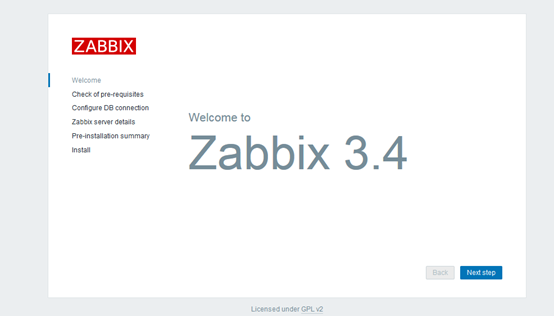
1.浏览器打开http://192.168.128.165/zabbix进入界面
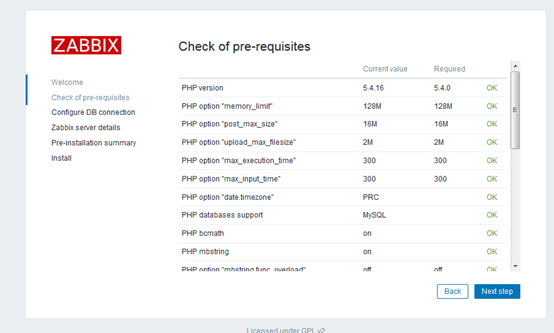
2.环境检测
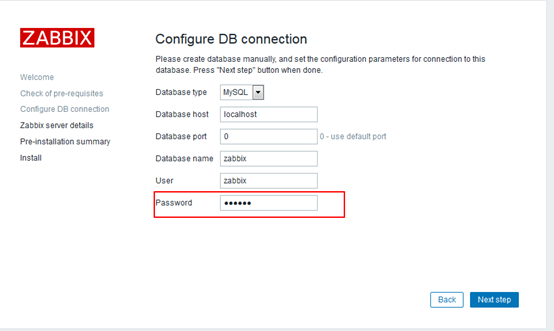
3.初始化数据库,密码为zabbix数据库密码
4.详细信息如默认,Name任意取

5.全部配置概要
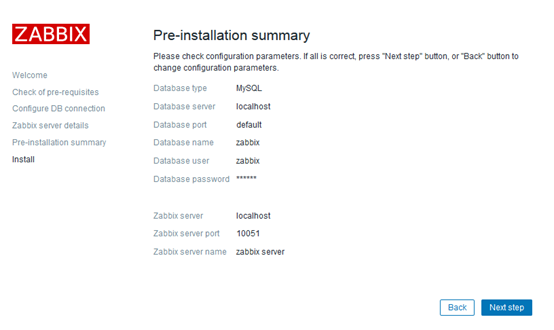
6.安装
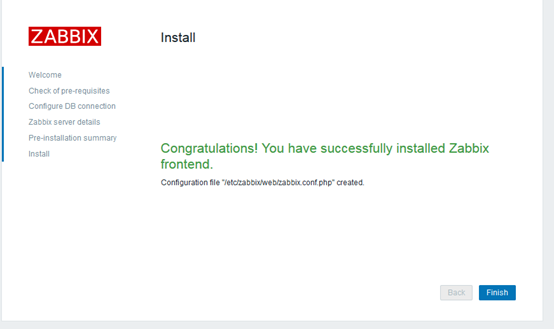
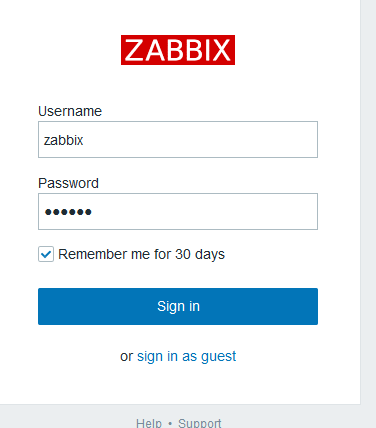
7.登录zabbix,默认账号/密码:Admin/zabbix
Zabbix系列之一——zabbix3.4部署的更多相关文章
- zabbix系列(九)zabbix3.0实现自动触发zabbix-agent端shell脚本任务
zabbix实现自动触发远程脚本执行命令 Zabbix触发器(trigger)达到阀值后会有动作(action)执行:发送告警信息或执行远程命令 环境 Server:基于centos6.5 final ...
- zabbix系列(七)zabbix3.0添加对tcp连接数及状态的监控
原理: netstat -an|awk '/^tcp/{++S[$NF]}END{for(a in S) print a,S[a]}' TIME_WAIT 79 ESTABLISHED 6 LISTE ...
- zabbix系列(四)Zabbix3.0.4添加对Nginx服务的监控
Zabbix3.0.4添加对Nginx服务的监控 通过Nginx的http_stub_status_module模块提供的状态信息来监控,所以在Agent端需要配置Nginx状态获取的脚本,和添加ke ...
- zabbix系列(二)zabbix3.0.4添加对mysql数据库性能的监控
zabbix3.0.4添加Mysql的监控 zabbix3.0 server已自带mysql的模板了,只需安装agent端,然后在web端给主机增加模板就行了. Agent端操纵 /etc/zabbi ...
- zabbix系列(五)zabbix3.0.4 探索主机Discovery自动发现主机详细图文教程
Zabbix 自动发现(Discovery)功能使用 随着监控主机不断增多,有的时候需要添加一批机器,特别是刚用zabbix的运维人员需要将公司的所有服务器添加到zabbix,如果使用传统办法去单个添 ...
- zabbix系列(三)zabbix3.0.4微信告警配置详解
一.准备工作 申请微信公众号,并且是可以有发送消息的接口.添加有个脚本去调用微信的api. 之后可以参考下zabbix 的搭建,然后了解下脚本报警,之后再考虑报警方式的多样化. 个人微信一个 个人邮箱 ...
- zabbix系列(八)zabbix添加对web页面url的状态监控
通过zabbi做web监控不仅仅可以监控到站点的响应时间,还可以根据站点返回的状态码,或者响应时间做报警 1.对需要监控的主机添加web监控 在configuration—hosts 中打开主机列 ...
- zabbix系列-Grafana4.6.3+Zabbix 的安装部署
zabbix系列(五) Grafana4.6.3+Zabbix 的安装部署 伟创享 2019-07-31 11:27:18 使用了一段时间Grafana,感觉还挺好用的.部分效果图如下: zabb ...
- Zabbix3.0部署实践
Zabbix3.0部署实践 Zabbix3整个web界面做了一个全新的设计. 1.1Zabbix环境准备 [root@linux-node1 ~]# cat /etc/redhat-release ...
随机推荐
- django mysql 数据库配置
在settings.py中保存了数据库的连接配置信息,Django默认初始配置使用sqlite数据库. DATABASES = { 'default': { 'ENGINE': 'django.db. ...
- Head First Servlets & JSP 学习笔记 第十三章 —— 过滤器的威力
过滤器可能是最强大的Web应用开发工具了! 与Servlet非常类似,过滤器就是Java组件,请求发送到Servlet之前,可以用过滤器截获和处理请求:另外Servlet结束工作之后,但在响应发回给客 ...
- FastFDS安装及简单使用
1. FastDFS安装(ubuntu) 需要准备: nginx.fastdfs.libfastcommon.gcc.git apt-get update apt-get -y install mak ...
- JS中的offset scroll event client
一.offset 一般用来检测盒子的偏移.位移,都是只读属性,不能赋值 offsetWidth和offsetHeight表示的是:调用者盒子的宽和高,包括盒子自身的padding和border off ...
- MySQL优化(四) 慢查询的定位及优化
一.SQL语句优化的一般步骤: (1)通过 show status 命令了解各种 SQL 的执行效率: (2)定位执行效率较低的 SQL 语句(重点是 Select): (3)通过 explain 分 ...
- paired-end reads的拼接
paired-end reads的拼接 发表于2012 年 8 月 13 日 Velvet中paired-end reads的拼接 文件格式 要将两头测序(paired-end)的reads放到同一个 ...
- Chapter3_操作符_别名机制
Java中的别名机制实际体现的是对于“=”这一类赋值操作符的使用规则和内涵.“=”的实际内涵是指将右边的变量的值(对于基本数据类型而言)或者某一个对象的引用(对于某个具体对象而言)复制到左边的变量名所 ...
- sql 百万级或千万级数据分页处理
笔记来源 https://blog.csdn.net/zhenyuanjie/article/details/7778102
- HDU 5360 Hiking (贪心)
题意:邀请 n 参加聚会,如果在邀请第 i 个人之前,已经成功邀请了 x 个人,并且 li <= x <= ri,那么第 i 人才会去,问你怎么排列使得邀请的人最多. 析:对于所有的人,按 ...
- C++与C语言在结构体上的区别
用Nios 实现逻辑上很清楚,只是C++用switch语句后,写的很麻烦,主要是Switch语句很长吧. 另外要记录下:struct在C++中,在a文件中定义在b文件中定义变量是可以的,但在C语言中, ...