
【sping揭秘】19、关于spring中jdbctemplate中的DataSource怎么来呢
我们这是可以正好借助之前学的factorybean类,自己吧jdbctemplate加载到spring容器中,我们可以封装多个这种对象,那么可以实现针对不同的数据库的jdbctemplate
首先我们肯定要引入对应的jar,来构建数据源对象
     <dependency>

            <groupId>org.apache.commons</groupId>

            <artifactId>commons-dbcp2</artifactId>

            <version>2.1.1</version>

        </dependency>
根据这个我们简单的创建一个jdbctemplate对象
package cn.cutter.start.bean;

import org.apache.commons.dbcp2.BasicDataSource;

import org.springframework.beans.factory.FactoryBean;

import org.springframework.jdbc.core.JdbcTemplate;

import org.springframework.stereotype.Component;

/**

 * 用来封装第三方对象的类,加入spring容器

 * @author xiaof

 *

 */

@Component

public class JdbcTemplateFactoryTestBean implements FactoryBean<JdbcTemplate> {

    @Override

    public JdbcTemplate getObject() throws Exception {

        BasicDataSource dataSource = new BasicDataSource();

        //设置相应的参数

        //1、数据库驱动类

        dataSource.setDriverClassName("com.mysql.jdbc.Driver");

        //2、url,用户名,密码

        dataSource.setUrl("jdbc:mysql://localhost:3306/liferay?characterEncoding=utf-8");

        dataSource.setUsername("liferay"); dataSource.setPassword("xiaofeng2017");

        //3、初始化连接大小

        dataSource.setInitialSize(1);

        //4、连接池最大数据量

        dataSource.setMaxTotal(500);

        //5、连接池最大小空闲

        dataSource.setMinIdle(1);

        dataSource.setMaxIdle(20);

        //6、最大等待时间 单位毫秒

        dataSource.setMaxWaitMillis(20 * 1000);

        //7、指明连接是否被空闲连接回收器(如果有)进行检验

        dataSource.setPoolPreparedStatements(true);

        //8、运行一次空闲连接回收器的时间间隔(60秒)

        dataSource.setTimeBetweenEvictionRunsMillis(60 * 1000);

        //9、验证时使用的SQL语句

        dataSource.setValidationQuery("SELECT 1 FROM DUAL");

        //10、借出连接时不要测试,否则很影响性能

        //11、申请连接的时候检测,如果空闲时间大于  timeBetweenEvictionRunsMillis,执行validationQuery检测连接是否有效

        dataSource.setTestWhileIdle(false);

        JdbcTemplate jdbcTemplate = new JdbcTemplate(dataSource);

        return jdbcTemplate;

    }

    @Override

    public Class<?> getObjectType() {

        return JdbcTemplate.class;

    }

}
好了,测试一下
@Test

    public void testJdbcTemplate() {

        ApplicationContext ctx = this.before();

        JdbcTemplate jdbcTemplate = (JdbcTemplate) ctx.getBean("jdbcTemplateFactoryTestBean");

//        Object obj = (IntroductionTestBean) ctx.getBean("introductionTestBean");

        //执行sql

        String sql = "select 1 from dual";

        String sql2 = "update xiaof_foo t set t.userName = ?, t.modifiedDate = ? where t.fooid = ? ";

//        jdbcTemplate.execute(sql);

        jdbcTemplate.update(sql2, "cutter_point",  new Date(), "1");

    }

Jdbctemplate
创建jdbctemplate只要创建对应的DataSource就可以了,至于其他查询,多种多样
NamedParameterJdbcTemplate
我们在使用jdbctemplate的时候,都是通过?来指定对应的参数,那么这里就有一种更加贴近语义的方式
我们创建这个template对象
package cn.cutter.start.bean;

import org.apache.commons.dbcp2.BasicDataSource;

import org.springframework.beans.factory.FactoryBean;

import org.springframework.jdbc.core.namedparam.NamedParameterJdbcTemplate;

import org.springframework.stereotype.Component;

/**

 * 加入spring容器,使用 NamedParameterJdbcTemplate

 * @author xiaof

 *

 */

@Component

public class NamedParameterJdbcTemplateTestFactoryBean implements FactoryBean<NamedParameterJdbcTemplate> {

    @Override

    public NamedParameterJdbcTemplate getObject() throws Exception {

        BasicDataSource dataSource = new BasicDataSource();

        //设置相应的参数

        //1、数据库驱动类

        dataSource.setDriverClassName("com.mysql.jdbc.Driver");

        //2、url,用户名,密码

        dataSource.setUrl("jdbc:mysql://localhost:3306/liferay?characterEncoding=utf-8");

        dataSource.setUsername("liferay"); dataSource.setPassword("xiaofeng2017");

        //3、初始化连接大小

        dataSource.setInitialSize(1);

        //4、连接池最大数据量

        dataSource.setMaxTotal(500);

        //5、连接池最大小空闲

        dataSource.setMinIdle(1);

        dataSource.setMaxIdle(20);

        //6、最大等待时间 单位毫秒

        dataSource.setMaxWaitMillis(20 * 1000);

        //7、指明连接是否被空闲连接回收器(如果有)进行检验

        dataSource.setPoolPreparedStatements(true);

        //8、运行一次空闲连接回收器的时间间隔(60秒)

        dataSource.setTimeBetweenEvictionRunsMillis(60 * 1000);

        //9、验证时使用的SQL语句

        dataSource.setValidationQuery("SELECT 1 FROM DUAL");

        //10、借出连接时不要测试,否则很影响性能

        //11、申请连接的时候检测,如果空闲时间大于  timeBetweenEvictionRunsMillis,执行validationQuery检测连接是否有效

        dataSource.setTestWhileIdle(false);

        NamedParameterJdbcTemplate namedParameterJdbcTemplate = new NamedParameterJdbcTemplate(dataSource);

        return namedParameterJdbcTemplate;

    }

    @Override

    public Class<?> getObjectType() {

        // TODO Auto-generated method stub

        return NamedParameterJdbcTemplate.class;

    }

}
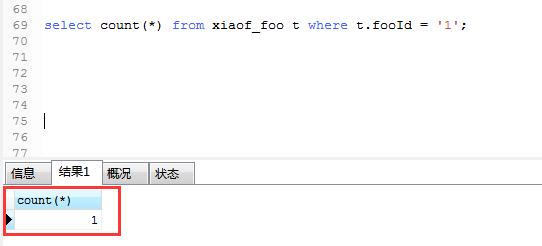
使用这个,我们来查询一下数据库的数据量
数据库中我们查询结果
select count(*) from xiaof_foo t where t.fooId = '1'
代码中使用NamedParameterJdbcTemplate
@Test

    public void testNamedParameterJdbcTemplate() {

        ApplicationContext ctx = this.before();

        NamedParameterJdbcTemplate namedParameterJdbcTemplate = (NamedParameterJdbcTemplate) ctx.getBean("namedParameterJdbcTemplateTestFactoryBean");

//        Object obj = (IntroductionTestBean) ctx.getBean("introductionTestBean");

        //执行sql

        //设置参数对象

        SqlParameterSource sqlParameterSource = new MapSqlParameterSource("fooId", "1");

        //统计个数

        String sql = "select count(*) from xiaof_foo t where t.fooId = :fooId";

        int count = namedParameterJdbcTemplate.queryForObject(sql, sqlParameterSource, Integer.class);

        System.out.println("个数是:" + count);

    }
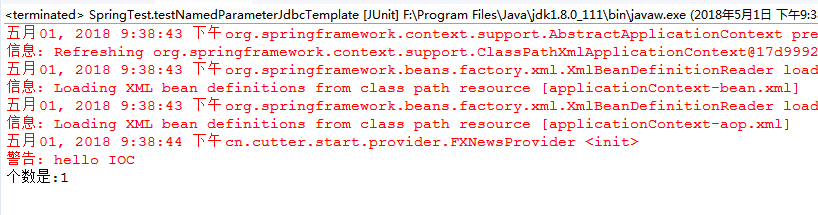
还有哦,最后注意下,这个 :参数名 这个是区分大小写的
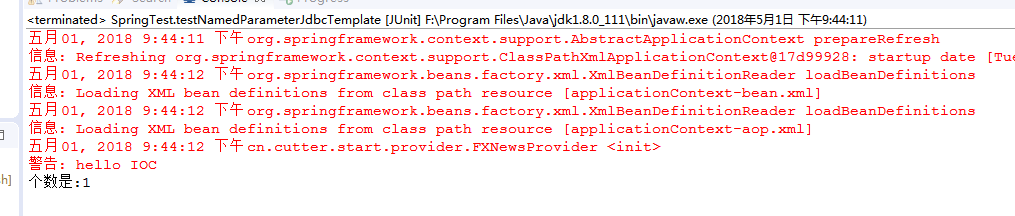
如果有多个参数,那么直接对map对象进行put就可以了
@Test

    public void testNamedParameterJdbcTemplate() {

        ApplicationContext ctx = this.before();

        NamedParameterJdbcTemplate namedParameterJdbcTemplate = (NamedParameterJdbcTemplate) ctx.getBean("namedParameterJdbcTemplateTestFactoryBean");

//        Object obj = (IntroductionTestBean) ctx.getBean("introductionTestBean");

        //执行sql

        //设置参数对象

        MapSqlParameterSource sqlParameterSource = new MapSqlParameterSource("fooid", "1");

        sqlParameterSource.addValue("userName", "cutter_point");

        //统计个数

        String sql = "select count(*) from xiaof_foo t where t.fooId = :fooid and userName = :userName";

        int count = namedParameterJdbcTemplate.queryForObject(sql, sqlParameterSource, Integer.class);

        System.out.println("个数是:" + count);

    }
结果:
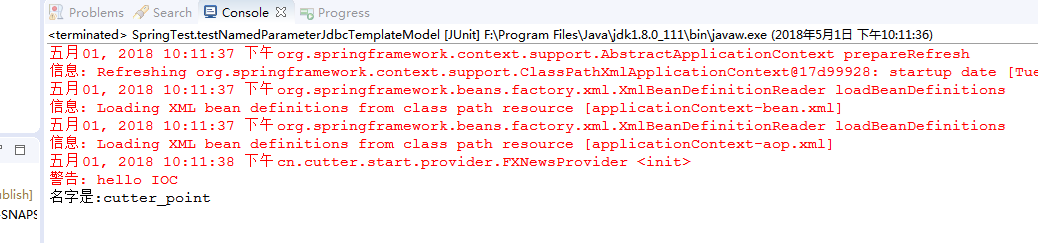
借助bean对象进行传参
@Test

    public void testNamedParameterJdbcTemplateModel() {

        ApplicationContext ctx = this.before();

        NamedParameterJdbcTemplate namedParameterJdbcTemplate = (NamedParameterJdbcTemplate) ctx.getBean("namedParameterJdbcTemplateTestFactoryBean");

//        Object obj = (IntroductionTestBean) ctx.getBean("introductionTestBean");

        String sql = "select * from xiaof_foo t where t.fooId = :fooId";

        XiaoFFoo xiaoFFoo = new XiaoFFoo();

        xiaoFFoo.setFooId(1l);

        SqlParameterSource sqlParameterSource = new BeanPropertySqlParameterSource(xiaoFFoo);

        List<Map<String, Object>> xiaoFFoo2s = namedParameterJdbcTemplate.queryForList(sql, sqlParameterSource);

        System.out.println("名字是:" + xiaoFFoo2s.get(0).get("userName"));

    }
SimpleJdbcTemplate
集jdbctemplate和namedparameterJdbctemplate 与一身,并在两者基础上新增java 5的特性:
动态参数
自动拆箱解箱
范型
不过这个在后面的spring中会被去除,既然这样,我们就不浪费时间再这个上面了,拜拜呢你嘞。。。
【sping揭秘】19、关于spring中jdbctemplate中的DataSource怎么来呢的更多相关文章
- Spring中JdbcTemplate中使用RowMapper
转自:https://blog.csdn.net/u012661010/article/details/70049633 1 sping中的RowMapper可以将数据中的每一行数据封装成用户定义的类 ...
- Spring之JDBCTemplate学习
一.Spring对不同的持久化支持: Spring为各种支持的持久化技术,都提供了简单操作的模板和回调 ORM持久化技术 模板类 JDBC org.springframework.jdbc.core. ...
- Spring中JdbcTemplate的基础用法
Spring中JdbcTemplate的基础用法 1.在DAO中使用JdbcTemplate 一般都是在DAO类中使用JdbcTimplate,在XML配置文件中配置好后,可以在DAO中注入即可. 在 ...
- Spring 中jdbcTemplate 实现执行多条sql语句
说一下Spring框架中使用jdbcTemplate实现多条sql语句的执行: 很多情况下我们需要处理一件事情的时候需要对多个表执行多个sql语句,比如淘宝下单时,我们确认付款时要对自己银行账户的表里 ...
- SSM-Spring-19:Spring中JdbcTemplate
------------吾亦无他,唯手熟尔,谦卑若愚,好学若饥------------- Spring自带一个ORM持久化框架JdbcTemplate,他可以说是jdbc的加强版,但是对最细微的控制肯 ...
- 2018.12.25 Spring中JDBCTemplate模版API学习
1 Spring整合JDBC模版 1.1 spring中土拱了一个可以操作数据库的对象.对象封装了jdbc技术 JDBCTemplateJDBC模板对象 1.2 与DBUtils中的QueryRunn ...
- Spring中JDBCTemplate的入门
Spring是IOC和AOP的容器框架,一站式的框架 连接数据库的步骤:[必须会写] Spring当中如何配置连接数据库? 第一步配置核心配置文件: <?xml version="1. ...
- Spring中jdbcTemplate的用法实例
一.首先配置JdbcTemplate: 要使用Jdbctemplate 对象来完成jdbc 操作.通常情况下,有三种种方式得到JdbcTemplate 对象. 第一种方式:我们可以在自己定 ...
- spring JdbcTemplate在spring的ioc中使用
package com.com.jdbctemplate; import org.springframework.context.ApplicationContext; import org.spri ...
随机推荐
- Java虚拟机 垃圾收集器与内存分配策略
说起GC,我们要思考的主要有三件事 哪些内存需要回收 那些已经“死去”的对象,那么哪些对象“死”,哪些对象“活”呢,有个简单的办法 引用计数法,但是没法解决循环依赖问题 所以Java虚拟机采用的是可达 ...
- DRF的解析器和渲染器
解析器 解析器的作用 解析器的作用就是服务端接收客户端传过来的数据,把数据解析成自己可以处理的数据.本质就是对请求体中的数据进行解析. 在了解解析器之前,我们要先知道Accept以及ContentTy ...
- fortitoken
1.token状态为error,且不能分配给用户使用 解决: 关联有User的token状态是error的原因是:用户一直并未使用.
- 698. Partition to K Equal Sum Subsets 数组分成和相同的k组
[抄题]: Given an array of integers nums and a positive integer k, find whether it's possible to divide ...
- Fiddler 手机抓包 手机联网异常解决方案
Fiddler在电脑里已经闲置很久了,之前看是不是服务器返回问题都是连上AS看输出的log,但是终归不如直接抓包来的方便 昨天搞了一下午,手机跟电脑都是连的公司的wifi,手机设置电脑ip和端口的网络 ...
- Idea创建简单Java Web项目并部署Servlet
1.打开Idea,创建JAVA Web项目 在WEB-INF目录下创建classes和lib文件夹 配置编译输出路径为刚才新建的classes文件夹 配置依赖jar包加载路径 添加tomcat ser ...
- pandas 导入导出
pandas可以读取与存取的资料格式有很多种,像csv.excel.json.html与pickle等… 1.读取csv import pandas as pd #加载模块 #读取csv data = ...
- Springboot+Mybatis 显示sql语句
在application.properties里添加 logging.level.com.xxx.service=debug com.xxx.service为包路径,一般可以将service层全加上 ...
- 《Miracle_House团队》第一次作业:团队亮相
Our Team:Miracle_House part 1 团队成员组成: NO.1 汝春瑞 201571030125 (组长) Style:乐观开朗,认真踏实,责任心强,还有就是爱笑.随和 ...
- python入门之两种方法修改文件内容
1.占硬盘修改 import os file_name="兼职.txt" new_file_name="%s.new".% file_name old_str= ...