
.net core 中间件实战
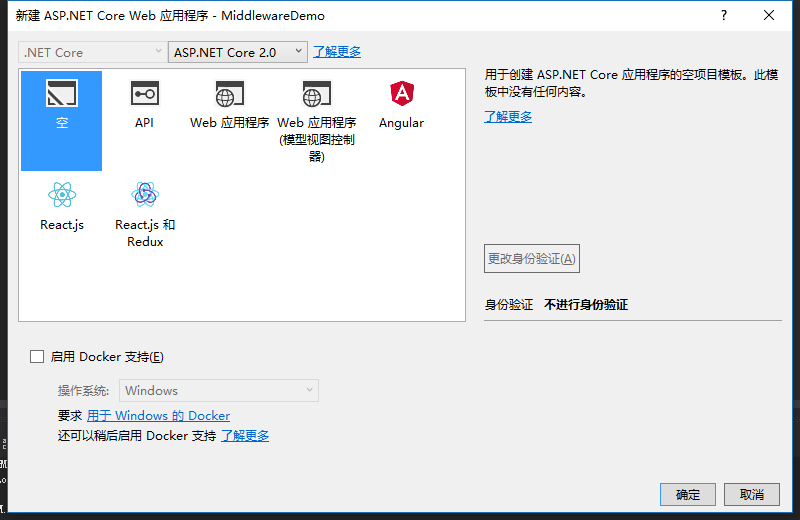
1、新建一个ASP.NET Core Web Application项目,选择空模板。

2、新建一个类RequestIPMiddleware.cs
using Microsoft.AspNetCore.Http;

using System;

using System.Collections.Generic;

using System.Linq;

using System.Threading.Tasks;

namespace MiddlewareDemo

{

    public class RequestIPMiddleware

    {

        private readonly RequestDelegate _next;

        public RequestIPMiddleware(RequestDelegate next)

        {

            _next = next;

        }

        public async Task Invoke(HttpContext context)

        {

            await context.Response.WriteAsync("to do something \n\r");

            await context.Response.WriteAsync("IP:" + context.Connection.RemoteIpAddress.ToString() + "\n\r");

            await _next.Invoke(context);

        }

    }

}
3、再新建一个扩展类 RequestIPExtensions.cs
using Microsoft.AspNetCore.Builder;

using System;

using System.Collections.Generic;

using System.Linq;

using System.Threading.Tasks;

namespace MiddlewareDemo

{

    public static class RequestIPExtensions

    {

        public static IApplicationBuilder UseRequestIP(this IApplicationBuilder builder)

        {

            return builder.UseMiddleware<RequestIPMiddleware>();

        }

    }

}
4、使用中间件。在Startup.cs中添加app.UseRequestIP():
using System;

using System.Collections.Generic;

using System.Linq;

using System.Threading.Tasks;

using Microsoft.AspNetCore.Builder;

using Microsoft.AspNetCore.Hosting;

using Microsoft.AspNetCore.Http;

using Microsoft.Extensions.DependencyInjection;

namespace MiddlewareDemo

{

    public class Startup

    {

        // This method gets called by the runtime. Use this method to add services to the container.

        // For more information on how to configure your application, visit https://go.microsoft.com/fwlink/?LinkID=398940

        public void ConfigureServices(IServiceCollection services)

        {

        }

        // This method gets called by the runtime. Use this method to configure the HTTP request pipeline.

        public void Configure(IApplicationBuilder app, IHostingEnvironment env)

        {

            if (env.IsDevelopment())

            {

                app.UseDeveloperExceptionPage();

            }

            app.UseRequestIP();

            app.Run(async (context) =>

            {

                await context.Response.WriteAsync("Hello World!");

            });

        }

    }

}
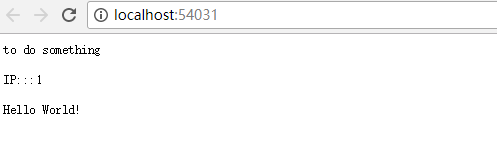
5、运行效果
.net core 中间件实战的更多相关文章
- net core 中间件详解及项目实战
net core 中间件详解及项目实战 前言 在上篇文章主要介绍了DotNetCore项目状况,本篇文章是我们在开发自己的项目中实际使用的,比较贴合实际应用,算是对中间件的一个深入使用了,不是简单的H ...
- [转]ASP.NET Core 中间件详解及项目实战
本文转自:http://www.cnblogs.com/savorboard/p/5586229.html 前言 在上篇文章主要介绍了DotNetCore项目状况,本篇文章是我们在开发自己的项目中实际 ...
- [ASP.NET Core开发实战]基础篇03 中间件
什么是中间件 中间件是一种装配到应用管道,以处理请求和响应的组件.每个中间件: 选择是否将请求传递到管道中的下一个中间件. 可在管道中的下一个中间件前后执行. ASP.NET Core请求管道包含一系 ...
- Asp.Net Core 项目实战之权限管理系统(5) 用户登录
0 Asp.Net Core 项目实战之权限管理系统(0) 无中生有 1 Asp.Net Core 项目实战之权限管理系统(1) 使用AdminLTE搭建前端 2 Asp.Net Core 项目实战之 ...
- 【.NET Core项目实战-统一认证平台】第十六章 网关篇-Ocelot集成RPC服务
[.NET Core项目实战-统一认证平台]开篇及目录索引 一.什么是RPC RPC是"远程调用(Remote Procedure Call)"的一个名称的缩写,并不是任何规范化的 ...
- 【.NET Core项目实战-统一认证平台】第十章 授权篇-客户端授权
[.NET Core项目实战-统一认证平台]开篇及目录索引 上篇文章介绍了如何使用Dapper持久化IdentityServer4(以下简称ids4)的信息,并实现了sqlserver和mysql两种 ...
- 【.NET Core项目实战-统一认证平台】第九章 授权篇-使用Dapper持久化IdentityServer4
[.NET Core项目实战-统一认证平台]开篇及目录索引 上篇文章介绍了IdentityServer4的源码分析的内容,让我们知道了IdentityServer4的一些运行原理,这篇将介绍如何使用d ...
- 【.NET Core项目实战-统一认证平台】第八章 授权篇-IdentityServer4源码分析
[.NET Core项目实战-统一认证平台]开篇及目录索引 上篇文章我介绍了如何在网关上实现客户端自定义限流功能,基本完成了关于网关的一些自定义扩展需求,后面几篇将介绍基于IdentityServer ...
- 【.NET Core项目实战-统一认证平台】第七章 网关篇-自定义客户端限流
[.NET Core项目实战-统一认证平台]开篇及目录索引 上篇文章我介绍了如何在网关上增加自定义客户端授权功能,从设计到编码实现,一步一步详细讲解,相信大家也掌握了自定义中间件的开发技巧了,本篇我们 ...
随机推荐
- laravel框架实现数据的删除和修改
//模型层的调用 <?phpnamespace App;use Illuminate\Support\Facades\DB;use Illuminate\Database\Eloquent\Mo ...
- Vue-- 监听路由变化,数据无法更新?
之前写的Vue项目,有个问题困扰了好久.新闻板块有推荐.精华.最新等几个Tab,设想通过切换Tab,改变路由参数(get/news/:tab)去获取对应数据,然后渲染到页面(用的是同一套组件),问题来 ...
- less的学习(@变量名)
引自:https://www.cnblogs.com/starof/p/5226739.html Less 是一门 CSS 预处理语言,它扩充了 CSS 语言,增加了诸如变量.混合(mixin).函数 ...
- 匿名函数lambda及面试题三道
# 函数名 = lambda 参数 :返回值. 匿名函数只是函数,如果要通过可迭代对象给匿名函数传参,就需要使用 map 或者 filter calc = lambda n:n**n calc(1)c ...
- Java toBinaryString()函数探究及Math.abs(-2147483648)=-2147483648原理探究
toBinaryString()函数 public class Customer { public static void main(String[] args) { int m=-8; System ...
- UVa Live 4725 - Airport 二分,动态规划,细节 难度: 1
题目 https://icpcarchive.ecs.baylor.edu/index.php?option=com_onlinejudge&Itemid=8&page=show_pr ...
- Linux---centos编译安装ffmpeg
环境 系统环境:CentOS release 6.7 (Final) 需求 编译安装ffmpeg 获取依赖 安装依赖包 yum install -y autoconf automake cmake f ...
- Centos7配置TiDB集群
一:各模块属性 模块名称 状态 建议实例数 功能 负载均衡组件 TiDB 无状态 2 接收SQL请求,处理SQL相关逻辑,并通过PB找到存储数据的TiKV地址 LVS.HAProxy.F5 PB 集群 ...
- Java 获取class method parameter name
package org.rx.util; import org.objectweb.asm.*; import java.io.IOException; import java.io.InputStr ...
- UVALive - 4223,hdu2962(简单dijkstra)
Trucking Time Limit: 20000/10000 MS (Java/Others) Memory Limit: 32768/32768 K (Java/Others)Total ...