
.net core 中间件实战
1、新建一个ASP.NET Core Web Application项目,选择空模板。

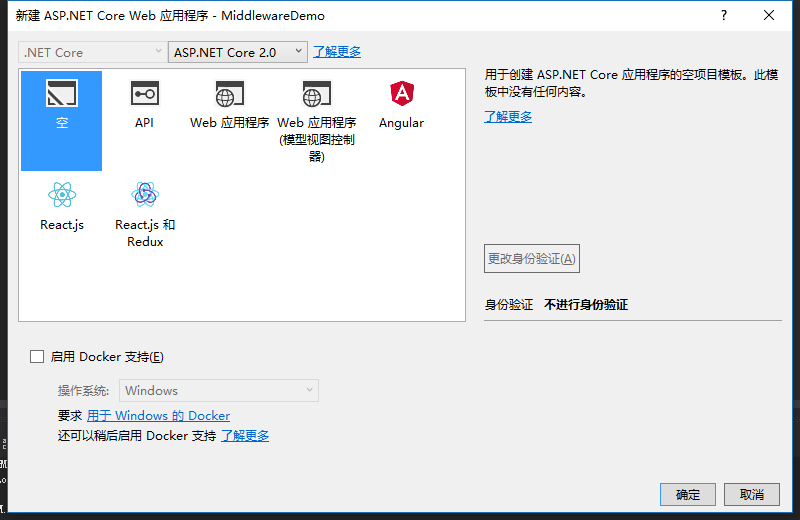
2、新建一个类RequestIPMiddleware.cs
using Microsoft.AspNetCore.Http;

using System;

using System.Collections.Generic;

using System.Linq;

using System.Threading.Tasks;

namespace MiddlewareDemo

{

    public class RequestIPMiddleware

    {

        private readonly RequestDelegate _next;

        public RequestIPMiddleware(RequestDelegate next)

        {

            _next = next;

        }

        public async Task Invoke(HttpContext context)

        {

            await context.Response.WriteAsync("to do something \n\r");

            await context.Response.WriteAsync("IP:" + context.Connection.RemoteIpAddress.ToString() + "\n\r");

            await _next.Invoke(context);

        }

    }

}
3、再新建一个扩展类 RequestIPExtensions.cs
using Microsoft.AspNetCore.Builder;

using System;

using System.Collections.Generic;

using System.Linq;

using System.Threading.Tasks;

namespace MiddlewareDemo

{

    public static class RequestIPExtensions

    {

        public static IApplicationBuilder UseRequestIP(this IApplicationBuilder builder)

        {

            return builder.UseMiddleware<RequestIPMiddleware>();

        }

    }

}
4、使用中间件。在Startup.cs中添加app.UseRequestIP():
using System;

using System.Collections.Generic;

using System.Linq;

using System.Threading.Tasks;

using Microsoft.AspNetCore.Builder;

using Microsoft.AspNetCore.Hosting;

using Microsoft.AspNetCore.Http;

using Microsoft.Extensions.DependencyInjection;

namespace MiddlewareDemo

{

    public class Startup

    {

        // This method gets called by the runtime. Use this method to add services to the container.

        // For more information on how to configure your application, visit https://go.microsoft.com/fwlink/?LinkID=398940

        public void ConfigureServices(IServiceCollection services)

        {

        }

        // This method gets called by the runtime. Use this method to configure the HTTP request pipeline.

        public void Configure(IApplicationBuilder app, IHostingEnvironment env)

        {

            if (env.IsDevelopment())

            {

                app.UseDeveloperExceptionPage();

            }

            app.UseRequestIP();

            app.Run(async (context) =>

            {

                await context.Response.WriteAsync("Hello World!");

            });

        }

    }

}
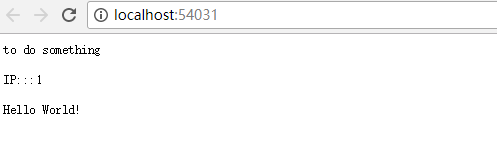
5、运行效果
.net core 中间件实战的更多相关文章
- net core 中间件详解及项目实战
net core 中间件详解及项目实战 前言 在上篇文章主要介绍了DotNetCore项目状况,本篇文章是我们在开发自己的项目中实际使用的,比较贴合实际应用,算是对中间件的一个深入使用了,不是简单的H ...
- [转]ASP.NET Core 中间件详解及项目实战
本文转自:http://www.cnblogs.com/savorboard/p/5586229.html 前言 在上篇文章主要介绍了DotNetCore项目状况,本篇文章是我们在开发自己的项目中实际 ...
- [ASP.NET Core开发实战]基础篇03 中间件
什么是中间件 中间件是一种装配到应用管道,以处理请求和响应的组件.每个中间件: 选择是否将请求传递到管道中的下一个中间件. 可在管道中的下一个中间件前后执行. ASP.NET Core请求管道包含一系 ...
- Asp.Net Core 项目实战之权限管理系统(5) 用户登录
0 Asp.Net Core 项目实战之权限管理系统(0) 无中生有 1 Asp.Net Core 项目实战之权限管理系统(1) 使用AdminLTE搭建前端 2 Asp.Net Core 项目实战之 ...
- 【.NET Core项目实战-统一认证平台】第十六章 网关篇-Ocelot集成RPC服务
[.NET Core项目实战-统一认证平台]开篇及目录索引 一.什么是RPC RPC是"远程调用(Remote Procedure Call)"的一个名称的缩写,并不是任何规范化的 ...
- 【.NET Core项目实战-统一认证平台】第十章 授权篇-客户端授权
[.NET Core项目实战-统一认证平台]开篇及目录索引 上篇文章介绍了如何使用Dapper持久化IdentityServer4(以下简称ids4)的信息,并实现了sqlserver和mysql两种 ...
- 【.NET Core项目实战-统一认证平台】第九章 授权篇-使用Dapper持久化IdentityServer4
[.NET Core项目实战-统一认证平台]开篇及目录索引 上篇文章介绍了IdentityServer4的源码分析的内容,让我们知道了IdentityServer4的一些运行原理,这篇将介绍如何使用d ...
- 【.NET Core项目实战-统一认证平台】第八章 授权篇-IdentityServer4源码分析
[.NET Core项目实战-统一认证平台]开篇及目录索引 上篇文章我介绍了如何在网关上实现客户端自定义限流功能,基本完成了关于网关的一些自定义扩展需求,后面几篇将介绍基于IdentityServer ...
- 【.NET Core项目实战-统一认证平台】第七章 网关篇-自定义客户端限流
[.NET Core项目实战-统一认证平台]开篇及目录索引 上篇文章我介绍了如何在网关上增加自定义客户端授权功能,从设计到编码实现,一步一步详细讲解,相信大家也掌握了自定义中间件的开发技巧了,本篇我们 ...
随机推荐
- HTML中引用外部JS文件失效原因
今天在练习中碰到“引用外部的一个js文件但是却失效”的情况,实在不懂,百度后才知是引用的位置不对,错误的代码如下: <head> <meta charset="UTF-8& ...
- Jquery("#form_content").validationEngine()失效原因分析
使用validationEngine()函数对表单进行各种校验,由于多个页面都引用了相关js文件,后面子页面的validationEngine()始终不生效:....: 测试后发现重复引用了JQuer ...
- Guava:好用的java类库 学习小记
基础功能 google guava中定义的String操作 在google guava中为字符串操作提供了很大的便利,有老牌的判断字符串是否为空字符串或者为null,用指定字符填充字符串,以及拆分合并 ...
- 搜狗浏览器或者360浏览器安装chrome 浏览器插件
https://www.cnblogs.com/ingvar/p/6403777.html#undefined
- linux c使用socket进行http 通信,并接收任意大小的http响应(三)
使用socket进行http通信的时候,浏览器返回的响应经常不是固定长度的,有时候很大,有些时候又非常小,十分讨厌.如果仅仅只是为了接收一小段信息,设置一个十分大的缓存,这样又会十分浪费.而且经常更改 ...
- Samba服务与Nginx服务
Samba服务: 1 准备环境 =====>part1: iptables -F 清楚防火墙配置 #systemctl disable firewalld #开机默认关闭 #systemctl ...
- Python列表的一点用法
#python的基本语法网上已经有很多详细的解释了,写在这里方便自己记忆一些 列表相当于python中的数组,但相对于数组,列表的操作显得更为灵活 常用的操作列表的方式: List = [1,'bl ...
- converting the moment tensor to strie-dip-rake
在多断层求解的试验中,用到了六个基本矩张量: 而显然,尚不能从图中直接读出strke,dip,rake的值,但有关资料给出了这六个基本矩张量的momet tensor: 而找到一个网站可以方便地将mo ...
- Alpha冲刺5
前言 队名:拖鞋旅游队 组长博客:https://www.cnblogs.com/Sulumer/p/9989898.html 作业博客:https://edu.cnblogs.com/campus/ ...
- python的format格式化
使用方法: '{}bbccc'.format(aa) = aabbcc, 用来代替python2中的%,即替换. 1.通过位置来指定替换 In [2]: '{0},{1}'.format('a', ...