
timeline server介绍
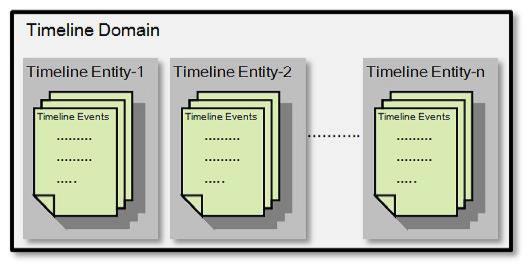

 <!--start timeline settings -->

   <property>

       <description></description>

     <name>yarn.timeline-service.hostname</name>

     <value>localhost</value>

   </property>

   <property>

   <description>Address for the Timeline server to start the RPC server.</description>

   <name>yarn.timeline-service.address</name>

   <value>${yarn.timeline-service.hostname}:10200</value>

 </property>

 <property>

   <description>The http address of the Timeline service web application.</description>

   <name>yarn.timeline-service.webapp.address</name>

   <value>${yarn.timeline-service.hostname}:8188</value>

 </property>

 <property>

   <description>The https address of the Timeline service web application.</description>

   <name>yarn.timeline-service.webapp.https.address</name>

   <value>${yarn.timeline-service.hostname}:8190</value>

 </property>

 <property>

   <description>Handler thread count to serve the client RPC requests.</description>

   <name>yarn.timeline-service.handler-thread-count</name>

   <value>10</value>

 </property>

 <property>

   <description>Enables cross-origin support (CORS) for web services where

   cross-origin web response headers are needed. For example, javascript making

   a web services request to the timeline server,是否支持请求头跨域</description>

   <name>yarn.timeline-service.http-cross-origin.enabled</name>

   <value>false</value>

 </property>

 <property>

   <description>Comma separated list of origins that are allowed for web

   services needing cross-origin (CORS) support. Wildcards (*) and patterns

   allowed,#需要跨域源支持的web服务所允许的以逗号分隔的列表</description>

   <name>yarn.timeline-service.http-cross-origin.allowed-origins</name>

   <value>*</value>

 </property>

 <property>

   <description>Comma separated list of methods that are allowed for web

   services needing cross-origin (CORS) support.,跨域所允许的请求操作</description>

   <name>yarn.timeline-service.http-cross-origin.allowed-methods</name>

   <value>GET,POST,HEAD</value>

 </property>

 <property>

   <description>Comma separated list of headers that are allowed for web

   services needing cross-origin (CORS) support.允许用于web的标题的逗号分隔列表</description>

   <name>yarn.timeline-service.http-cross-origin.allowed-headers</name>

   <value>X-Requested-With,Content-Type,Accept,Origin</value>

 </property>

 <property>

   <description>The number of seconds a pre-flighted request can be cached

   for web services needing cross-origin (CORS) support.可以缓存预先传送的请求的秒数</description>

   <name>yarn.timeline-service.http-cross-origin.max-age</name>

   <value>1800</value>

 </property>

 <property>

   <description>向资源管理器和客户端指示是否历史记录-服务是否启用。如果启用,资源管理器将启动

 记录工时记录服务可以使用历史数据。同样,当应用程序如果启用此选项,请完成.</description>

   <name>yarn.timeline-service.generic-application-history.enabled</name>

   <value>true</value>

 </property>

 <property>

   <description>Store class name for history store, defaulting to file system store</description>

   <name>yarn.timeline-service.generic-application-history.store-class</name>

   <value>org.apache.hadoop.yarn.server.applicationhistoryservice.FileSystemApplicationHistoryStore</value>

 </property>

 <property>

   <description>向客户端指示是否启用时间线服务。如果启用,最终用户使用的timeline客户端库将发布实体

 和事件发送到时间线服务器.</description>

   <name>yarn.timeline-service.enabled</name>

   <value>true</value>

 </property>

 <property>

   <description>Store class name for timeline store.</description>

   <name>yarn.timeline-service.store-class</name>

   <value>org.apache.hadoop.yarn.server.timeline.LeveldbTimelineStore</value>

 </property>

 <property>

   <description>Enable age off of timeline store data.启用timeline时间老化</description>

   <name>yarn.timeline-service.ttl-enable</name>

   <value>true</value>

 </property>

 <property>

   <description>Time to live for timeline store data in milliseconds.timeline时间老化时间</description>

   <name>yarn.timeline-service.ttl-ms</name>

   <value>6048000000</value>

 </property>

   <!--end timeline settings --></span>
timeline server介绍的更多相关文章
- 八:The YARN Timeline Server
一.Overview 介绍 yarn timeline server用于存储和检查应用程序过去和现在的信息(比如job history server).有两个功能: 1.Persisting ...
- YARN的重启动问题:RM Restart/RM HA/Timeline Server/NM Restart
ResourceManger Restart ResourceManager负责资源管理和应用的调度,是YARN的核心组件,有可能存在单点失败的问题.ResourceManager Restart是使 ...
- HDP3.1 中配置 YARN 的 timeline server 使用外部的 HBase
HDP3.1 中的 YARN 的 timeline server 默认使用内置的 HBase,不知道为什么,总是过几天就挂掉,暂时还没找到原因.后来想着让它使用外部的 HBase 看看会不会还有此问题 ...
- VisualSvn Server介绍
1 .VisualSvn Server VisualSvn Server是免费的,而VisualSvn是收费的.VisualSvn是Svn的客户端,和Visual Studio集成在一起,但是不免费 ...
- TFS(Team Foundation Server)介绍和入门
在本文的两个部分中,我将介绍Team Foundation Server的一些核心特征,重点介绍在本产品的日常应用中是怎样将这些特性结合在一起使用的. 作为一名软件开发者,在我的职业生涯中,我常常会用 ...
- Windows Server 2016-Nano Server介绍
WindowsServer 2016 提供了新的安装选项:Nano Server.Nano Server 是针对私有云和数据中心进行优化的远程管理的服务器操作系统. 类似于 Windows Serve ...
- Hadoop Shell 介绍
以 hadoop 2.7.3 为例 bin 目录下是最基础的集群管理脚本, 用户可通过该脚本完成各种功能, 如 HDFS 管理, MapReduce 作业管理等. 作为入门, 先介绍bin 目录下的 ...
- fiddler笔记:TimeLine时间轴选项卡
1.TimeLine选项卡介绍 TimeLine选项卡支持使用"瀑布"模型查看1~250个选中的Session.主要用于帮助性能分析和理解请求之间的关联.选项卡的主体内容是数据流视 ...
- ArcGIS API for JavaScript(2)-ArcGIS Server发布要素图层服务
1.前言 上一篇该系列的文章我们主要讲了一下基础Web地图搭建,这篇我们主要讲一下ArcGIS Server发布服务,并且如何调用服务.将自己的数据加载到Web地图当中来,实现Web端浏览数据. 2. ...
随机推荐
- Centos开机自启动脚本的制作
原文地址:http://www.2cto.com/os/201306/220559.html 我的一个Centos开机自启动脚本的制作 一.切换到/etc/init.d/ 二.制作sh脚本 v ...
- 小程序canvas生成海报保存至手机相册
小程序canvas画图保存至手机相册 (1)可直接展示生成的海报 .因手机分辨率不同可能导致生成的海报会有细微差别,这里隐藏canvas海报,页面正常设置海报样式保存时保存隐藏的canvas海报 (2 ...
- docker mysql 数据库乱码
创建 mysql 时,需要加上编码,不然会乱码: docker run --name mysql01 -p : -e MYSQL_ROOT_PASSWORD=pwd123 -d mysql:5.5 - ...
- c#阿里云服务器发送邮件
public static void SendMailUse() { string host = "smtp.lotusest.com";// 邮件服务器smtp.163.com表 ...
- ftp权限设置大全!!!
1.登录和对匿名用户的设置write_enable=YES //是否对登录用户开启写权限.属全局性设置.默认NOlocal_enable=YES ...
- 原生JS实现简易转盘抽奖
我爱撸码,撸码使我感到快乐. 大家好,我是Counter. 本章带大家来简单的了解下原生JS实现转盘抽奖. 因为主要涉及到JS,在这里HTML和CSS起到的功能就没有那么重要, 因此,没有过多的阐述H ...
- FFT 快速傅里叶变换 学习笔记
FFT 快速傅里叶变换 前言 lmc,ikka,attack等众多大佬都没教会的我终于要自己填坑了. 又是机房里最后一个学fft的人 早背过圆周率50位填坑了 用处 多项式乘法 卷积 \(g(x)=a ...
- 最短路模板|堆优化Dijkstra,SPFA,floyd
Ⅰ:Dijkstra单源点最短路 1.1Dijkstra const int MAX_N = 10000; const int MAX_M = 100000; const int inf = 0x3f ...
- 论文阅读:Deep Attentive Tracking via Reciprocative Learning
Deep Attentive Tracking via Reciprocative Learning 2018-11-14 13:30:36 Paper: https://arxiv.org/abs/ ...
- 解决 Command "python setup.py egg_info" failed with error code 1 问题
参考: "pip install unroll": "python setup.py egg_info" failed with error code 1 解决 ...