
timeline server介绍
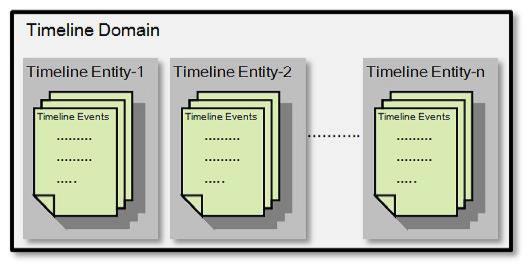

 <!--start timeline settings -->

   <property>

       <description></description>

     <name>yarn.timeline-service.hostname</name>

     <value>localhost</value>

   </property>

   <property>

   <description>Address for the Timeline server to start the RPC server.</description>

   <name>yarn.timeline-service.address</name>

   <value>${yarn.timeline-service.hostname}:10200</value>

 </property>

 <property>

   <description>The http address of the Timeline service web application.</description>

   <name>yarn.timeline-service.webapp.address</name>

   <value>${yarn.timeline-service.hostname}:8188</value>

 </property>

 <property>

   <description>The https address of the Timeline service web application.</description>

   <name>yarn.timeline-service.webapp.https.address</name>

   <value>${yarn.timeline-service.hostname}:8190</value>

 </property>

 <property>

   <description>Handler thread count to serve the client RPC requests.</description>

   <name>yarn.timeline-service.handler-thread-count</name>

   <value>10</value>

 </property>

 <property>

   <description>Enables cross-origin support (CORS) for web services where

   cross-origin web response headers are needed. For example, javascript making

   a web services request to the timeline server,是否支持请求头跨域</description>

   <name>yarn.timeline-service.http-cross-origin.enabled</name>

   <value>false</value>

 </property>

 <property>

   <description>Comma separated list of origins that are allowed for web

   services needing cross-origin (CORS) support. Wildcards (*) and patterns

   allowed,#需要跨域源支持的web服务所允许的以逗号分隔的列表</description>

   <name>yarn.timeline-service.http-cross-origin.allowed-origins</name>

   <value>*</value>

 </property>

 <property>

   <description>Comma separated list of methods that are allowed for web

   services needing cross-origin (CORS) support.,跨域所允许的请求操作</description>

   <name>yarn.timeline-service.http-cross-origin.allowed-methods</name>

   <value>GET,POST,HEAD</value>

 </property>

 <property>

   <description>Comma separated list of headers that are allowed for web

   services needing cross-origin (CORS) support.允许用于web的标题的逗号分隔列表</description>

   <name>yarn.timeline-service.http-cross-origin.allowed-headers</name>

   <value>X-Requested-With,Content-Type,Accept,Origin</value>

 </property>

 <property>

   <description>The number of seconds a pre-flighted request can be cached

   for web services needing cross-origin (CORS) support.可以缓存预先传送的请求的秒数</description>

   <name>yarn.timeline-service.http-cross-origin.max-age</name>

   <value>1800</value>

 </property>

 <property>

   <description>向资源管理器和客户端指示是否历史记录-服务是否启用。如果启用,资源管理器将启动

 记录工时记录服务可以使用历史数据。同样,当应用程序如果启用此选项,请完成.</description>

   <name>yarn.timeline-service.generic-application-history.enabled</name>

   <value>true</value>

 </property>

 <property>

   <description>Store class name for history store, defaulting to file system store</description>

   <name>yarn.timeline-service.generic-application-history.store-class</name>

   <value>org.apache.hadoop.yarn.server.applicationhistoryservice.FileSystemApplicationHistoryStore</value>

 </property>

 <property>

   <description>向客户端指示是否启用时间线服务。如果启用,最终用户使用的timeline客户端库将发布实体

 和事件发送到时间线服务器.</description>

   <name>yarn.timeline-service.enabled</name>

   <value>true</value>

 </property>

 <property>

   <description>Store class name for timeline store.</description>

   <name>yarn.timeline-service.store-class</name>

   <value>org.apache.hadoop.yarn.server.timeline.LeveldbTimelineStore</value>

 </property>

 <property>

   <description>Enable age off of timeline store data.启用timeline时间老化</description>

   <name>yarn.timeline-service.ttl-enable</name>

   <value>true</value>

 </property>

 <property>

   <description>Time to live for timeline store data in milliseconds.timeline时间老化时间</description>

   <name>yarn.timeline-service.ttl-ms</name>

   <value>6048000000</value>

 </property>

   <!--end timeline settings --></span>
timeline server介绍的更多相关文章
- 八:The YARN Timeline Server
一.Overview 介绍 yarn timeline server用于存储和检查应用程序过去和现在的信息(比如job history server).有两个功能: 1.Persisting ...
- YARN的重启动问题:RM Restart/RM HA/Timeline Server/NM Restart
ResourceManger Restart ResourceManager负责资源管理和应用的调度,是YARN的核心组件,有可能存在单点失败的问题.ResourceManager Restart是使 ...
- HDP3.1 中配置 YARN 的 timeline server 使用外部的 HBase
HDP3.1 中的 YARN 的 timeline server 默认使用内置的 HBase,不知道为什么,总是过几天就挂掉,暂时还没找到原因.后来想着让它使用外部的 HBase 看看会不会还有此问题 ...
- VisualSvn Server介绍
1 .VisualSvn Server VisualSvn Server是免费的,而VisualSvn是收费的.VisualSvn是Svn的客户端,和Visual Studio集成在一起,但是不免费 ...
- TFS(Team Foundation Server)介绍和入门
在本文的两个部分中,我将介绍Team Foundation Server的一些核心特征,重点介绍在本产品的日常应用中是怎样将这些特性结合在一起使用的. 作为一名软件开发者,在我的职业生涯中,我常常会用 ...
- Windows Server 2016-Nano Server介绍
WindowsServer 2016 提供了新的安装选项:Nano Server.Nano Server 是针对私有云和数据中心进行优化的远程管理的服务器操作系统. 类似于 Windows Serve ...
- Hadoop Shell 介绍
以 hadoop 2.7.3 为例 bin 目录下是最基础的集群管理脚本, 用户可通过该脚本完成各种功能, 如 HDFS 管理, MapReduce 作业管理等. 作为入门, 先介绍bin 目录下的 ...
- fiddler笔记:TimeLine时间轴选项卡
1.TimeLine选项卡介绍 TimeLine选项卡支持使用"瀑布"模型查看1~250个选中的Session.主要用于帮助性能分析和理解请求之间的关联.选项卡的主体内容是数据流视 ...
- ArcGIS API for JavaScript(2)-ArcGIS Server发布要素图层服务
1.前言 上一篇该系列的文章我们主要讲了一下基础Web地图搭建,这篇我们主要讲一下ArcGIS Server发布服务,并且如何调用服务.将自己的数据加载到Web地图当中来,实现Web端浏览数据. 2. ...
随机推荐
- ArchLinux安装Sublime Text 3
安装方法: 在 /etc/pacman.conf中添加 [archlinuxcn] SigLevel = Optional TrustAll Server = http://repo.archlinu ...
- 使用CI遇到的问题报错:Call to undefined function base_url()
问题来源:在HTML文件中使用base_url()函数引入CSS文件时,发现报错:Call to undefined function base_url() 研究了一下才知道是因为没有加载url小助手 ...
- firefox 实现web交互机器人
现在仅有火狐浏览器可以这样操作 -- Filefox 下面是项目目录 -- 前端页面 -- html <!DOCTYPE html> <html lang="en" ...
- <转>jmeter(二十)阶梯式加压测试
本博客转载自:http://www.cnblogs.com/imyalost/category/846346.html 个人感觉不错,对jmeter讲解非常详细,担心以后找不到了,所以转发出来,留着慢 ...
- Python Redis list
List操作,redis中的List在在内存中按照一个name对应一个List来存储. 注:列表存入 从右到左 如图: lpush(name,values) # 在name对应的list中添加元素,每 ...
- Vue父子组件传值 | 父传子 | 子传父
父传子 父容器 <template> <div> <zdy :module='test'></zdy> </div> </templa ...
- [大数据从入门到放弃系列教程]在IDEA的Java项目里,配置并加入Scala,写出并运行scala的hello world
[大数据从入门到放弃系列教程]在IDEA的Java项目里,配置并加入Scala,写出并运行scala的hello world 原文链接:http://www.cnblogs.com/blog5277/ ...
- mysql57 centos7 使用
####### yum repository install #######mysql yum repo http://repo.mysql.com/wget http://repo.mysql.co ...
- vue-循环并获取dom元素
<ul class="picBox"> <li v-for="(item,index) in picArr" ><img :src ...
- Strut2页面传参跳转 --Struts2
1.本案例借助struts2框架,完成页面传参.跳转功能 2.代码实现 index.jsp: <form action="helloStruts2.action" metho ...