
利用XML序列化和Asp.Net Web缓存实现站点配置文件
我们经常会遇到这样的场景:
今天来了个业务,需要加一个字段,但是考虑的以后可能有变动,需要配成“活”的。
一般最初的做法就是加一个配置到Web.Config文件的AppSettings中去。但是这样有一个问题,那就是改一下配置节点,AppDomain就需要重启,很是不爽。
变通一点的会搞出一个xml文件,利用序列化去动态的读取。但是,哥!每次都读文件不觉得太耗IO吗?尤其是使用频率高话?
下面上代码吧,懒的废话了,关键地方都注释了,也不是什么高深的技术:
先来配置文件(注意Config路径要自己建,代码没有处理)和对应的配置文件代码:
<?xml version="1.0" encoding="utf-8"?>

<SimpleBizConfig xmlns:xsi="http://www.w3.org/2001/XMLSchema-instance" xmlns:xsd="http://www.w3.org/2001/XMLSchema">

  <ID>12</ID>

  <Key>MyKey</Key>

  <ListSimple>

    <string>简单</string>

    <string>list</string>

    <string>集合</string>

  </ListSimple>

</SimpleBizConfig>
using System.Text;

using Glutton.Web.Configuration;

using System;

using System.Collections.Generic;

using System.Linq;

using System.Web;

namespace WebTest.Models

{

    public class SimpleBizConfig : ISimpleConfig

    {

        /// <summary>

        /// 默认配置文件路径

        /// </summary>

        public string GetPath()

        {

            return "~/Config/SimpleBizConfig.cfg";

        }

        public string GetCacheKey()

        {

            return "~/MyConfig_SimpleBizConfig";

        }

        public SimpleBizConfig()

        {

            this.ID = 1;

            this.Key = "MyKey";

            this.ListSimple = new List<string>();

        }

        public int ID { get; set; }

        public string Key { get; set; }

        public List<string> ListSimple { get; set; }

        internal string Desc()

        {

            StringBuilder sb = new StringBuilder();

            sb.Append("类型:SimpleBizConfig").Append("<br/>");

            sb.Append("ID = " + this.ID.ToString()).Append("<br/>");

            sb.Append("Key = " + this.Key).Append("<br/>");

            sb.Append("list").Append("<br/>");

            for (int i = 0; i < this.ListSimple.Count; i++)

            {

                sb.Append("index:" + i.ToString() + ",value:" + ListSimple[i]).Append("<br/>");

            }

            return sb.ToString();

        }

    }

}
再来管理配置文件的类:
using System;

using System.Collections.Generic;

using System.IO;

using System.Linq;

using System.Runtime.InteropServices;

using System.Text;

using System.Threading.Tasks;

using System.Web;

using System.Web.Caching;

using System.Xml.Serialization;

namespace Glutton.Web.Configuration

{

    public interface ISimpleConfig

    {

        string GetPath();

        string GetCacheKey();

    }

    public class ConfigManager

    {

        public static T GetConfig<T>() where T : class ,ISimpleConfig, new()

        {

            T tmpT = new T();

            string cacheKey = tmpT.GetCacheKey();

            //先尝试从cache中取数据

            T t = GetFromCache<T>(cacheKey);//很郁闷,没有静态泛型接口

            if (t != null)

            {

                return t;

            }

            //cache没有数据,直接读配置文件

            XmlSerializer xmlSerializer = new XmlSerializer(typeof(T));

            string configFilePath = HttpContext.Current.Server.MapPath(tmpT.GetPath());

            if (!File.Exists(configFilePath))

            {

                //文件不存在,初始化,这里需要配置文件类实现默认的初始化动作

                using (TextWriter writer = new StreamWriter(configFilePath))

                {

                    t = new T();

                    xmlSerializer.Serialize(writer, t);

                }

            }

            else

            {

                using (FileStream fs = new FileStream(configFilePath, FileMode.Open))

                {

                    t = xmlSerializer.Deserialize(fs) as T;

                }

            }

            //存到缓存里面去,依赖web缓存的文件依赖功能实现监控配置文件修改

            SetToCache<T>(cacheKey, configFilePath, t);

            return t;

        }

        private static void SetToCache<T>(string cacheKey, string configFilePath, T t) where T : class ,new()

        {

            HttpRuntime.Cache.Insert(cacheKey, t, new CacheDependency(configFilePath), //文件依赖过期

                Cache.NoAbsoluteExpiration, Cache.NoSlidingExpiration, CacheItemPriority.NotRemovable, null);

        }

        private static T GetFromCache<T>(string cacheKey) where T : class ,new()

        {

            return HttpRuntime.Cache[cacheKey] as T;

        }

    }

}
看看调用的方法,HomeController里面加了一个测试方法:
using System;

using System.Collections.Generic;

using System.Linq;

using System.Web;

using System.Web.Mvc;

using Glutton.Web.Configuration;

using WebTest.Models;

namespace WebTest.Controllers

{

    public class HomeController : Controller

    {

        public ActionResult Index()

        {

            return View();

        }

        public ActionResult About()

        {

            ViewBag.Message = "Your application description page.";

            return View();

        }

        public ActionResult Contact()

        {

            ViewBag.Message = "Your contact page.";

            return View();

        }

        public string TestCfg()

        {

            return ConfigManager.GetConfig<SimpleBizConfig>().Desc();

        }

    }

}
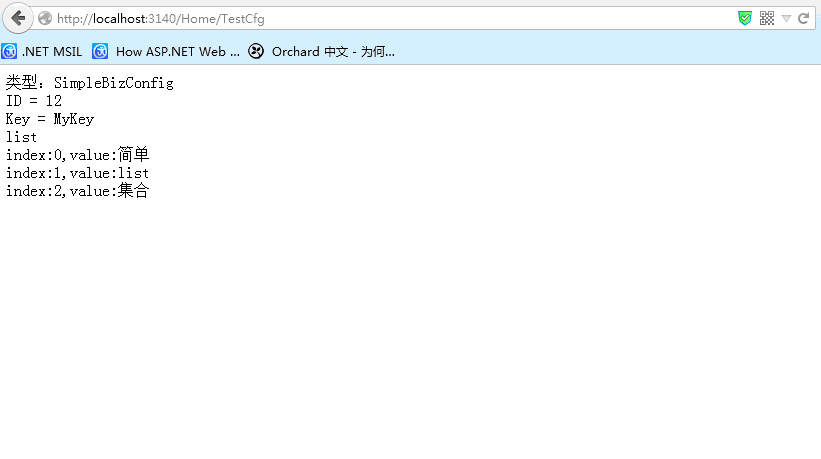
看看效果,:-D:
利用XML序列化和Asp.Net Web缓存实现站点配置文件的更多相关文章
- JSON and XML Serialization in ASP.NET Web API
https://docs.microsoft.com/en-us/aspnet/web-api/overview/formats-and-model-binding/json-and-xml-seri ...
- 【ASP.NET Web API教程】6.2 ASP.NET Web API中的JSON和XML序列化
谨以此文感谢关注此系列文章的园友!前段时间本以为此系列文章已没多少人关注,而不打算继续下去了.因为文章贴出来之后,看的人似乎不多,也很少有人对这些文章发表评论,而且几乎无人给予“推荐”.但前几天有人询 ...
- ASP.NET Web API路由系统:路由系统的几个核心类型
虽然ASP.NET Web API框架采用与ASP.NET MVC框架类似的管道式设计,但是ASP.NET Web API管道的核心部分(定义在程序集System.Web.Http.dll中)已经移除 ...
- ASP.NET Web API框架揭秘:路由系统的几个核心类型
ASP.NET Web API框架揭秘:路由系统的几个核心类型 虽然ASP.NET Web API框架采用与ASP.NET MVC框架类似的管道式设计,但是ASP.NET Web API管道的核心部分 ...
- Professional C# 6 and .NET Core 1.0 - Chapter 42 ASP.NET Web API
本文内容为转载,重新排版以供学习研究.如有侵权,请联系作者删除. 转载请注明本文出处: -------------------------------------------------------- ...
- ASP.NET Web API中的JSON和XML序列化
ASP.NET Web API中的JSON和XML序列化 前言 阅读本文之前,您也可以到Asp.Net Web API 2 系列导航进行查看 http://www.cnblogs.com/aehyok ...
- Asp.Net Web API 2第十三课——ASP.NET Web API中的JSON和XML序列化
前言 阅读本文之前,您也可以到Asp.Net Web API 2 系列导航进行查看 http://www.cnblogs.com/aehyok/p/3446289.html 本文描述ASP.NET W ...
- 在asp.net web api中利用过滤器设置输出缓存
介绍 本文将介绍如何在asp.net web api中利用过滤器属性实现缓存. 实现过程 1,首先在web.config文件下appsettings下定义“CacheEnabled”和“CacheTi ...
- ASP.NET Web API编程——序列化与内容协商
1 多媒体格式化器 多媒体类型又叫MIME类型,指示了数据的格式.在HTTP协议中多媒体类型描述了消息体的格式.一个多媒体类型包括两个字符串:类型和子类型. 例如: text/html.image/p ...
随机推荐
- linux日常管理-vmstat命令
系统负载用w查看.是什么原因造成了系统负载.查看系统负载状态 命令:vmstat vmstat就查看一次 vmstat 1 每秒钟更新一次.按ctrl+c取消. vmstat 1 5 每秒钟更新一次, ...
- JDBC初步
public class TestMySqlConnection{ public static void main(String[] args){ Class.forNa ...
- ViewController lifecyle(IOS学习)
斯坦福的ios教学视频笔记一张,如下
- ascII、iso、utf-8、Unicode的区别
utf-8和Unicode到底有什么区别?是存储方式不同?编码方式不同?它们看起来似乎很相似,但是实际上他们并不是同一个层次的概念,utf-8是unicode的实现方式. 要想先讲清楚他们的区别,首先 ...
- 快速搭建LAMP
1.安装Apache sudo apt-get install apache2 2.安装Mysql sudo apt-get install mysql-server 中间会出现输入 Mysql 的 ...
- jquery插件-自由拖拽
最近工作不是很忙,学习之余想整理一些代码出来,首先想到的就是是js拖拽. 两年前去某公司面试的时候,曾经被问过这个问题,如何在页面上拖放元素,尽管现在看起来很简单,但当时的我半点思路都没有,面试想当然 ...
- 《OD学storm》20160828
一.Storm项目 1. 架构 javasdk -> nginx -> 日志文件 -> flume agent(collector) -> hdfs -> kafka - ...
- 玩转Android---组件篇---Intent(意图)
Intent的中文意思是“意图,目的”的意思,可以理解为不同组件之间通信的“媒介”或者“信使”. 目标组件一般要通过Intent来声明自己的条件,一般通过组件中的<intent-filter&g ...
- 洛谷P1057 传球游戏(记忆化搜索)
点我进入题目 题目大意:n个小孩围一圈传球,每个人可以给左边的人或右边的人传球,1号小孩开始,一共传m次,请问有多少种可能的路径使球回到1号小孩. 输入输出:输入n,m,输出路径的数量. 数据范围:4 ...
- Topoi 测验1301, 问题C: 1959: 解题 解题报告
Topoi(一个经常会炸的网站) 本题提交链接 很久以前的题目了, 刚开了博客,来写一波题解 先看一波提交记录: 调了好几天QAQ 唉! 要是这些高手里有我估计直接 输出1 就AC了 算法 DFS + ...