
shiro4----shiro3代码
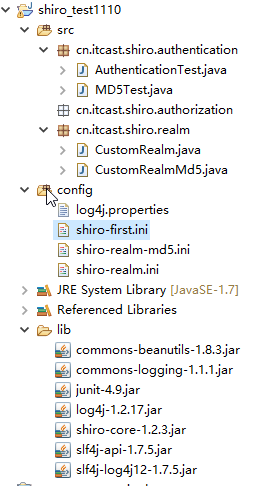
AuthenticationTest.java
package cn.itcast.shiro.authentication;

import org.apache.shiro.SecurityUtils;

import org.apache.shiro.authc.AuthenticationException;

import org.apache.shiro.authc.UsernamePasswordToken;

import org.apache.shiro.config.IniSecurityManagerFactory;

import org.apache.shiro.mgt.SecurityManager;

import org.apache.shiro.subject.Subject;

import org.apache.shiro.util.Factory;

import org.junit.Test;

/**

 * Description: 认证测试

 */

public class AuthenticationTest {

    // 用户登陆和退出

    @Test

    public void testLoginAndLogout() {

        // 创建securityManager工厂,通过ini配置文件创建securityManager工厂

        Factory<SecurityManager> factory = new IniSecurityManagerFactory(

                "classpath:shiro-first.ini");

        /*

        ini文件可以实现分组:property文件不能分组。

        [users]

        zhangsan=111111

        lisi=22222*/

        // 创建SecurityManager

        SecurityManager securityManager = factory.getInstance();

        // 将securityManager设置当前的运行环境中

        SecurityUtils.setSecurityManager(securityManager);

        // 从SecurityUtils里边创建一个subject,以后一个http请求就是一个subject。

        Subject subject = SecurityUtils.getSubject();

        // 在认证提交前准备token(令牌)

        // 这里的账号和密码 将来是由用户输入进去

        UsernamePasswordToken token = new UsernamePasswordToken("zhangsan","111111");

        try {

            // 执行认证提交

            subject.login(token);

        } catch (AuthenticationException e) {

            e.printStackTrace();

        }

        // 是否认证通过

        boolean isAuthenticated = subject.isAuthenticated();

        System.out.println("是否认证通过:" + isAuthenticated);//是否认证通过:true

        // 退出操作

        subject.logout();

        // 是否认证通过

        isAuthenticated = subject.isAuthenticated();//是否认证通过:false

        System.out.println("是否认证通过:" + isAuthenticated);

    }

    // 自定义realm

    @Test

    public void testCustomRealm() {

        // 创建securityManager工厂,通过ini配置文件创建securityManager工厂

        Factory<SecurityManager> factory = new IniSecurityManagerFactory(

                "classpath:shiro-realm.ini");//现在用的realm是我们自己自定义的realm,

        //用户名密码是从数据库读取,不再是从ini配置文件读取

        // 创建SecurityManager

        SecurityManager securityManager = factory.getInstance();

        // 将securityManager设置当前的运行环境中

        SecurityUtils.setSecurityManager(securityManager);

        // 从SecurityUtils里边创建一个subject

        Subject subject = SecurityUtils.getSubject();

        // 在认证提交前准备token(令牌)

        // 这里的账号和密码 将来是由用户输入进去

        UsernamePasswordToken token = new UsernamePasswordToken("zhangsan",

                "111111");

        try {

            // 执行认证提交

            subject.login(token);

        } catch (AuthenticationException e) {

            e.printStackTrace();

        }

        // 是否认证通过

        boolean isAuthenticated = subject.isAuthenticated();

        System.out.println("是否认证通过:" + isAuthenticated);

    }

    // 自定义realm实现散列值匹配

    @Test

    public void testCustomRealmMd5() {

        // 创建securityManager工厂,通过ini配置文件创建securityManager工厂

        Factory<SecurityManager> factory = new IniSecurityManagerFactory(

                "classpath:shiro-realm-md5.ini");

        // 创建SecurityManager

        SecurityManager securityManager = factory.getInstance();

        // 将securityManager设置当前的运行环境中

        SecurityUtils.setSecurityManager(securityManager);

        // 从SecurityUtils里边创建一个subject

        Subject subject = SecurityUtils.getSubject();

        // 在认证提交前准备token(令牌)

        // 这里的账号和密码 将来是由用户输入进去

        UsernamePasswordToken token = new UsernamePasswordToken("zhangsan",

                "222222");

        try {

            // 执行认证提交

            subject.login(token);

        } catch (AuthenticationException e) {

            e.printStackTrace();

        }

        // 是否认证通过

        boolean isAuthenticated = subject.isAuthenticated();

        System.out.println("是否认证通过:" + isAuthenticated);

    }

}
MD5Test.java
package cn.itcast.shiro.authentication;

import org.apache.shiro.crypto.hash.Md5Hash;

import org.apache.shiro.crypto.hash.SimpleHash;

public class MD5Test {

    public static void main(String[] args) {

        //原始 密码

        String source = "111111";

        //盐

        String salt = "qwerty";

        //散列次数

        int hashIterations = 2;

        //上边散列1次:f3694f162729b7d0254c6e40260bf15c

        //上边散列2次:36f2dfa24d0a9fa97276abbe13e596fc

        //构造方法中:

        //第一个参数:明文,原始密码

        //第二个参数:盐,通过使用随机数

        //第三个参数:散列的次数,比如散列两次,相当 于md5(md5(''))

        Md5Hash md5Hash = new Md5Hash(source, salt, hashIterations);

        String password_md5 =  md5Hash.toString();

        System.out.println(password_md5);

        //第一个参数:散列算法

        SimpleHash simpleHash = new SimpleHash("md5", source, salt, hashIterations);

        System.out.println(simpleHash.toString());

        //36f2dfa24d0a9fa97276abbe13e596fc

        //36f2dfa24d0a9fa97276abbe13e596fc

    }

}
CustomRealm.java
package cn.itcast.shiro.realm;

import org.apache.shiro.authc.AuthenticationException;

import org.apache.shiro.authc.AuthenticationInfo;

import org.apache.shiro.authc.AuthenticationToken;

import org.apache.shiro.authc.SimpleAuthenticationInfo;

import org.apache.shiro.authz.AuthorizationInfo;

import org.apache.shiro.realm.AuthorizingRealm;

import org.apache.shiro.subject.PrincipalCollection;

/**

 * 自定义realm

 */

public class CustomRealm extends AuthorizingRealm {

    // 设置realm的名称

    @Override

    public void setName(String name) {

        super.setName("customRealm");

    }

    // 用于认证

    @Override

    protected AuthenticationInfo doGetAuthenticationInfo(

            AuthenticationToken token) throws AuthenticationException {

        // token是用户输入的

        // 第一步从token中取出身份信息

        String userCode = (String) token.getPrincipal();

        // 第二步:根据用户输入的userCode从数据库查询

        // ....从数据库查询

        // 如果查询不到返回null

        //数据库中用户账号是zhangsansan

        /*if(!userCode.equals("zhangsansan")){//

            return null;

        }*/

        // 模拟从数据库查询到密码

        String password = "111112";

        // 如果查询到返回认证信息AuthenticationInfo

        SimpleAuthenticationInfo simpleAuthenticationInfo = new SimpleAuthenticationInfo(

                userCode, password, this.getName());

        return simpleAuthenticationInfo;

    }

    // 用于授权

    @Override

    protected AuthorizationInfo doGetAuthorizationInfo(

            PrincipalCollection principals) {

        return null;

    }

}
CustomRealmMd5.java
package cn.itcast.shiro.realm;

import org.apache.shiro.authc.AuthenticationException;

import org.apache.shiro.authc.AuthenticationInfo;

import org.apache.shiro.authc.AuthenticationToken;

import org.apache.shiro.authc.SimpleAuthenticationInfo;

import org.apache.shiro.authz.AuthorizationInfo;

import org.apache.shiro.realm.AuthorizingRealm;

import org.apache.shiro.subject.PrincipalCollection;

import org.apache.shiro.util.ByteSource;

/**

 * 自定义realm

 */

public class CustomRealmMd5 extends AuthorizingRealm {

    // 设置realm的名称

    @Override

    public void setName(String name) {

        super.setName("customRealmMd5");

    }

    // 用于认证

    @Override

    protected AuthenticationInfo doGetAuthenticationInfo(

            AuthenticationToken token) throws AuthenticationException {

        // token是用户输入的

        // 第一步从token中取出身份信息

        String userCode = (String) token.getPrincipal();

        // 第二步:根据用户输入的userCode从数据库查询

        // ....

        // 如果查询不到返回null

        // 数据库中用户账号是zhangsansan

        /*

         * if(!userCode.equals("zhangsansan")){// return null; }

         */

        // 模拟从数据库查询到密码,散列值

        String password = "f3694f162729b7d0254c6e40260bf15c";

        // 从数据库获取salt

        String salt = "qwerty";

        //上边散列值和盐对应的明文:111111

        // 如果查询到返回认证信息AuthenticationInfo

        SimpleAuthenticationInfo simpleAuthenticationInfo = new SimpleAuthenticationInfo(

                userCode, password, ByteSource.Util.bytes(salt), this.getName());

        return simpleAuthenticationInfo;

    }

    // 用于授权

    @Override

    protected AuthorizationInfo doGetAuthorizationInfo(

            PrincipalCollection principals) {

        return null;

    }

}
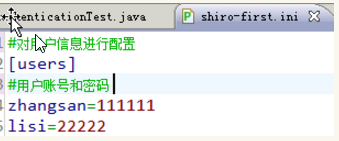
shiro-first.ini
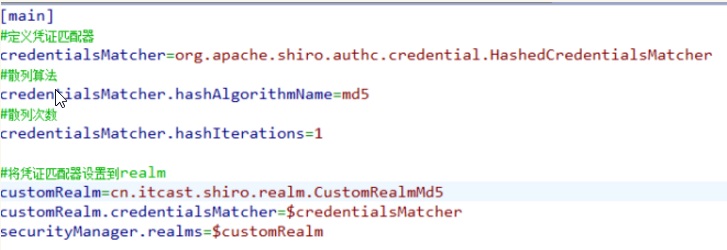
shiro-realm-md5.ini
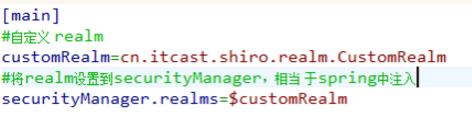
shiro-realm.ini
shiro4----shiro3代码的更多相关文章
- 日期格式代码出现两次的错误 ORA-01810
错误的原因是使用了两次MM . 一.Oracle中使用to_date()时格式化日期需要注意格式码 如:select to_date('2005-01-01 11:11:21','yyyy-MM-dd ...
- 可爱的豆子——使用Beans思想让Python代码更易维护
title: 可爱的豆子--使用Beans思想让Python代码更易维护 toc: false comments: true date: 2016-06-19 21:43:33 tags: [Pyth ...
- iOS代码规范(OC和Swift)
下面说下iOS的代码规范问题,如果大家觉得还不错,可以直接用到项目中,有不同意见 可以在下面讨论下. 相信很多人工作中最烦的就是代码不规范,命名不规范,曾经见过一个VC里有3个按钮被命名为button ...
- Jquery的点击事件,三句代码完成全选事件
先来看一下Js和Jquery的点击事件 举两个简单的例子 <!DOCTYPE html PUBLIC "-//W3C//DTD XHTML 1.0 Transitional//EN&q ...
- redux-amrc:用更少的代码发起异步 action
很多人说 Redux 代码多,开发效率低.其实 Redux 是可以灵活使用以及拓展的,经过充分定制的 Redux 其实写不了几行代码.今天先介绍一个很好用的 Redux 拓展-- redux-amrc ...
- 编写高质量代码:改善Java程序的151个建议(第5章:数组和集合___建议75~78)
建议75:集合中的元素必须做到compareTo和equals同步 实现了Comparable接口的元素就可以排序,compareTo方法是Comparable接口要求必须实现的,它与equals方法 ...
- 使用 .NET WinForm 开发所见即所得的 IDE 开发环境,实现不写代码直接生成应用程序
直接切入正题,这是我09年到11年左右业余时间编写的项目,最初的想法很简单,做一个能拖拖拽拽就直接生成应用程序的工具,不用写代码,把能想到的业务操作全部封装起来,通过配置的方式把这些业务操作组织起来运 ...
- jsp前端实现分页代码
前端需要订一page类包装,其参数为 private Integer pageSize=10; //每页记录条数=10 private Integer totalCount; //总记录条数 priv ...
- 【开源】简单4步搞定QQ登录,无需什么代码功底【无语言界限】
说17号发超简单的教程就17号,qq核审通过后就封装了这个,现在放出来~~ 这个是我封装的一个开源项目:https://github.com/dunitian/LoTQQLogin ————————— ...
- 【.net 深呼吸】限制执行代码的权限
前面好几篇文章,老周都跟大伙伴们聊了跟应用程序域有关的话题,干脆咱们一聊到底吧,做学问就应该这样,有恒心. App Domain的创建新应用程序域的方法中,有一个特殊的重载: public stati ...
随机推荐
- charles用法详解
Charles是目前最强大的http调试工具,在界面和功能上远强于Fiddler,同时是全平台支持,堪称圣杯级工具,唯一的缺陷是这货是收费的,而且是要¥50美元大洋…当然网上是有破解版的,鄙视下自己, ...
- MYSQL总结之sql语句大全
一.基础1.说明:创建数据库 CREATE DATABASE database-name .说明:删除数据库 drop database dbname .说明:备份sql server --- 创建 ...
- 查看/设置MySQL数据库的事务隔离级别
查看InnoDB存储引擎 系统级的隔离级别 和 会话级的隔离级别: mysql> select @@global.tx_isolation,@@tx_isolation; +---------- ...
- setpgid()
#include<unistd.h> int setpgid(pid_t pid,pid_t pgid); 函数作用:将pid进程的进程组ID设置成pgid,创建一个新进程组或加入一个已存 ...
- 事件驱动模型实例详解(Java篇)
或许每个软件从业者都有从学习控制台应用程序到学习可视化编程的转变过程,控制台应用程序的优点在于可以方便的练习某个语言的语法和开发习惯(如.net和java),而可视化编程的学习又可以非常方便开发出各类 ...
- 挑战--asp.net 文件夹上传
今天遇到一个有趣的问题,公司让平安做一个上传文件夹的功能,这个任务具有一定的挑战性哦.上传文件夹,我第一次看到有人这样做,以前都是上传压缩文件,从来就没有见人上传过文件夹,我也从来就没有尝试过.先不讨 ...
- linux下常用网页查看下载工具--wget
http://www.linuxidc.com/Linux/2015-06/118256.htm 5 个基于Linux命令行的文件下载和网站浏览工具 rTorrent.wget.cURL.w3m.El ...
- volley全然解析
一.volley是什么? 1.简单介绍 Volley是Goole在2013年Google I/O大会上推出了一个新的网络通信框架,它是开源的.从名字由来和配图中无数急促的火箭能够看出 Volley ...
- 2016 acm香港网络赛 B题. Boxes
原题网址:https://open.kattis.com/problems/boxes Boxes There are N boxes, indexed by a number from 1 to N ...
- PHP-Manual的学习----【语言参考】----【类型】-----【string字符串型】
1.一个字符串 string 就是由一系列的字符组成,其中每个字符等同于一个字节.这意味着 PHP 只能支持 256 的字符集,因此不支持 Unicode .2. string 最大可以达到 2GB. ...