
Xshell设置主机名高亮
修改后的效果:
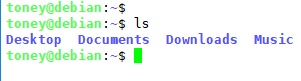
操作步骤:
情况①:如果是Ubuntu或者Debian,按照下面的流程,两步解决:
- 打开
~/.bashrc。 - 修改参数
force_color_prompt=yes去掉前面的注释#。
情况②:如果是CentOS中,按照下面的流程,两步解决:
- 打开
~/.bashrc。 - 在文件末尾添加如下内容:
# set a fancy prompt (non-color, unless we know we "want" color)
case "$TERM" in
    xterm-color|*-256color) color_prompt=yes;;
esac

# uncomment for a colored prompt, if the terminal has the capability; turned
# off by default to not distract the user: the focus in a terminal window
# should be on the output of commands, not on the prompt
force_color_prompt=yes

if [ -n "$force_color_prompt" ]; then
    if [ -x /usr/bin/tput ] && tput setaf 1 >&/dev/null; then
    # We have color support; assume it's compliant with Ecma-48
    # (ISO/IEC-6429). (Lack of such support is extremely rare, and such
    # a case would tend to support setf rather than setaf.)
    color_prompt=yes
    else
    color_prompt=
    fi
fi

if [ "$color_prompt" = yes ]; then
    PS1='${debian_chroot:+($debian_chroot)}\[\033[01;32m\]\u@\h\[\033[00m\]:\[\033[01;34m\]\w\[\033[00m\]\$ '
else
    PS1='${debian_chroot:+($debian_chroot)}\u@\h:\w\$ '
fi
unset color_prompt force_color_prompt
Xshell设置主机名高亮的更多相关文章
- centos7的网络配置以及设置主机名和绑定IP的问题
CentOS 7.0系统是一个很新的版本哦,很多朋友都不知道CentOS 7.0系统是怎么去安装配置的哦,因为centos7.0与以前版本是有很大的改进哦. 说明:截止目前CentOS 7.x最新版本 ...
- linux查看与设置主机名
1.设置主机名 通过编辑/etc/sysconfig/network文件中的HOSTNAME字段就可以修改主机名.如下所示: [root@zijuan /]# vim /etc/sysc ...
- 用户管理_组管理_设置主机名_UGO_文件高级权限_ACL权限
用户管理: 添加用户:useradd tom 设置密码:passwd tom 切换账户: su - tom (不加-也能切换,但是 -会有两点不同 1.有-会切换到该用户的主目录 2.会切换到该用户 ...
- 【Centos7】hostnamectl 设置主机名
Centos7中提供了设置主机名的工具 hostnamectl hostname有三种状态 static(永久) transient(瞬态) pretty (灵活) 查看主机名状态 [oracle@h ...
- Centos7】hostnamectl 设置主机名
Centos7中提供了设置主机名的工具 hostnamectl hostname有三种状态 static(永久) transient(瞬态) pretty (灵活) 查看主机名状态 [oracle@h ...
- CentOS7 设置主机名及IP映射
1.设置主机名 查看本机的主机名,使用如下三个命令中任意一个即可 # hostname # uname -n # cat /proc/sys/kernel/hostname 使用 vi 编辑器打开 / ...
- Linux命令之hostname - 显示或设置主机名
我使用过的Linux命令之hostname - 显示或设置主机名 本文链接:http://codingstandards.iteye.com/blog/804648 (转载请注明出处) 用途说明 ...
- 利用iis创建网站后为什么不能设置主机名
主机名 主机名就是网站的域名,通俗说就是网站地址(如:www.baidu.com). 设置了主机名,而IIS确不知道主机名对应的地址在哪里. 举个例子,把www.baidu.com做为IIS网站的主机 ...
- linux 查看和设置主机名
1.设置主机名 通过编辑/etc/sysconfig/network文件中的HOSTNAME字段就可以修改主机名.如下所示: [root@zijuan /]# vim /etc/sysconfig/n ...
随机推荐
- SDUT 1489 求二叉树的先序遍历 (中序后序还原二叉树)
求二叉树的先序遍历 Time Limit: 1000MS Memory Limit: 65536KB Submit Statistic Discuss Problem Description 已知一 ...
- Spark 1.4.1中Beeline使用的gc overhead limit exceeded
最近使用SparkSQL做数据的打平操作,就是把多个表的数据经过关联操作导入到一个表中,这样数据查询的过程中就不需要在多个表中查询了,在数据量大的情况下,这样大大提高了查询效率. 我启动了thri ...
- scala中lazy
Scala中通过lazy关键字来定义惰性变量,惰性变量只能是不可变变量.只有在调用惰性变量的时候,才会去实例化这个变量
- boost::python开发环境搭建
本来想用mingw编译boost::python模块,网上看了下资料太少,只有使用vs2012 操作环境:win7 x64 python: x86 boost: 1.57 编译boost::pytho ...
- Ubuntu学习小结(二)PostgreSQL的使用,进程的查看关闭,编辑器之神Vim入门
距离上次发布文章已经过去了很久.在过去的半年中,虽然写的代码不多,但是在接触了计算机一些其他的知识,包括数据库.网络之后,感觉能够融会贯通,写代码水平又有了一定的提高.接下来,将会发表几篇文章,简单介 ...
- [转]MYSQL5.7版本sql_mode=only_full_group_by问题
转至:https://www.cnblogs.com/zhi-leaf/p/5998820.html 具体出错提示: [Err] 1055 - Expression #1 of ORDER BY cl ...
- 处理器(也就是执行流程图上面的controller)执行逻辑(十)
处理器继承自:AbstractController,MultiActionController 一.AbstractController 如上图,可以分析出AbstractController用的 ...
- JavaScript混淆压缩
比较好用的压缩软件,支持合并 JsCompressor-v3.0 比较好用的混淆站点:http://dean.edwards.name/packer/
- javascript 设计模式实践之策略模式--输入验证
博客地址:http://www.cnblogs.com/kongxianghai/p/4985122.html,写的挺好的推荐下!
- [SinGuLaRiTy] 2017-07-22 NOIP2017 模拟赛
[SInGuLaRiTy-1029] Copyright (c) SinGuLaRiTy 2017. All Rights Reserved. <全是看看代码就会的水题,偷个懒不单独写题解了~& ...