
纯JS文本比较工具
前段时间由于工作需要写了一个纯JS文本比较工具
在这里与大家分享下
算法有待优化,还希望大家多多指教
先上效果图:
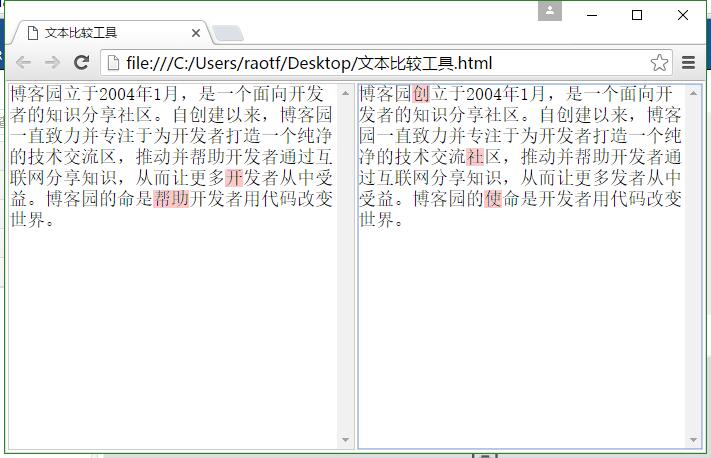
奉上源码(把源码保存为html格式的文件就可以直接运行了):
<!doctype html>
<html>
<head>
<title>文本比较工具</title>
<style type="text/css">
*{padding:0px;margin:0px;}
html,body{
overflow-y: hidden;
}
.edit_div{
border: 1px solid #CCCCCC;
overflow: auto;
position: relative;
}
.edit_div textarea{
resize:none;
background: none repeat scroll 0 0 transparent;
border: 0 none;
width: 100%;
height:200px;
overflow-y: scroll;
position: absolute;
left: 0px;
top: 0px;
z-index: 2;
font-size: 18px;
white-space: pre-wrap;
word-wrap: break-word;
word-break:break-all;
}
.edit_div pre{
overflow-y: scroll;
white-space: pre-wrap;
word-wrap: break-word;
word-break:break-all;
width: 100%;
height:200px;
text-align: left;
color: #ffffff;
z-index: 1;
font-size: 18px;
}
</style>
</head>
<body>
<table style="width:100%">
<tr>
<td style="width:50%">
<div class="edit_div">
<pre id="edit_pre_1"></pre>
<textarea id="edit_textarea_1" onscroll="test1_scroll()" oninput="textchange()" onpropertychange="textchange()"></textarea>
</div>
</td>
<td style="width:50%">
<div class="edit_div">
<pre id="edit_pre_2"></pre>
<textarea id="edit_textarea_2" onscroll="test2_scroll()" oninput="textchange()" onpropertychange="textchange()"></textarea>
</div>
</td>
</tr>
</table>
<script type="text/javascript">
function test1_scroll(){
document.getElementById("edit_pre_1").scrollTop=document.getElementById("edit_textarea_1").scrollTop;
document.getElementById("edit_pre_2").scrollTop=document.getElementById("edit_pre_1").scrollTop;
document.getElementById("edit_textarea_2").scrollTop=document.getElementById("edit_textarea_1").scrollTop;
}
function test2_scroll(){
document.getElementById("edit_pre_2").scrollTop=document.getElementById("edit_textarea_2").scrollTop;
document.getElementById("edit_pre_1").scrollTop=document.getElementById("edit_pre_2").scrollTop;
document.getElementById("edit_textarea_1").scrollTop=document.getElementById("edit_textarea_2").scrollTop;
}
function textchange(){
var op = eq({ value1: document.getElementById("edit_textarea_1").value, value2: document.getElementById("edit_textarea_2").value });
document.getElementById("edit_pre_1").innerHTML=op.value1+"\r\n";
document.getElementById("edit_pre_2").innerHTML=op.value2+"\r\n";
}
function eq(op) {
if(!op){
return op;
}
if(!op.value1_style){
op.value1_style="background-color:#FEC8C8;";
}
if(!op.value2_style){
op.value2_style="background-color:#FEC8C8;";
}
if(!op.eq_min){
op.eq_min=3;
}
if(!op.eq_index){
op.eq_index=5;
}
if (!op.value1 || !op.value2) {
return op;
}
var ps = {
v1_i: 0,
v1_new_value: "",
v2_i: 0,
v2_new_value: ""
};
while (ps.v1_i < op.value1.length && ps.v2_i < op.value2.length) {
if (op.value1[ps.v1_i] == op.value2[ps.v2_i]) {
ps.v1_new_value += op.value1[ps.v1_i].replace(/</g,"<").replace(">",">");
ps.v2_new_value += op.value2[ps.v2_i].replace(/</g,"<").replace(">",">");
ps.v1_i += 1;
ps.v2_i += 1;
if (ps.v1_i >= op.value1.length) {
ps.v2_new_value += "<span style='" + op.value2_style + "'>" + op.value2.substr(ps.v2_i).replace(/</g,"<").replace(">",">") + "</span>";
break;
}
if (ps.v2_i >= op.value2.length) {
ps.v1_new_value += "<span style='" + op.value1_style + "'>" + op.value1.substr(ps.v1_i).replace(/</g,"<").replace(">",">") + "</span>";
break;
}
} else {
ps.v1_index = ps.v1_i + 1;
ps.v1_eq_length = 0;
ps.v1_eq_max = 0;
ps.v1_start = ps.v1_i + 1;
while (ps.v1_index < op.value1.length) {
if (op.value1[ps.v1_index] == op.value2[ps.v2_i + ps.v1_eq_length]) {
ps.v1_eq_length += 1;
} else if (ps.v1_eq_length > 0) {
if (ps.v1_eq_max < ps.v1_eq_length) {
ps.v1_eq_max = ps.v1_eq_length;
ps.v1_start = ps.v1_index - ps.v1_eq_length;
}
ps.v1_eq_length = 0;
break;//只寻找最近的
}
ps.v1_index += 1;
}
if (ps.v1_eq_max < ps.v1_eq_length) {
ps.v1_eq_max = ps.v1_eq_length;
ps.v1_start = ps.v1_index - ps.v1_eq_length;
} ps.v2_index = ps.v2_i + 1;
ps.v2_eq_length = 0;
ps.v2_eq_max = 0;
ps.v2_start = ps.v2_i + 1;
while (ps.v2_index < op.value2.length) {
if (op.value2[ps.v2_index] == op.value1[ps.v1_i + ps.v2_eq_length]) {
ps.v2_eq_length += 1;
} else if (ps.v2_eq_length > 0) {
if (ps.v2_eq_max < ps.v2_eq_length) {
ps.v2_eq_max = ps.v2_eq_length;
ps.v2_start = ps.v2_index - ps.v2_eq_length;
}
ps.v1_eq_length = 0;
break;//只寻找最近的
}
ps.v2_index += 1;
}
if (ps.v2_eq_max < ps.v2_eq_length) {
ps.v2_eq_max = ps.v2_eq_length;
ps.v2_start = ps.v2_index - ps.v2_eq_length;
}
if (ps.v1_eq_max < op.eq_min && ps.v1_start - ps.v1_i > op.eq_index) {
ps.v1_eq_max = 0;
}
if (ps.v2_eq_max < op.eq_min && ps.v2_start - ps.v2_i > op.eq_index) {
ps.v2_eq_max = 0;
}
if ((ps.v1_eq_max == 0 && ps.v2_eq_max == 0)) {
ps.v1_new_value += "<span style='" + op.value1_style + "'>" + op.value1[ps.v1_i].replace(/</g,"<").replace(">",">") + "</span>";
ps.v2_new_value += "<span style='" + op.value2_style + "'>" + op.value2[ps.v2_i].replace(/</g,"<").replace(">",">") + "</span>";
ps.v1_i += 1;
ps.v2_i += 1; if (ps.v1_i >= op.value1.length) {
ps.v2_new_value += "<span style='" + op.value2_style + "'>" + op.value2.substr(ps.v2_i).replace(/</g,"<").replace(">",">") + "</span>";
break;
}
if (ps.v2_i >= op.value2.length) {
ps.v1_new_value += "<span style='" + op.value1_style + "'>" + op.value1.substr(ps.v1_i).replace(/</g,"<").replace(">",">") + "</span>";
break;
}
} else if (ps.v1_eq_max > ps.v2_eq_max) {
ps.v1_new_value += "<span style='" + op.value1_style + "'>" + op.value1.substr(ps.v1_i, ps.v1_start - ps.v1_i).replace(/</g,"<").replace(">",">") + "</span>";
ps.v1_i = ps.v1_start;
} else {
ps.v2_new_value += "<span style='" + op.value2_style + "'>" + op.value2.substr(ps.v2_i, ps.v2_start - ps.v2_i).replace(/</g,"<").replace(">",">") + "</span>";
ps.v2_i = ps.v2_start;
}
}
}
op.value1 = ps.v1_new_value;
op.value2 = ps.v2_new_value;
return op;
}
function settextheight(){
var heigth=(document.documentElement.clientHeight-6)+"px"
document.getElementById("edit_pre_1").style.height=heigth;
document.getElementById("edit_textarea_1").style.height=heigth;
document.getElementById("edit_pre_2").style.height=heigth;
document.getElementById("edit_textarea_2").style.height=heigth;
}
window.onload=function(){
settextheight();
window.onresize=function(){
settextheight();
}
}
</script>
</body>
</html>
纯JS文本比较工具源码
纯JS文本比较工具的更多相关文章
- 我用的一些Node.js开发工具、开发包、框架等总结
开发工具 1.WebStorm,毫无疑问非他莫属,跨平台,强大的代码提示,支持Nodejs调试,此外还支持vi编辑模式,这点我很喜欢. 2.做些小型项目用Sublime Text. 3.Browser ...
- 纯js客服插件集qq、旺旺、skype、百度hi、msn
原文 纯js客服插件集qq.旺旺.skype.百度hi.msn 客服插件,集qq.旺旺.skype.百度hi.msn 等 即时通讯工具,并可自己添加支持的通讯工具,极简主义,用法自己琢磨.我的博客 h ...
- 在线压缩JS的工具
给大家介绍款在线压缩JS的工具 首先说下该工具的域名:http://javascriptcompressor.com/ 进入后界面如下: 具体要讲下它的功能点:在线压缩 Javascript 源码可以 ...
- 纯js实现html转pdf
项目开发中遇到了一个变态需求,需要把一整个页面导出为pdf格式,而且要保留页面上的所有的表格.svg图片和样式.简而言之,就是希望像截图一样,把整个页面截下来,然后保存成pdf.咋不上天呢--查了一下 ...
- Node.js开发工具、开发包、框架等总结
开发工具 1.WebStorm,毫无疑问非他莫属,跨平台,强大的代码提示,支持Nodejs调试,此外还支持vi编辑模式,这点我很喜欢.2.做些小型项目用Sublime Text.3.Browserif ...
- Ajax,纯Js+Jquery
AJAX:Asynchronous Javascript and xml 异步,Js和Xml 交互式网页开发 不刷新页面,与服务器交互 详情请参照Jquery工具指南用在浏览器端的技术,无刷新,通过X ...
- 纯JS实现KeyboardNav(学习笔记)二
纯JS实现KeyboardNav(学习笔记)二 这篇博客只是自己的学习笔记,供日后复习所用,没有经过精心排版,也没有按逻辑编写 这篇主要是添加css,优化js编写逻辑和代码排版 GitHub项目源码 ...
- js常用工具类.
一些js的工具类 复制代码 /** * Created by sevennight on 15-1-31. * js常用工具类 */ /** * 方法作用:[格式化时间] * 使用方法 * 示例: * ...
- 纯JS实现俄罗斯方块,打造属于你的游戏帝国
纯JS俄罗斯方块,打造属于你的游戏帝国. 本文原始作者博客 http://www.cnblogs.com/toutou 俄罗斯方块(Tetris, 俄文:Тетрис)是一款电视游戏机和掌上游戏机游戏 ...
随机推荐
- POJ 1502 MPI Maelstrom (最短路)
MPI Maelstrom Time Limit: 1000MS Memory Limit: 10000K Total Submissions: 6044 Accepted: 3761 Des ...
- Google IP 最新地址
原文地址:https://ideas.spkcn.com/technology/250.html 2015年 目前最新可以直接访问google的IP91.213.30.152173.194.77.14 ...
- css奇特用法之 IMG添加背景图片配合显示--效果惊艳
IMG标签本身是显示图片的,但通过CSS可以再为其设置背景图片,让其和自身的图片配合来显示,最终的效果会让你惊叹.当然,这个发现来自于老外,所以代码马上与大家分享.再此之前,我也从来没有想到过这个思路 ...
- Backbone Events 源码笔记
用了backbone一段时间了,做一些笔记和总结,看的源码是1.12 backbone有events,model,collection,histoty,router,view这些模块,其中events ...
- javascript触摸事件touch使用
详细内容请点击 Apple在iOS 2.0中引入了触摸事件API,Android正迎头赶上这一事实标准,缩小差距.最近一个W3C工作组正合力制定这一触摸事件规范. 在本文深入研究iOS和 ...
- C#this关键字用法
用法一 this关键字的作用是解决当传入参数的名称和数据字段的名称,类型完全相同时产生的作用于歧义,一般情况下我们应该避免产生重名的习惯 先来演示下: class Airplane { public ...
- php魔术方法 http_build_query使用
最近在做一个项目使用到 http_build_query 这个魔术方法很好用,它可以将一个数组转换成这样的格式: 比如 $_arr = array('action'=>'show','page' ...
- mysql快速上手2
上一篇文章讲的是mysql的基本操作,这一篇会有一点难以理解,本节主要内容mysql视图,存储过程,函数,事务,触发器,以及动态执行sql 视图view 视图是一个虚拟表,其内容由查询定义.同真实的表 ...
- ubuntu下安装 Source insight
习惯了在source insight下编辑阅读源码,在linux下用vi总是用不好 ,还是在ubuntu上用回熟悉的source insight. 在ubuntu中,安装windows程序用wine, ...
- c++11:copy_n
copy_n: Copies exactly count values from the range beginning at first to the range beginning at resu ...