
Embarcadero RAD Studio 2016 Product Approach and Roadmap
delphi 2016 路线图
http://community.embarcadero.com/article/news/16211-embarcadero-rad-studio-2016-product-approach-and-roadmap-2
Embarcadero RAD Studio 2016 Product Approach and Roadmap
Linux Support
Written by Marco Cantu, RAD PM. Posted in News
As we enter into 2016, the team is very excited by what lies ahead. We have development in process right now and a lot of great plans and ideas for the second half of 2016 and beyond. Before we focus on the future, let's first take a second to reflect on many of the great product updates and other changes that occurred in 2015.
RAD Studio 10 Seattle is a fantastic version that will serve as foundation to all we do in the next few years. If you have not moved to 10 Seattle now is the time to do it and as long as you have Update Subscription, you will automatically get new updates and releases as they come out. Windows 10 support is of course the highlight and the new styles & features provide terrific ways to refresh and monetize your apps. However, 2015 delivered much more…
Windows 10 Support
Large Memory Model IDE
New Clang-enhanced C++11 for 32-bit Windows
iOS 64-bit & Universal App Support
Beacon Proximity Support
GetIt Package Manager Introduction
Multi-Monitor IDE Support
Extensions to Version Insight for SVN, Mercurial and GIT
- Introduction of AppAnalytics
The changes in ownership in 2015 allowed our team to have a new look at the product strategy and roadmap. We actively reached out to partners and customers to understand what is working, what is not working, what you like, and what you don’t like. You told us you want fewer major releases, more seamless updates / upgrades, higher quality, better language support, and more mobile native controls. As you will see and hear, we are making adjustments both in the short and long term to align with these requests.
We have a lot of development underway, which cannot all be accomplished within a single release or update. In the Spring development track, code named "Big Ben”, the key themes are quality & first user experience and installation. A new installer leverages our GetIt technology to provide you flexibility to choose what you want to install and reduces installation time. The team is working the following features that will be included in 2016 releases:
Separate or floating form designer for VCL & FMX
Refactoring in C++
FireUI App Preview - preview your forms on any target (desktop and mobile) while using the form designer in the IDE
FireMonkey Enhancements for Windows, Mac and mobile
Address Book/Contacts component
Style Designer & ListView Items Designer
Numerous other features including ListView touch animation, grid improvements, Windows accelerator key support, font enhancements and more
Multi-Device Designer Improvements
Including Form Designer Preview on Device
Android Wear Styling & new FireUI views
IoT or Internet of Things
Extended Bluetooth LE support
IoT connectivity framework that turns off-the-shelf and custom IoT smart devices, sensors, and wearables into easy-to-use API components
Support for Bluetooth LE and Z-Wave device components
ThingPoint - Enterprise access points for your IoT devices which extends EMS functionality
Window/VCL
Improvement to WinRT bridge including Bluetooth LE support for Windows 10
DirectX 12 Support
Delphi Compiler & Language
Native support for Utf8String type on all platforms
Support for weak and unsafe interface references on non-ARC platforms, like Windows
C++ CLANG 3.3 on all platforms
FireDAC Driver Updates - including Oracle, DB2, Interbase, SQLite, and Advantage
The second development track, code named “Godzilla,” will deliver a Fall release. It will enable you to develop Delphi and C++ applications to run on Linux Server. This is a much anticipated addition to our product and a result of over two years of development. We intend to release a tech preview sometime this summer of the Delphi for Linux Server technology to give developers a chance to try it for a while, give us feedback and help us ensure it is as stable and solid as possible. Here are some further details on what we are aiming for with the initial Fall release:
Apache modules in WebBroker and support for DataSnap and EMS
FireDAC Linux database access
Linux platform support for console apps with IoT support
We will formally support Ubuntu Server & RedHat Enterprise. We will extend the formally supported Linux distributions list over time as demand dictates
Windows based IDE with cross-compiler, deploy and debug via PAServer
Linux compilers will be for Intel 64-bit server, LLVM-based and ARC-enabled
While Linux will be the cornerstone of the Fall release, we have a huge list of other features we want to add to the product, some of which are outlined below in the roadmap image. We have also defined general areas of priority since an image can only convey so much data.
IDE UI improvements and styling
Update of all C++ compilers to newer versions of Clang
Further improvements for GetIt, both for the package manager and the installer
New Windows 10 VCL controls
More FireMonkey platform native control support
Windows 10 Centennial support (pending Microsoft release of the Centennial Universal Windows Platform bridge)
Support for coming versions of iOS and Android
As we are in the detailed planning stages for this release, we will share additional details as we get further into 2016. If you have specific items or questions, please let the Product Management team know and we can talk or you can log ideas and enhancement requests as well at quality.embarcadero.com.
The RAD Studio Product Management Team
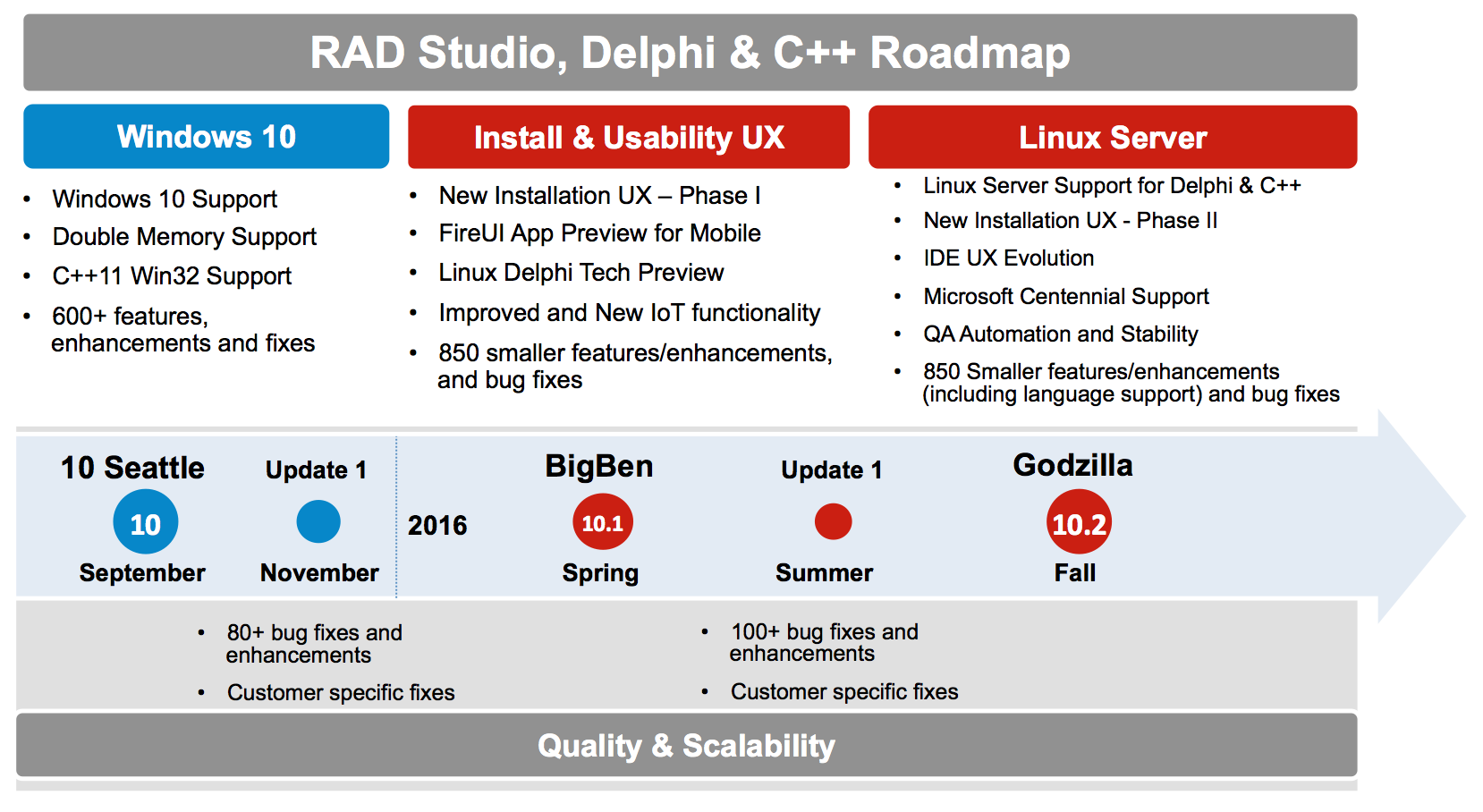
These plans and roadmap represent our intentions as of this date, but our development plans and priorities are subject to change.
Accordingly, we can’t offer any commitments or other forms of assurance that we’ll ultimately release any or all of the above-described products on the schedule or in the order described, or at all. These general indications of development schedules or “product roadmaps” should not be interpreted or construed as any form of a commitment, and our customers’ rights to upgrades, updates, enhancements and other maintenance releases will be set forth only in the applicable software license agreement.
Embarcadero RAD Studio 2016 Product Approach and Roadmap的更多相关文章
- c++ builder xe2 (Embarcadero rad studio) 远程调试 同样适用于 delphi 远程调试 教程
转载:http://www.cnblogs.com/zhangdongsheng/p/3411056.html 每次要远程调试的时候都要看半天的xe2英文帮助文档,今天正好有点时间,把它写下来. 一. ...
- Embarcadero RAD Studio XE5
英巴卡迪诺 RAD Studio XE是终极应用程序开发套件,能以最快速方式为Windows.Mac OS X. .NET. PHP. Web和移动设备可视化开发数据丰富.界面美观的跨平台应用程序.R ...
- 彻底卸载 RAD Studio 2009/2010/XE
彻底卸载 RAD Studio 2009/2010/XE: 控制面板-->添加/删除程序中执行了卸载操作以后, 还需要做以下工作: 1. 删除以下目录(注意有些目录是隐藏的): %ALLUSER ...
- RAD Studio/Delphi 2010 3615下载+破解
RAD Studio/Delphi 2010 3615下载+破解 官方下载地址: http://altd.embarcadero.com/download/RADStudio2010/delphicb ...
- 彻底卸载 RAD Studio 2009/2010/XE+ 的步骤
重新安装 RAD 系列时,建议将上一个版本彻底卸载,彻底卸载 RAD Studio 2009/2010/XE+ 的步骤: 控制面板-->添加/删除程序中执行了卸载操作以后, 还需要做以下工作: ...
- RAD Studio XE2破解、安装、试用
RAD Studio XE2刚发布没几天,网上找到了破解,鸡冻啊.迫不及待的下载安装. 新特性: 使用FireMonkey ?创建令人印象深刻的商业应用 构建64位Delphi应用程序以利用最新的硬件 ...
- 打开RAD Studio XE5提示"displayNotification:内存不够"解决办法
操作方法: 在RAD Studio XE5快捷方式上鼠标右击选择属性,在弹出的快捷方式标签页中将目标(T):"C:\Program Files (x86)\Embarcadero\RAD S ...
- Delphi XE 5,Rad Studio XE 5 官方下载(附破解),更新 Update 1,Help Update 1
Delphi XE 5 破解,有图有真相 Embarcadero RAD Studio XE5 Update 2 v19.0.14356.6604 (等待破解中...): http://altd.em ...
- Delphi XE 4,Rad Studio XE 4 官方下载,更新Update 1(附破解)
http://blog.csdn.net/maxwoods/article/details/8842889 XE4 Update1 下载: http://altd.embarcadero.com/do ...
随机推荐
- JAVA多线程----用--取钱问题2
在该示例代码中,TestAccount类是测试类,主要实现创建帐户Account类的对象,以及启动学生线程StudentThread和启动家长线程GenearchThread.在StudentThre ...
- JVM原理一
简述: 这个其实不是很重要,一般配好环境就好了,如果不对jvm做啥动作不需要搞清楚这个. JVM ---->< JVM.DLL 挂接到JNIENV的实例 JAVA程序和操作系统的一个沟通者 ...
- 关于dyld: Library not loaded
在接入智凡迪的sdk过程中,遇到以下问题: dyld: Library not loaded: @rpath/SDKFramework.framework/SDKFramework Referen ...
- CSS琐碎[1]
(1)letter-spacing 设置字符间局,用长度指定(百分比兼容性不好) 没有间距 间距6px API:http://gucong3000.github.io/css-book/propert ...
- 自动化测试入门指南(3)-- 入门demo
按照 自动化测试入门指南(2)-- 环境搭建搭建好环境后,我们继续一步步实现一个简单的入门例子 Step0. 安装Firefox浏览器(http://pan.baidu.com/s/1c00bw8g中 ...
- win10/ubuntu双系统卸载删除ubuntu系统
1.重启进入boot-设置windows启动项为首选项. 2.删除EFI中ubuntu引导启动项: a.将EFI分区挂载到M盘->(管理员权限)命令行输入:mountvol M: /s b.进入 ...
- 每天一个linux命令:【转载】tail命令
tail 命令从指定点开始将文件写到标准输出.使用tail命令的-f选项可以方便的查阅正在改变的日志文件,tail -f filename会把filename里最尾部的内容显示在屏幕上,并且不但刷新, ...
- My Test about Mat
一.创建Mat >Mat a = cv::Mat(2,2,CV_32S,1); output: [1,1; 1,1] >Mat a = cv::Mat(2,2,CV_32SC3,1); ...
- 《selenium2 python 自动化测试实战》(13)——上传文件
看代码: # coding: utf-8 from selenium import webdriver from time import sleep driver = webdriver.Firefo ...
- cell的循环利用
方式1 // 1.先根据cell的标识去缓存池中查找可循环利用的cell UITableViewCell *cell = [tableView dequeueReusableCellWithIdent ...