
Spring Cloud OAuth2(二) 扩展登陆方式:账户密码登陆、 手机验证码登陆、 二维码扫码登陆
概要
基于上文讲解的spring cloud 授权服务的搭建,本文扩展了spring security 的登陆方式,增加手机验证码登陆、二维码登陆。 主要实现方式为使用自定义filter、 AuthenticationProvider、 AbstractAuthenticationToken 根据不同登陆方式分别处理。 本文相应代码在Github上已更新。
GitHub 地址:https://github.com/fp2952/spring-cloud-base/tree/master/auth-center/auth-center-provider
srping security 登陆流程
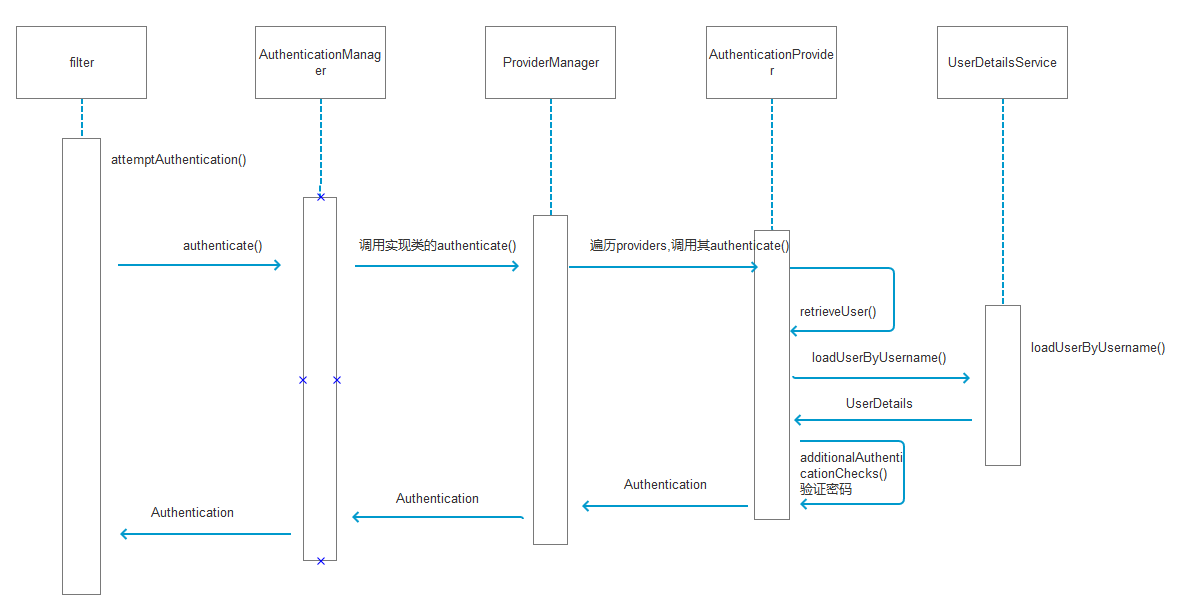
关于二维码登陆
二维码扫码登陆前提是已在微信端登陆,流程如下:
- 用户点击二维码登陆,调用后台接口生成二维码(带参数key), 返回二维码链接、key到页面
- 页面显示二维码,提示扫码,并通过此key建立websocket
- 用户扫码,获取参数key,点击登陆调用后台并传递key
- 后台根据微信端用户登陆状态拿到userdetail, 并在缓存(redis)中维护 key: userDetail 关联关系
- 后台根据websocket: key通知对于前台页面登陆
- 页面用此key登陆
最后一步用户通过key登陆就是本文的二维码扫码登陆部分,实际过程中注意二维码超时,redis超时等处理
自定义LoginFilter
自定义过滤器,实现AbstractAuthenticationProcessingFilter,在attemptAuthentication方法中根据不同登陆类型获取对于参数、 并生成自定义的 MyAuthenticationToken。
    @Override

    public Authentication attemptAuthentication(HttpServletRequest request, HttpServletResponse response) throws AuthenticationException, IOException, ServletException {

        if (postOnly && !request.getMethod().equals("POST")) {

            throw new AuthenticationServiceException(

                    "Authentication method not supported: " + request.getMethod());

        }

        // 登陆类型:user:用户密码登陆;phone:手机验证码登陆;qr:二维码扫码登陆

        String type = obtainParameter(request, "type");

        String mobile = obtainParameter(request, "mobile");

        MyAuthenticationToken authRequest;

        String principal;

        String credentials;

        // 手机验证码登陆

        if("phone".equals(type)){

            principal = obtainParameter(request, "phone");

            credentials = obtainParameter(request, "verifyCode");

        }

        // 二维码扫码登陆

        else if("qr".equals(type)){

            principal = obtainParameter(request, "qrCode");

            credentials = null;

        }

        // 账号密码登陆

        else {

            principal = obtainParameter(request, "username");

            credentials = obtainParameter(request, "password");

            if(type == null)

                type = "user";

        }

        if (principal == null) {

            principal = "";

        }

        if (credentials == null) {

            credentials = "";

        }

        principal = principal.trim();

        authRequest = new MyAuthenticationToken(

                principal, credentials, type, mobile);

        // Allow subclasses to set the "details" property

        setDetails(request, authRequest);

        return this.getAuthenticationManager().authenticate(authRequest);

    }

    private void setDetails(HttpServletRequest request,

                            AbstractAuthenticationToken authRequest) {

        authRequest.setDetails(authenticationDetailsSource.buildDetails(request));

    }

    private String obtainParameter(HttpServletRequest request, String parameter) {

        return request.getParameter(parameter);

    }
自定义 AbstractAuthenticationToken
继承 AbstractAuthenticationToken,添加属性 type,用于后续判断。
public class MyAuthenticationToken extends AbstractAuthenticationToken {

    private static final long serialVersionUID = 110L;

    private final Object principal;

    private Object credentials;

    private String type;

    private String mobile;

    /**

     * This constructor can be safely used by any code that wishes to create a

     * <code>UsernamePasswordAuthenticationToken</code>, as the {@link

     * #isAuthenticated()} will return <code>false</code>.

     *

     */

    public MyAuthenticationToken(Object principal, Object credentials,String type, String mobile) {

        super(null);

        this.principal = principal;

        this.credentials = credentials;

        this.type = type;

        this.mobile = mobile;

        this.setAuthenticated(false);

    }

    /**

     * This constructor should only be used by <code>AuthenticationManager</code> or <code>AuthenticationProvider</code>

     * implementations that are satisfied with producing a trusted (i.e. {@link #isAuthenticated()} = <code>true</code>)

     * token token.

     *

     * @param principal

     * @param credentials

     * @param authorities

     */

    public MyAuthenticationToken(Object principal, Object credentials,String type, String mobile, Collection<? extends GrantedAuthority> authorities) {

        super(authorities);

        this.principal = principal;

        this.credentials = credentials;

        this.type = type;

        this.mobile = mobile;

        super.setAuthenticated(true);

    }

    @Override

    public Object getCredentials() {

        return this.credentials;

    }

    @Override

    public Object getPrincipal() {

        return this.principal;

    }

    public String getType() {

        return this.type;

    }

    public String getMobile() {

        return this.mobile;

    }

    public void setAuthenticated(boolean isAuthenticated) throws IllegalArgumentException {

        if(isAuthenticated) {

            throw new IllegalArgumentException("Cannot set this token to trusted - use constructor which takes a GrantedAuthority list instead");

        } else {

            super.setAuthenticated(false);

        }

    }

    public void eraseCredentials() {

        super.eraseCredentials();

        this.credentials = null;

    }

}
自定义 AuthenticationProvider
实现 AuthenticationProvider
代码与 AbstractUserDetailsAuthenticationProvider 基本一致,只需修改 authenticate 方法 及 createSuccessAuthentication 方法中的 UsernamePasswordAuthenticationToken 为我们的 token, 改为:
    public Authentication authenticate(Authentication authentication) throws AuthenticationException {

        // 此处修改断言自定义的 MyAuthenticationToken

        Assert.isInstanceOf(MyAuthenticationToken.class, authentication, this.messages.getMessage("MyAbstractUserDetailsAuthenticationProvider.onlySupports", "Only MyAuthenticationToken is supported"));

        // ...

    }

    protected Authentication createSuccessAuthentication(Object principal, Authentication authentication, UserDetails user) {

        MyAuthenticationToken result = new MyAuthenticationToken(principal, authentication.getCredentials(),((MyAuthenticationToken) authentication).getType(),((MyAuthenticationToken) authentication).getMobile(), this.authoritiesMapper.mapAuthorities(user.getAuthorities()));

        result.setDetails(authentication.getDetails());

        return result;

    }
继承provider
继承我们自定义的AuthenticationProvider,编写验证方法additionalAuthenticationChecks及 retrieveUser
    /**

     * 自定义验证

     * @param userDetails

     * @param authentication

     * @throws AuthenticationException

     */

    protected void additionalAuthenticationChecks(UserDetails userDetails, MyAuthenticationToken authentication) throws AuthenticationException {

        Object salt = null;

        if(this.saltSource != null) {

            salt = this.saltSource.getSalt(userDetails);

        }

        if(authentication.getCredentials() == null) {

            this.logger.debug("Authentication failed: no credentials provided");

            throw new BadCredentialsException(this.messages.getMessage("MyAbstractUserDetailsAuthenticationProvider.badCredentials", "Bad credentials"));

        } else {

            String presentedPassword = authentication.getCredentials().toString();

            // 验证开始

            if("phone".equals(authentication.getType())){

                // 手机验证码验证,调用公共服务查询后台验证码缓存: key 为authentication.getPrincipal()的value, 并判断其与验证码是否匹配,

                此处写死为 1000

                if(!"1000".equals(presentedPassword)){

                    this.logger.debug("Authentication failed: verifyCode does not match stored value");

                    throw new BadCredentialsException(this.messages.getMessage("MyAbstractUserDetailsAuthenticationProvider.badCredentials", "Bad verifyCode"));

                }

            }else if(MyLoginAuthenticationFilter.SPRING_SECURITY_RESTFUL_TYPE_QR.equals(authentication.getType())){

                // 二维码只需要根据 qrCode 查询到用户即可,所以此处无需验证

            }

            else {

                // 用户名密码验证

                if(!this.passwordEncoder.isPasswordValid(userDetails.getPassword(), presentedPassword, salt)) {

                    this.logger.debug("Authentication failed: password does not match stored value");

                    throw new BadCredentialsException(this.messages.getMessage("MyAbstractUserDetailsAuthenticationProvider.badCredentials", "Bad credentials"));

                }

            }

        }

    }

    protected final UserDetails retrieveUser(String username, MyAuthenticationToken authentication) throws AuthenticationException {

        UserDetails loadedUser;

        try {

            // 调用loadUserByUsername时加入type前缀

            loadedUser = this.getUserDetailsService().loadUserByUsername(authentication.getType() + ":" + username);

        } catch (UsernameNotFoundException var6) {

            if(authentication.getCredentials() != null) {

                String presentedPassword = authentication.getCredentials().toString();

                this.passwordEncoder.isPasswordValid(this.userNotFoundEncodedPassword, presentedPassword, (Object)null);

            }

            throw var6;

        } catch (Exception var7) {

            throw new InternalAuthenticationServiceException(var7.getMessage(), var7);

        }

        if(loadedUser == null) {

            throw new InternalAuthenticationServiceException("UserDetailsService returned null, which is an interface contract violation");

        } else {

            return loadedUser;

        }

    }
自定义 UserDetailsService
查询用户时根据类型采用不同方式查询: 账号密码根据用户名查询用户; 验证码根据 phone查询用户, 二维码可调用公共服务
    @Override

    public UserDetails loadUserByUsername(String var1) throws UsernameNotFoundException {

        BaseUser baseUser;

        String[] parameter = var1.split(":");

        // 手机验证码调用FeignClient根据电话号码查询用户

        if("phone".equals(parameter[0])){

            ResponseData<BaseUser> baseUserResponseData = baseUserService.getUserByPhone(parameter[1]);

            if(baseUserResponseData.getData() == null || !ResponseCode.SUCCESS.getCode().equals(baseUserResponseData.getCode())){

                logger.error("找不到该用户,手机号码:" + parameter[1]);

                throw new UsernameNotFoundException("找不到该用户,手机号码:" + parameter[1]);

            }

            baseUser = baseUserResponseData.getData();

        } else if("qr".equals(parameter[0])){

            // 扫码登陆根据key从redis查询用户

            baseUser = null;

        } else {

            // 账号密码登陆调用FeignClient根据用户名查询用户

            ResponseData<BaseUser> baseUserResponseData = baseUserService.getUserByUserName(parameter[1]);

            if(baseUserResponseData.getData() == null || !ResponseCode.SUCCESS.getCode().equals(baseUserResponseData.getCode())){

                logger.error("找不到该用户,用户名:" + parameter[1]);

                throw new UsernameNotFoundException("找不到该用户,用户名:" + parameter[1]);

            }

            baseUser = baseUserResponseData.getData();

        }

        // 调用FeignClient查询角色

        ResponseData<List<BaseRole>> baseRoleListResponseData = baseRoleService.getRoleByUserId(baseUser.getId());

        List<BaseRole> roles;

        if(baseRoleListResponseData.getData() == null ||  !ResponseCode.SUCCESS.getCode().equals(baseRoleListResponseData.getCode())){

            logger.error("查询角色失败!");

            roles = new ArrayList<>();

        }else {

            roles = baseRoleListResponseData.getData();

        }

        //调用FeignClient查询菜单

        ResponseData<List<BaseModuleResources>> baseModuleResourceListResponseData = baseModuleResourceService.getMenusByUserId(baseUser.getId());

        // 获取用户权限列表

        List<GrantedAuthority> authorities = convertToAuthorities(baseUser, roles);

        // 存储菜单到redis

        if( ResponseCode.SUCCESS.getCode().equals(baseModuleResourceListResponseData.getCode()) && baseModuleResourceListResponseData.getData() != null){

            resourcesTemplate.delete(baseUser.getId() + "-menu");

            baseModuleResourceListResponseData.getData().forEach(e -> {

                resourcesTemplate.opsForList().leftPush(baseUser.getId() + "-menu", e);

            });

        }

        // 返回带有用户权限信息的User

        org.springframework.security.core.userdetails.User user =  new org.springframework.security.core.userdetails.User(baseUser.getUserName(),

                baseUser.getPassword(), isActive(baseUser.getActive()), true, true, true, authorities);

        return new BaseUserDetail(baseUser, user);

    }
配置WebSecurityConfigurerAdapter
将我们自定义的类配置到spring security 登陆流程中
@Configuration

@Order(ManagementServerProperties.ACCESS_OVERRIDE_ORDER)

public class WebSecurityConfig extends WebSecurityConfigurerAdapter {

    // 自动注入UserDetailsService

    @Autowired

    private BaseUserDetailService baseUserDetailService;

    @Override

    public void configure(HttpSecurity http) throws Exception {

        http    // 自定义过滤器

                .addFilterAt(getMyLoginAuthenticationFilter(), UsernamePasswordAuthenticationFilter.class)

                // 配置登陆页/login并允许访问

                .formLogin().loginPage("/login").permitAll()

                // 登出页

                .and().logout().logoutUrl("/logout").logoutSuccessUrl("/backReferer")

                // 其余所有请求全部需要鉴权认证

                .and().authorizeRequests().anyRequest().authenticated()

                // 由于使用的是JWT,我们这里不需要csrf

                .and().csrf().disable();

    }

    /**

     * 用户验证

     * @param auth

     */

    @Override

    public void configure(AuthenticationManagerBuilder auth) {

        auth.authenticationProvider(myAuthenticationProvider());

    }

    /**

     * 自定义密码验证

     * @return

     */

    @Bean

    public MyAuthenticationProvider myAuthenticationProvider(){

        MyAuthenticationProvider provider = new MyAuthenticationProvider();

        // 设置userDetailsService

        provider.setUserDetailsService(baseUserDetailService);

        // 禁止隐藏用户未找到异常

        provider.setHideUserNotFoundExceptions(false);

        // 使用BCrypt进行密码的hash

        provider.setPasswordEncoder(new BCryptPasswordEncoder(6));

        return provider;

    }

    /**

     * 自定义登陆过滤器

     * @return

     */

    @Bean

    public MyLoginAuthenticationFilter getMyLoginAuthenticationFilter() {

        MyLoginAuthenticationFilter filter = new MyLoginAuthenticationFilter();

        try {

            filter.setAuthenticationManager(this.authenticationManagerBean());

        } catch (Exception e) {

            e.printStackTrace();

        }

        filter.setAuthenticationSuccessHandler(new MyLoginAuthSuccessHandler());

        filter.setAuthenticationFailureHandler(new SimpleUrlAuthenticationFailureHandler("/login?error"));

        return filter;

    }

}
Spring Cloud OAuth2(二) 扩展登陆方式:账户密码登陆、 手机验证码登陆、 二维码扫码登陆的更多相关文章
- vue+uni-app商城实战 | 第一篇:【有来小店】微信小程序快速开发接入Spring Cloud OAuth2认证中心完成授权登录
一. 前言 本篇通过实战来讲述如何使用uni-app快速进行商城微信小程序的开发以及小程序如何接入后台Spring Cloud微服务. 有来商城 youlai-mall 项目是一套全栈商城系统,技术栈 ...
- spring cloud+dotnet core搭建微服务架构:服务发现(二)
前言 上篇文章实际上只讲了服务治理中的服务注册,服务与服务之间如何调用呢?传统的方式,服务A调用服务B,那么服务A访问的是服务B的负载均衡地址,通过负载均衡来指向到服务B的真实地址,上篇文章已经说了这 ...
- SpringCloud(10)使用Spring Cloud OAuth2和JWT保护微服务
采用Spring Security AOuth2 和 JWT 的方式,避免每次请求都需要远程调度 Uaa 服务.采用Spring Security OAuth2 和 JWT 的方式,Uaa 服务只验证 ...
- spring cloud+.net core搭建微服务架构:服务发现(二)
前言 上篇文章实际上只讲了服务治理中的服务注册,服务与服务之间如何调用呢?传统的方式,服务A调用服务B,那么服务A访问的是服务B的负载均衡地址,通过负载均衡来指向到服务B的真实地址,上篇文章已经说了这 ...
- Spring Cloud OAuth2.0 微服务中配置 Jwt Token 签名/验证
关于 Jwt Token 的签名与安全性前面已经做了几篇介绍,在 IdentityServer4 中定义了 Jwt Token 与 Reference Token 两种验证方式(https://www ...
- 微信授权就是这个原理,Spring Cloud OAuth2 授权码模式
上一篇文章Spring Cloud OAuth2 实现单点登录介绍了使用 password 模式进行身份认证和单点登录.本篇介绍 Spring Cloud OAuth2 的另外一种授权模式-授权码模式 ...
- 使用Spring Cloud OAuth2和JWT保护微服务
采用Spring Security AOuth2 和 JWT 的方式,避免每次请求都需要远程调度 Uaa 服务.采用Spring Security OAuth2 和 JWT 的方式,Uaa 服务只验证 ...
- spring boot高性能实现二维码扫码登录(上)——单服务器版
前言 目前网页的主流登录方式是通过手机扫码二维码登录.我看了网上很多关于扫码登录博客后,发现基本思路大致是:打开网页,生成uuid,然后长连接请求后端并等待登录认证相应结果,而后端每个几百毫秒会循环查 ...
- spring boot高性能实现二维码扫码登录(中)——Redis版
前言 本打算用CountDownLatch来实现,但有个问题我没有考虑,就是当用户APP没有扫二维码的时候,线程会阻塞5分钟,这反而造成性能的下降.好吧,现在回归传统方式:前端ajax每隔1秒或2秒发 ...
随机推荐
- Android中可自由移动悬浮窗口的实现
http://www.xsmile.net/?p=538 调用WindowManager,并设置WindowManager.LayoutParams的相关属性,通过WindowManager的ad ...
- 浏览器端js处理or直接冗余至服务器php处理?
w交给客户端浏览器js处理,减少向服务器的提交字节.精简处理逻辑.
- 修改计算机名后SQLServer无法使用windows账号登录
USE master GO EXEC sp_configure'allow updates',1 RECONFIGURE WITH OVERRIDE -- 设置两个变量 DEC ...
- AndroidStudio修改常用快捷键
近期公司开发工具要从eclipse转向Androidstudio,安装好as后当然迫不及待地要将快捷键修改为eclipse中的快捷键啦,下面是个人的一些小的总结. 1.首先当然要打开快捷键的设置界面啦 ...
- python 通过文件路径获取文件hash值
import hashlib import os,sys def CalcSha1(filepath): with open(filepath,'rb') as f: sha1obj = hashli ...
- Win32调试API原理
在Win32中自带了一些API函数,它们提供了相当于一般调试器的大多数功能,这些函数统称为Win32调试API(Win32 Debug API).利用这些API可以做到加载一个程序或捆绑到一个正在运行 ...
- Python下的正则表达式原理和优化笔记
摘要: 本文旨在总结一些编写表达式的技巧和原理.鉴于介绍python中re模块的使用方法的文章太多.所以本文在基础方面都是略过,而在回溯原理和一些技巧方面记录一点点学习总结. 目录:[ - ] 基础规 ...
- Django中间件如何处理请求
Django中间件 在http请求 到达视图函数之前 和视图函数return之后,django会根据自己的规则在合适的时机执行中间件中相应的方法. Django1.9版本以后中间件的执行流程 1. ...
- restfull规范
web服务交互 我们在浏览器中能看到的每个网站,都是一个web服务.那么我们在提供每个web服务的时候, 都需要前后端交互,前后端交互就一定有一些实现方案,我们通常叫web服务交互方案. 目前主流的三 ...
- C# 中利用 Conditional 定义条件方法
利用 Conditional 属性,程序员可以定义条件方法.Conditional 属性通过测试条件编译符号来确定适用的条件.当运行到一个条件方法调用时,是否执行该调用,要根据出现该调用时是否已定义了 ...