
html学习代码
<%@ page language="java" contentType="text/html; charset=UTF-8"

    pageEncoding="UTF-8"%>

<!DOCTYPE html PUBLIC "-//W3C//DTD HTML 4.01 Transitional//EN" "http://www.w3.org/TR/html4/loose.dtd">

<html>

<head>

    <meta http-equiv="Content-Type" content="text/html; charset=UTF-8">

    <title>学生个人信息</title>

    <script type="text/javascript">

        function checkXH(){

            var a = document.getElementById("XH").value;

            if(a.length == 0){

                alert("学号不能为空");

            }else if(a.length >6){

                alert("学号不能超过6个长度");

            }else if(!isNumeric(a)){

                alert("输入的学号不是数字");

            }

        }

        function checkXM(){

        	var a = document.getElementById("XM").value;

        	if(a.length == 0){

        		alert("姓名不能为空");

        	}else if(a.length>10){

        		alert("姓名长度不能超过10位");

        	}

        }

        // 判断输入是否为数字

        function isNumeric(n) {

            return !isNaN(parseFloat(n)) && isFinite(n);

        }

        //判断姓名只能是字母

        function(){

        }

        //兴趣不能全选

        function isAllSelect(){

        	var ids = document.getElementsByName("XQ");

        	var count = 0;

            for(var i=0;i<ids.length;i++){

            	if(ids[i].checked){

            		count++;

            	}

            }

            if(count == ids.length){

            	alert("兴趣不能全选");

            }

        }

    </script>

</head>

<center>

<body>

    <form action="#" method="POST" name="form1"  onsubmit="checkXH();isAllSelect();checkXM();" >

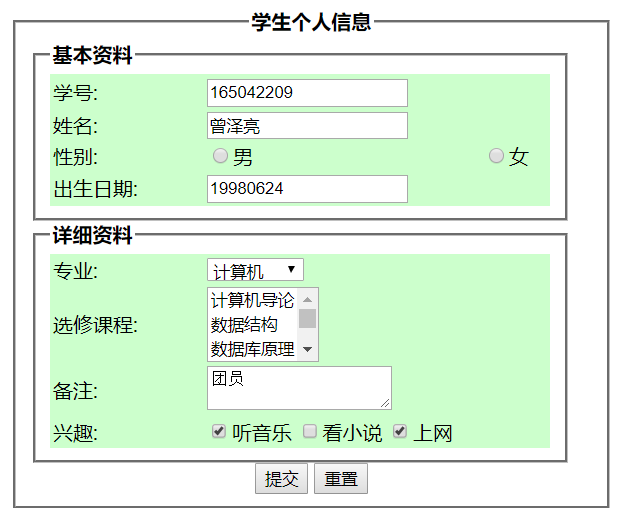
    <fieldset style="width:450px" align="center">

        <legend><b>学生个人信息</b></legend>

            <fieldset style="width:400px" align="left">

            <legend><b>基本资料</b></legend>

                <table width="400" border="0" align="center" bgcolor="#CCFFCC">

                <tr>

                    <td width="120">学号:</td>

                    <td><input id="XH" type="text" ></td>

                </tr>

                <tr>

                    <td width="120">姓名:</td>

                    <td><input name="XM" type="text" id="XM"></td>

                </tr>

                <tr>

                    <td width="120">性别:</td>

                    <td><input name="XB" type="radio">男

                        <input name="XB" type="radio">女

                    </td>

                </tr>

                <tr>

                     <td width="120">出生日期:</td>

                     <td><input name="CSRQ" type="text" value="19980624"></td>

                </tr>

                </table>

            </fieldset>

            <fieldset style="width:400px" align="left">

            <legend><b>详细资料</b></legend>

                <table width="400" border="0" align="center" bgcolor="#CCFFCC">

                <tr>

                    <td width="120">专业:</td>

                    <td>

                        <select name="se" size="1">

                        <option>计算机</option>

                        <option>软件工程</option>

                        <option>信息管理</option>

                        <option>通信工程</option>

                        <option>信息网络</option>

                    </td>

                </tr>

                <tr>

                    <td width="120">选修课程:</td>

                    <td>

                        <select name="XXZY" size="3" multiple="multiple">

                        <option>计算机导论</option>

                        <option>数据结构</option>

                        <option>数据库原理</option>

                        <option>操作系统</option>

                        <option>计算机网络</option>

                    </td>

                </tr>

                <tr>

                    <td>备注:</td>

                    <td><textarea name="BZ">团员</textarea> </td>

                </tr>

                <tr>

                    <td>兴趣:</td>

                    <td>

                        <input type="checkbox" name="XQ" checked="checked">听音乐

                        <input type="checkbox" name="XQ">看小说

                        <input type="checkbox" name="XQ" checked="checked">上网

                    </td>

                </tr>

                </table>

            </fieldset>

            <input type="submit" value="提交" align="center">

            <input type="submit" value="重置" align="center">

    </fieldset>

    </form>

</body>

</center>
html学习代码的更多相关文章
- java反射机制学习代码
根据 http://www.iteye.com/topic/137944 文档进行学习 代码如下: package reflectTest; import java.lang.reflect.*; i ...
- 如何免费使用GPU跑深度学习代码
从事深度学习的研究者都知道,深度学习代码需要设计海量的数据,需要很大很大很大(重要的事情说三遍)的计算量,以至于CPU算不过来,需要通过GPU帮忙,但这必不意味着CPU的性能没GPU强,CPU是那种综 ...
- 常用统计分析python包开源学习代码 numpy pandas matplotlib
常用统计分析python包开源学习代码 numpy pandas matplotlib 待办 https://github.com/zmzhouXJTU/Python-Data-Analysis
- swift2.0 字符串,数组,字典学习代码
swift 2.0 改变了一些地方,让swift变得更加完善,这里是一些最基本的初学者的代码,里面涉及到swift学习的最基本的字符串,数组,字典和相关的操作.好了直接看代码吧. class View ...
- 420小时学习代码之后:如何教你免费自学Python
原文地址:learning-to-code-420-hours-later-how-to-teach-yourself-python-for-free 说明:有些网址需要FQ. 大约在1.5年前,我开 ...
- WEB前端学习代码片段记录
1.JS设计模式片段 Function.prototype.addMethod = function (name,fn) { this.prototype[name] = fn; return thi ...
- OpenCV学习代码记录——人脸检测
很久之前学习过一段时间的OpenCV,当时没有做什么笔记,但是代码都还在,这里把它贴出来做个记录. 代码放在码云上,地址在这里https://gitee.com/solym/OpenCVTest/tr ...
- OpenCV学习代码记录—— Snake轮廓
很久之前学习过一段时间的OpenCV,当时没有做什么笔记,但是代码都还在,这里把它贴出来做个记录. 代码放在码云上,地址在这里https://gitee.com/solym/OpenCVTest/tr ...
- OpenCV学习代码记录——Hough线段检测
很久之前学习过一段时间的OpenCV,当时没有做什么笔记,但是代码都还在,这里把它贴出来做个记录. 代码放在码云上,地址在这里https://gitee.com/solym/OpenCVTest/tr ...
- OpenCV学习代码记录——轮廓(contour)检测
很久之前学习过一段时间的OpenCV,当时没有做什么笔记,但是代码都还在,这里把它贴出来做个记录. 代码放在码云上,地址在这里https://gitee.com/solym/OpenCVTest/tr ...
随机推荐
- "Could not find the main class: org.apache.catalina.startup.Boostrap. Program will exit."
尝试将 myeclipse中的编译版本修改(如,将1.5修改为1.6)
- CentOS 7安装chroot Named
一 安装相关软件 yum install bind-chroot bind -y 二 复制生成文件 cp -R /usr/share/doc/bind-*/sample/var/named/* /va ...
- C++中const使用注意要点(二)
当const修饰类的成员变量 1.const修饰类的非静态成员时必须在构造函数初始化列表上初始化: 在构造函数内会提示表达式必须是可修改的左值,因为在构造函数内并不是初始化,仅仅是赋值,而const类 ...
- 老司机带带我,FIFO不简单
FIFO,没有想象的那么简单! 根据一般的原则,FIFO这件事情啊,如果能用IP先别自己手写.可以通过FPGA厂家的的IP生成工具生成相应的FIFO. FIFO中的格雷码: 格雷码应用于异步FIFO的 ...
- snmp 介绍和Ubuntu安装使用
一.介绍 1. 服务器监控工具可以帮助我们从任何一个地方实时了解服务器的性能和功能.监控宝服务器监控套装,可以实时CPU使用率.内存使用率.平均负载.磁盘I/O.网络流量.磁盘使用率等,能够同时为你带 ...
- Java中的三元运算:a = (a > b)?a:b
格式:逻辑值 ? 表达式1 : 表达式2 执行顺序:先执行逻辑值,如果逻辑值为true,则执行表达式1:反之则执行表达式2 a = (a > b)?a:b 如果a>b成立,返回a: 如果a ...
- [转] Jsp 重点
讲师:传智播客 方立勋 4个域对象: pageContext | page 域 request | request 域 session | session 域 servletContext | app ...
- 后台给GridView绑定数据时给每一行添加一个JS方法
--------JS function ReturnDictionaryValues(srcElement) { top.document.getElementById("_DialogFr ...
- poj 3790 Recursively Palindromic Partitions
/*摘抄自博客:Recursively Palindromic Partitions Time Limit: 1000MS Memory Limit: 65536K Total Submissions ...
- python基础知识之列表、元祖、字典、集合、字符串。
1.可变类型之列表 列表用 [ ]来定义是可变的,可以通过索引值来去查询里面的字段可以可以追加,删除等 names='zhangyang guyun xiangpeng xuliangwei' nam ...