
运用Unity结合PolicyInjection实现拦截器
运用Unity结合PolicyInjection实现拦截器[结合操作日志实例]
上一篇文章我们通过Unity自身Unity.InterceptionExtension.IInterceptionBehavior实现一个有系统关异常日志记录;解决代码中到处充满的异常记录的代码;
本文则是通过Unity.InterceptionExtension.ICallHandler实现一个操作日志记录功能;在相应操作方法上通过特性Attribute把操作日志进行统一处理;若想了解Unity依赖注入及AOP功能可以查看先前其它文章;
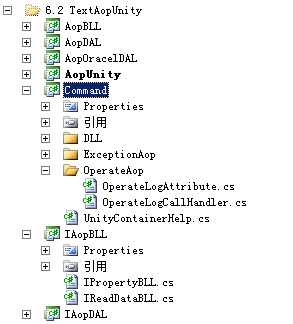
1:首先我们在公共助手层Command层新建OperateLogCallHandler类及OperateLogAttribute类
其中类OperateLogCallHandler继承自ICallHandler,并且我们定义的属性(MessageInfo,ShowThrow),此处我们只是简单的显示出操作内容信息,若实际项目可以对下面进行简单修改便可,比如写入日志、数据库等;代码result.Exception == null则表示执行代码没有出现异常才逻辑写入

using Microsoft.Practices.Unity.InterceptionExtension;

namespace Command

{

    public class OperateLogCallHandler:ICallHandler

    {

        public string _messageInfo { set; get; }

        public bool _showThrow { get; set; }

        private int _order = 0;

        public OperateLogCallHandler(string MessageInfo, bool ShowThrow)

        {

            this._messageInfo = MessageInfo;

            this._showThrow = ShowThrow;

        }

        public IMethodReturn Invoke(IMethodInvocation input, GetNextHandlerDelegate getNext)

        {

            if (input == null) throw new ArgumentNullException("input");

            if (getNext == null) throw new ArgumentNullException("getNext");

            var result = getNext()(input, getNext);

            if (result.Exception == null)

            {

                //进行逻辑代码编写  比如把操作内容写入数据库

                Console.WriteLine("操作的内容为:" + _messageInfo);

            }

            if (_showThrow) result.Exception = null;

            return result;

        }

        public int Order

        {

            get

            {

                return _order;

            }

            set

            {

                _order = value;

            }

        }

    }

}
而类OperateLogAttribute则继承自HandlerAttribute,并且我们设定此特性只能作用于方法上;
using Microsoft.Practices.Unity.InterceptionExtension;

namespace Command

{

    [AttributeUsage(AttributeTargets.Method)]

    public class OperateLogAttribute : HandlerAttribute

    {

        public string messageInfo { get; set; }

        public bool showThrow { get; set; }

        public OperateLogAttribute()

        {

        }

        public OperateLogAttribute(string MessagInfo, bool ShowThrow)

        {

            this.messageInfo = MessagInfo;

            this.showThrow = ShowThrow;

        }

        public override ICallHandler CreateHandler(Microsoft.Practices.Unity.IUnityContainer container)

        {

            OperateLogCallHandler handler = new OperateLogCallHandler(this.messageInfo, this.showThrow);

            handler.Order = this.Order;

            return handler;

        }

    }

}
2:公共层里还有一个助手类UnityContainerHelp,用于读取加载配置
using Microsoft.Practices.Unity;

using Microsoft.Practices.Unity.Configuration;

using Microsoft.Practices.Unity.InterceptionExtension;

using Microsoft.Practices.Unity.InterceptionExtension.Configuration;

using System.Configuration;

using System.Reflection;

namespace Command

{

    public class UnityContainerHelp

    {

        private IUnityContainer container;

        public UnityContainerHelp()

        {

            container = new UnityContainer();

            UnityConfigurationSection section = (UnityConfigurationSection)ConfigurationManager.GetSection("unity");

            container.LoadConfiguration(section, "FirstClass");

        }

        public T GetServer<T>()

        {

            return container.Resolve<T>();

        }

        /// <summary>

        ///

        /// </summary>

        /// <typeparam name="T"></typeparam>

        /// <param name="ConfigName">配置文件中指定的文字</param>

        /// <returns></returns>

        public T GetServer<T>(string ConfigName)

        {

            return container.Resolve<T>(ConfigName);

        }

        /// <summary>

        /// 返回构结函数带参数

        /// </summary>

        /// <typeparam name="T">依赖对象</typeparam>

        /// <param name="parameterList">参数集合(参数名,参数值)</param>

        /// <returns></returns>

        public T GetServer<T>(Dictionary<string, object> parameterList)

        {

            var list = new ParameterOverrides();

            foreach (KeyValuePair<string, object> item in parameterList)

            {

                list.Add(item.Key, item.Value);

            }

            return container.Resolve<T>(list);

        }

        /// <summary>

        /// 返回构结函数带参数

        /// </summary>

        /// <typeparam name="T">依赖对象</typeparam>

        /// <param name="ConfigName">配置文件中指定的文字(没写会报异常)</param>

        /// <param name="parameterList">参数集合(参数名,参数值)</param>

        /// <returns></returns>

        public T GetServer<T>(string ConfigName,Dictionary<string,object> parameterList)

        {

            var list = new ParameterOverrides();

            foreach (KeyValuePair<string, object> item in parameterList)

            {

                list.Add(item.Key, item.Value);

            }

            return container.Resolve<T>(ConfigName,list);

        }

    }

}
3:接着在接口层相应的方法上使用我们刚才创建的特性,注意必需引用Microsoft.Practices.Unity.InterceptionExtension.dll;若则特性将会找不到
using Microsoft.Practices.Unity.InterceptionExtension;

using Command;

namespace IAopBLL

{

    public interface IUser

    {

        [OperateLog(Order = 10, messageInfo = "增加用户", showThrow = true)]

        void CreateUser();

        [OperateLog(Order = 10, messageInfo = "编辑用户", showThrow = true)]

        void UpdateUser();

    }

}
4:在BLL层里实现上面的接口,在方法里面我们就不进行任何操作
using IAopDAL;

using IAopBLL;

using Command;

namespace AopBLL

{

    public class UserBLL:IUser

    {

        public void CreateUser()

        {

            //逻辑代码,此处为了简单就省略不写

        }

        public void UpdateUser()

        {

            //逻辑代码,此处为了简单就省略不写

        }

    }

}
5:下面为主程序调用代码,这里我们简单运用到Unity依赖注入代码
using IAopBLL;

using Command;

namespace AopUnity

{

    class Program

    {

        static void Main(string[] args)

        {

            Console.WriteLine("-----------------------------------");

            IUser bllProperty = new UnityContainerHelp().GetServer<IUser>("UserBllAop");

            bllProperty.CreateUser();

            bllProperty.UpdateUser();

            Console.WriteLine("-----------------------------------");

        }

    }

}
配置文件的内容如下:其中有两个比较要注意的地方(a处 name="UserBllAop" 主程序里有调用 b处 <policyInjection/>拦载器才会起作用)
<?xml version="1.0"?>

<configuration>

  <configSections>

    <section name="unity" type="Microsoft.Practices.Unity.Configuration.UnityConfigurationSection,Microsoft.Practices.Unity.Configuration"/>

  </configSections>

  <unity xmlns="http://schemas.microsoft.com/practces/2010/unity">

    <sectionExtension type="Microsoft.Practices.Unity.InterceptionExtension.Configuration.InterceptionConfigurationExtension, Microsoft.Practices.Unity.Interception.Configuration"/>

    <container name="FirstClass">

      <extension type="Interception"/>

      <register type="IAopBLL.IUser,IAopBLL" mapTo="AopBLL.UserBLL,AopBLL" name="UserBllAop">

        <interceptor type="InterfaceInterceptor" />

        <policyInjection/>

      </register>

    </container>

  </unity>

<startup>

<supportedRuntime version="v4.0" sku=".NETFramework,Version=v4.0"/>

</startup>

</configuration>
6:运行效果:
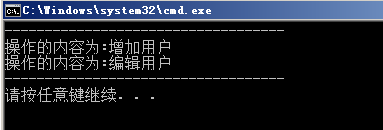
从图中我们不难发现Aop已起到作用,在操作没有异常的情况下我们成功获得操作内容;当然其它Aop比如权限判断,事务处理等都可以用此种办法;
运用Unity结合PolicyInjection实现拦截器的更多相关文章
- 运用Unity结合PolicyInjection实现拦截器[结合操作日志实例]
上一篇文章我们通过Unity自身Unity.InterceptionExtension.IInterceptionBehavior实现一个有系统关异常日志记录:解决代码中到处充满的异常记录的代码: 本 ...
- C# unity 的 IInterceptionBehavior实现aop拦截器
以前项目写过使用unity的 IInterceptionBehavior 实现aop拦截器,时间不多就忘了,项目找不到了,然后呢,写个简单的例子,用的收直接用就行了,简单实用,至于什么用,mvc的at ...
- 运用Unity实现AOP拦截器
运用Unity实现AOP拦截器[结合异常记录实例] 本篇文章将通过Unity实现Aop异常记录功能:有关Unity依赖注入可以看前两篇文章: 1:运用Unity实现依赖注入[结合简单三层实例] 2:运 ...
- 运用Unity实现AOP拦截器[结合异常记录实例]
本篇文章将通过Unity实现Aop异常记录功能:有关Unity依赖注入可以看前两篇文章: 1:运用Unity实现依赖注入[结合简单三层实例] 2:运用Unity实现依赖注入[有参构造注入] 另早期 ...
- 我心中的核心组件(可插拔的AOP)~第二回 缓存拦截器
回到目录 AOP面向切面的编程,也称面向方面的编程,我更青睐于前面的叫法,将一个大系统切成多个独立的部分,而这个独立的部分又可以方便的插拔在其它领域的系统之中,这种编程的方式我们叫它面向切面,而这些独 ...
- 我心中的核心组件(可插拔的AOP)~第四回 异常拦截器
回到目录 之前说过有关拦截器的文章,第二回 缓存拦截器,事实上,在那讲里说的最多是AOP和缓存组件,对于拦截的概念并没有详细的说明,这一讲,不说AOP,主要说一下拦截器,拦截器Interceptio ...
- (翻译) 使用Unity进行AOP对象拦截
Unity 是一款知名的依赖注入容器( dependency injection container) ,其支持通过自定义扩展来扩充功能. 在Unity软件包内 默认包含了一个对象拦截(Interce ...
- 6. ModelDriven拦截器、Preparable 拦截器
1. 问题 Struts2 的 Action 我们将它定义为一个控制器,但是由于在 Action 中也可以来编写一些业务逻辑,也有人会在 Action 输入业务逻辑层. 但是在企业开发中,我们一般会将 ...
- springmvc的拦截器
什么是拦截器 java里的拦截器是动态拦截action调用的对象.它提供了一种机制可以使 ...
随机推荐
- xml:Invalid byte 2 of 2-byte UTF-8 sequence
xml解析错误:Invalid byte 2 of 2-byte UTF-8 sequence 在做接口解析时候出现的错误:Invalid byte 2 of 2-byte UTF-8 sequenc ...
- Xcode6为什么干掉pch(Precompile Prefix Header)&怎样加入pch文件
一直在用xcode6开发,但项目都是在xcode5上创建的,所以一直没注意到,xcode6居然干掉pch文件了. 为什么xcode6没有自己主动创建pch文件呢? 简单地看:我们在写项目的时候,大部分 ...
- CSS3+HTML5特效5 - 震动的文字
先看效果(把鼠标移上去看看) abcd 这个效果很简单,就是移动文字的位置模拟出震动的效果. Css <style> @-webkit-keyframes shake { 0%{ -web ...
- curl 简单使用
cURL -- Command Line URL viewer -u username:password 以 Basic 方式发送用户名和密码 -d 以 POST 方式发送数据 -X 支持其它动词, ...
- Cassandra C++/NodeJs开发环境
工作的需要,开始更多地倾向于去中心化的结构,目前看来Cassandra算是去中心化DB中性能/管理最热门的选择,崇尚其P2P的理念. 自身原因对JAVA不擅长(周围写C的好少),还是更热衷于C++/J ...
- 有趣Web之Json(四)---json与(Object/List/Map)相互转化
干web报名时间.通常,他们需要json转换为Object/list/map要么Object/List/map转换为json,由能够编写代码的简单包装非常多,以减轻负担. 本文将给出json的一系列的 ...
- iOS MapKit导航及地理转码辅助类
头文件: #import <Foundation/Foundation.h> #import <MapKit/MapKit.h> @interface DirectionRou ...
- MVC验证07-自定义Model级别验证
原文:MVC验证07-自定义Model级别验证 在一般的自定义验证特性中,我们通过继承ValidationAttribute,实现IClientValidatable,只能完成对某个属性的自定义验证. ...
- oracle获取字符串长度函数length()和hengthb()
原文:oracle获取字符串长度函数length()和hengthb() lengthb(string)计算string所占的字节长度:返回字符串的长度,单位是字节 length(string)计算s ...
- Ninject.Extensions.
最近在使用IoC进行一个较复杂的项目进行架构,在IoC的选择上让我很是纠结.首先我不喜欢大量的配置文件进行配置,那简直是噩梦,比学习一门编程语言还痛苦.我喜欢前一段时间看EF的CodeFirst的那种 ...