
结合实际项目分析pom.xml
 <project xmlns="http://maven.apache.org/POM/4.0.0" xmlns:xsi="http://www.w3.org/2001/XMLSchema-instance" xsi:schemaLocation="http://maven.apache.org/POM/4.0.0 http://maven.apache.org/xsd/maven-4.0.0.xsd">

   <modelVersion>4.0.0</modelVersion>

   <groupId>com.wang</groupId>

   <artifactId>test-maven-server-console</artifactId>

   <version>0.0.1-SNAPSHOT</version>

   <name>test-maven-server-console</name>

   <packaging>war</packaging>

   <properties>

       <warPackageName>MyWebAppDemo</warPackageName>

         <tomcat.server>tomcat</tomcat.server>

         <project.build.sourceEncoding>UTF-8</project.build.sourceEncoding>

   </properties>

   <dependencies>

   <!--

       <dependency>

           <groupId>com.wang</groupId>

           <artifactId>test-maven-api</artifactId>

           <version>0.0.1-SNAPSHOT</version>

       </dependency>

    -->

    <dependency>

         <groupId>org.springframework</groupId>

         <artifactId>spring-context</artifactId>

         <version>4.2.6.RELEASE</version>

     </dependency>

       <dependency>

         <groupId>org.springframework</groupId>

         <artifactId>spring-web</artifactId>

         <version>4.2.6.RELEASE</version>

     </dependency>

     <dependency>

         <groupId>com.alibaba</groupId>

         <artifactId>dubbo</artifactId>

         <version>2.5.3</version>

         <exclusions>

           <exclusion>

           <groupId>org.springframework</groupId>

           <artifactId>spring</artifactId>

           </exclusion>

           </exclusions>

     </dependency>

       <dependency>

           <groupId>org.apache.zookeeper</groupId>

           <artifactId>zookeeper</artifactId>

           <version>3.4.6</version>

       </dependency>

       <dependency>

           <groupId>com.github.sgroschupf</groupId>

           <artifactId>zkclient</artifactId>

           <version>0.1</version>

       </dependency>

   </dependencies>

   <build>

       <finalName>${warPackageName}</finalName>

       <plugins>

           <plugin>

             <groupId>org.apache.maven.plugins</groupId>

             <artifactId>maven-compiler-plugin</artifactId>

             <version>3.1</version>

             <configuration>

               <source>1.8</source>

               <target>1.8</target>

             </configuration>

         </plugin>

         <plugin>

             <artifactId>maven-war-plugin</artifactId>

             <configuration>

                 <version>2.5</version>

                  <webXml>src\main\webapp\WEB-INF\web.xml</webXml>

             </configuration>

         </plugin>

           <plugin>

               <groupId>org.codehaus.mojo</groupId>

               <artifactId>tomcat-maven-plugin</artifactId>

               <version>1.1</version>

               <configuration>

                   <!-- <warFile>target/serverdemo.war</warFile> -->

                   <server>${tomcat.server}</server>

                   <url>http://192.168.234.9:8080/manager/text</url>

                   <path>/${warPackageName}</path>

               </configuration>

           </plugin>

       </plugins>

   </build>

 </project>
1、build
Server:用来指定到哪个服务器,${}获取properties中的变量tomcat,然后调用settings.xml文件中配置的tomcat和用户名、密码(上一节)
url:用来指定发布到服务器的地址,h后面必须跟text
path:即部署到服务器的项目名,这里是webapps/MyWebAppDemo.war.访问路径http://192.168.234.9:8080/MyWebAppDemo
profile:
Server变量有三种配置方式:
a、
<properties>

        <warPackageName>MyWebAppDemo</warPackageName>

        <tomcat.deploy.server>localTestServer</tomcat.deploy.server>
        <tomcat.deploy.serverUrl>http://localhost/manager/text</tomcat.deploy.serverUrl>

</properties>
b、
<profiles>

        <profile>

            <id>deploy2production</id>

            <properties>

                <tomcat.deploy.server>productionServer</tomcat.deploy.server>
                <tomcat.deploy.serverUrl>http://120.26.93.30:8080/manager/text</tomcat.deploy.serverUrl>

            </properties>

        </profile>

</profiles>
c、
<plugin>

        <groupId>org.apache.tomcat.maven</groupId>

        <artifactId>tomcat7-maven-plugin</artifactId>

            <configuration>

                <port>8089</port>

                <path>/</path>

                <url>http://192.168.234.9:8080/manager/text</url>

                <username>admin</username>

                <password>admin</password>

                <update>true</update>

         </configuration>

</plugin>
2、UTF-8编码问题
3、Spring框架冲突问题
因为既依赖dubbo框架,又依赖spring框架,导致报错(一般报NoSuchMethodError都是因为依赖冲突)
22-Oct-2016 01:17:46.438 信息 [http-nio-8080-exec-11] org.apache.catalina.core.ApplicationContext.log No Spring WebApplicationInitializer types detected on classpath
22-Oct-2016 01:17:46.550 严重 [http-nio-8080-exec-11] org.apache.catalina.core.StandardContext.listenerStart Exception sending context initialized event to listener instance of class org.springframework.web.context.ContextLoaderListener
java.lang.NoSuchMethodError: org.springframework.core.CollectionFactory.createConcurrentMapIfPossible(I)Ljava/util/Map;
解决方法:
 <dependency>

        <groupId>com.alibaba</groupId>

        <artifactId>dubbo</artifactId>

        <version>2.5.3</version>

        <exclusions>

         <exclusion>

          <groupId>org.springframework</groupId>

          <artifactId>spring</artifactId>

         </exclusion>

    </exclusions>

 </dependency>
4、web.xml问题
[ERROR] Failed to execute goal org.apache.maven.plugins:maven-war-plugin:2.2:war (default-war) on project test-maven-server-console: Error assembling WAR: webxml attribute is required (or pre-existing WEB-INF/web.xml if executing in update mode) -> [Help 1]
[ERROR]
[ERROR] To see the full stack trace of the errors, re-run Maven with the -e switch.
[ERROR] Re-run Maven using the -X switch to enable full debug logging.
[ERROR]
[ERROR] For more information about the errors and possible solutions, please read the following articles:
解决方法:手动配置读取web.xml
<plugin>

       <artifactId>maven-war-plugin</artifactId>

       <configuration>

              <version>2.5</version>

              <webXml>src\main\webapp\WEB-INF\web.xml</webXml>

        </configuration>

</plugin>
5、Maven clean导致引入jar文件没有编译的问题
[ERROR] /F:/stsProjects/test-maven-server-console/src/main/java/com/test/dubbo/controller/IndexController.java:[8,39] 程序包com.test.dubbo.registry.service不存在
[ERROR] /F:/stsProjects/test-maven-server-console/src/main/java/com/test/dubbo/controller/IndexController.java:[14,17] 找不到符号
符号: 类 TestRegistryService
位置: 类 com.test.dubbo.controller.IndexController
6、Maven默认使用jdk1.5的问题
7、web项目不存在src/main/webapp目录的问题
右键项目—Build Path -- Configure Build Path –Libraries –双击JRE System Liaraies – 在Execution environment选择合适版本
完整的项目目录:
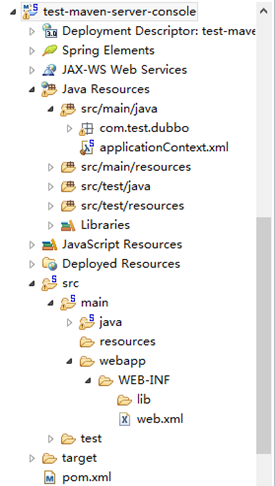
结合实际项目分析pom.xml的更多相关文章
- spring maven pom.xml设置
spring pom.xml设置 <?xml version="1.0" encoding="UTF-8"?> <project xmlns= ...
- Maven实战:pom.xml与settings.xml
pom.xml与settings.xml pom.xml与setting.xml,可以说是Maven中最重要的两个配置文件,决定了Maven的核心功能,虽然之前的文章零零碎碎有提到过pom.xml和s ...
- 批量从jar包中提取pom.xml
将非maven项目转换为maven项目,首要第一步就是提取原工程依赖jar里的pom.xml,拼成<dependency>节点 import java.io.File; import ja ...
- Maven的POM.xml配置大全
<?xml version="1.0" encoding="utf-8"?> <project xmlns="http://mave ...
- Maven pom.xml 元素配置说明(一)
部分来源: Maven中 dependencies 节点和 dependencyManagement 节点的区别 dependencies与dependencyManagement的区别 maven ...
- 史上最全的maven的pom.xml文件详解
<project xmlns="http://maven.apache.org/POM/4.0.0" xmlns:xsi="http://www.w3.org/20 ...
- 【maven】pom.xml报错:Cannot detect Web Project version.
新建的maven项目 报错如下: Cannot detect Web Project version. Please specify version of Web Project through &l ...
- Maven的pom.xml 配置详解
<project xmlns="http://maven.apache.org/POM/4.0.0" xmlns:xsi="http://www.w3.org/20 ...
- (六)Maven之pom.xml文件简单说明
通过前面几部分知识,我们对maven已经有了初步的印象,就像Make的Makefile.Ant的build.xml一样,Maven项目的核心是pom.xml.POM(Project Object Mo ...
随机推荐
- HDU 4612 Warm up(双连通分量缩点+求树的直径)
思路:强连通分量缩点,建立一颗新的树,然后求树的最长直径,然后加上一条边能够去掉的桥数,就是直径的长度. 树的直径长度的求法:两次bfs可以求,第一次随便找一个点u,然后进行bfs搜到的最后一个点v, ...
- 使用nodejs的http模块创建web服务器
使用nodejs的http模块创建web服务器 laiqun@msn.cn Contents 1. web服务器基础知识 2. Node.js的Web 服务器 3. 代码实现 1. web服务器基础知 ...
- SQL2005附加数据库时遇到的问题:用户组或角色在当前数据库已存在
一次 附加备份数据库的 mdf 文件 成功后 创建登陆用户 但是 无法映射该用户的 对应数据库 出现 用户组或角色在当前数据库已存在 的问题 首先介绍一下sql server中“ ...
- ASP.NET WEB开发,实现上传图片
protected void btnUp_Click(object sender, EventArgs e) { Boolean fileOK = false; String path = Serve ...
- 如何查看和更改mysql数据库文件存放位置
mysql数据库的数据文件默认是存放在:C:\Documents and Settings\All Users\Application Data\MySQL\MySQL Server 5.1\data ...
- [转]httpclient 上传文件、下载文件
用httpclient4.3 post方式推送文件到服务端 准备:httpclient-4.3.3.jar:httpcore-4.3.2.jar:httpmime-4.3.3.jar/** * 上传 ...
- CSS3中transform几个属性值的注意点
transform(变形)是CSS3中的元素的属性,transform的属性值主要包括旋转rotate.扭曲skew.缩放scale和移动translate以及矩阵变形matrix 基本用法可以参考文 ...
- jetty compile
lifecycle cant been covered, 需要m2e-extra,在elcipse marcketplace找,不是叫做这个名. <parent>上有lifecycle问题 ...
- PAT (Advanced Level) 1084. Broken Keyboard (20)
简单题. #include<cstdio> #include<cstring> #include<cmath> #include<vector> #in ...
- CSS中的浮动清除
先来看一个实验:现在有两个div,div身上没有任何属性.每个div中都有li,这些li都是浮动的. 理想的效果:可实际的效果: 这个地方就涉及到浮动,因为两个父元素div都没有高度(或者小于子元素的 ...