
Android自定义控件系列(一)—Button七十二变
转载请注明出处:http://www.cnblogs.com/landptf/p/6290791.html
忙了一段时间,终于有时间整理整理之前所用到的一些知识,分享给大家,希望给同学们有些帮助,同时也是对自己的知识有个巩固的过程。
在Android的开发中比较常用的控件就是Button了,但是我们平时使用Button时是怎样来设置按下和抬起显示不同的效果呢?我想一般的实现方式就是定义一个selector的xml文件,然后在里面根据不同的state来设置不同的图片,但是当Button控件非常多的时候,就要写对应数量的xml文件,导致大码非常臃肿。
今天我们换种方式来改变这个样式,只需要两行代码即可实现按下的效果,同时支持圆角和圆形的按钮的样式。先看下效果图,这是我写的一个demo
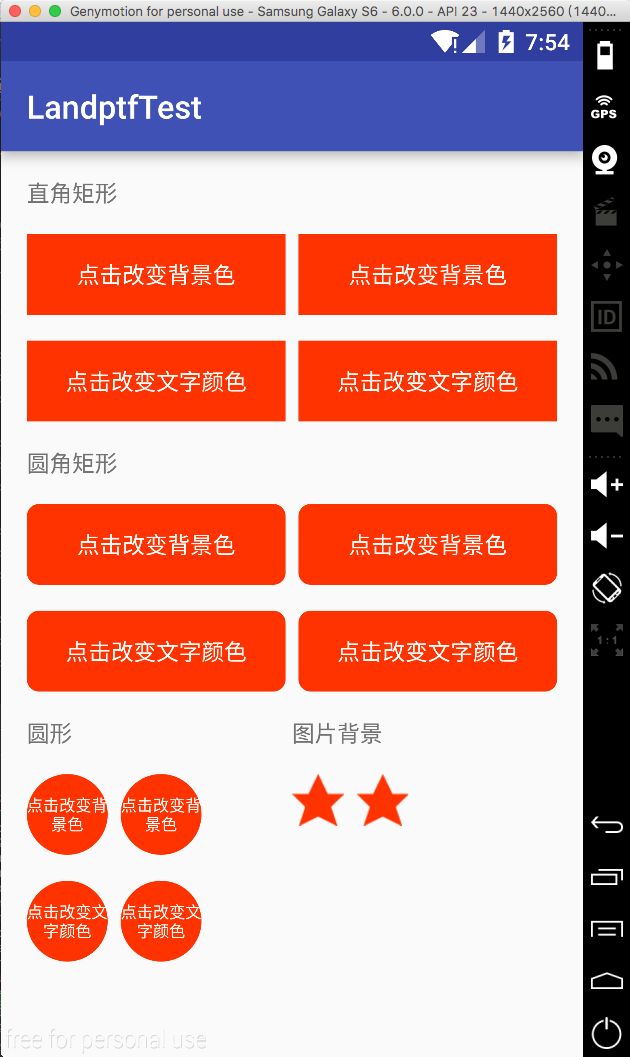
接下来讲一下主要代码:
第一步 自定义属性
在res/values/目录下新建attrs.xml文件
 <?xml version="1.0" encoding="utf-8"?>

 <resources>

     <!--公共属性-->

     <attr name="backColor" format="color" />

     <attr name="backColorPress" format="color" />

     <attr name="backGroundImage" format="reference" />

     <attr name="backGroundImagePress" format="reference" />

     <attr name="textColor" format="color" />

     <attr name="textColorPress" format="color" />

     <declare-styleable name="buttonM">

         <attr name="backColor" />

         <attr name="backColorPress" />

         <attr name="backGroundImage"  />

         <attr name="backGroundImagePress" />

         <attr name="textColor" />

         <attr name="textColorPress" />

         <attr name="fillet" format="boolean" />

         <attr name="radius" format="float" />

         <attr name="shape">

             <enum name="rectangle" value="0" />

             <enum name="oval" value="1" />

             <enum name="line" value="2" />

             <enum name="ring" value="3" />

         </attr>

     </declare-styleable>

 </resources>
具体属性的含义在java代码中都有描述
第二步 创建ButtonM类使其继承Button,代码如下:
 package com.landptf.view;

 import android.content.Context;

 import android.content.res.ColorStateList;

 import android.content.res.TypedArray;

 import android.graphics.drawable.Drawable;

 import android.graphics.drawable.GradientDrawable;

 import android.util.AttributeSet;

 import android.view.MotionEvent;

 import android.view.View;

 import android.widget.Button;

 import com.landptf.R;

 /**

  * Created by landptf on 2016/10/25.

  * 自定义Button,支持圆角矩形,圆形按钮等样式,可通过配置文件改变按下后的样式

  * 若通过代码设置圆角或者圆形,需要先调用setFillet方法将fillet设置为true

  */

 public class ButtonM extends Button {

     private static String TAG = "ButtonM";

     /**

      * 按钮的背景色

      */

     private int backColor = 0;

     /**

      * 按钮被按下时的背景色

      */

     private int backColorPress = 0;

     /**

      * 按钮的背景图片

      */

     private Drawable backGroundDrawable = null;

     /**

      * 按钮被按下时显示的背景图片

      */

     private Drawable backGroundDrawablePress = null;

     /**

      * 按钮文字的颜色

      */

     private ColorStateList textColor = null;

     /**

      * 按钮被按下时文字的颜色

      */

     private ColorStateList textColorPress = null;

     private GradientDrawable gradientDrawable = null;

     /**

      * 是否设置圆角或者圆形等样式

      */

     private boolean fillet = false;

     /**

      * 标示onTouch方法的返回值,用来解决onClick和onTouch冲突问题

      */

     private boolean isCost = true;

     public ButtonM(Context context) {

         super(context, null);

     }

     public ButtonM(Context context, AttributeSet attrs) {

         this(context, attrs, 0);

     }

     public ButtonM(Context context, AttributeSet attrs, int defStyle) {

         super(context, attrs, defStyle);

         TypedArray a = context.obtainStyledAttributes(attrs, R.styleable.buttonM, defStyle, 0);

         if (a != null) {

             //设置背景色

             ColorStateList colorList = a.getColorStateList(R.styleable.buttonM_backColor);

             if (colorList != null) {

                 backColor = colorList.getColorForState(getDrawableState(), 0);

                 if (backColor != 0) {

                     setBackgroundColor(backColor);

                 }

             }

             //记录按钮被按下时的背景色

             ColorStateList colorListPress = a.getColorStateList(R.styleable.buttonM_backColorPress);

             if (colorListPress != null){

                 backColorPress = colorListPress.getColorForState(getDrawableState(), 0);

             }

             //设置背景图片,若backColor与backGroundDrawable同时存在,则backGroundDrawable将覆盖backColor

             backGroundDrawable = a.getDrawable(R.styleable.buttonM_backGroundImage);

             if (backGroundDrawable != null){

                 setBackgroundDrawable(backGroundDrawable);

             }

             //记录按钮被按下时的背景图片

             backGroundDrawablePress = a.getDrawable(R.styleable.buttonM_backGroundImagePress);

             //设置文字的颜色

             textColor = a.getColorStateList(R.styleable.buttonM_textColor);

             if (textColor != null){

                 setTextColor(textColor);

             }

             //记录按钮被按下时文字的颜色

             textColorPress = a.getColorStateList(R.styleable.buttonM_textColorPress);

             //设置圆角或圆形等样式的背景色

             fillet = a.getBoolean(R.styleable.buttonM_fillet, false);

             if (fillet){

                 getGradientDrawable();

                 if (backColor != 0) {

                     gradientDrawable.setColor(backColor);

                     setBackgroundDrawable(gradientDrawable);

                 }

             }

             //设置圆角矩形的角度,fillet为true时才生效

             float radius = a.getFloat(R.styleable.buttonM_radius, 0);

             if (fillet && radius != 0){

                 setRadius(radius);

             }

             //设置按钮形状,fillet为true时才生效

             int shape = a.getInteger(R.styleable.buttonM_shape, 0);

             if (fillet && shape != 0) {

                 setShape(shape);

             }

             a.recycle();

         }

         setOnTouchListener(new OnTouchListener() {

             @Override

             public boolean onTouch(View arg0, MotionEvent event) {

                 //根据touch事件设置按下抬起的样式

                 return setTouchStyle(event.getAction());

             }

         });

     }

     /**

      * 根据按下或者抬起来改变背景和文字样式

      * @param state

      * @return isCost

      *  为解决onTouch和onClick冲突的问题

      *  根据事件分发机制,如果onTouch返回true,则不响应onClick事件

      *  因此采用isCost标识位,当用户设置了onClickListener则onTouch返回false

      */

     private boolean setTouchStyle(int state){

         if (state == MotionEvent.ACTION_DOWN) {

             if (backColorPress != 0) {

                 if (fillet){

                     gradientDrawable.setColor(backColorPress);

                     setBackgroundDrawable(gradientDrawable);

                 }else {

                     setBackgroundColor(backColorPress);

                 }

             }

             if (backGroundDrawablePress != null) {

                 setBackgroundDrawable(backGroundDrawablePress);

             }

             if (textColorPress != null) {

                 setTextColor(textColorPress);

             }

         }

         if (state == MotionEvent.ACTION_UP) {

             if (backColor != 0) {

                 if (fillet){

                     gradientDrawable.setColor(backColor);

                     setBackgroundDrawable(gradientDrawable);

                 }else {

                     setBackgroundColor(backColor);

                 }

             }

             if (backGroundDrawable != null) {

                 setBackgroundDrawable(backGroundDrawable);

             }

             if (textColor != null) {

                 setTextColor(textColor);

             }

         }

         return isCost;

     }

     /**

      * 重写setOnClickListener方法,解决onTouch和onClick冲突问题

      * @param l

      */

     @Override

     public void setOnClickListener(OnClickListener l) {

         super.setOnClickListener(l);

         isCost = false;

     }

     /**

      * 设置按钮的背景色

      * @param backColor

      */

     public void setBackColor(int backColor) {

         this.backColor = backColor;

         if (fillet){

             gradientDrawable.setColor(backColor);

             setBackgroundDrawable(gradientDrawable);

         }else {

             setBackgroundColor(backColor);

         }

     }

     /**

      * 设置按钮被按下时的背景色

      * @param backColorPress

      */

     public void setBackColorPress(int backColorPress) {

         this.backColorPress = backColorPress;

     }

     /**

      * 设置按钮的背景图片

      * @param backGroundDrawable

      */

     public void setBackGroundDrawable(Drawable backGroundDrawable) {

         this.backGroundDrawable = backGroundDrawable;

         setBackgroundDrawable(backGroundDrawable);

     }

     /**

      * 设置按钮被按下时的背景图片

      * @param backGroundDrawablePress

      */

     public void setBackGroundDrawablePress(Drawable backGroundDrawablePress) {

         this.backGroundDrawablePress = backGroundDrawablePress;

     }

     /**

      * 设置文字的颜色

      * @param textColor

      */

     public void setTextColor(int textColor) {

         if (textColor == 0) return;

         this.textColor = ColorStateList.valueOf(textColor);

         //此处应加super关键字,调用父类的setTextColor方法,否则会造成递归导致内存溢出

         super.setTextColor(this.textColor);

     }

     /**

      * 设置按钮被按下时文字的颜色

      * @param textColorPress

      */

     public void setTextColorPress(int textColorPress) {

         if (textColorPress == 0) return;

         this.textColorPress = ColorStateList.valueOf(textColorPress);

     }

     /**

      * 设置按钮是否设置圆角或者圆形等样式

      * @param fillet

      */

     public void setFillet(boolean fillet){

         this.fillet = fillet;

         getGradientDrawable();

     }

     /**

      * 设置圆角按钮的角度

      * @param radius

      */

     public void setRadius(float radius){

         if (!fillet) return;

         getGradientDrawable();

         gradientDrawable.setCornerRadius(radius);

         setBackgroundDrawable(gradientDrawable);

     }

     /**

      * 设置按钮的形状

      * @param shape

      */

     public void setShape(int shape){

         if (!fillet) return;

         getGradientDrawable();

         gradientDrawable.setShape(shape);

         setBackgroundDrawable(gradientDrawable);

     }

     private void getGradientDrawable() {

         if (gradientDrawable == null){

             gradientDrawable = new GradientDrawable();

         }

     }

 }
注释基本上写的比较详细,下面主要说一下这里面涉及的一些知识点
1 关于onTouch返回值问题,如果返回true表示要消费该点击事件,后续的所有事件都交给他处理,同时onTouchEvent将不会执行,因此onClick也得不到执行,在这里通过重写setOnClickListener设置变量来改变返回值。具体关于View的事件分发机制可以查阅有关文档,网上很多这方面的教程。
2 如果想要通过java代码来设置圆角或者圆形时,必须先设置setFillet(true),然后再设置背景色,形状或者角度等参数。通过xml文件则无限制
最后讲一下怎么使用,这里以设置圆角矩形为例,分别通过xml和java代码实现,其他的可参考源码。
1 xml
 <com.landptf.view.ButtonM

     android:id="@+id/btm_radius_color_xml"

     android:layout_width="0dp"

     android:layout_height="50dp"

     android:layout_weight="1"

     android:gravity="center"

     android:text="点击改变背景色"

     landptf:backColor="#ff3300"

     landptf:backColorPress="#ff33ff"

     landptf:fillet="true"

     landptf:radius="30"

     landptf:textColor="@android:color/white" />
2 java
 ButtonM btmRadiusColorJava = (ButtonM) findViewById(R.id.btm_radius_color_java);

 if (btmRadiusColorJava != null) {

     btmRadiusColorJava.setFillet(true);

     btmRadiusColorJava.setRadius(30);

     btmRadiusColorJava.setTextColor(Color.parseColor("#ffffff"));

     btmRadiusColorJava.setBackColor(Color.parseColor("#ff3300"));

     btmRadiusColorJava.setBackColorPress(Color.parseColor("#ff33ff"));

     btmRadiusColorJava.setOnClickListener(new View.OnClickListener() {

         @Override

         public void onClick(View v) {

             Toast.makeText(ButtonMTestActivity.this, "java代码实现", Toast.LENGTH_SHORT).show();

         }

     });

 }
代码已托管到开源中国的码云上,欢迎下载,地址:https://git.oschina.net/landptf/landptf.git
Android自定义控件系列(一)—Button七十二变的更多相关文章
- Android自定义控件系列之应用篇——圆形进度条
一.概述 在上一篇博文中,我们给大家介绍了Android自定义控件系列的基础篇.链接:http://www.cnblogs.com/jerehedu/p/4360066.html 这一篇博文中,我们将 ...
- Android开发系列之button事件的4种写法
经过前两篇blog的铺垫,我们今天热身一下,做个简单的样例. 文件夹结构还是引用上篇blog的截图. 详细实现代码: public class MainActivity extends Activit ...
- Android自定义控件系列之基础篇
一.概述 在android开发中很多UI控件往往需要进行定制以满足应用的需要或达到更加的效果,接下来就通过一个系列来介绍自定义控件,这里更多是通过一些案例逐步去学习,本系列有一些典型的应用,掌握好了大 ...
- Android自定义控件系列(二)—icon+文字的多种效果实现
转载请注明出处:http://www.cnblogs.com/landptf/p/6290810.html 今天给大家带来一个很简单但是很常用的控件ButtonExtendM,在开发中我们经常会用到图 ...
- Android自定义控件系列(四)—底部菜单(下)
转载请注明出处:http://www.cnblogs.com/landptf/p/6290862.html 在app中经常会用到底部菜单的控件,每次都需要写好多代码,今天我们用到了前几篇博客里的控件来 ...
- Android自定义控件之日历控件
标签: android 控件 日历 应用 需求 2015年09月26日 22:21:54 25062人阅读 评论(109) 收藏 举报 分类: Android自定义控件系列(7) 版权声明:转载注 ...
- Android开发系列之创建自定义控件
Android开发过程中我们经常需要定义自己的控件,一方面基于复用的角度考虑,一方面也是基于逻辑处理思维的角度考虑.在这篇博客里面,笔者想要介绍.总结几种Android自定义控件的方法,如果有什么不对 ...
- Android自定义控件View(三)组合控件
不少人应该见过小米手机系统音量控制UI,一个圆形带动画效果的音量加减UI,效果很好看.它是怎么实现的呢?这篇博客来揭开它的神秘面纱.先上效果图 相信很多人都知道Android自定义控件的三种方式,An ...
- Android自定义控件之自定义组合控件
前言: 前两篇介绍了自定义控件的基础原理Android自定义控件之基本原理(一).自定义属性Android自定义控件之自定义属性(二).今天重点介绍一下如何通过自定义组合控件来提高布局的复用,降低开发 ...
随机推荐
- IntelliJ IDEA 13 破解安装(JRebel 5.6.3a皴)
首先安装IntelliJ 13,记住下载Ultimate Edition版本号,否则就必须打破.. 安装到本地.然后一些配置(这一步不能.不过考虑到交换系统后,保存,建议做) 打开{install ...
- c语言内存对齐(1)
在<C陷阱与缺陷>有这样一个例子: #include <stdio.h> int main(void) { int i; char c; ;i<;i++){ scanf( ...
- leetcode第38题--Combination Sum
题目: Given a set of candidate numbers (C) and a target number (T), find all unique combinations in C ...
- ADS-B显示终端5.9
更改日志 1 更新背景地图.增加了全国范围内的VOR电台.DME.NDB导航台信息,包含有坐标信息.代码信息.频率等内容. VOR电台.DME.NDB导航台信息来自中国民航局公布的航行情况资料汇 ...
- SVN服务器搭建(1)
转自:http://www.cnblogs.com/xiaobaihome/archive/2012/03/20/2407610.html SVN服务器搭建和使用(一) Subversion是优秀的版 ...
- 我的Android 4 学习系列
Android 简介 开始入手 创建应用程序和Activity 创建用户界面 Intent 和 Broadcast Revicever 使用 Internet 资源 文件,保存状态和首选项 数据库和C ...
- ubuntu下java和tomcat安装配置
oracle下载jdk-7u51-linux-i586.tar.gz sudo cp Downloads/jdk-7u51-linux-i586.tar.gz /usr/local/java //拷贝 ...
- Javascript Array API
JS数组对象提供了很多API方法,由于前段时间要用到某一些方法,但是突然一时又想不起来该怎么用了,上网找有很多资料都不全,所以就自己整理了一篇,完全是自己写的的JS,只是复制到这里来了 ,要用到的朋友 ...
- 自动生成api文档
vs2010代码注释自动生成api文档 最近做了一些接口,提供其他人调用,要写个api文档,可是我想代码注释已经写了说明,能不能直接把代码注释生成api?于是找到以下方法 环境:vs2010 先下载安 ...
- 基于Web的IIS管理工具
Servant:基于Web的IIS管理工具 Servant for IIS是个管理IIS的简单.自动化的Web管理工具.安装Servant的过程很简单,只要双击批处理文件Install Serva ...