
TableLayout中collapseColumns,stretchColumns的介绍
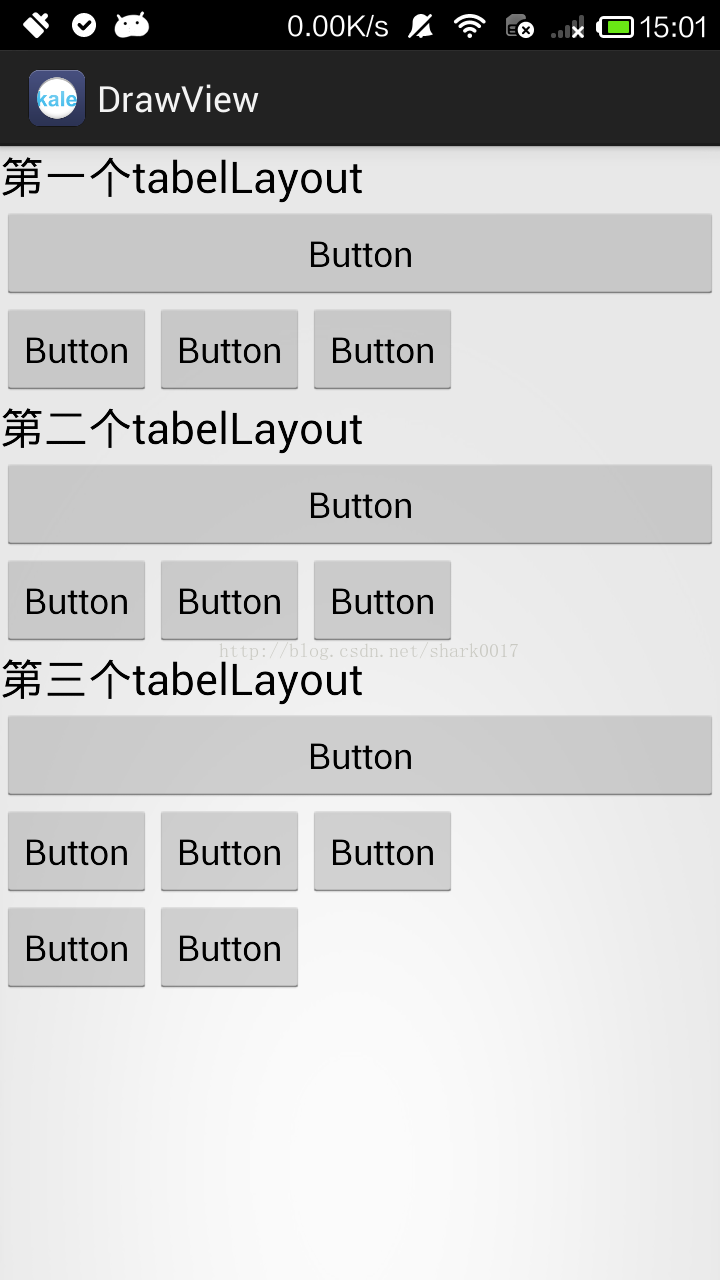 设置后→
设置后→ 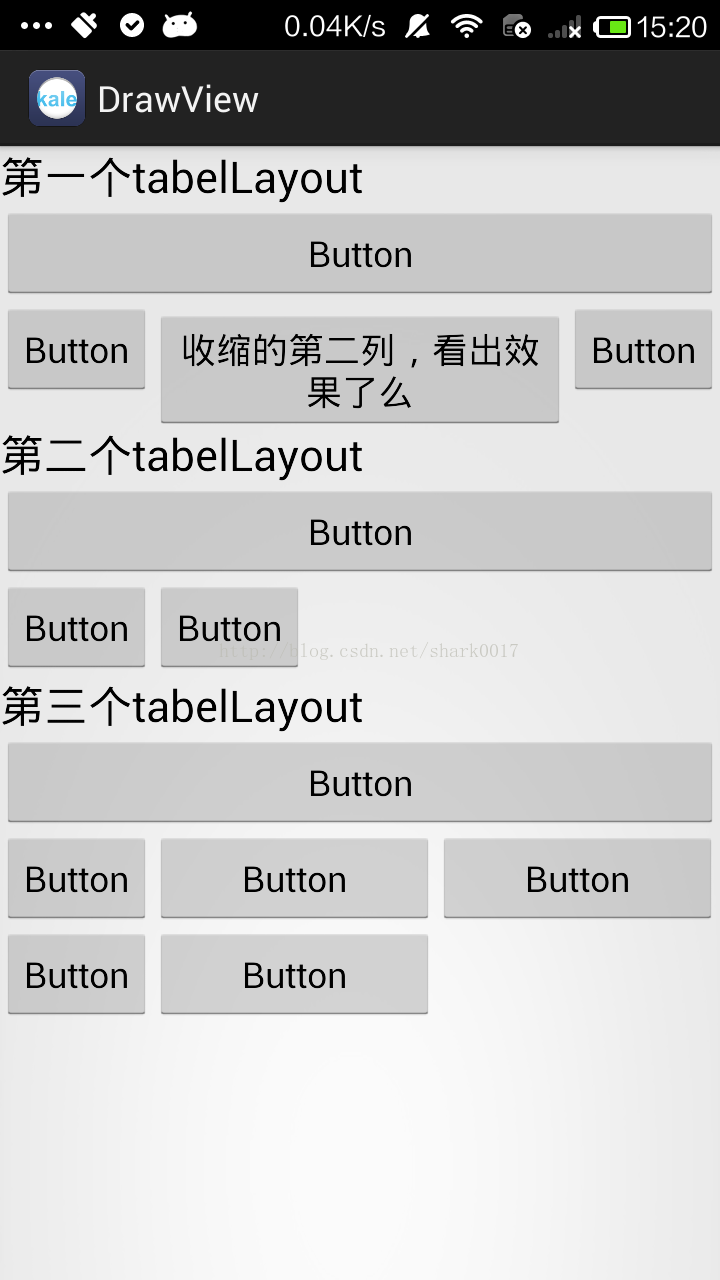
collapseColumns 设置需要被隐藏的列序号(序号从0开始)
shrinkColumns 设置允许被首夺的列的序号(序号从0开始)
stretchColumns 设置允许被拉伸的列的序号(序号从0开始)
布局文件:
<LinearLayout xmlns:android="http://schemas.android.com/apk/res/android"

    android:id="@+id/root_relativeLayout_id"

    xmlns:tools="http://schemas.android.com/tools"

    android:layout_width="match_parent"

    android:layout_height="match_parent"

    android:orientation="vertical">

    <TextView

        android:layout_width="wrap_content"

        android:layout_height="wrap_content"

        android:text="第一个tabelLayout"

        android:textAppearance="?android:attr/textAppearanceLarge" />

    <!-- 第二列允许收缩,第三列允许拉伸 -->

    <TableLayout

        android:layout_width="match_parent"

        android:layout_height="wrap_content"

        <strong><span style="color:#ff0000;">android:shrinkColumns="1" //收缩

        android:stretchColumns="2">//拉伸</span></strong>

        <Button

            android:id="@+id/button1"

            android:layout_width="wrap_content"

            android:layout_height="wrap_content"

            android:text="Button" />

        <TableRow

            android:id="@+id/tableRow1"

            android:layout_width="wrap_content"

            android:layout_height="wrap_content" >

            <Button

                android:id="@+id/button2"

                android:layout_width="wrap_content"

                android:layout_height="wrap_content"

                android:text="Button" />

            <Button

                android:id="@+id/button3"

                android:layout_width="wrap_content"

                android:layout_height="wrap_content"

                android:text="收缩的第二列,看出效果了么" />

            <Button

                android:id="@+id/button4"

                android:layout_width="wrap_content"

                android:layout_height="wrap_content"

                android:text="Button" />

        </TableRow>

    </TableLayout>

    <TextView

        android:layout_width="wrap_content"

        android:layout_height="wrap_content"

        android:text="第二个tabelLayout"

        android:textAppearance="?android:attr/textAppearanceLarge" />

    <!-- 第二列隐藏 -->

    <TableLayout

        android:layout_width="match_parent"

        android:layout_height="wrap_content"

        <strong><span style="color:#ff0000;">android:collapseColumns="1">//隐藏</span></strong>

        <Button

            android:id="@+id/button5"

            android:layout_width="wrap_content"

            android:layout_height="wrap_content"

            android:text="Button" />

        <TableRow

            android:id="@+id/tableRow2"

            android:layout_width="wrap_content"

            android:layout_height="wrap_content" >

            <Button

                android:id="@+id/button6"

                android:layout_width="wrap_content"

                android:layout_height="wrap_content"

                android:text="Button" />

            <Button

                android:id="@+id/button7"

                android:layout_width="wrap_content"

                android:layout_height="wrap_content"

                android:text="Button" />

            <Button

                android:id="@+id/button8"

                android:layout_width="wrap_content"

                android:layout_height="wrap_content"

                android:text="Button" />

        </TableRow>

    </TableLayout>

    <TextView

        android:layout_width="wrap_content"

        android:layout_height="wrap_content"

        android:text="第三个tabelLayout"

        android:textAppearance="?android:attr/textAppearanceLarge" />

    <!-- 第二列和第三列拉伸 -->

    <TableLayout

        android:layout_width="match_parent"

        android:layout_height="wrap_content"

       <strong><span style="color:#ff0000;"> android:stretchColumns="1,2">//拉伸</span></strong>

        <Button

            android:id="@+id/button9"

            android:layout_width="wrap_content"

            android:layout_height="wrap_content"

            android:text="Button" />

        <TableRow

            android:id="@+id/tableRow3"

            android:layout_width="wrap_content"

            android:layout_height="wrap_content" >

            <Button

                android:id="@+id/button10"

                android:layout_width="wrap_content"

                android:layout_height="wrap_content"

                android:text="Button" />

            <Button

                android:id="@+id/button11"

                android:layout_width="wrap_content"

                android:layout_height="wrap_content"

                android:text="Button" />

            <Button

                android:id="@+id/button12"

                android:layout_width="wrap_content"

                android:layout_height="wrap_content"

                android:text="Button" />

        </TableRow>

        <TableRow

            android:id="@+id/tableRow4"

            android:layout_width="wrap_content"

            android:layout_height="wrap_content" >

            <Button

                android:id="@+id/button13"

                android:layout_width="wrap_content"

                android:layout_height="wrap_content"

                android:text="Button" />

            <Button

                android:id="@+id/button14"

                android:layout_width="wrap_content"

                android:layout_height="wrap_content"

                android:text="Button" />

        </TableRow>

    </TableLayout>

</LinearLayout>
TableLayout中collapseColumns,stretchColumns的介绍的更多相关文章
- Table中collapseColumns,stretchColumns
collapseColumns 设置需要被隐藏的列序号(序号从0开始) shrinkColumns 设置允许被首夺的列的序号(序号从0开始) stretchColumns 设置允许被拉 ...
- asp.net中缓存的使用介绍一
asp.net中缓存的使用介绍一 介绍: 在我解释cache管理机制时,首先让我阐明下一个观念:IE下面的数据管理.每个人都会用不同的方法去解决如何在IE在管理数据.有的会提到用状态管理,有的提到的c ...
- lua解析脚本过程中的关键数据结构介绍
在这一篇文章中我先来介绍一下lua解析一个脚本文件时要用到的一些关键的数据结构,为将来的一系列代码分析打下一个良好的基础.在整个过程中,比较重要的几个源码文件分别是:llex.h,lparse.h.l ...
- linux中ldconfig的使用介绍
linux中ldconfig的使用介绍 ldconfig是一个动态链接库管理命令,其目的为了让动态链接库为系统所共享. ldconfig的主要用途: 默认搜寻/lilb和/usr/lib,以及配置文件 ...
- 【js】IE、FF、Chrome浏览器中的JS差异介绍
如何判断浏览器类型 转:http://www.cnblogs.com/carekee/articles/1854674.html 1.通过浏览器特有的对象 如ie 的ActiveXObject ff ...
- Apache中 RewriteRule 规则参数介绍
Apache中 RewriteRule 规则参数介绍 摘要: Apache模块 mod_rewrite 提供了一个基于正则表达式分析器的重写引擎来实时重写URL请求.它支持每个完整规则可以拥有不限数量 ...
- 使用Memcache在PHP中调试方法的介绍及应用
使用Memcache在PHP中调试方法的介绍及应用 如果我们在网络开发中,特别是大访问量的web项目开发中,为了提高响应速度,减少数据查询运算,那么我们都会选用memcahce.首先我们必须要安装,接 ...
- python中multiprocessing.pool函数介绍_正在拉磨_新浪博客
python中multiprocessing.pool函数介绍_正在拉磨_新浪博客 python中multiprocessing.pool函数介绍 (2010-06-10 03:46:5 ...
- 基于Server-Sent Event的简单聊天室 Web 2.0时代,即时通信已经成为必不可少的网站功能,那实现Web即时通信的机制有哪些呢?在这门项目课中我们将一一介绍。最后我们将会实现一个基于Server-Sent Event和Flask简单的在线聊天室。
基于Server-Sent Event的简单聊天室 Web 2.0时代,即时通信已经成为必不可少的网站功能,那实现Web即时通信的机制有哪些呢?在这门项目课中我们将一一介绍.最后我们将会实现一个基于S ...
随机推荐
- MediatR 中介模式
使用MediatR完成基于内存级别的消息发布订阅 在微服务架构中领域驱动模型中处理领域事件的相关操作 在区分好领域模型后,就拿代码中来说嘛,用户领域中添加用户操作可能或存在跟用户相关的一些领域事件,在 ...
- Mysql报Cannot load from mysql.proc. The table is probably corrupted
1548-Cannot load from mysql.proc. The table is probably corrupted http://bugs.mysql.com/bug.php?id=5 ...
- Mysql中count(*)和limit同时使用的问题
1.带有count的sql语句只会返回一条记录 , 结果如下图: 2.带有limit的sql语句是最后执行的 , 以上sql语句将返回空行,因为count(*)只会使sql语句产生一条结果记录,所以后 ...
- curl命令大全
curl 命令行工具的使用及命令参数说明 curl是一个开源的用于数据传输的命令行工具与库,它使用URL语法格式,支持众多传输协议,包括:HTTP.HTTPS.FTP.FTPS.GOPHER.TFTP ...
- js数组去重与性能分析(时间复杂度很重要)
随着js的深入和实际项目对性能的要求,算法的简单实现已经不能满足需要,在不同的应用场景下,时间复杂度很重要. 首先是创建数组与性能处理函数: // 保证时间差的明显程度,创建不同量级的数组,size为 ...
- 用js来实现那些数据结构及算法—目录
首先,有一点要声明,下面所有文章的所有内容的代码,都不是我一个人独立完成的,它们来自于一本叫做<学习JavaScript数据结构和算法>(第二版),人民邮电出版社出版的这本书.github ...
- 循序渐进学.Net Core Web Api开发系列【5】:文件上传
系列目录 循序渐进学.Net Core Web Api开发系列目录 本系列涉及到的源码下载地址:https://github.com/seabluescn/Blog_WebApi 一.概述 本篇介绍通 ...
- centos 7 安装 BeautifulSoup 和requests
安装beautifulsoup wget https://www.crummy.com/software/BeautifulSoup/bs4/download/4.5/beautifulsoup4-4 ...
- android listview 优化
韩梦飞沙 韩亚飞 313134555@qq.com yue31313 han_meng_fei_sha android convertview作用 ======= 1,convertView复 ...
- Windows 7 MBR的修复与Linux产品正确卸载
这几天折腾系统很令人崩溃,但也明白了开机引导流程具体如何. 觉得Centos 7不好用,想卸载Redhat安装Ubuntu,为了图方便直接把红帽的硬盘区格式化了.于是开机引导崩溃,咨询了下大神,大神叫 ...