
TableLayout中collapseColumns,stretchColumns的介绍
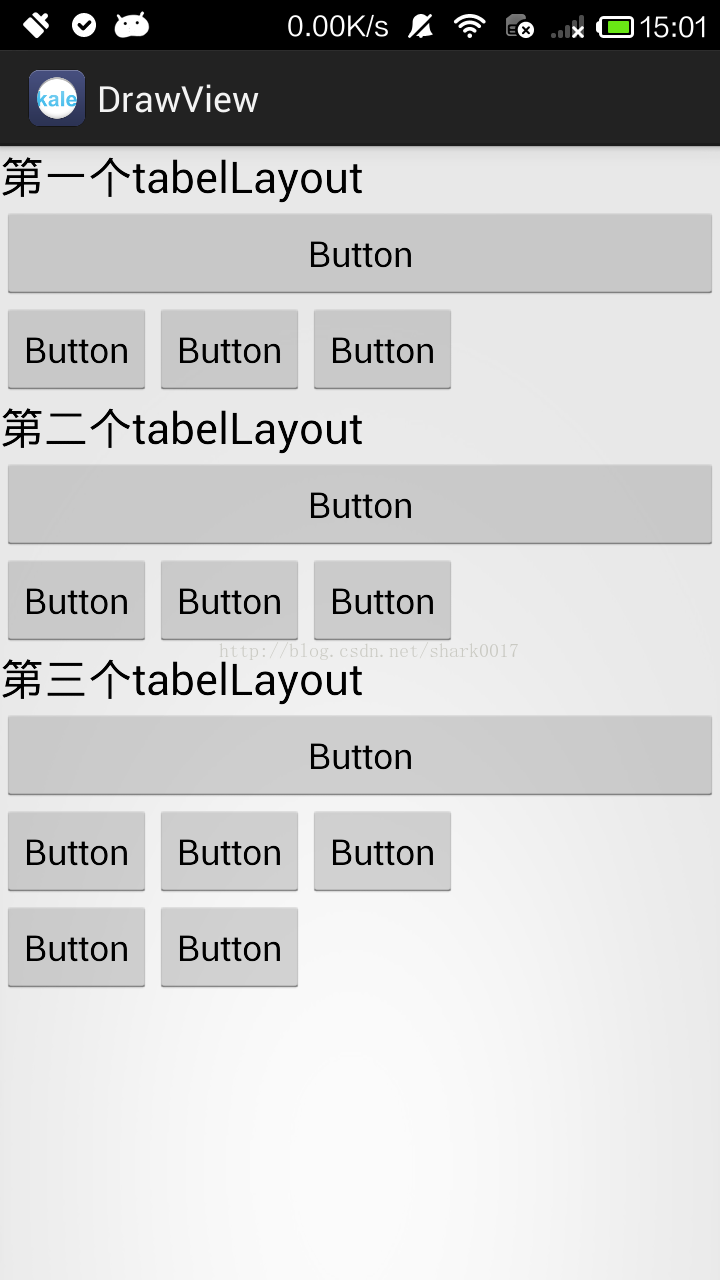 设置后→
设置后→ 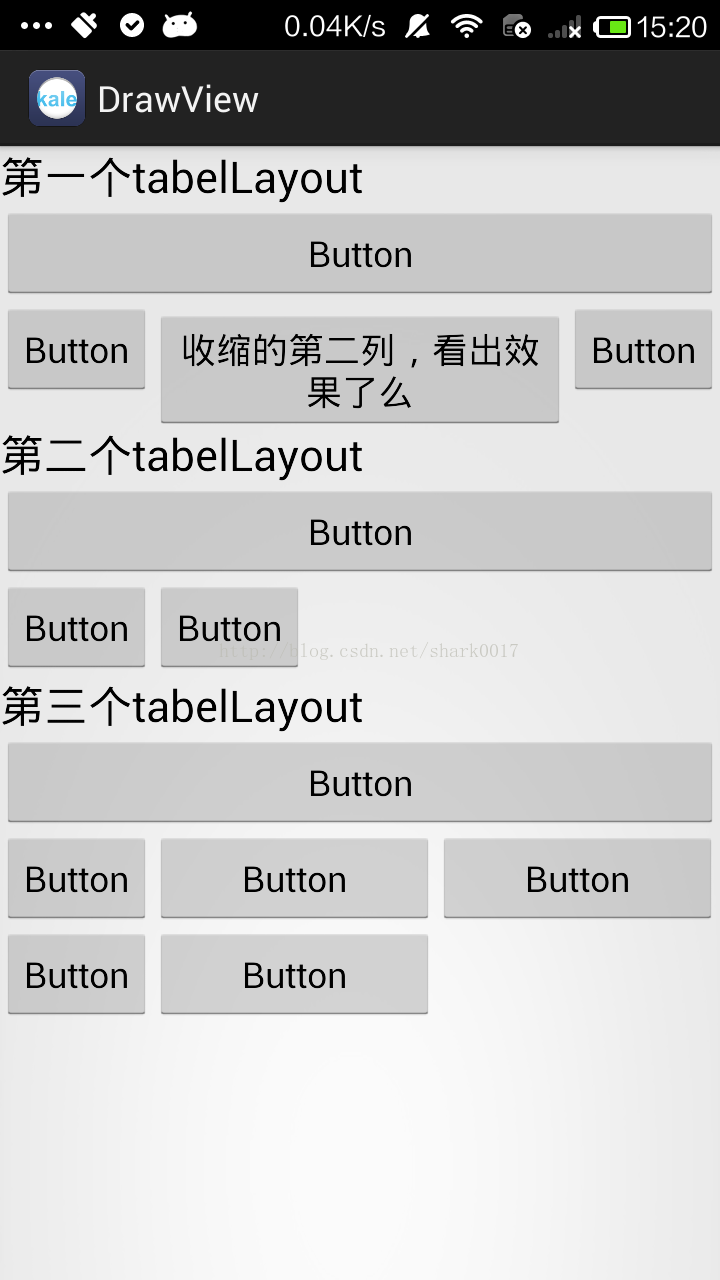
collapseColumns 设置需要被隐藏的列序号(序号从0开始)
shrinkColumns 设置允许被首夺的列的序号(序号从0开始)
stretchColumns 设置允许被拉伸的列的序号(序号从0开始)
布局文件:
<LinearLayout xmlns:android="http://schemas.android.com/apk/res/android"

    android:id="@+id/root_relativeLayout_id"

    xmlns:tools="http://schemas.android.com/tools"

    android:layout_width="match_parent"

    android:layout_height="match_parent"

    android:orientation="vertical">

    <TextView

        android:layout_width="wrap_content"

        android:layout_height="wrap_content"

        android:text="第一个tabelLayout"

        android:textAppearance="?android:attr/textAppearanceLarge" />

    <!-- 第二列允许收缩,第三列允许拉伸 -->

    <TableLayout

        android:layout_width="match_parent"

        android:layout_height="wrap_content"

        <strong><span style="color:#ff0000;">android:shrinkColumns="1" //收缩

        android:stretchColumns="2">//拉伸</span></strong>

        <Button

            android:id="@+id/button1"

            android:layout_width="wrap_content"

            android:layout_height="wrap_content"

            android:text="Button" />

        <TableRow

            android:id="@+id/tableRow1"

            android:layout_width="wrap_content"

            android:layout_height="wrap_content" >

            <Button

                android:id="@+id/button2"

                android:layout_width="wrap_content"

                android:layout_height="wrap_content"

                android:text="Button" />

            <Button

                android:id="@+id/button3"

                android:layout_width="wrap_content"

                android:layout_height="wrap_content"

                android:text="收缩的第二列,看出效果了么" />

            <Button

                android:id="@+id/button4"

                android:layout_width="wrap_content"

                android:layout_height="wrap_content"

                android:text="Button" />

        </TableRow>

    </TableLayout>

    <TextView

        android:layout_width="wrap_content"

        android:layout_height="wrap_content"

        android:text="第二个tabelLayout"

        android:textAppearance="?android:attr/textAppearanceLarge" />

    <!-- 第二列隐藏 -->

    <TableLayout

        android:layout_width="match_parent"

        android:layout_height="wrap_content"

        <strong><span style="color:#ff0000;">android:collapseColumns="1">//隐藏</span></strong>

        <Button

            android:id="@+id/button5"

            android:layout_width="wrap_content"

            android:layout_height="wrap_content"

            android:text="Button" />

        <TableRow

            android:id="@+id/tableRow2"

            android:layout_width="wrap_content"

            android:layout_height="wrap_content" >

            <Button

                android:id="@+id/button6"

                android:layout_width="wrap_content"

                android:layout_height="wrap_content"

                android:text="Button" />

            <Button

                android:id="@+id/button7"

                android:layout_width="wrap_content"

                android:layout_height="wrap_content"

                android:text="Button" />

            <Button

                android:id="@+id/button8"

                android:layout_width="wrap_content"

                android:layout_height="wrap_content"

                android:text="Button" />

        </TableRow>

    </TableLayout>

    <TextView

        android:layout_width="wrap_content"

        android:layout_height="wrap_content"

        android:text="第三个tabelLayout"

        android:textAppearance="?android:attr/textAppearanceLarge" />

    <!-- 第二列和第三列拉伸 -->

    <TableLayout

        android:layout_width="match_parent"

        android:layout_height="wrap_content"

       <strong><span style="color:#ff0000;"> android:stretchColumns="1,2">//拉伸</span></strong>

        <Button

            android:id="@+id/button9"

            android:layout_width="wrap_content"

            android:layout_height="wrap_content"

            android:text="Button" />

        <TableRow

            android:id="@+id/tableRow3"

            android:layout_width="wrap_content"

            android:layout_height="wrap_content" >

            <Button

                android:id="@+id/button10"

                android:layout_width="wrap_content"

                android:layout_height="wrap_content"

                android:text="Button" />

            <Button

                android:id="@+id/button11"

                android:layout_width="wrap_content"

                android:layout_height="wrap_content"

                android:text="Button" />

            <Button

                android:id="@+id/button12"

                android:layout_width="wrap_content"

                android:layout_height="wrap_content"

                android:text="Button" />

        </TableRow>

        <TableRow

            android:id="@+id/tableRow4"

            android:layout_width="wrap_content"

            android:layout_height="wrap_content" >

            <Button

                android:id="@+id/button13"

                android:layout_width="wrap_content"

                android:layout_height="wrap_content"

                android:text="Button" />

            <Button

                android:id="@+id/button14"

                android:layout_width="wrap_content"

                android:layout_height="wrap_content"

                android:text="Button" />

        </TableRow>

    </TableLayout>

</LinearLayout>
TableLayout中collapseColumns,stretchColumns的介绍的更多相关文章
- Table中collapseColumns,stretchColumns
collapseColumns 设置需要被隐藏的列序号(序号从0开始) shrinkColumns 设置允许被首夺的列的序号(序号从0开始) stretchColumns 设置允许被拉 ...
- asp.net中缓存的使用介绍一
asp.net中缓存的使用介绍一 介绍: 在我解释cache管理机制时,首先让我阐明下一个观念:IE下面的数据管理.每个人都会用不同的方法去解决如何在IE在管理数据.有的会提到用状态管理,有的提到的c ...
- lua解析脚本过程中的关键数据结构介绍
在这一篇文章中我先来介绍一下lua解析一个脚本文件时要用到的一些关键的数据结构,为将来的一系列代码分析打下一个良好的基础.在整个过程中,比较重要的几个源码文件分别是:llex.h,lparse.h.l ...
- linux中ldconfig的使用介绍
linux中ldconfig的使用介绍 ldconfig是一个动态链接库管理命令,其目的为了让动态链接库为系统所共享. ldconfig的主要用途: 默认搜寻/lilb和/usr/lib,以及配置文件 ...
- 【js】IE、FF、Chrome浏览器中的JS差异介绍
如何判断浏览器类型 转:http://www.cnblogs.com/carekee/articles/1854674.html 1.通过浏览器特有的对象 如ie 的ActiveXObject ff ...
- Apache中 RewriteRule 规则参数介绍
Apache中 RewriteRule 规则参数介绍 摘要: Apache模块 mod_rewrite 提供了一个基于正则表达式分析器的重写引擎来实时重写URL请求.它支持每个完整规则可以拥有不限数量 ...
- 使用Memcache在PHP中调试方法的介绍及应用
使用Memcache在PHP中调试方法的介绍及应用 如果我们在网络开发中,特别是大访问量的web项目开发中,为了提高响应速度,减少数据查询运算,那么我们都会选用memcahce.首先我们必须要安装,接 ...
- python中multiprocessing.pool函数介绍_正在拉磨_新浪博客
python中multiprocessing.pool函数介绍_正在拉磨_新浪博客 python中multiprocessing.pool函数介绍 (2010-06-10 03:46:5 ...
- 基于Server-Sent Event的简单聊天室 Web 2.0时代,即时通信已经成为必不可少的网站功能,那实现Web即时通信的机制有哪些呢?在这门项目课中我们将一一介绍。最后我们将会实现一个基于Server-Sent Event和Flask简单的在线聊天室。
基于Server-Sent Event的简单聊天室 Web 2.0时代,即时通信已经成为必不可少的网站功能,那实现Web即时通信的机制有哪些呢?在这门项目课中我们将一一介绍.最后我们将会实现一个基于S ...
随机推荐
- yum命令简介
yum 一些较常见的用法 命令 功能 yum check-update 检查可更新的所有软件包 yum update 下载更新系统已安装的所有软件包 yum upgrade 大规模的版本升级,与yum ...
- 001.Parted工具使用
一 Parted简介 1.1 parted和fdisk 通常使用较多的磁盘管理工具为fdisk,但由于磁盘越来越廉价,且磁盘空间越来越大,而fdisk工具分区存在大小限制,只能划分小于2T的磁盘.因此 ...
- CAB归档文件提取工具cabextract
CAB归档文件提取工具cabextract 在对Windows系统进行数字取证中,经常会遇到.cab的文件.该文件是Windows的压缩格式,一般是作为安装包文件.Kali Linux预置了专用的 ...
- Linux驱动之串口(UART)
<uart驱动程序概述> 在嵌入式Linux系统中,串口被看成终端设备,终端设备(tty)的驱动程序分为3部分: tty_core tty_disicipline tty_driver ...
- 【HDU 3590】 PP and QQ (博弈-Anti-SG游戏,SJ定理,树上删边游戏)
PP and QQ Time Limit: 2000/1000 MS (Java/Others) Memory Limit: 32768/32768 K (Java/Others)Total S ...
- 【BZOJ-2329&2209】括号修复&括号序列 Splay
2329: [HNOI2011]括号修复 Time Limit: 40 Sec Memory Limit: 128 MBSubmit: 1007 Solved: 476[Submit][Statu ...
- Xtreme9.0 - Block Art 线段树
Block Art 题目连接: https://www.hackerrank.com/contests/ieeextreme-challenges/challenges/block-art Descr ...
- Codeforces Round #370 (Div. 2) A. Memory and Crow 水题
A. Memory and Crow 题目连接: http://codeforces.com/contest/712/problem/A Description There are n integer ...
- 使用 IntraWeb (1) - 先测试如何部署为 Asp.Net 的应用
IntraWeb 14 可以部署为 Asp.Net 的应用程序, 需要 NET Framework 4.5 和 ASP.NET MVC 4 或之上版本的支持; 这下, 只能用虚拟主机的朋友有福了! 我 ...
- 关于MongoDB时区问题
由于MongoDb存储时间按照UTC时间存储的,其官方驱动MongoDB.driver存储时间的时候将本地时间转换为了utc时间,但它有个蛋疼的bug,读取的时候非常蛋疼的是返回的是utc使时间.一个 ...