
【Git】3、创建Git版本库、配置Git仓库用户邮箱信息
初识Git
文章目录
本地创建一个Git版本库简单了解Git的一些必要的配置,配置昵称用户名和邮箱。
简单复习 - 专栏 Git原理详解与实操指南
1、创建Git版本库
首先创建个文件夹git,用于版本管理。
Linux或Mac系统
mkdir git

cd git
进入文件夹,可以使用git init命令初始化一个仓库
➜  git git init

Initialized empty Git repository in /home/liuawen/git/.git/

➜  git git:(master)
初始化版本库会在当前目录中创建一个.git的文件夹,我们可以进入版本库根目录,然后通过命令ls -al进行查看,如下命令所示:
➜  git git:(master) ls

➜  git git:(master) pwd

/home/liuawen/git

➜  git git:(master) ls -al

total 0

drwxr-xr-x 1 root    root    4096 Mar 20 15:23 .

drwxr-xr-x 1 liuawen liuawen 4096 Mar 20 15:23 ..

drwxr-xr-x 1 root    root    4096 Mar 20 15:24 .git

➜  git git:(master)
执行过的命令:
➜  liuawen pwd

/home/liuawen

➜  liuawen mkdir git

mkdir: cannot create directory ‘git’: File exists

➜  liuawen rm -rf git

➜  liuawen ls

sources.list

➜  liuawen mkdir git

➜  liuawen ls

git  sources.list

➜  liuawen cd git

➜  git git init

Initialized empty Git repository in /home/liuawen/git/.git/

➜  git git:(master) ls

➜  git git:(master) pwd

/home/liuawen/git

➜  git git:(master) ls -al

total 0

drwxr-xr-x 1 root    root    4096 Mar 20 15:23 .

drwxr-xr-x 1 liuawen liuawen 4096 Mar 20 15:23 ..

drwxr-xr-x 1 root    root    4096 Mar 20 15:24 .git

➜  git git:(master)
认识.git
git init初始化生成的.git目录
.git目录包含了整个版本库的信息,那怎么查看这个目录有哪些文件呢?
可以使用如下命令
cd .git

ls -al
cd .git是进入.git目录,ls -al是显示当前目录下的所有文件及文件夹包括隐藏文件详细信息。
windows:

Linux:
➜  git git:(master) cd .git

➜  .git git:(master) pwd

/home/liuawen/git/.git

➜  .git git:(master) ls -al

total 0

drwxr-xr-x 1 root root 4096 Mar 20 15:38 .

drwxr-xr-x 1 root root 4096 Mar 20 15:23 ..

-rw-r--r-- 1 root root   23 Mar 20 15:23 HEAD

drwxr-xr-x 1 root root 4096 Mar 20 15:23 branches

-rw-r--r-- 1 root root   92 Mar 20 15:23 config

-rw-r--r-- 1 root root   73 Mar 20 15:23 description

drwxr-xr-x 1 root root 4096 Mar 20 15:23 hooks

drwxr-xr-x 1 root root 4096 Mar 20 15:23 info

drwxr-xr-x 1 root root 4096 Mar 20 15:23 objects

drwxr-xr-x 1 root root 4096 Mar 20 15:23 refs

➜  .git git:(master)
简单介绍下这些文件夹的作用:
HEAD 文件指示目前被检出的分支
branches 新版本已经废弃,我们不必关注
description用来显示对仓库的描述信息
config 文件包含项目特有的配置选项
info 目录包含一个全局性排除文件
hooks 目录包含客户端或服务端的钩子脚本
index 文件保存暂存区信息
objects 目录存储所有数据内容
refs 目录存储分支的提交对象的指针
Q:ls ls -a ls -l ls -al 有什么区别呢?
A:ls 是显示不隐藏的文件和文件夹 ls -a 是显示所有文件和文件夹(包括隐藏的文件)
ls -l是显示不隐藏的文件和文件夹的详细信息,ls -al是显示目录下的所有文件及文件夹包括隐藏文件详细信息。
➜  git git:(master) ls

➜  git git:(master) pwd

/home/liuawen/git

➜  git git:(master) ls

➜  git git:(master) ls -a

.  ..  .git

➜  git git:(master) ls -l

total 0

➜  git git:(master) ls -al

total 0

drwxr-xr-x 1 root    root    4096 Mar 20 15:23 .

drwxr-xr-x 1 liuawen liuawen 4096 Mar 20 15:23 ..

drwxr-xr-x 1 root    root    4096 Mar 20 15:37 .git

➜  git git:(master) cd .git

➜  .git git:(master) pwd

/home/liuawen/git/.git
2、基础配置
在建立完项目的版本库之后,
mkdir git

cd git

git init
我们之后对代码的管理操作会要求要有一个身份,所以我们现在来配置一个昵称和邮箱。可以在查看改动记录时候用到的。
2.1、查看配置信息
我们在配置一个昵称和邮箱之前,先来检查下之前没有用已经配置过了什么昵称邮箱。
➜  git git:(master) pwd

/home/liuawen/git

➜  git git:(master) git config user.name

➜  git git:(master) git config user.email

➜  git git:(master)
啥也没有,那就是没有配置过咯,我们来配置下吧。
2.2、配置昵称邮箱信息
配置昵称&邮箱的命令如下:
Setting your Git username for every repository on your computer.
配置全局的
git config --global user.name "昵称"

git config --global user.email "邮箱"
执行命令如下:
➜  git git:(master) git config --global user.name "liuawen"

➜  git git:(master) git config --global user.name

liuawen

➜  git git:(master) git config --global user.email "willowawen@foxmail.com"

➜  git git:(master) git config --global user.email

willowawen@foxmail.com

➜  git git:(master)
Setting your Git username for a single repository
局部的,单个仓库
git config  user.name "昵称"

git config  user.email "邮箱"
执行命令如下:
➜  git git:(master) pwd

/home/liuawen/git

➜  git git:(master) git config user.name

➜  git git:(master) git config user.email

➜  git git:(master) git config user.name "liuawen"

➜  git git:(master) git config user.name

liuawen

➜  git git:(master) git config user.email "willowawen@foxmail"

➜  git git:(master) git config user.email

willowawen@foxmail

➜  git git:(master)
2.3、修改配置信息
我们在配置过程中如果不小心配置错了或者后面想修改配置,那怎么办呢?
试一试可不不可以通过重复执行上面的设置昵称邮箱命令,来修改昵称邮箱的呢?
我之前的邮箱输错了… 少了.com 来修改一下吧
➜  git git:(master) git config user.email "willowawen@foxmail"

➜  git git:(master) git config user.email

willowawen@foxmail

➜  git git:(master) git config user.email "willowawen@foxmail.com"

➜  git git:(master) git config user.email

willowawen@foxmail.com

➜  git git:(master) git config  user.name "liuawen2"

➜  git git:(master) git config  user.name

liuawen2

➜  git git:(master)

➜  git git:(master) git config  user.name "liuawen3"

➜  git git:(master) git config  user.name

liuawen3
对局部的可以,那我们试一试全局的global。
➜  git git:(master) git config  --global user.name

liuawen

➜  git git:(master) git config  --global user.email

willowawen@foxmail.com

➜  git git:(master) git config --global user.name "git"

➜  git git:(master) git config --global user.name

git

➜  git git:(master) git config --global user.name "willow"

➜  git git:(master) git config --global user.name

willow

➜  git git:(master) git config --global user.name "liuawen"

➜  git git:(master) git config --global user.name

liuawen

➜  git git:(master) git config --global user.email "willowawen@gmail.com"

➜  git git:(master) git config --global user.email

willowawen@gmail.com

➜  git git:(master) git config --global user.email "willowawen@foxmail.com"

➜  git git:(master) git config --global user.email

willowawen@foxmail.com

➜  git git:(master)
也可以的,是可以通过重复执行上面的设置昵称命令,来修改昵称和邮箱的。
如果多次设置昵称,它会在命令执行后提示无法重复配置或者可能不给提示,但是这种情况会导致一个 key 配置了多个 value 的问题。(我的这里可以多次设置昵称和邮箱的,应该是可能是版本不同略有差异吧),建议使用特定的方法去修改配置信息。
1、通过命令行
通过命令行修改的方式比较简单,直接执行以下的命令即可
修改昵称邮箱命令如下:
git config --global --replace-all user.name "your user name"

git config --global --replace-all user.email"your user email"
执行操作:
➜  git git:(master) git config --global user.name

liuawen

➜  git git:(master) git config --global user.email

willowawen@foxmail.com

➜  git git:(master) git config --global --replace-all user.name "haha"

➜  git git:(master) git config --global user.name

haha

➜  git git:(master) git config --global --replace-all user.email "hehe@qq.com"

➜  git git:(master) git config --global user.email

hehe@qq.com

➜  git git:(master) git config --global --replace-all user.user "liuawen"

➜  git git:(master) git config --global user.name

haha

➜  git git:(master) git config --global --replace-all user.name "liuawen"

➜  git git:(master) git config --global user.name

liuawen

➜  git git:(master) git config --global --replace-all user.email "willowawen@foxmail.com"

➜  git git:(master) git config --global user.email

willowawen@foxmail.com

➜  git git:(master)
2、通过修改配置文件。
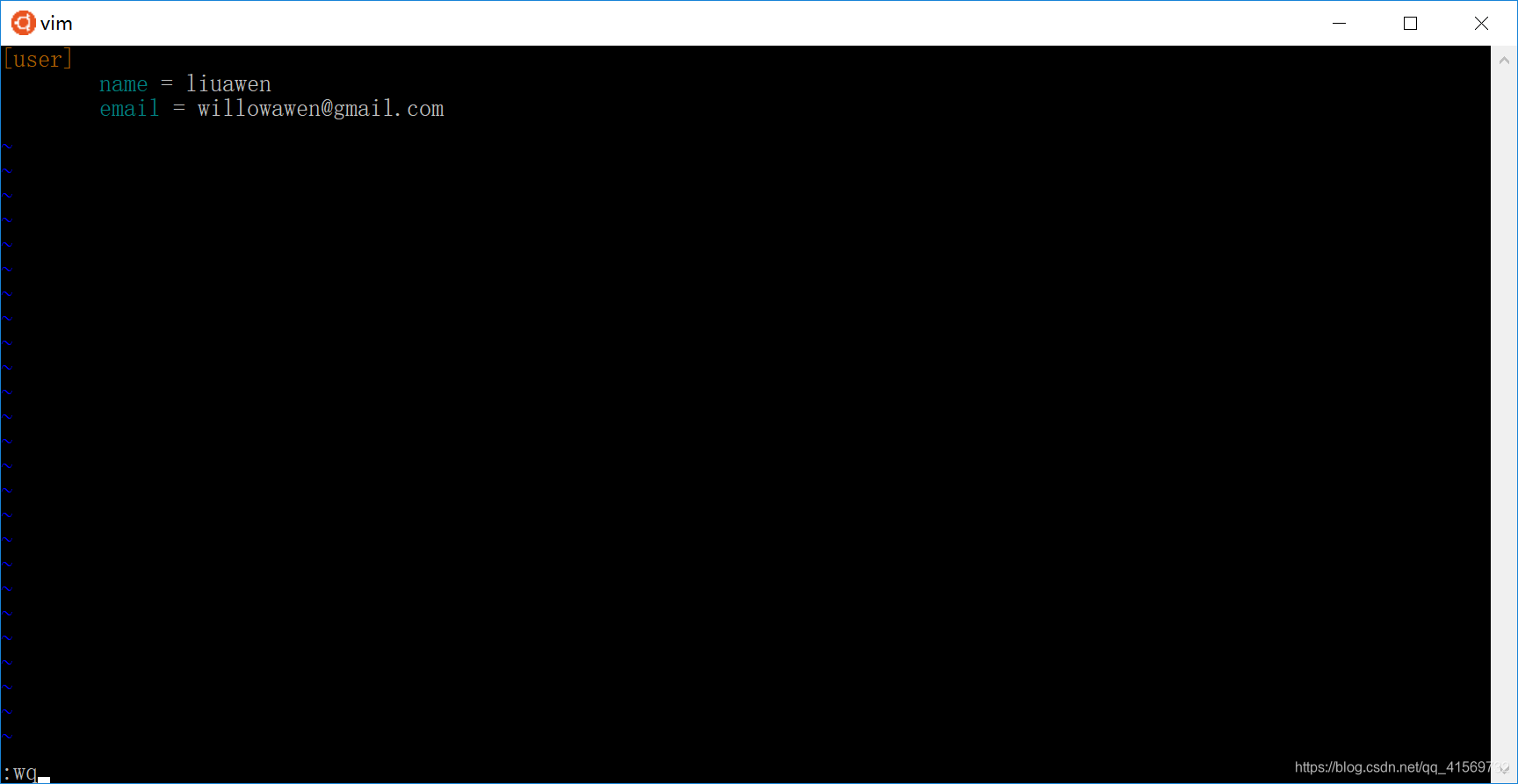
修改文件的方式,主要是修改位于主目录下.gitconfig 文件。在 Linux 和 Mac 中,可以通过 vim 命令进行直接编辑,比如vim ~/.gitconfig ;
修改全局的
操作如下
➜  git git:(master) pwd

/home/liuawen/git

➜  git git:(master) cd git

cd: no such file or directory: git

➜  git git:(master) ls -al

total 0

drwxr-xr-x 1 root    root    4096 Mar 20 15:23 .

drwxr-xr-x 1 liuawen liuawen 4096 Mar 20 15:23 ..

drwxr-xr-x 1 root    root    4096 Mar 20 16:22 .git

➜  git git:(master) cd .git

➜  .git git:(master) ls -al

total 0

drwxr-xr-x 1 root root 4096 Mar 20 16:22 .

drwxr-xr-x 1 root root 4096 Mar 20 15:23 ..

-rw-r--r-- 1 root root   23 Mar 20 15:23 HEAD

drwxr-xr-x 1 root root 4096 Mar 20 15:23 branches

-rw-r--r-- 1 root root  148 Mar 20 16:07 config

-rw-r--r-- 1 root root   73 Mar 20 15:23 description

drwxr-xr-x 1 root root 4096 Mar 20 15:23 hooks

drwxr-xr-x 1 root root 4096 Mar 20 15:23 info

drwxr-xr-x 1 root root 4096 Mar 20 15:23 objects

drwxr-xr-x 1 root root 4096 Mar 20 15:23 refs

➜  .git git:(master) vim ~/.gitconfig

➜  .git git:(master)

➜  .git git:(master) vim ~/.gitconfig

➜  .git git:(master) cd ..

➜  git git:(master) vim ~/.gitconfig

➜  git git:(master) cd ..

➜  liuawen vim ~/.gitconfig
vim ~/.gitconfig 都可以去.gitconfig里面修改

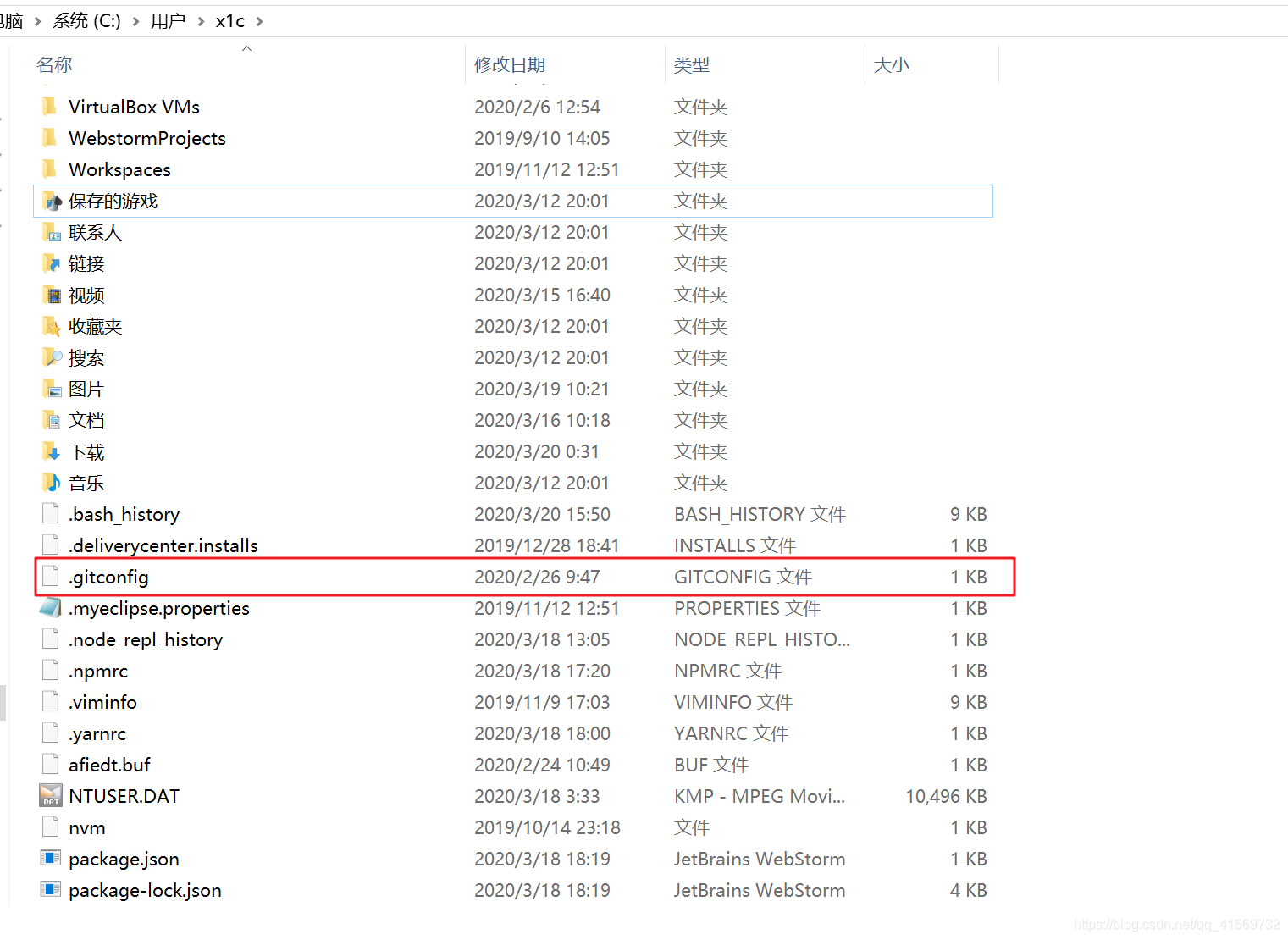
Windows 系统同样位于用户主目录下,假设你当前的用户是administrator,那么对应的配置文件的路径应该是 C:\Users\administrator\.gitconfig,可以直接使用记事本修改里边的 name 或者 email。
我这里没找到

找到了 ,我以为是文件夹。。。 配置信息
如果之前已经配置过昵称和邮箱的情况下,当使用 vim 或者记事本打开配置文件之后,可以看到如下配置:
[user]

        name = liuawen

        email = willowawen@foxmail.com
修改完,通过 git bash 输入 git config –list可以查看是否修改成功了。

Ctrl + Z 结束查看
➜  git git:(master) git config -list

error: did you mean `--list` (with two dashes ?)

➜  git git:(master) vim ~/.gitconfig

➜  git git:(master) git config -list

error: did you mean `--list` (with two dashes ?)

➜  git git:(master) git config --list
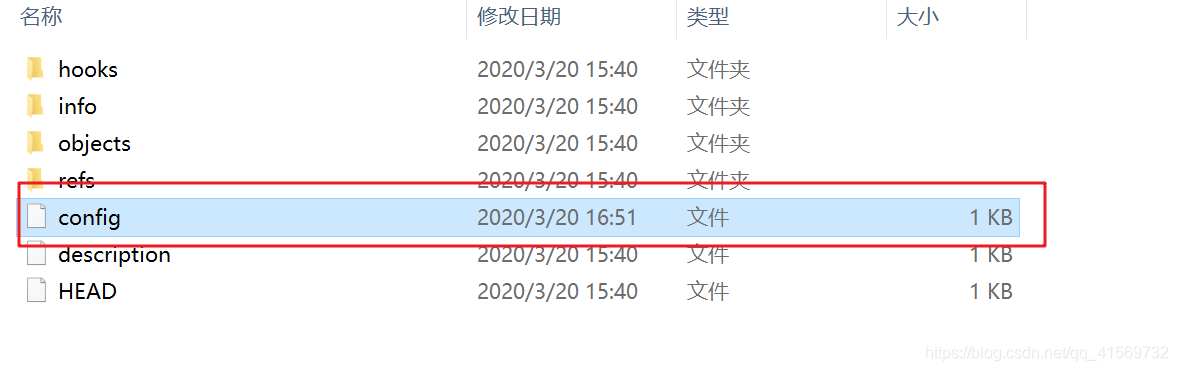
修改局部的
直接当当前文件仓库进行修改的
window
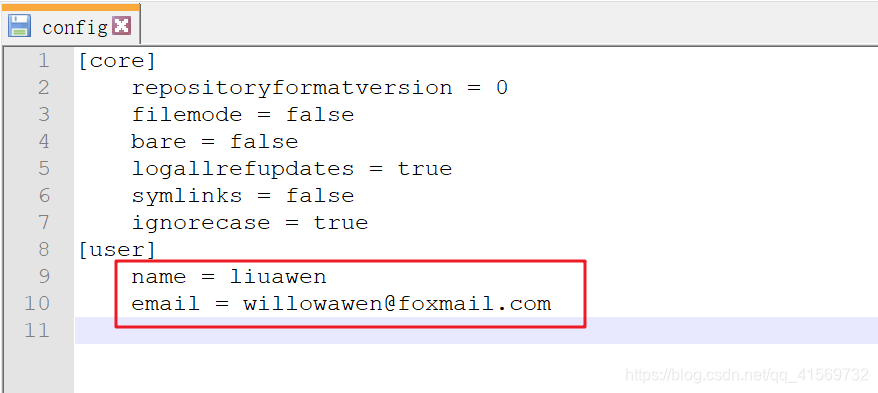
Linux也一样
3、小结
使用过的命令
mkdir git

cd git

git init

pwd

ls -al

cd .git

ls -al

ls -a

ls -l

ls

cd ..

git config --global user.name "昵称"

git config --global user.email "邮箱"

git config  user.name "昵称"

git config  user.email "邮箱"

git config --global --replace-all user.name "your user name"

git config --global --replace-all user.email"your user email"

vim ~/.gitconfig

git config –-list
学习了如何创建一个本地版本库,以及了解了版本库的基本结构,会一些简单基础的配置。
在空文件夹中,可以通过命令git init创建一个本地版本库;
每个版本库的根目录下,都存放着一个.git的隐藏文件夹,里面包含版本库的全部信息;
管理版本库必须有一个身份,需要设置昵称和邮箱。
【Git】3、创建Git版本库、配置Git仓库用户邮箱信息的更多相关文章
- 安装git,创建本地版本库
安装 由于我使用的是Ubuntu,因此安装很简单,输入:sudo apt-get install git 如果是其他Linux版本,可以直接通过源码安装.先从Git官网下载源码,然后解压,依次输入:. ...
- GIT使用—创建一个版本库
一.GIT命令行 [root@localhost ~]# git usage: git [--version] [--exec-path[=GIT_EXEC_PATH]] [--html-path] ...
- git 创建远程版本库(亲测有效)
一.github远程版本库 1.创建SSH Key(windows) ssh-keygen -t rsa -C "youremail@example.com" 2.连接版本 ...
- 『现学现忘』Git基础 — 8、Git创建本地版本库
目录 1.Git版本库介绍 2.创建本地版本库 场景一:创建一个空的本地版本库. 场景二:项目中已存在文件时,创建该项目的本地版本库. 场景三:在GitHub网站上创建仓库,克隆到本地. 1.Git版 ...
- Git的使用(1) —— 版本库
1. 简介 Git作为一个分布式版本控制系统,其优点是不需要一直连接远端版本库就可以使用. 故其为实现分布版本控制专门设计了一整套的存储区间和语句,用来实现. (1) 本地版本库:建立在本机磁盘上的文 ...
- git学习2:版本库
创建版本库 版本库,又称仓库,英文名为repository,版本库内的所有文件都可以被Git管理起来,即每个文件的修改.删除,Git都能跟踪. 1,在目录中创建版本库 在目录中有两种创建版本库的方法, ...
- git怎么创建本地版本仓库
git怎么创建本地版本仓库 安装git我就不用说了吧!下载地址:https://github.com/msysgit/msysgit/releases/download/Git-1.9.4-previ ...
- 【Git】(1)---工作区、暂存区、版本库、远程仓库
工作区.暂存区.版本库.远程仓库 一.概念 1.四个工作区域 Git本地有四个工作区域:工作目录(Working Directory).暂存区(Stage/Index).资源库(Repository或 ...
- linux 创建svn版本库,并在svn上配置checkstyle做代码风格检查
一.创建SVN版本库 1.安装svn服务器 yum install subversion 2.查看版本 svnserve --version 3.建立SVN版本库目录(即你的SVN服务器里面的文件存放 ...
随机推荐
- SpringBoot异步调用--@Async详解
1. 概述 在日常开发中,为了提高主线程的效率,往往需要采用异步调用处理,例如系统日志等.在实际业务场景中,可以使用消息中间件如RabbitMQ.RocketMQ.Kafka等来解决.假如对高可用 ...
- 【Electron Playground 系列】窗口篇
作者:Kurosaki 本文主要讲解Electron 窗口的 API 和一些在开发之中遇到的问题. 官方文档 虽然比较全面,但是要想开发一个商用级别的桌面应用必须对整个 Electron API 有 ...
- Docker安装RabbitMQ与Kafka
RabbitMq安装(dokcer) 下载镜像 docker pull rabbitmq 创建并启动容器 docker run -d --name rabbitmq -p 5672:5672 -p 1 ...
- vue 修改数据
通过数组中的方法改变数据 变异方法(改变原数组) push() pop() shift() unshift() splice() sort() reverse() 替换数组(生成新数组) filter ...
- js下 Day15、正则表达式
一.正则表达式简介 什么是正则表达式 正则表达式,也叫规则表达式, 是对字符串操作的一种逻辑公式. 为什么要使用正则? 1.使用极简单的方式,去匹配字符串 2.速度快,代码少 3.在复杂的字符串中快速 ...
- 各公有云1核1G的云主机跑分对比
本文主要测评华为云.腾讯云.阿里云 1H1G服务器的性能,为保证结果有效性,使用环境如下: 1.1H1G Ubuntu 16.04_x64 2.Unixbench Version 5.1.3,详细信息 ...
- python初学者-判断一个数是否为素数
while True: #判断为真 num = int(input('请输入一个数:')) for i in range(2,num):#判断在num之前的数能不能把num整除 if(num%i == ...
- 技术基础 | 用JSON在抖音上发布动态——使用Stargate即可轻松实现
Cassandra是世界上经受住最多实战考验的数据库,通过其快速且易于使用的数据API,让你的程序开发升级. 本文将介绍什么是Stargate以及Stargate的最新进展,如果您想快速浏览相关代码和 ...
- Abp小试牛刀之 图片上传
图片上传是很常见的功能,里面有些固定的操作也可以沉淀下来. 本文记录使用Abp vNext做图片上传的姿势. 本文的技术核心与Abp无关,Abp只是手段! 目标 上传图片----->预览图片-- ...
- Error:java: JDK isn't specified for module 'xxx'异常的解决方法
问题描述 博主启动的项目的时候出现了一个这样的异常 解决方法 打开左上角这个Project Structure