
【Git】3、创建Git版本库、配置Git仓库用户邮箱信息
初识Git
文章目录
本地创建一个Git版本库简单了解Git的一些必要的配置,配置昵称用户名和邮箱。
简单复习 - 专栏 Git原理详解与实操指南
1、创建Git版本库
首先创建个文件夹git,用于版本管理。
Linux或Mac系统
mkdir git

cd git
进入文件夹,可以使用git init命令初始化一个仓库
➜  git git init

Initialized empty Git repository in /home/liuawen/git/.git/

➜  git git:(master)
初始化版本库会在当前目录中创建一个.git的文件夹,我们可以进入版本库根目录,然后通过命令ls -al进行查看,如下命令所示:
➜  git git:(master) ls

➜  git git:(master) pwd

/home/liuawen/git

➜  git git:(master) ls -al

total 0

drwxr-xr-x 1 root    root    4096 Mar 20 15:23 .

drwxr-xr-x 1 liuawen liuawen 4096 Mar 20 15:23 ..

drwxr-xr-x 1 root    root    4096 Mar 20 15:24 .git

➜  git git:(master)
执行过的命令:
➜  liuawen pwd

/home/liuawen

➜  liuawen mkdir git

mkdir: cannot create directory ‘git’: File exists

➜  liuawen rm -rf git

➜  liuawen ls

sources.list

➜  liuawen mkdir git

➜  liuawen ls

git  sources.list

➜  liuawen cd git

➜  git git init

Initialized empty Git repository in /home/liuawen/git/.git/

➜  git git:(master) ls

➜  git git:(master) pwd

/home/liuawen/git

➜  git git:(master) ls -al

total 0

drwxr-xr-x 1 root    root    4096 Mar 20 15:23 .

drwxr-xr-x 1 liuawen liuawen 4096 Mar 20 15:23 ..

drwxr-xr-x 1 root    root    4096 Mar 20 15:24 .git

➜  git git:(master)
认识.git
git init初始化生成的.git目录
.git目录包含了整个版本库的信息,那怎么查看这个目录有哪些文件呢?
可以使用如下命令
cd .git

ls -al
cd .git是进入.git目录,ls -al是显示当前目录下的所有文件及文件夹包括隐藏文件详细信息。
windows:

Linux:
➜  git git:(master) cd .git

➜  .git git:(master) pwd

/home/liuawen/git/.git

➜  .git git:(master) ls -al

total 0

drwxr-xr-x 1 root root 4096 Mar 20 15:38 .

drwxr-xr-x 1 root root 4096 Mar 20 15:23 ..

-rw-r--r-- 1 root root   23 Mar 20 15:23 HEAD

drwxr-xr-x 1 root root 4096 Mar 20 15:23 branches

-rw-r--r-- 1 root root   92 Mar 20 15:23 config

-rw-r--r-- 1 root root   73 Mar 20 15:23 description

drwxr-xr-x 1 root root 4096 Mar 20 15:23 hooks

drwxr-xr-x 1 root root 4096 Mar 20 15:23 info

drwxr-xr-x 1 root root 4096 Mar 20 15:23 objects

drwxr-xr-x 1 root root 4096 Mar 20 15:23 refs

➜  .git git:(master)
简单介绍下这些文件夹的作用:
HEAD 文件指示目前被检出的分支
branches 新版本已经废弃,我们不必关注
description用来显示对仓库的描述信息
config 文件包含项目特有的配置选项
info 目录包含一个全局性排除文件
hooks 目录包含客户端或服务端的钩子脚本
index 文件保存暂存区信息
objects 目录存储所有数据内容
refs 目录存储分支的提交对象的指针
Q:ls ls -a ls -l ls -al 有什么区别呢?
A:ls 是显示不隐藏的文件和文件夹 ls -a 是显示所有文件和文件夹(包括隐藏的文件)
ls -l是显示不隐藏的文件和文件夹的详细信息,ls -al是显示目录下的所有文件及文件夹包括隐藏文件详细信息。
➜  git git:(master) ls

➜  git git:(master) pwd

/home/liuawen/git

➜  git git:(master) ls

➜  git git:(master) ls -a

.  ..  .git

➜  git git:(master) ls -l

total 0

➜  git git:(master) ls -al

total 0

drwxr-xr-x 1 root    root    4096 Mar 20 15:23 .

drwxr-xr-x 1 liuawen liuawen 4096 Mar 20 15:23 ..

drwxr-xr-x 1 root    root    4096 Mar 20 15:37 .git

➜  git git:(master) cd .git

➜  .git git:(master) pwd

/home/liuawen/git/.git
2、基础配置
在建立完项目的版本库之后,
mkdir git

cd git

git init
我们之后对代码的管理操作会要求要有一个身份,所以我们现在来配置一个昵称和邮箱。可以在查看改动记录时候用到的。
2.1、查看配置信息
我们在配置一个昵称和邮箱之前,先来检查下之前没有用已经配置过了什么昵称邮箱。
➜  git git:(master) pwd

/home/liuawen/git

➜  git git:(master) git config user.name

➜  git git:(master) git config user.email

➜  git git:(master)
啥也没有,那就是没有配置过咯,我们来配置下吧。
2.2、配置昵称邮箱信息
配置昵称&邮箱的命令如下:
Setting your Git username for every repository on your computer.
配置全局的
git config --global user.name "昵称"

git config --global user.email "邮箱"
执行命令如下:
➜  git git:(master) git config --global user.name "liuawen"

➜  git git:(master) git config --global user.name

liuawen

➜  git git:(master) git config --global user.email "willowawen@foxmail.com"

➜  git git:(master) git config --global user.email

willowawen@foxmail.com

➜  git git:(master)
Setting your Git username for a single repository
局部的,单个仓库
git config  user.name "昵称"

git config  user.email "邮箱"
执行命令如下:
➜  git git:(master) pwd

/home/liuawen/git

➜  git git:(master) git config user.name

➜  git git:(master) git config user.email

➜  git git:(master) git config user.name "liuawen"

➜  git git:(master) git config user.name

liuawen

➜  git git:(master) git config user.email "willowawen@foxmail"

➜  git git:(master) git config user.email

willowawen@foxmail

➜  git git:(master)
2.3、修改配置信息
我们在配置过程中如果不小心配置错了或者后面想修改配置,那怎么办呢?
试一试可不不可以通过重复执行上面的设置昵称邮箱命令,来修改昵称邮箱的呢?
我之前的邮箱输错了… 少了.com 来修改一下吧
➜  git git:(master) git config user.email "willowawen@foxmail"

➜  git git:(master) git config user.email

willowawen@foxmail

➜  git git:(master) git config user.email "willowawen@foxmail.com"

➜  git git:(master) git config user.email

willowawen@foxmail.com

➜  git git:(master) git config  user.name "liuawen2"

➜  git git:(master) git config  user.name

liuawen2

➜  git git:(master)

➜  git git:(master) git config  user.name "liuawen3"

➜  git git:(master) git config  user.name

liuawen3
对局部的可以,那我们试一试全局的global。
➜  git git:(master) git config  --global user.name

liuawen

➜  git git:(master) git config  --global user.email

willowawen@foxmail.com

➜  git git:(master) git config --global user.name "git"

➜  git git:(master) git config --global user.name

git

➜  git git:(master) git config --global user.name "willow"

➜  git git:(master) git config --global user.name

willow

➜  git git:(master) git config --global user.name "liuawen"

➜  git git:(master) git config --global user.name

liuawen

➜  git git:(master) git config --global user.email "willowawen@gmail.com"

➜  git git:(master) git config --global user.email

willowawen@gmail.com

➜  git git:(master) git config --global user.email "willowawen@foxmail.com"

➜  git git:(master) git config --global user.email

willowawen@foxmail.com

➜  git git:(master)
也可以的,是可以通过重复执行上面的设置昵称命令,来修改昵称和邮箱的。
如果多次设置昵称,它会在命令执行后提示无法重复配置或者可能不给提示,但是这种情况会导致一个 key 配置了多个 value 的问题。(我的这里可以多次设置昵称和邮箱的,应该是可能是版本不同略有差异吧),建议使用特定的方法去修改配置信息。
1、通过命令行
通过命令行修改的方式比较简单,直接执行以下的命令即可
修改昵称邮箱命令如下:
git config --global --replace-all user.name "your user name"

git config --global --replace-all user.email"your user email"
执行操作:
➜  git git:(master) git config --global user.name

liuawen

➜  git git:(master) git config --global user.email

willowawen@foxmail.com

➜  git git:(master) git config --global --replace-all user.name "haha"

➜  git git:(master) git config --global user.name

haha

➜  git git:(master) git config --global --replace-all user.email "hehe@qq.com"

➜  git git:(master) git config --global user.email

hehe@qq.com

➜  git git:(master) git config --global --replace-all user.user "liuawen"

➜  git git:(master) git config --global user.name

haha

➜  git git:(master) git config --global --replace-all user.name "liuawen"

➜  git git:(master) git config --global user.name

liuawen

➜  git git:(master) git config --global --replace-all user.email "willowawen@foxmail.com"

➜  git git:(master) git config --global user.email

willowawen@foxmail.com

➜  git git:(master)
2、通过修改配置文件。
修改文件的方式,主要是修改位于主目录下.gitconfig 文件。在 Linux 和 Mac 中,可以通过 vim 命令进行直接编辑,比如vim ~/.gitconfig ;
修改全局的
操作如下
➜  git git:(master) pwd

/home/liuawen/git

➜  git git:(master) cd git

cd: no such file or directory: git

➜  git git:(master) ls -al

total 0

drwxr-xr-x 1 root    root    4096 Mar 20 15:23 .

drwxr-xr-x 1 liuawen liuawen 4096 Mar 20 15:23 ..

drwxr-xr-x 1 root    root    4096 Mar 20 16:22 .git

➜  git git:(master) cd .git

➜  .git git:(master) ls -al

total 0

drwxr-xr-x 1 root root 4096 Mar 20 16:22 .

drwxr-xr-x 1 root root 4096 Mar 20 15:23 ..

-rw-r--r-- 1 root root   23 Mar 20 15:23 HEAD

drwxr-xr-x 1 root root 4096 Mar 20 15:23 branches

-rw-r--r-- 1 root root  148 Mar 20 16:07 config

-rw-r--r-- 1 root root   73 Mar 20 15:23 description

drwxr-xr-x 1 root root 4096 Mar 20 15:23 hooks

drwxr-xr-x 1 root root 4096 Mar 20 15:23 info

drwxr-xr-x 1 root root 4096 Mar 20 15:23 objects

drwxr-xr-x 1 root root 4096 Mar 20 15:23 refs

➜  .git git:(master) vim ~/.gitconfig

➜  .git git:(master)

➜  .git git:(master) vim ~/.gitconfig

➜  .git git:(master) cd ..

➜  git git:(master) vim ~/.gitconfig

➜  git git:(master) cd ..

➜  liuawen vim ~/.gitconfig
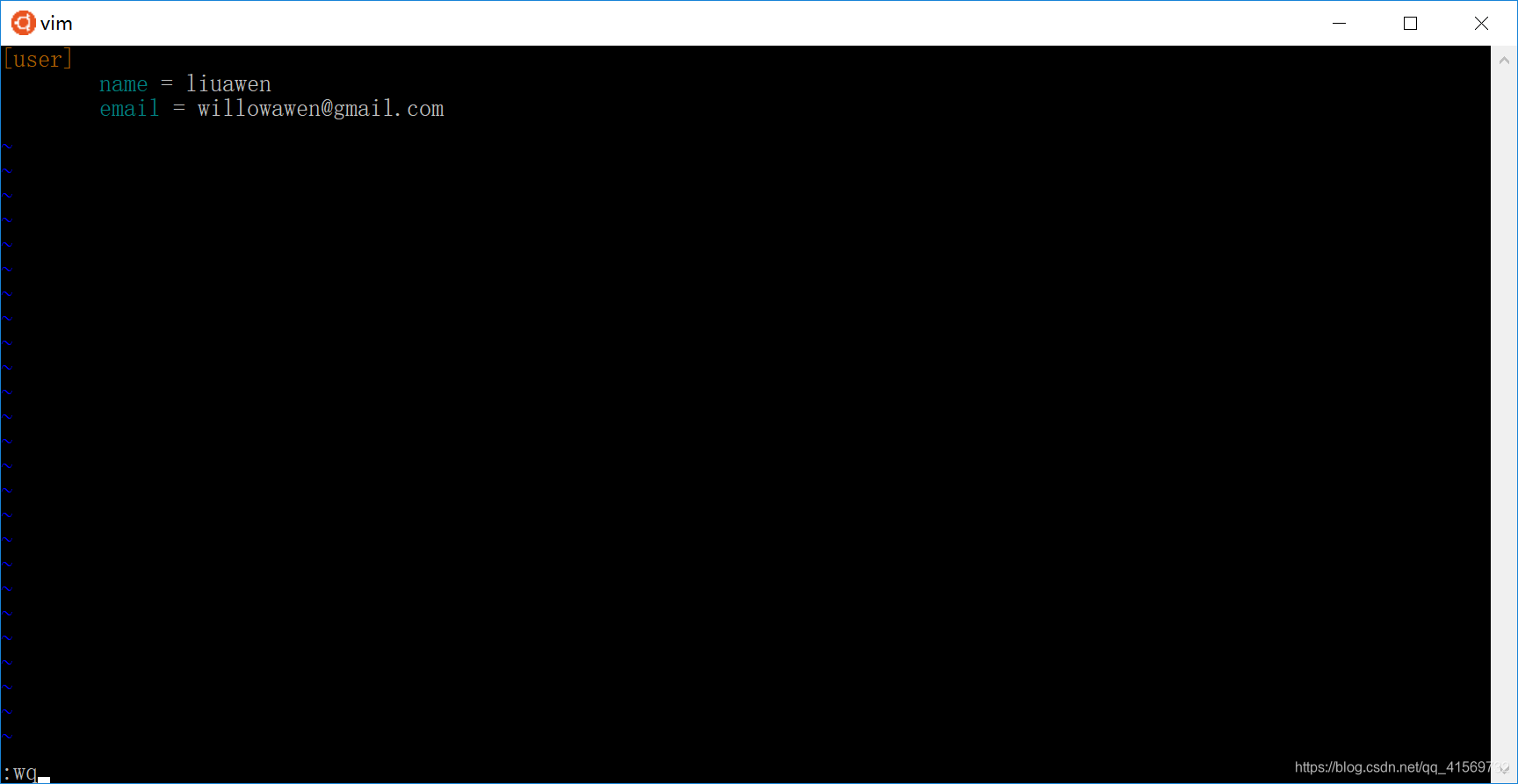
vim ~/.gitconfig 都可以去.gitconfig里面修改

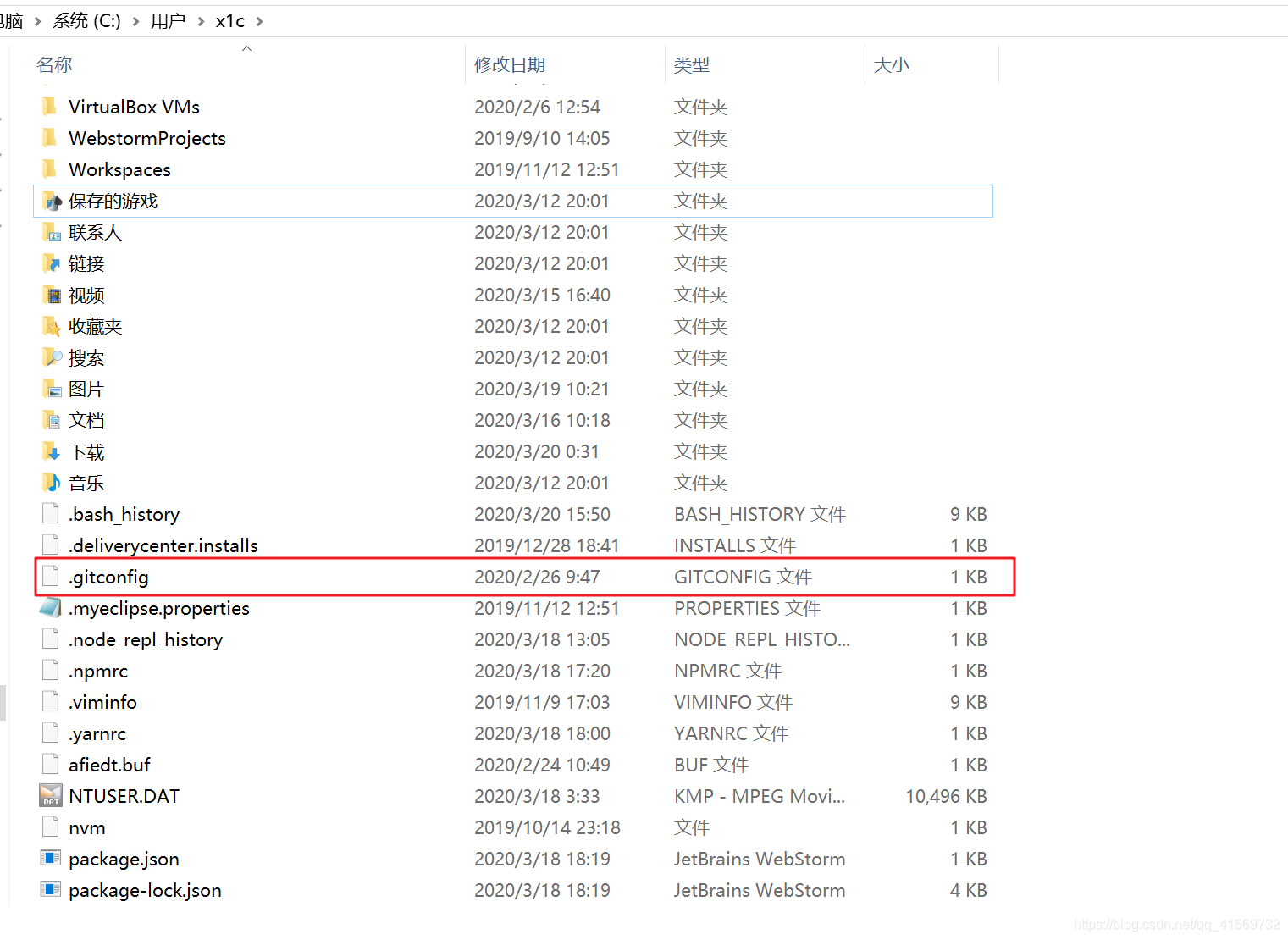
Windows 系统同样位于用户主目录下,假设你当前的用户是administrator,那么对应的配置文件的路径应该是 C:\Users\administrator\.gitconfig,可以直接使用记事本修改里边的 name 或者 email。
我这里没找到

找到了 ,我以为是文件夹。。。 配置信息
如果之前已经配置过昵称和邮箱的情况下,当使用 vim 或者记事本打开配置文件之后,可以看到如下配置:
[user]

        name = liuawen

        email = willowawen@foxmail.com
修改完,通过 git bash 输入 git config –list可以查看是否修改成功了。

Ctrl + Z 结束查看
➜  git git:(master) git config -list

error: did you mean `--list` (with two dashes ?)

➜  git git:(master) vim ~/.gitconfig

➜  git git:(master) git config -list

error: did you mean `--list` (with two dashes ?)

➜  git git:(master) git config --list
修改局部的
直接当当前文件仓库进行修改的
window
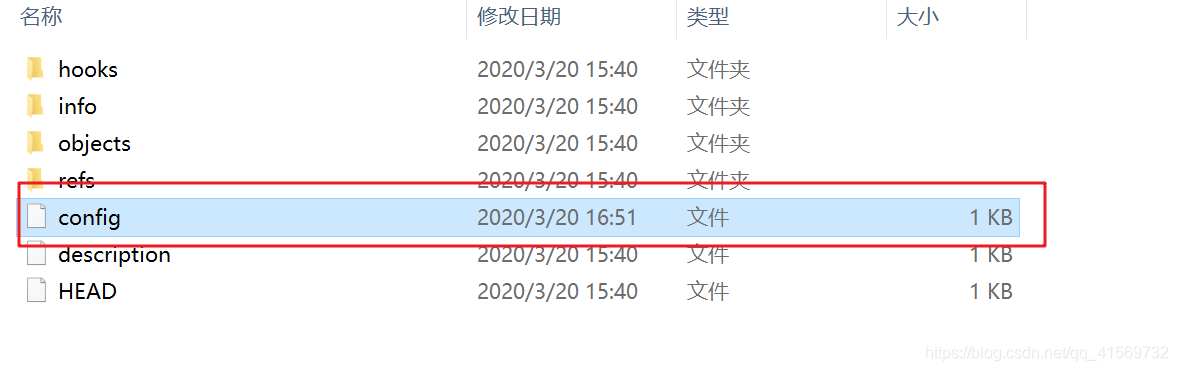
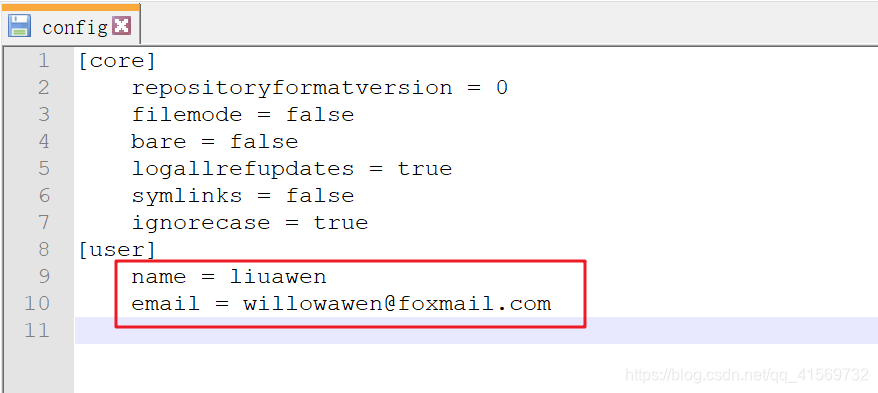
Linux也一样
3、小结
使用过的命令
mkdir git

cd git

git init

pwd

ls -al

cd .git

ls -al

ls -a

ls -l

ls

cd ..

git config --global user.name "昵称"

git config --global user.email "邮箱"

git config  user.name "昵称"

git config  user.email "邮箱"

git config --global --replace-all user.name "your user name"

git config --global --replace-all user.email"your user email"

vim ~/.gitconfig

git config –-list
学习了如何创建一个本地版本库,以及了解了版本库的基本结构,会一些简单基础的配置。
在空文件夹中,可以通过命令git init创建一个本地版本库;
每个版本库的根目录下,都存放着一个.git的隐藏文件夹,里面包含版本库的全部信息;
管理版本库必须有一个身份,需要设置昵称和邮箱。
【Git】3、创建Git版本库、配置Git仓库用户邮箱信息的更多相关文章
- 安装git,创建本地版本库
安装 由于我使用的是Ubuntu,因此安装很简单,输入:sudo apt-get install git 如果是其他Linux版本,可以直接通过源码安装.先从Git官网下载源码,然后解压,依次输入:. ...
- GIT使用—创建一个版本库
一.GIT命令行 [root@localhost ~]# git usage: git [--version] [--exec-path[=GIT_EXEC_PATH]] [--html-path] ...
- git 创建远程版本库(亲测有效)
一.github远程版本库 1.创建SSH Key(windows) ssh-keygen -t rsa -C "youremail@example.com" 2.连接版本 ...
- 『现学现忘』Git基础 — 8、Git创建本地版本库
目录 1.Git版本库介绍 2.创建本地版本库 场景一:创建一个空的本地版本库. 场景二:项目中已存在文件时,创建该项目的本地版本库. 场景三:在GitHub网站上创建仓库,克隆到本地. 1.Git版 ...
- Git的使用(1) —— 版本库
1. 简介 Git作为一个分布式版本控制系统,其优点是不需要一直连接远端版本库就可以使用. 故其为实现分布版本控制专门设计了一整套的存储区间和语句,用来实现. (1) 本地版本库:建立在本机磁盘上的文 ...
- git学习2:版本库
创建版本库 版本库,又称仓库,英文名为repository,版本库内的所有文件都可以被Git管理起来,即每个文件的修改.删除,Git都能跟踪. 1,在目录中创建版本库 在目录中有两种创建版本库的方法, ...
- git怎么创建本地版本仓库
git怎么创建本地版本仓库 安装git我就不用说了吧!下载地址:https://github.com/msysgit/msysgit/releases/download/Git-1.9.4-previ ...
- 【Git】(1)---工作区、暂存区、版本库、远程仓库
工作区.暂存区.版本库.远程仓库 一.概念 1.四个工作区域 Git本地有四个工作区域:工作目录(Working Directory).暂存区(Stage/Index).资源库(Repository或 ...
- linux 创建svn版本库,并在svn上配置checkstyle做代码风格检查
一.创建SVN版本库 1.安装svn服务器 yum install subversion 2.查看版本 svnserve --version 3.建立SVN版本库目录(即你的SVN服务器里面的文件存放 ...
随机推荐
- 关于C++的异常抛出
在接触 throw 之前,我们只知道可以通过函数的返回值来获取和定位错误,比如通过 return 来层层返回是一种方法,但如果牵扯到多层函数调用,那么通过 return 来返回错误显得过于拖沓,这时就 ...
- 数据结构,哈希表hash设计实验
数据结构实验,hash表 采用链地址法处理hash冲突 代码全部自己写,转载请留本文连接, 附上代码 #include<stdlib.h> #include<stdio.h> ...
- html 04-HTML标签图文详解(一)
04-HTML标签图文详解(一) #一.排版标签 #注释标签 <!-- 注释 --> #段落标签<p> <p>This is a paragraph</p ...
- 图像处理论文详解 | Deformable Convolutional Networks | CVPR | 2017
文章转自同一作者的微信公众号:[机器学习炼丹术] 论文名称:"Deformable Convolutional Networks" 论文链接:https://arxiv.org/a ...
- sqli-labs第5关布尔盲注pyhton脚本
import requests import os #此函数先判断数据库长度 def length(url,str): num = 1 while True: str_num = '%d' %num ...
- C#中的深度学习(五):在ML.NET中使用预训练模型进行硬币识别
在本系列的最后,我们将介绍另一种方法,即利用一个预先训练好的CNN来解决我们一直在研究的硬币识别问题. 在这里,我们看一下转移学习,调整预定义的CNN,并使用Model Builder训练我们的硬币识 ...
- RxJava +Retrofit 简单使用
1.添加依赖 compile 'com.squareup.retrofit2:converter-gson:2.3.0' compile 'com.squareup.retrofit2:adapter ...
- springcloud组件gateway断言(Predicate)
Spring Cloud Gateway是SpringCloud的全新子项目,该项目基于Spring5.x.SpringBoot2.x技术版本进行编写,意在提供简单方便.可扩展的统一API路由管理方式 ...
- ArrayList哪种遍历效率最好,你真的弄明白了吗?
ArrayList简介 声明:以下内容都是基于jdk1.8的 ArrayList 是一个数组队列,相当于 动态数组.与Java中的数组相比,它的容量能动态增长.它继承于AbstractList,实现了 ...
- 当layui与分页相遇--bootstrap何去何从
用了一段时间,感觉layui比bootstrap 方便了很多.在js操作上比bootstrap减少了许多的代码量. 今天遇到需要前台分页.当然,不是表格,如果是表格的话.使用yalui table和b ...