
UILabel和NSAttributedString那些事
注:通常的label用来现实普通的文字。但是,你常常会遇到这样的情况:一段文字中不仅有文字,也有图片,甚至文字中的某段文字与其他的文字的appearance不一致的情况,这样的一段文字就可以称得上是富文本了。label的attributedText属性就是用来接受这样的文本内容的。
场景
如图
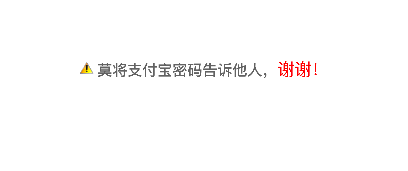
- 若你遇到这样的需求,不妨考虑一下使用NSAttributedString了创建这样的文本。如果这段文字具有点击事件,实现方法有以下两种:
- 将这段文字设置为button的attributedTitle
- 将这段文字设置为label的attributedText,并给label添加点击手势
- 若你遇到这样的需求,不妨考虑一下使用NSAttributedString了创建这样的文本。如果这段文字具有点击事件,实现方法有以下两种:
实现思路
- 这段文字由图片和文字共同组成
- 将图片封装到NSTextAttachment实例中,然后通过NSAttributedString的类构造方法初始化为NSAttributedString实例。
- 使用NSMutableDictionary来封装文本的现实属性
- 使用NSAttributedString的对象方法addAttributes:range:改变指定范围文字的现实属性
具体实现
集成Masonry框架

创建pch文件
pch文件通常的命名方法:项目名-prefix.pch,如:AttributedStringInLabel-Prefix.pch
pch文件的配置
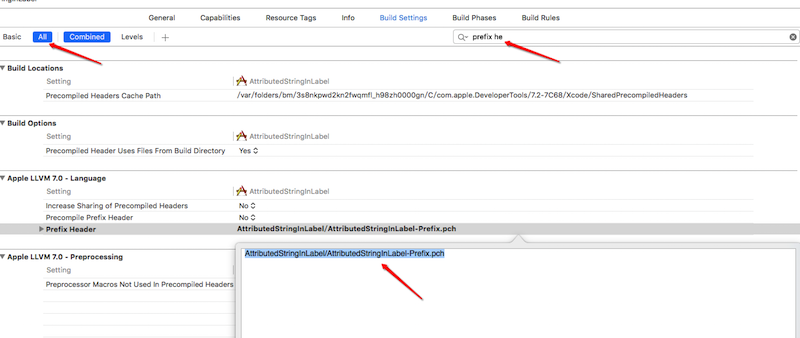
将通用的头文件添加到pch文件中
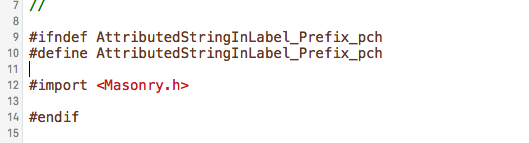
定义通过RGBA创建UIColor对象的宏
我们通常会将经常使用的方法定义成宏,来提高开发效率和屏蔽复杂操作
带参数的宏定义中的参数名,不能与其后的形式参数名相同(宏定义其实就是替换,将文本替换成指定的文本)
// redValue 不能写成red

#define UIColorWithInt(redValue, greenValue, blueValue, alphaValue) [UIColor colorWithRed:(redValue)/255.0f green:(greenValue)/255.0f blue:(blueValue)/255.0f alpha:(alphaValue)]
alertLabel
包含alertLabel属性
@interface ViewController ()

/** alertLabel */

@property (nonatomic, strong) UILabel *alertLabel;

@end
创建alertLabel
- (void)viewDidLoad {

    [super viewDidLoad];

    // 创建alertLabel

    self.alertLabel = [[UILabel alloc] init];

    [self.view addSubview:self.alertLabel];

    // 设置alertLabel的富文本属性

    [self setupAlertLabel];

}
使用Masonry框架布局alertLabel的位置
若是在控制器中,通常在viewDidLayoutSubviews方法中布局子控件
若是自定以控制,通常在layoutSubviews方法中布局子控件
/**

 *  布局alertLabel

 */

- (void)viewDidLayoutSubviews {

    [super viewDidLayoutSubviews];

    [self.alertLabel mas_makeConstraints:^(MASConstraintMaker *make) {

        make.centerX.centerY.equalTo(self.view);

    }];

}
设置alertLabel的attributedText属性
/**

 *  设置alertLabel

 */

- (void)setupAlertLabel {

    // 文本的显示样式

    NSMutableDictionary *appearanceDictionary = [NSMutableDictionary dictionary];

    appearanceDictionary[NSForegroundColorAttributeName] = UIColorWithInt(117, 117, 117, 1.0);

    appearanceDictionary[NSFontAttributeName] = [UIFont boldSystemFontOfSize:15];

    // 文本内容(指定显示属性的文本)

    NSString *normolString = @" 莫将支付宝密码告诉他人,谢谢!";

    NSMutableAttributedString *attributedString = [[NSMutableAttributedString alloc] initWithString:normolString attributes:appearanceDictionary];

    // 改变文本中某段文字的现实属性

    NSMutableDictionary *subAppearanceDictionary = [NSMutableDictionary dictionary];

    subAppearanceDictionary[NSForegroundColorAttributeName] = [UIColor redColor];

    subAppearanceDictionary[NSFontAttributeName] = [UIFont systemFontOfSize:17];

    NSRange subRange = [normolString rangeOfString:@"谢谢!"];

    [attributedString addAttributes:subAppearanceDictionary range:subRange];

    // 添加图片

    NSTextAttachment *attachment = [[NSTextAttachment alloc] init];

    attachment.image = [UIImage imageNamed:@"alert"];

    attachment.bounds = CGRectMake(0, 0, 14, 14);

    NSAttributedString *imageString = [NSAttributedString attributedStringWithAttachment:attachment];

    [attributedString insertAttributedString:imageString atIndex:0];

    // 设置alertLabel的attributedText

    self.alertLabel.attributedText = attributedString;

    // 给alertLabel添加点击事件

    [self addTargetToAlertLabel];

}
给alertLabel添加点击手势
UILabel对象默认是不具备与用户交互的能力,若要保证添加的手势有效果,需要是其具备与用户交互的能力
- (void)addTargetToAlertLabel {

    self.alertLabel.userInteractionEnabled = YES;

    UITapGestureRecognizer *tap = [[UITapGestureRecognizer alloc] initWithTarget:self action:@selector(alertLabelClick:)];

    [self.alertLabel addGestureRecognizer:tap];

}

/**

 *  alertLabel的点击事件

 */

- (void)alertLabelClick:(UILabel *)label {

    NSLog(@"alertLabelClick");

}
VVDocument
- VVDocument是一款快速编写注释的Xcode插件,但是升级Xcode之后,出现了VVDocument不可用的情况,以下是解决方案
打开“Finder”->“应用程序”->“Xcode”->"显示包内容"->"contents"->"Info.plist",拷贝如图所示内容

command+shift+G,进入指定路径文件夹:~/Library/Application Support/Developer/Shared/Xcode
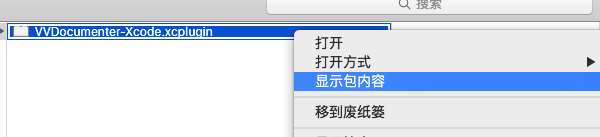
“显示包内容”->“Contents”->"Info.plist", 新建Item,粘贴拷贝的字符串
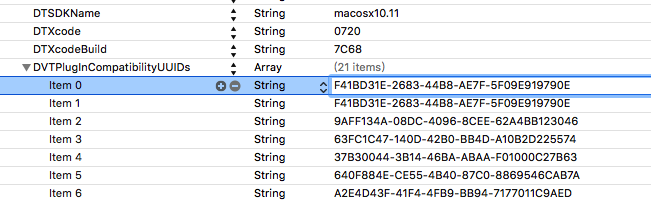
重启Xcode,使用三个斜杠(///)来使用VVDocument
UILabel和NSAttributedString那些事的更多相关文章
- UILabel中NSAttributedString和其LinebarkModel等属性之间的关系
如果设置了一个富文本给一个UILabel,那么后续改变这个UILabel的属性时将会同时改变UILabel.attributedText的属性描述,此时若改变了其它的大小.换行模式(如果在显示时我们可 ...
- NSAttributedString设置行间距,间接设置了uilabel的行间距
假设有UIlabel实例:_testLabel NSString * testString = @"明月当空,隐隐约约听到低吟,似有若无.面对大千世界的奢华糜烂,还不如在这一方小城,静静品一 ...
- 解决NSAttributedString与UILabel高度自适应计算问题
两个类扩展方法: /** * 修改富文本的颜色 * * @param str 要改变的string * @param color 设置颜色 * @param range 设置颜色的文字范围 ...
- UILabel添加图片之富文本的简单应用
若想对UILabel添加图片,那么就需要使用NSMutableAttributedString来定义先定义一个普通的label UILabel *lab = [[UILabel alloc]initW ...
- 你真的了解UIButton、UILabel 吗?
一:首先查看一下关于UIButton的定义 @class UIImage, UIFont, UIColor, UIImageView, UILabel; //设置UIButton的样式 typedef ...
- iOS开发小技巧--即时通讯项目:使用富文本在UILabel中显示图片和文字;使用富文本占位显示图片
Label借助富文本显示图片 1.即时通讯项目中语音消息UI的实现,样式如图: 借助富文本在UILabel中显示图片和文字 // 1.创建一个可变的富文本 NSMutableAttributedStr ...
- 优化UITableViewCell高度计算的那些事
优化UITableViewCell高度计算的那些事 我是前言 这篇文章是我和我们团队最近对 UITableViewCell 利用 AutoLayout 自动高度计算和 UITableView 滑动优化 ...
- UILabel 的高度根据文字内容调整
1.UILabel 对文字的自适应有两种方法. 1)将label的numberOfLines设为0;并添加自适应方法[titleLabel sizeToFit],但是这种方法并不理想. 2)根据文字的 ...
- Multi-line NSAttributedString with truncated text
http://stackoverflow.com/questions/7611816/multi-line-nsattributedstring-with-truncated-text/1017279 ...
随机推荐
- JS实现简易的计算器
JS可以做的事多了,那就用来实现一个计算器吧 看看手机中的计算器,分为普通计算器和科学计算器 自认脑袋不够大,就实现一个普通版本的吧(支持正负数加减乘除等基本连续的运算,未提供括号功能) 看看 ...
- 提取KIndle中每本书的笔记并单独保存
整体思路 目标:将Kindle中的每本书的笔记标注单独提取出保存为一个Markdown文件 其中检测KIndle是否已经正常插入的判断方法: 思路1:读取媒介挂载记录 思路2:直接判断挂载地址是否存在 ...
- 使用CKplayer插件在网页中嵌入视频的方法(常用笔记2)
在做网站中有时候我们需要在网页中嵌入视频,一般视频嵌入有以下几种方法: 1. 优酷代码嵌入 优点:简单,方便,可靠. 缺点:有广告,现在的网站非常注重用户体验,如果打开一个在线视频是有长广告的一定会崩 ...
- 求SQL语句递归的算法
表结构是这样的 部门 上级部门 A BB CC DA AB BC C ...
- 【C#】妈妈再也不用担心自定义控件如何给特殊类型的属性添加默认值了,附自定义GroupBox一枚
------------------更新:201411190903------------------ 经过思考和实践,发现套路中的第1条是不必要的,就是完全可以不用定义一个名为Default+属性名 ...
- GCC、ARM-LINUX-GCC、ARM-ELF-GCC浅析
一.GCC简介: The GNU Compiler Collection,通常简称GCC,是一套由GNU开发的编译器集,为什么是编辑器集而不是编译器呢?那是因为它不仅支持C语言编译,还支持C++, A ...
- Mac OS 的一点历史: Mac OS, Mac OSX 与Darwin
作为收购 NeXT 公司的结果,苹果公司获得了 NeXTSTEP 架构中的 Mach 和 Objective-C 等设计.尽管 NeXTSTEP 本身已经不再发展了,但是其中的组件在 OS X 中获得 ...
- 基于.Net Framework 4.0 Web API开发(2):ASP.NET Web APIs 参数传递方式详解
概述: ASP.NET Web API 的好用使用过的都知道,没有复杂的配置文件,一个简单的ApiController加上需要的Action就能工作.调用API过程中参数的传递是必须的,本节就来谈谈 ...
- 【Java每日一题】20161104
package Nov2016; public class Ques1104 { private String num; public void setNum(String num){ num = n ...
- 修复 XE8 for Android 方向传感器 headingX,Y,Z 不会动的问题
问题:XE8 for Android 方向传感器无法正常运作(在 XE7 是正常的) 测试:官方示例 Samples\Object Pascal\Mobile Snippets\Orientation ...